SourceAnywhere Standalone - Summary

by Dynamsoft Corporation - Product Type: Component / Application / DLL / Java Class

Summary

SourceAnywhere Standalone by Dynamsoft Corporation

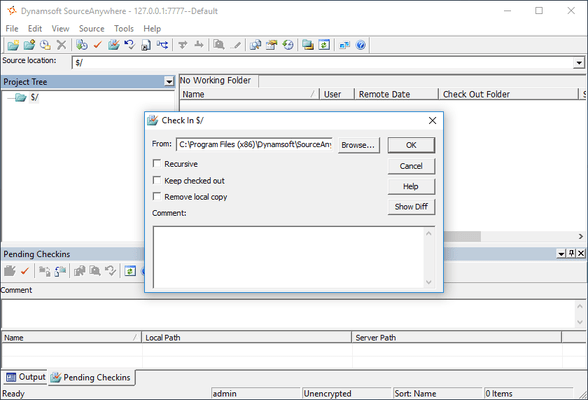
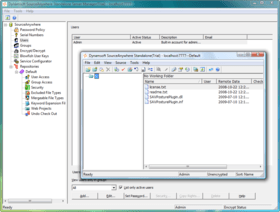
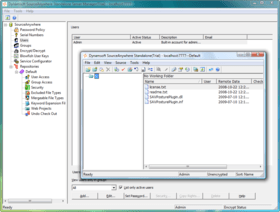
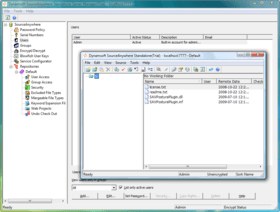
A SQL-based replacement for Visual SourceSafe. SourceAnywhere Standalone is a SQL-based source control tool designed to be a replacement for Microsoft Visual SourceSafe. SourceAnywhere Standalone stores source control files and history in repositories in Microsoft SQL Server. The SourceAnywhere Standalone Server serves one SQL database and you can create any number of repositories in this database. The SourceAnywhere Standalone Client is a GUI application that resembles the SourceSafe Explorer user interface. Users can perform most SourceSafe operations in a similar fashion.

SourceAnywhere Standalone Features & Benefits

High performance back-end - With a carefully designed and engineered back-end, SourceAnywhere Standalone can operate on repositories with large number of files smoothly

Includes fast remote access for geographically distributed teams

All major Visual SourceSafe features are supported - SourceAnywhere Standalone is designed to be a replacement for Visual SourceSafe. All major features of Visual SourceSafe are supported

Familiar GUI - The GUI of SourceAnywhere Standalone is so similar to Visual SourceSafe/VSS that you can begin using SourceAnywhere Standalone in minutes

Painless data migration from Visual SourceSafe/VSS - A SourceAnywhere Standalone VSS import tool is provided to migrate data from VSS easily

Improved security - SourceAnywhere Standalone is a client/server application, thus there is no need to grant read/write permission of your whole DB through the file system anymore. 128-bit cryptography is used to protect the data

Enhanced features of Visual SourceSafe/VSS - SourceAnywhere Standalone has many enhancements of VSS operations, such as:

Strong label management: you can add or delete items from a label, or change the version of an item in a label

Strong branch management: you can branch any files or projects from any version to a new location, or branch from a label

Strong versioning support: you can visually view the whole project tree and any items in the tree from any version or a label

Wide IDE integration - SourceAnywhere Standalone supports all MSSCCI compatible IDE integrations, such as Microsoft Visual Studio, .NET and IBM Rational

Enhanced robustness and scalability - Built on Microsoft SQL Server 2000, SourceAnywhere Standalone enables you to scale up and scale out to meet the needs of even the largest repository

Atomic commit - If an operation on the repository is interrupted in the middle, your data will not be left in an inconsistent state.

Strong change set support - A group of related operations can be treated as one change set and the version number of all the parent items increases by 1

Reduced repository storage – Using Delta Storage technology, SourceAnywhere Standalone saves only the difference of each version, so that the storage of repository is reduced significantly. Delta Storage works on both binary and text files

What’s new in SourceAnywhere Standalone V2.2?

Project Diff operation greatly improved in Windows GUI Client

The performance is greatly improved and the interface is more user friendly

Allows users to perform operations, such as Add Files, Delete, Get, Check Out/In, Undo Check Out, Show Difference, Reconcile All, in the Project Difference dialog box

Added Advanced options for choosing files to show in the Project Differences dialog box

Added Annotate functionality, which enables users to easily determine who and when made the last changes on each individual section of file

MergeHero interface greatly improved. More like Microsoft Visual SourceSafe Visual Merge. More friendly to use

Added Changed Text marker to designate conflicting changes to a file

Added optional way to apply/remove changes - by left clicking the button-like lines in the top two panes

For File Diff, added display options for Ignore Tabstop and Ignore White Space

For Directory Diff, added display options for showing only the files exist in the left/right side, or only the identical/different ones in both places. (Show Left-Only Files, Show Right-Only Files, Show Identical Files, Show Different Files).

Added support for Dreamweaver CS3

Added "Remember Password" option in Login dialog box of GUI Client, Visual Studio IDE Client and Eclipse Plug-in

Improved COM SDK

Fixed bug where Working Folder positioning failed in the Add Files dialog box when some special software is included in the Folders pane

What’s new in SourceAnywhere Standalone V2.1?

The database of SourceAnywhere Standalone 2.1 is compatible with the database of SourceAnywhere Hosted

Added Encrypt/Decrypt page in Server Manager which allows users to encrypt or decrypt databases to ensure the data security

Web Deploy functionality optimized. A web project can be deployed to a FTP server, or multiple FTP servers. And the performance is improved by deploying only changes made in projects

SourceAnywhere Standalone is improved to support Eclipse 3.3

Java Client can be launched directly by double-clicking the application

Added export functionality which allows users to export file/project history, search result and file list

SSL root certificate is exported and imported automatically when using SSL encryption

Added Description and Email columns in Users page of Server Manager

Allows users to see users count in Server Manager

Added a file state in IDE Client which helps users judge whether the local copy is the latest version

Fixed bug where Server IP in Service Relation page of Cache Server Manager cannot be domain name

What’s new in V2.0?

Product name changed from "SourceHero" to "SourceAnywhere Standalone".

Cross Platform (Java GUI Client Added)

Cache Server Added

Command Line Client Added

Eclipse Plug-in Added

Macromedia Studio Plug-in Added

SDK Added

Server-side Improvements

Windows GUI Client Improvements

Dynamsoft SourceAnywhere Standalone Help

Cross Platform (Java Client Added) - With a Java client in addition to the standard windows client, SourceAnywhere Standalone can run on any platform that SWT (Standard Widget Toolkit) supports, such as Linux, MAC and Solaris, etc.

Cache Server Added - From version 2.0, SourceAnywhere Standalone provides a caching solution (optional) for distributed development. It is used to cache copies of requested server files, thereby improving the client responsiveness.

Command Line Client Added - In addition to the GUI Client, SourceAnywhere Standalone provides a Windows and a Java Command Line Client for users who prefer typing commands and those who write or maintain batch files for automatic source control processing. SourceAnywhere Standalone Command Line supports all the major operations required for source control.

Eclipse Plug-in Added - SourceAnywhere Standalone Eclipse plug-in is a team provider plug-in for the Eclipse IDE. It enables users to perform SourceAnywhere Standalone operations within the Eclipse IDE.

Macromedia Studio Plug-in Added - SourceAnywhere Standalone Macromedia Studio plug-in enables Dreamweaver or Flash users to access their SourceAnywhere Standalone repositories remotely and perform basic operations.

SDK Added - SourceAnywhere Standalone provides a Software Development Kit (SDK) which enables software developers to integrate SourceAnywhere Standalone functionality with their applications. Through SourceAnywhere Standalone Software Development Kit's APIs, you can develop applications that provide the similar functionality as the client software of SourceAnywhere Standalone.

Server-side Improvements

Management of SourceAnywhere Standalone Server is divided into two parts: general configuration of SourceAnywhere Standalone service is accomplished through the Service Configurator utility, and repository-related management is done through Server Manager

Added support for SSL encryption

Added server caching capability. Requested data can be cached on server to speed up client access

Added connection pool. Provides an efficient way of maintaining database connection

Windows GUI Client Improvements

Improved performance when refreshing file list

Added support for SSL encryption

Added socket validity check functionality. Enables SourceAnywhere Standalone to check if the socket is valid before network operation

Added exclusive locks functionality. Allows you to set the default option for the Request Exclusive Lock checkbox in Check Out dialog box

Added Duration for file status caching option for the General tab of Visual Studio IDE Client options. Checking this option may improve the performance of IDE client when there are a large number of files in the solution

PartNumbers: PC-517282-144067 517282-144067 PC-517282-144077 517282-144077 PC-517282-144078 517282-144078 PC-517282-144068 517282-144068 PC-517282-144069 517282-144069 PC-517282-144070 517282-144070 PC-517282-144071 517282-144071 PC-517282-144072 517282-144072 PC-517282-144073 517282-144073 PC-517282-144074 517282-144074 PC-517282-144075 517282-144075 PC-517282-144076 517282-144076

Publisher PartNumbers: DSSAWS20001 DSSAWS20050

PurchaseOptions: SourceAnywhere Standalone V2.2 1 User License - with 1 Year Subscription , SourceAnywhere Standalone V2.2 5 User License - with 1 Year Subscription , SourceAnywhere Standalone V2.2 10 User License - with 1 Year Subscription , SourceAnywhere Standalone V2.2 50 User License - with 1 Year Subscription , SourceAnywhere Standalone V2.2 100 User License - with 1 Year Subscription , SourceAnywhere Standalone V2.2 1 User 1 Year Subscription Renewal , SourceAnywhere Standalone V2.2 - Migration 1 User License - with 1 Year Subscription Migration from SourceAnywhere for VSS Professional Edition , SourceAnywhere Standalone V2.2 - Migration 1 User License - with 1 Year Subscription Migration from SourceAnywhere for VSS Standard Edition , SourceAnywhere Standalone V2.2 - Migration 1 User License Migration from SourceAnywhere for VSS Professional Edition , SourceAnywhere Standalone V2.2 - Migration 1 User License Migration from SourceAnywhere for VSS Standard Edition , SourceAnywhere Standalone V2.2 - Upgrades 1 User License - with 1 Year Subscription Upgrade from SourceAnywhere Standalone 1.x , SourceAnywhere Standalone V2.2 - Upgrades 1 User License Upgrade from SourceAnywhere Standalone 1.x

Resources: Read the SourceAnywhere Standalone help file, Read the SourceAnywhere Standalone License Agreement, Download the SourceAnywhere Standalone V2.2 evaluation on to your computer - Expires After 30 Days

Operating System for Deployment: Windows XP, Windows Server 2003, Windows 2000

Architecture of Product: 32Bit

Product Type: Component, Application

Component Type: DLL, Java Class

Compatible Containers: Microsoft Visual Studio 6.0, Microsoft Visual Basic 6.0, Microsoft Visual C++ 6.0, Eclipse V3.3, Eclipse V3.1.2

Keywords: Version versioning versions Professional Partner stand alone source any where sourceanywherestand sourceanywherestandalone source hero SourceSafe, Version Control, Source Control, SourceSafe remote

Product Search

Enter search words:

Quick Links

Award