SourceGear SourceOffSite - Summary

by SourceGear Corporation - Product Type: Add-In / Application

Summary

SourceGear SourceOffSite by SourceGear Corporation

Fast and secure access to centralized Visual SourceSafe databases via any TCP/IP connection. SourceGear SourceOffSite is an Internet access tool for Microsoft Visual SourceSafe. With SourceGear SourceOffSite, distributed development teams can have secure access to a SourceSafe database using any TCP/IP connection. SourceGear SourceOffSite integrates into the Visual Studio environment, uses encryption to protect data transfer and does not require the use of RAS. With data compression and cryptography, SourceGear SourceOffSite provides fast and secure access to your SourceSafe database. SourceOffSite consists of a Server and a Client. They can communicate over any standard TCP/IP connection, including a PPP connection over a modem, an ISDN line, or an Ethernet connection on the same LAN as the Server.

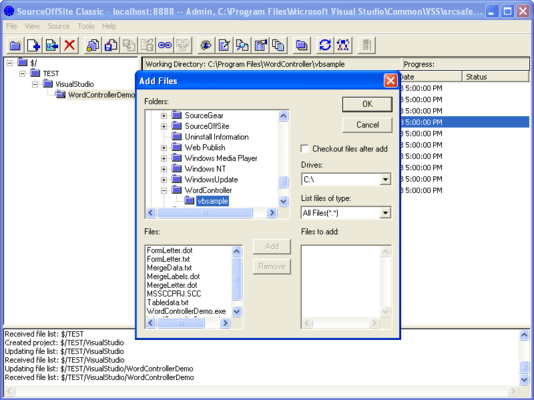
SourceOffSite enables companies with distributed, cross-platform development teams to have fast and secure access to centralized Visual SourceSafe databases via any TCP/IP connection. The product is a client/server application with a GUI client similar to SourceSafe Explorer. With data compression and cryptography, SourceOffSite provides fast and secure access to your SourceSafe database. SourceOffSite supports all major SourceSafe operations as well as IDE integration.

"Enterprises with multiple development sites should consider this access solution for Visual SourceSafe 6.0. SourceOffSite enables distributed teams to securely share a centralized SourceSafe database over the Internet. Their product integrates seamlessly with Visual Studio and addresses a very important market need." - Scott Regan, Product Manager, MS Visual Studio

SourceOffSite is a remote access product for users of Microsoft Visual SourceSafe. SourceOffSite makes it easy to use Visual SourceSafe over the Internet. With SourceOffSite, most Visual SourceSafe operations can be performed from any remote location using standard TCP/IP access.

SourceOffSite consists of a Server and a Client. They can communicate over any standard TCP/IP connection, including a PPP connection over a modem, an ISDN line, or an Ethernet connection on the same LAN as the Server. SourceOffSite does not require Windows Remote Access Service (RAS).

The Server is installed on the machine with access to the file system on which the Visual SourceSafe database resides. Once installed there, the Server provides access to Visual SourceSafe operations to Clients that connect using any standard TCP/IP connection.

The Server requires .NET 3.5, and can therefore be installed on systems running Windows Server 2003, Windows ServerTM 2008, Windows XP, Windows Vista, or Windows 7. It runs in the background with no user interface of any kind. Configuration of the Server is accomplished through the Server Manager utility

The SourceOffSite Server does not necessarily need to be installed on the machine where the VSS database resides. It can be installed on a different machine from the one hosting the VSS database, as long as they are both on the same LAN. However, the SourceOffSite Server does use the Visual SourceSafe Automation component (APIs). Thus, the Visual SourceSafe Client component must be installed on the server machine hosting the SourceOffSite Server. Installing the Visual SourceSafe Client also installs the Visual SourceSafe APIs.

The SourceOffSite Client is a Microsoft 2007 Office Fluent UI designed application that provides all major Visual SourceSafe Explorer functionality. Visual SourceSafe users should find the SourceOffSite Client to be familiar and easy to use. Users can perform almost all Visual SourceSafe operations in a similar fashion. These operations include:

Create Project

Add Files

Delete Files or Projects

Get Latest Version

Check Out

Check In

Undo Check Out

Share

Branch

View

Edit

Merge

Show Differences

Show Properties

Show History

Status Search

Cloak

Web deploy

Label Version

Pin Files

Rename

Move

Set Working Folder

Refresh File List

Refresh Project Tree

Cancel Operation

SourceOffSite Key Benefits

Use over any TCP/IP connection (does not require RAS)

Use within Visual Studio and other IDEs that support the Microsoft Source Code Control API

Use in cross-platform environments - Windows and UNIX Clients available

Work in a familiar GUI client environment that closely resembles the Visual SourceSafe Explorer

Work up to 12 times faster using SourceOffSite over the Internet

Enjoy hassle-free, fast and secure remote Internet access to your SourceSafe database

SourceOffSite Network Connectivity

The SourceOffSite Client and Server communicates over any standard TCP/IP connection, including a PPP connection over a modem, an ISDN line, or an Ethernet connection on the same LAN as the Server

SourceOffSite Platforms

SourceOffSite 5 Server and Client are supported on Windows XP Professional, Windows Server 2003, Windows Vista, Windows Server 2008, and Windows 7

Supported SourceSafe Operations

Get Latest Version

Check In

Check Out

Undo Check Out

Set Working Folder

Create Project

Add Files

Show Differences

Show History

Label Version

Delete Files/Project

Share

branch

web deploy

edit

view

Get By Label

Pin

Cryptography

SourceOffSite supports data encryption to protect passwords and data files from being compromised as they are transferred across the Internet. SourceOffSite uses the Blowfish encryption algorithm as a symmetric block cipher.

SourceOffSite 5.0 contains 128-bit cryptography and has been approved for limited export by the US Commerce Department in accordance with the Export Administration Act.

Export to following countries is prohibited by United States law: Cuba, Iran, North Korea, Sudan, and Syria.

SourceOffSite is also available with no cryptography for users located within a restricted country.

The SourceOffSite Server manages encryption by referencing a key file containing all user keys. User keys are configured within the Server Manager.

What's New in SourceOffSite 5.0.1?

SourceOffSite Client

Get latest on a folder now correctly retrieves missing files in the immediate folder

Project History maintains History options for "Include Files", "Include Labels", and "Labels Only" between client sessions

View/Edit tool has been corrected to save the settings in the User options

The IDE can be configured to not emit a disconnect message which may crash IDEs such as VB 6.

The Auto connect option used from within the IDE client now connects upon opening a project

SourceOffSite Server

The server corrected a problem where project history incorporating a FROM or TO label to sets the boundaries for the History results

What's New in SourceOffSite 5?

Multi-threaded network redesign improves performance. The SourceOffSite Graphical User Interface (GUI) Client has been refitted with a multi-threaded architecture, which allows more throughput of network traffic and fewer operations that block the application

Graphical User Interface overhaul. SourceOffSite now uses the Microsoft Office Fluent User Interface within the GUI Client

File Transfer Performance optimization. SourceOffSite has been optimized to eliminate unnecessary network traffic based on certain combinations of VSS settings

Wildcard search. SourceOffSite now lets user search for filenames via wildcard and regular expression patterns

Pending checkout list. SourceOffSite now includes a tab showing all checkouts for the currently logged in user on a particular machine

Custom External Applications. SourceOffSite now allows users to configure custom applications for viewing, editing, and diffing files based on file extension

Search by label. History queries can now be performed by specifying label boundaries within the search

Compatibility with the latest tools. SourceOffSite has been updated to run smoothly on newer operating systems such as Windows Vista and Windows 7, as well as Visual Studio 2008 and Visual Studio 2010

SourceGear DiffMerge. SourceOffSite now ships with SourceGear DiffMerge 3.3, which allow more powerful options for diffing files and folders

Improved server memory utilization. The SourceOffSite 5 Server memory handler releases resources back to the operating system in a more timely fashion, thereby running with a reduced memory footprint

Character encodings. When coupled with Visual SourceSafe 2005, SourceOffSite lets users set their own preferences for character encodings of text files

What's New in SourceOffSite V4.x?

Client-side merging of files. SOS now supports the automatic merging of files on the client machine during a Get Latest operation when changes have been made to both the local and remote copies of the file. A user-interactive, visual merge can also be done on the client machine using SourceGear's new Diff/Merge utility or with any merge application of your choice

Auto-connect (remember password). SOS can now be configured to remember passwords on a per-server basis, and can also be configured to auto-connect to the last server and database, allowing you to login and connect to a server when starting the client without ever seeing a dialog or being prompted for input

Configuring columns in the File List pane. SOS now allows the user to configure which columns are displayed in the file list, and includes additional columns for Locate Version Number and Remote Version Number. Disabling the Remote Date column should result in a performance gain

Server cache files (named databaseX.sos) are now stored in the user's Windows application data directory, making it easier for multiple users to use the same client installation on the same machine. This also helps in situations when a user does not have permission to write to folders inside of Program Files

Resizable Dialogs. Most of the SOS GUI Client's dialogs have been made resizable

The Status Search capabilities of the SOS GUI Client have been expanded to allow the user to search for all types of file status, such as Old, Renegade, Missing, etc.

There is now an option in the IDE Client to option status messages through the IDE (e.g. VS.NET) instead of using Popup dialogs

Projects can now be added via Drag and Drop into the Projects pane

Files that are checked out now display with a red icon in the File List pane

SOS now supports the SourceSafe Move operation

There now exists an option in the Tools menu to launch Windows Explorer to the current working folder of the currently selected project

The current working folder path can now be copied to the Clipboard

The SOS command line client now supports the option for setting the timestamp on files during retrieval

The SOS command line client now supports database aliases

SourceOffsite Server correctly identifies and installs on systems configured only with Microsoft .NET 2.0 Framework.

The SOS Server now removes temp files from gets of pinned files in the server's %WINDIR%\system32 directory.

SOS Server no longer adds non-VSS users to Server Manager's users pane.

Get Latest Version on Web Projects from within Visual Studio .NET 2005 now works properly.

The IDE Client correctly honors the time setting options for Get Latest Version.

The IDE Client correctly handles files of Renegade and Unknown status.

Moves and renames of objects within Visual Studio .NET 2005 work correctly.

Deletions of Folders are handled correctly within Visual Studio .NET 2003 and 2005.

The IDE client now works with Visual Studio 2003 and 2005 .NET's "Solution Root" configuration.

Fast and secure access to centralized Visual SourceSafe databases via any TCP/IP connection.

PartNumbers: PC-509981-258240 509981-258240 PC-509981-258241 509981-258241 PC-509981-258242 509981-258242 PC-509981-258243 509981-258243 PC-509981-258244 509981-258244 PC-509981-258245 509981-258245 PC-509981-258246 509981-258246 PC-509981-258247 509981-258247 PC-509981-258248 509981-258248 PC-509981-258249 509981-258249 PC-509981-258250 509981-258250 PC-509981-258251 509981-258251

Publisher PartNumbers: S01 S01U S05 S10 S100 S25

PurchaseOptions: SourceOffSite without cryptography 5.0.1 1 User License, SourceOffSite without cryptography 5.0.1 1 User Upgrade License, SourceOffSite without cryptography 5.0.1 5 User License, SourceOffSite without cryptography 5.0.1 10 User License, SourceOffSite without cryptography 5.0.1 25 User License, SourceOffSite without cryptography 5.0.1 100 User License, SourceOffSite with cryptography 5.0.1 1 User License, SourceOffSite with cryptography 5.0.1 1 User Upgrade License, SourceOffSite with cryptography 5.0.1 5 User License, SourceOffSite with cryptography 5.0.1 10 User License, SourceOffSite with cryptography 5.0.1 25 User License, SourceOffSite with cryptography 5.0.1 100 User License

Resources: SourceOffSite 5 Data Sheet, Read the SourceOffSite 5 Manual, Download the SourceOffSite 5.0.1 evaluation on to your computer - Expires after 30 days

Operating System for Deployment: Windows 7, Windows Vista, Windows XP, Windows 2000

Architecture of Product: 32Bit

Product Type: Add-In, Application

Compatible Containers: Microsoft Visual Studio 2008, Microsoft Visual Studio 2005, Microsoft Visual Studio 6.0, Microsoft Visual Studio 97, Microsoft Visual Basic 2008, Microsoft Visual Basic 2005, Microsoft Visual Basic 6.0, Microsoft Visual Basic 5.0, Microsoft Visual C++ 2008, Microsoft Visual C++ 2005, Microsoft Visual C++ 6.0, Microsoft Visual C++ 5.0, Microsoft Visual C# 2008, Microsoft Visual C# 2005, Microsoft Visual J++ 6.0, Microsoft Visual J++ 1.1, .NET Framework 3.5

Product Class: Component Development Tools, Component Building Tools

Keywords: Version versioning versions SourceGear Corporation Author sourceoffsite, sourcegear sourceoffsite, sourceoffsite 5, sourceoffsite distributor, sos

Product Search

Enter search words:

Quick Links

Publisher

Primary Category

Related Products

Why buy from ComponentSource?

ComponentSource offers a unique global service, used by over 1,000,000 software developers worldwide.

More Info | About Us

Screenshot Gallery

Award