by SourceGear Corporation - Product Type: Application
SourceGear Vault by SourceGear Corporation
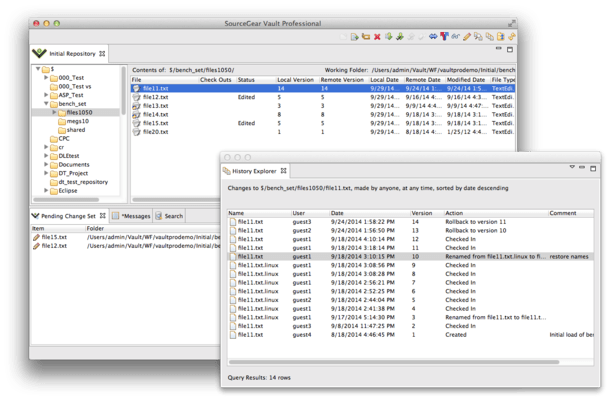
A compelling replacement for Visual SourceSafe. SourceGear Vault is a version control system for Windows developers, with full integration into the Visual Studio .NET environment. SourceGear Vault is implemented entirely in the .NET Framework and uses SQL Server 2000 for its repository storage. SourceGear Vault is designed specifically to offer a seamless transition from Visual SourceSafe. SourceGear Vault's basic architecture is a centralized Vault server which manages one or more repositories. SourceGear Vault includes several client applications and also provides a way to create custom clients using any .NET language. SourceGear Vault now also includes a Eclipse client and a VS2008 and VS2005 integration.
SourceGear Vault is a version control system built on the latest Microsoft tools and technologies including the .NET Framework and SQL Server 2005.
Vault is built entirely in C# and is designed for the Internet. The basic architecture is a centralized Vault server which manages one or more repositories. Vault includes several client applications and also provides a way to create custom clients using any .NET language.
The Vault server is a .NET Web Service running under IIS. All communication between client and server is conducted over HTTP, optionally with SSL. This architecture allows the use of standard IIS administration tools to manage the Vault server.
The Vault server stores all repository data in a SQL Server 2000 database. This architecture allows Vault to benefit from the ten years of maturity behind SQL Server. As an additional reliability feature, Vault uses SQL transactions to support Atomic Checkin Transactions. When you checkin a set of changes to your repository, the set will entirely succeed or entirely fail. There is no way to get your repository into a state.
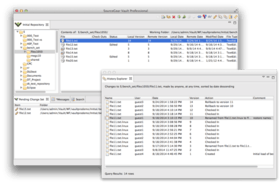
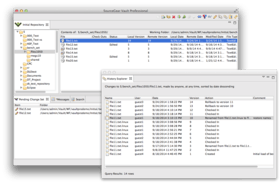
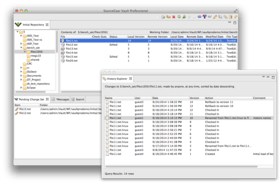
The main Vault client is built using C# and Windows Forms. It communicates with the Vault server using XML Web Services. The user interface is designed to familiar for users of SourceSafe.
Vault includes a SourceSafe Import Tool which can be used to migrate data from a SourceSafe database into a Vault repository. Every version of every file is imported, including all history.
Vault also includes an IDE integration client which allows Vault to be used from within the Visual Studio .NET environment.
The Vault Admin Tool is an additional client which allows Vault administrators to manage Vault servers and repositories.
The Vault Command Line Client is a client which functions as a console application. The source code for this client is included as a sample application for the Vault Client API. This API allows users to build custom client applications on the same libraries used by SourceGear.
What's new in SourceGear Vault V4.1.1?
Visual Studio 2008 support. This is the first version of Vault that offers integration with Visual Studio 2008.
Legacy IDE options. Users requested a few options available in the Classic Client be implemented in the VS Enhanced Client. The two options that have been implemented are Get Latest when a solution is opened and Check In when a solution is closed.
VS Enhanced Context Menus. The VS Enhanced Client's context menus were rearranged in order to provide easier access to commonly used operations.
Better progress indicators In the VS Enhanced client. The Add Solution and Check In commands now give status as to what is occurring.
Refresh Source Control Status. In the VS Enhanced client, there's a new menu item in the File->Vault submenu to refresh all source control statuses to update file icons in the Solution Explorer.
64 bit support. We've corrected the installer issue that was preventing server installs on a 64 bit OS. IIS will still need to be put into 32 bit mode.
Ant Tasks. Tasks are included for calling Vault source control operations from the Ant build tool.
Java CLC. For users on non-Windows platforms, there is now a Java based command line client.
New Web Diff Page. The Web Diff page has been rewritten to make it more useful for code reviews
What's new in SourceGear Vault V4.0?
Visual Studio 2005 client. This new client allows a much deeper integration in Visual Studio, including the ability to work in either VSS or CVS mode
Eclipse client. This new client allows integration with the Eclipse IDE, including Eclipse on non-Windows platforms, like Linux, Solaris and Mac OS X
Preview Move, Rename and Delete options. For users who have the auto-commit option disabled, or who are working in the Visual Studio 2005 or Eclipse IDE clients, move, rename and deletes will be reflected in the working folder when they are pended. This allows users to see all the implications of a refactoring operation and correct the build before checkin in any changes
New Web-based admin tool. The new Admin Web client allows administrators to configure their Vault server without installing a separate application. All previous operations are available to administrators through the Admin Web Client
What's new in SourceGear Vault V3.5.x?
In addition to Vault's previously supported platforms, Vault 3.5.2 includes support for:
Windows XP Pro (x64)
Windows 2003 Server (x64)
Windows Vista Home* (x86 / x64)
Windows Vista Home Premium* (x86 / x64)
Windows Vista Business (x86 / x64)
Windows Vista Ultimate (x86 / x64)
New Functionality
Export / Import Folders - This feature will allow folder and file history along with corresponding
labels to be moved between Vault repositories
Macromedia Dreamweaver client - Full support of Vault within Macromedia's Dreamweaver IDE
New Vault Client functionality:
History Favorites - Store and run predefined filters of common History Queries for given
users, actions, comments, etc.
History Query Filtering by Label - History Queries can be filtered by items before or after a label,
as well as within a range of labels.
Ghosted Folders - Within the Vault GUI client, a new setting allows local disk items not found
within the Vault Repository to be seen within the Folder Tree and File view of assigned
Working Folders.
Built In Folder Diff - Added a built in Folder Diff utility for faster diff comparisons between folders.
Rescan button added to Change Set tool bar for users who work in Edit, Merge, and Commit mode.
Improvements
Vault Admin Tool Improvements
Obliterate performance - Improvement in performance when obliterating deleted items from the
Vault Admin Tool.
Obliterate UI - Changes made within the obliterate tab to show a tree view of obliterated
items allowing an easier way to navigate through deleted items.
Vault Client Improvements
Status Search - Status Search has been tweaked for speed, and users can now invoke common
Vault commands on the search results - Get, Checkout, Checkin, Show Differences, etc.
Version checking - The Vault version check now runs within a background thread so it does
not interfere with login.
Improved UI support with .Net 2.0 Framework - Changes made to the Vault GUI client's
interaction with the .Net 2.0 Framework.
Added Unicode support for CP 950 and GB 2312 within the SourceGear Diff / Merge tool.
Vault Server Improvements
Support for SQL Server 2005 Service Pack 1.
Fixes
Get no longer deletes local files on Get Latest if a repository folder was deleted and new folder of
same name was later added
Can now checkout a file in a repository folder where the working folder is set and the file's status is Missing.
Pin, rollback, share, and undelete are disallowed by the server when the operation would cause a
name conflict with an existing object of the folder.
Command Line Client GET command now honors the -performdeletions option.
Fixed Blame in which certain cases caused gaps in the results.
Vault Server retrieves all history when filtering more than 100 users.
Vault Server no longer logs a Windows Event Viewer error on 2.0 .Net Framework.
What's new in SourceGear Vault V3.1?
Visual Studio 2005 Compatible
SQL Server 2005 Compatible
.NET Framework 2.0 Compatible
General
Added support for .NET framework 2.0 (beta 2)
Vault now works with SQL Server 2005 (Yukon)
Vault DLLs now use strong names
Client Only
You can now choose the location on disk for the client cache folders, working folder state/baseline folders and backup folders
The history transaction details dialog now displays the full repository path for the transaction items
You can now view the differences of a file or folder from the history transaction details dialog
Fixed problem that caused duplicate files and folders to appear in file list
Improved commit performance on large change sets
Improved performance on adding and updating multiple files
History query filtered by date now displays the full path to the item
Non-binary files are no longer read-only after the initial get when the local file option is set to make binary files read-only
Working folder scanning message is now correctly displayed the entire time the working folders are scanned
Keywords now correctly updated on check-ins of unmodified files
Check-In button on toolbar now correctly enabled
Fixed handle leak in shadow folders
Server Only
Fixed problem that caused repositories to no longer be visible in some cases after a checkin of an invalid folder version
You can now specify which repositories a Vault Server serves in the Vault.config file
Optimized stored procedures for better concurrency
Improved label performance
Improved performance on committing modified files
What’s New in V3.0
General Features
Integration with Dragnet Bug Tracking System
Vault users can now choose to be authenticated using their Active Directory credentials.
Email notification of changes to the repository.
Performance improved when creating trees in the server
Performance improved on refresh when there is not enough server RAM to store many trees.
Get, Refresh and Checkout are much faster during long commit operations.
Greatly improved handling of files with an Unknown status. Vault now automatically detects when a file matches a version on the server, and it will automatically create a baseline file if there is no match.
Can now specify checksums instead of file dates to determine whether a file has been modified
Windows Client
Completely redesigned Add File dialog, which allows more control over which files are added for recursive and non-recursive folder adds.
Can now drag and drop files and folders onto the Windows client to add files and folders to the repository.
Set Working Folder Dialog now allows you to recursively unset working folders, and also override inherited working folders.
Search pane now supports searching on “Any” status.
Search pane now supports searching by filename.
Can now undo a checkout from a different machine than the checkout happened on.
Additional columns in file list allow sorting by file type and modified date
Context menu commit from Pending Change Set only includes files that selected.
All files that are included as part of a checkin are now selected by default, even unmodified files.
Pending change set and file list are now syncronized.
Keep checked out now works when checking in unmodified files
Checkin comments can now be modified from the Version Details dialog from the History Explorer.
History query now always includes the full path to the history item, so diffs can be invoked on any item.
History in branches now include labels that were applied in the trunk prior to the branch.
Selection no longer lost after an operation
Can now resolve merge status on multiple files at a once.
The Merge Branches tool now shows labels associated with versions to select.
The Merge Branches tool now shows transaction details by double clicking the selected version.
The Merge Branches tool now retrieves files from the server more efficiently.
Automerge no longer reports conflict if both files have the exact same changes.
Multi-line comments are now allowed when creating labels
Changing timezones no longer sets all files to an Edited status.
Rollack now works correctly on files that have been renamed.
Branch now retains the EOL settings from the trunk.
Needs Merge status now takes precedence over Renegade status.
Errors related to mutexes have been addressed
IDE Client
Client side logging is now available in the IDE.
IDE now guarantees that if a .cs file checked out, the .resx file is checked out too.
Using a profile in the IDE now automatically logins the user in.
No longer have to use a profile for the IDE to automatically choose the repository associated with the project.
Cancelling the login dialog ignores further requests by Visual Studio to bring up additional login dialogs when invoking a project under source control.
Refresh command is now hooked up, but is throttled to only fire every 30 seconds, to maintain reasonable performance
Command Line Client
New command GETLABELDIFFS will get history by labels
New command RENAMELABEL allows renaming a label
New command DELETELABEL allows deleting a label
CLC can now checkin a single folder recursively.
CLC can now checkout a folder recursively and can also specify wildcards for files to checkout.
Files with a status of Renegade or Needs Merge can no longer be checked in via the CLC
SSL connection problems are now reported within XML output
Login dialog should now always appear on top of the IDE window
Diff Tool
Diff Tool now supports unicode files
Next/Prev Conflict buttons now available.
Hotkey support now available
Colors can now be configured
Remembers its window position and size
Admin Tool
Copy Rights now works correctly
Now sorts dates correctly in the Backup pane the Undo Checkouts Pane
PartNumbers: PC-513578-156298 513578-156298 PC-513578-156302 513578-156302 PC-513578-156306 513578-156306 PC-513578-156323 513578-156323 PC-513578-156334 513578-156334 PC-513578-156314 513578-156314 PC-513578-156317 513578-156317 PC-513578-156320 513578-156320 PC-513578-156329 513578-156329 PC-513578-156331 513578-156331 PC-513578-156310 513578-156310 PC-513578-156333 513578-156333
Publisher PartNumbers: V01 V05 V10 V25 VG01 VG05 VG10 VG100 VG25
PurchaseOptions: SourceGear Vault V4.1.1 SourceGear Vault - 1 User License , SourceGear Vault V4.1.1 SourceGear Vault - 5 User Pack License , SourceGear Vault V4.1.1 SourceGear Vault - 10 User Pack License , SourceGear Vault V4.1.1 SourceGear Vault - 25 User Pack License , SourceGear Vault V4.1.1 SourceGear Vault - 100 User Pack License , SourceGear Vault V4.1.1 (with Maintenance) SourceGear Vault - 1 User License with Maintenance , SourceGear Vault V4.1.1 (with Maintenance) SourceGear Vault - 5 User Pack License with Maintenance , SourceGear Vault V4.1.1 (with Maintenance) SourceGear Vault - 10 User Pack License with Maintenance , SourceGear Vault V4.1.1 (with Maintenance) SourceGear Vault - 25 User Pack License with Maintenance , SourceGear Vault V4.1.1 (with Maintenance) SourceGear Vault - 100 User Pack License with Maintenance , SourceGear Vault - Maintenance Subscription Licenses 1 Maintenance Subscription, one user for one year (only for licenses which are already current) , SourceGear Vault V4.1.1 - Upgrade 1 Developer Upgrade License (Upgrade from Vault 3.x.)
Resources: Vault Users Guide - Requires Acrobat Reader, Vault Admin Manual - Requires Acrobat Reader, Vault Import Tool Manual - Requires Acrobat Reader, Read the Vault Server license file, Download the Vault Server + Client V4.1.1 evaluation on to your computer - Limited to 1 User
Operating System for Deployment: Windows Vista, Windows XP, Windows Server 2003, Windows 2000
Product Type: Application
Built Using: Visual C# .NET
Compatible Containers: Microsoft Visual Studio 2005, Microsoft SQL Server 2005, .NET Framework 2.0
Product Class: Component Development Tools, .NET Development Tool
Search Items: New Product Apr 03, New Version Nov 03, New Version Feb 04, New Product Mar 04, New Product Jan 05, New Product June 05, New Product July 05
Keywords: Version versioning versions SourceGear Corporation Professional Partner SourceGear Vault, Vault SourceGear, Sourcegear