by DataDirect Technologies - Product Type: Application
Stylus Studio XML Enterprise Suite by DataDirect Technologies
URLs: stylus-studio-xml-enterprise, stylus studio xml enterprise, stylusstudioxmlenterprise, datadirect
XML productivity through innovation. Stylus Studio's XML IDE provides XML developers and data integration specialists with a comprehensive toolset for managing XML data transformation and aggregation. Whether you are working with latest XQuery specification or wrestling with complex XSLT stylesheets, Stylus Studio XML IDE is designed to make your life easier. Graphical XML mappers, code generators, unique backmapping technology, integrated debugging, start-of-the-art profilers all add up to one of the most advanced XML IDEs available.
Top-Ten Reasons to Buy Stylus Studio XML Enterprise Suite - Wondering why you should buy Stylus Studio XML Enterprise Suite instead of Stylus Studio XML Professional Suite? Here are 10 reasons:
10. Java Code Generation
Stylus Studio XML Enterprise Suite generates portable Java code for XML transformations (XSLT) and queries (XQuery) developed in Stylus Studio. The generated Java files, which work in any software application, reflect all of the settings that you specified in your XQuery and XSLT scenario properties — your choice of XML processor, parameters, input/output files, and post processing options — are all preserved and converted to working code! Dozens of other options allow you to easily further customize the generated code. Save yourself hours of tedious and error-prone work with the click of a button with the Stylus Studio XML Enterprise Suite Java Code Generator.
9. XSLT and XQuery Profilers
Profilers are important tools for analyzing XSLT stylesheet or XQuery performance — they report detailed trace of execution times, allowing you to benchmark XSLT or XQuery against different processors, providing valuable insight into how to optimize the underlying XSLT or XQuery code. As XSLT and XQuery applications become increasingly complex, Stylus Studio's Profiler become essential - especially if you plan to deploy XSLT or XQuery code to mission-critical systems. Stop the guesswork and improve XML application performance by buying Stylus Studio XML Enterprise Suite today.
8. Support for EDI: UN/EDIFACT, EANCOM, IATA, X12 and More
Stylus Studio XML Enterprise Suite has advanced EDI tools for transforming EDI files into XML — and XML back to EDI — making even the most complicated EDI integration work a breeze. It features a suite of EDI dictionaries covering dozens of versions, including HL7, EDIFACT, X12, IATA and EANCOM. There are also extension mechanisms and powerful visual tools for creating EDI-to-XML data mappings for custom formats. Wizards are provided which will create W3C XML Schema documents corresponding to specific message types and versions (such as EDIFACT or X12 schemas), so that you can validate your XML against the EDI standards.
7. Data Conversion Tools and Pre-built Data Converters
Convert to XML is the all-purpose tool for visually converting practically any data source into any XML output format, or vice-versa. You can design your own XML converters in minutes, or automatically convert stuff to XML with Stylus Studio XML Enterprise Suite's pre-built data converters. File formats as diverse as Base64, CSV, dBase, Binary, .ini, RTF, EDI, EDIFACT, X12 and hundreds of others can all be easily and quickly converted to XML. And these are not just one-off data conversions — they're Stylus Studio file converters. This means you can create a customized XML view of your legacy data, then seamlessly operate on that legacy data source using all of Stylus Studio's XML tools. That converted legacy data source can be used to generate Java code (see reason #10) to make the whole kit and kaboodle work in a live server-based XML application. Need to use them in your own applications? No problem. The Data Conversion API is available for your programs to call directly.
6. Industry-Standard XML Catalogs
Working with FIXML, HL7, RIXML, DocBook, or any industry-standard XML vocabulary for that matter? Then get Stylus Studio XML Enterprise Suite — it includes the most comprehensive out-of-the-box support for working with XML catalogs that you'll find in any XML IDE, regardless of cost. Thousands of industry-standard XML data models available to you at your fingertips.
5. Enterprise Web Service Tools
Stylus Studio XML Enterprise Suite provides Web service tools within the framework of the and comprehensive XML IDE. Under the covers, Web services rely on XML technologies, so an XML approach to developing XML Web services can often yield significant productivity gains. For example, once you've configured a Web Service Call Scenario, only Stylus Studio allows you to abstract the Web service call as a live, Stylus Studio data source, allowing you to seamlessly use live Web service data anywhere in Stylus Studio XML — as a data source for XQuery or XSLT, or in conjunction with the Java Code Generator for example. (See #7 for more information about Stylus Studio data sources, and #10 for the Java Code Generator).
4. XML Schema-Awareness in XSLT 2.0 and XQuery 1.0
When working with external data sources, it's important that you check the validity of the data before using it in your application. Why? Because it helps ensure correct program behavior and reduces unwanted bugs. Validating the input in a data integration application is important, but it's not a complete solution. Stylus Studio XML Enterprise Suite makes it easy to practice safe XSLT and XQuery with new Schema-Awareness features, allowing you to enable static typing, type-safety and automatic validation of the output of an XML transformation or query against any XML Schema. With the new schema-aware Stylus Studio XML Enterprise Suite, you can automatically check and be confident in the correctness of your output.
3. XML Publishing Tools
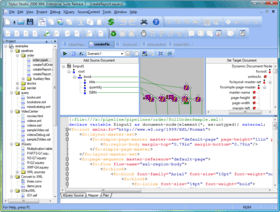
Simplify XML Publising applications with Stylus Studio XML Publisher, a powerful XML report designer that allows users to create advanced document layouts for use in single-source publishing, XML content management, and multi-channel publishing applications. Using an intuitive visual interface, business users can easily design rich document layouts to publish XML to PDF, HTML, Postscript and many other document formats using XSLT 1.0, XSLT 2.0, or XQuery 1.0. Stylus Studio XML Publisher supports numerous heterogeneous data sources including relational databases; XML databases; Web services: EDI, EDIFACT, X12, CSV and other flat file formats; as well as XML and XML Schema documents.
2. XML Pipeline
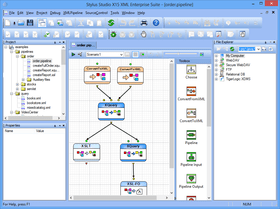
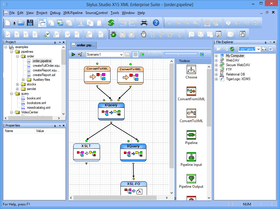
An XML pipeline is a way to express the various steps in processing XML documents. Stylus Studio XML Enterprise Suite provides powerful grapical tools for expressing XML pipelines in terms of a series of XML operations, for example, converting, validating, transforming, or performing other operations on an XML document. Using the XML Pipeline, Software Architects can easily visualize their XML applications (such as ETL, EII, and EAI applications) at a higher level, and automate many common XML programming tasks including Java code generation and debugging of XML processing applications.
1. Support for DataDirect XML Converters
Once you've set up an XML data integration application in Stylus Studio XML Enterprise Suite, you can use the Java code generator to generate the code, leveraging DataDirect XML Converters to make it all work. And you can deploy at any level: entire pipelines, individual steps such as XQuery or XSLT embedded in Java, or even just calling the data converters directly from your own application. Instead of the black box method of deployment, use Stylus Studio XML Enterprise Suite's Java code generator (see reason #10) to take your applications from development to deployment.
Stylus Studio's main design goals were to maximize XML developer productivity, push innovation, and provide unquestioned value, which are the top needs for both software developers and managers alike.
Productivity
Stylus Studio is designed to automate and accelerate the XML development process. XML's verbose self-describing syntax is generally cumbersome to work with manually, and is of course better suited for being developed with Stylus Studio. Stylus Studio consists of powerful XML editors, for example, an XML editor that allows users to work with XML in a variety of different views including text, grid, and tree views.
Complex XML code - for XQuery, XSLT, XML Schema or SQL/XML queries - can be intuitively developed using their respective editors, which support drag-and-drop or visual design operations. Productivity gains are also achieved using Stylus Studio's plentiful XML developer features, including code generators (for XML Schema and DTD, for example) and conversion utilities (import/export data wizards and HTML-to-XSLT conversions, for example) which automate commonly performed developer tasks.
Support for source code integration and a robust project window enable Stylus Studio to be used on large software projects in real-world software development scenarios.
Innovation
The explosive growth of XML standards and their extensive adoption throughout enterprise computing requires an XML IDE that can provide comprehensive and innovative support for the newest XML technologies, and one capable of issuing timely product updates as XML specifications evolve. Stylus Studio has a long history of first-to-market achievements, including the first XSLT debugger, XSLT Mapper, and the new XQuery Mapper. And on startup, Stylus Studio notifies you if an update to your installed version is available, so you are never behind the curve in the rapidly evolving world of XML technology.
Value
Stylus Studio offers unprecedented value as a true enterprise software development tool. But the value of a tool is not solely derived by merely weighing the cost of the software application against the types of productivity gains described earlier. Stylus Studio's vast collection of XML debuggers and testing utilities ensures correct program behavior and eliminates costly software bugs at the outset of the software development cycle, resulting in better quality code. Furthermore, the XML standards-based approach to software application development is fundamentally more cost effective then proprietary alternatives, enabling you to avoid the higher costs associated with single vendor traps and lock-ins. Finally, Stylus Studio product support is offered free of charge and Stylus Studio Developers Network offers numerous free developer resources, eliminating support and maintenance plans.
Stylus Studio Editions
Stylus Studio XML Professional Suite Stylus Studio XML Professional Suite provides a complete set of tools for the XML
application developer, including XML Differencing for comparing multiple XML
documents and folders. XML Differencing is also included in Stylus Studio XML Enterprise Suite.
Stylus Studio XML Enterprise Suite - Stylus Studio XML Enterprise Suite is Stylus Studio's most comprehensive XML IDE,
offering a complete and robust set of tools for writing, testing, debugging, and deploying
XML applications. In addition to editors for XML, XML Schema, XQuery, and XSLT,
Stylus Studio XML Enterprise Suite provides the following features exclusive to this
edition of Stylus Studio:
Java and C# for .NET code generation for deployment of XQuery and XSLT
transformations
The ability to expose XML Schema to Java bindings
XQuery and XSLT Profilers to help you gather performance metrics and troubleshoot
performance bottlenecks
Custom XML Conversions, a module that allows you to easily convert non-XML files
like EDI and CSV to XML
Web Service Call Composer to help you build and test calls to hundreds of industrystandard
Web services
Integration with Raining Data Tiger Logic XDMS
Support for OASIS catalogs, including dozens of catalogs bundled with Stylus Studio
Stylus Studio XML Enterprise Suite: XML Tools Overview
Stylus Studio XML Enterprise Suite provides a comprehensive set of XML tools and features for working with XML, XQuery, SQL/XML, Web services, XML publishing, and many other XML technologies.
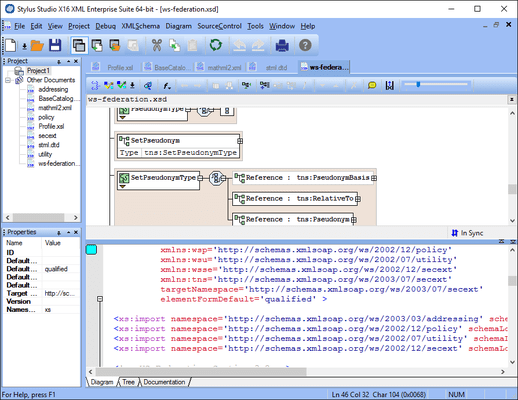
XML Editors - Stylus Studio XML Enterprise Suite includes numerous synchronized, visual XML editing views, Sense:X (Intelligent XML Editing), Integrated XML Validator, XML differencing, and much more.
XQuery (XML Query) Tools - Stylus Studio XML Enterprise Suite is one of the first XML development tools to support visual XQuery editing, XQuery mapping, and XQuery debugging.
XSL/XSLT Tools - Stylus Studio XML Enterprise Suite provides comprehensive XSLT development support, including XSLT debugging, XSLT mapping, XSLT profiling, visual HTML-to-XSLT stylesheet design, XSL:FO, and much more.
EDI Tools - Electronic Data Interchange (EDI) integration tools for converting, mapping and deploying advanced XML data integration applications which involve read/write access to legacy EDIFACT and X12 data sources.
XML Pipeline - XML Pipeline lets you model your entire XML application instead of just individual pieces; use it to design, edit, debug and deploy advanced XML data service applications.
XML Publishing - Visually design beautiful XML reports for XML publishing applications using XSL:FO, XQuery and XSLT technologies to generate PDF or HTML output from any data source.
Document Type Definition (DTD) Editor - Stylus Studio XML Enterprise Suite includes a visual DTD editor, integrated DTD validator, and various DTD generation utilities.
XPath Tools - Stylus Studio XML Enterprise Suite includes utilities for XPath 1.0/2.0, including XPath Evaluator, XPath Expression Generator, Sense:X for XPath (Intelligent XPath Editing), and much more.
Web Services Tools - Stylus Studio XML Enterprise Suite supports Web Service Development via a Web Service Call Composer, UDDI Registry Browser, and other tools that make it easy to find, test, and use Web services.
XML Mapping Tools - With Stylus Studio XML Enterprise Suite, you can map data in one format to another using visual drag-and-drop mappers. Stylus Studio's mappers include support for mapping to and from XML documents, Web service data, relational data, flat files, and many more.
Import/Export Utilities for any File, XML and Relational Data - Stylus Studio XML Enterprise Suite includes Convert to XML, a visual tool for extracting XML data from any file format including CSV, tab separated, binary data files, EDI, or any other flat format, as well as many other data import/export utilities for RDBMS, XML, ADO, and more.
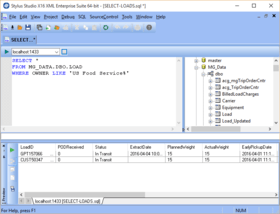
Relational Database Connectivity Tools - Create XML views of relational databases and render relational data as XML with Stylus Studio XML Enterprise Suite's SQL/XML utilities.
Java and XML Tools - Build XML-enabled Java applications using Stylus Studio XML Enterprise Suite's JSP Editor, XML-Java debugger, and more.
HTML/XHTML and Web Design Tools - Easily design advanced XML-data driven Web sites with Stylus Studio XML Enterprise Suite's handy XML tools for Web designers.
Microsoft and XML Tools - Use Stylus Studio XML Enterprise Suite to build XML-enabled Microsoft applications with MSXML, Microsoft .NET XML (System.XML), SQL Server 2000, and other XML-enabled products and APIs.
What's New in Stylus Studio X14?
XSLT Editor Enhancements
Saxon 9.3 support
Support for XSLT 3.0 Draft 11 May 2010
Syntax coloring and auto-complete
Support for executing and debugging XSLT 3.0
Support for XPath 3.0 Draft 14 June 2011
XSLT mapping tool adds support for XPath 3.0 functions
XSLT-FO Enhancements
RenderX 4.19
Support creation of PDF documents with rich media
Support creation of PDF documents with form fields
Added missing fo:blocker instruction
Refresh auto-complete information when the project folder associated schemas are changed
XQuery Editor Enhancements
Saxon 9.3 support
Support for executing and debugging XQuery 3.0 Draft June 14 2011
Do not prompt a message box when an imported module cannot be resolved
Reset step point marker when debug session is terminated
Framework Enhancements
WebDav Client now reports last modified date
Docking windows preserve the state across sessions
XML productivity through innovation.
Pricing: Stylus Studio X14 XML Enterprise Suite 1 User License, Stylus Studio X14 XML Enterprise Suite 2 User License, Stylus Studio X14 XML Enterprise Suite 5 User License, Stylus Studio X14 XML Enterprise Suite 10 User License, Stylus Studio X14 XML Enterprise Suite 20 User License, Stylus Studio X14 XML Enterprise Suite 50 User License, Stylus Studio X14 XML Enterprise Suite 100 User License, Stylus Studio X14 XML Enterprise Suite 200 User License, Stylus Studio X14 XML Enterprise Suite AUP (Annual Upgrade Protection) 1 User AUP (Annual Upgrade Protection), Stylus Studio X14 XML Enterprise Suite AUP (Annual Upgrade Protection) 2 User AUP (Annual Upgrade Protection), Stylus Studio X14 XML Enterprise Suite AUP (Annual Upgrade Protection) 5 User AUP (Annual Upgrade Protection), Stylus Studio X14 XML Enterprise Suite AUP (Annual Upgrade Protection) 10 User AUP (Annual Upgrade Protection), Stylus Studio X14 XML Enterprise Suite AUP (Annual Upgrade Protection) 20 User AUP (Annual Upgrade Protection), Stylus Studio X14 XML Enterprise Suite AUP (Annual Upgrade Protection) 50 User AUP (Annual Upgrade Protection), Stylus Studio X14 XML Enterprise Suite AUP (Annual Upgrade Protection) 100 User AUP (Annual Upgrade Protection), Stylus Studio X14 XML Enterprise Suite AUP (Annual Upgrade Protection) 200 User AUP (Annual Upgrade Protection), Stylus Studio X14 XML Enterprise Suite 1 User Major Upgrade License, Stylus Studio X14 XML Enterprise Suite 2 User Major Upgrade License, Stylus Studio X14 XML Enterprise Suite 5 User Major Upgrade License, Stylus Studio X14 XML Enterprise Suite 10 User Major Upgrade License, Stylus Studio X14 XML Enterprise Suite 20 User Major Upgrade License, Stylus Studio X14 XML Enterprise Suite 50 User Major Upgrade License, Stylus Studio X14 XML Enterprise Suite 100 User Major Upgrade License, Stylus Studio X14 XML Enterprise Suite 200 User Major Upgrade License
Evals & Downloads: Read the Stylus Studio help file, Browse the Stylus Studio XML Edition Feature Matrix Web page, Browse the Stylus Studio License Agreement, Read the Building XQuery with Stylus Studio White Paper, Read the Power Schemas with Stylus Studio White Paper, Read the FIXML Case Study, Read the Building XQuery with Stylus Studio - Web Service Aggregation and Reporting White Paper, Download the Stylus Studio Enterprise X14 evaluation on to your computer - Expires after 14 days
Operating System for Deployment: Windows 7, Windows Vista, Windows XP, Windows 2000
Architecture of Product: 32Bit
Product Type: Application
Keywords: XML, XSLT, XML Schema, XPath, DTD, XQuery, XML Editor, XML IDE, XQuery Editor, XQuery IDE, XML Mapping, SOAP, WSDL, XSLT Debugging, XQuery Debugging, XSLT Profiling, XQuery Debugging, XML Transformation, Saxon, XML Pipeline, Visual XSLT, FLOWR, XQuery Map
DataDirect Technologies Data Direct Tech
XML Extensible Markup
Part numbers: PC-515959-417690 515959-417690 PC-515959-417695 515959-417695 PC-515959-417700 515959-417700 PC-515959-417705 515959-417705 PC-515959-417710 515959-417710 PC-515959-417720 515959-417720 PC-515959-417725 515959-417725 PC-515959-417730 515959-417730 PC-515959-417715 515959-417715 PC-515959-417735 515959-417735 PC-515959-417739 515959-417739 PC-515959-417743 515959-417743 PC-515959-417747 515959-417747 PC-515959-417751 515959-417751 PC-515959-417755 515959-417755 PC-515959-417759 515959-417759 PC-515959-417765 515959-417765 PC-515959-417767 515959-417767 PC-515959-417763 515959-417763 PC-515959-417769 515959-417769 PC-515959-417771 515959-417771 PC-515959-417773 515959-417773 PC-515959-417775 515959-417775 PC-515959-417777 515959-417777
ComponentSource offers a unique global service, used by over 1,000,000 software developers worldwide.