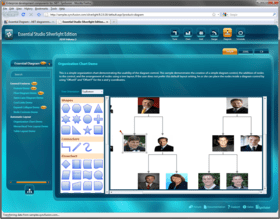
Screenshot Preview

Syncfusion Essential Diagram for WPF

de Syncfusion - Tipo de producto: Componente / ASP.NET WebForms / ASP.NET AJAX (ATLAS) / .NET WinForms / .NET WPF / Silverlight / 100% Managed Code / Source Code / JavaScript / AJAX

Por favor note que al menos que se indique lo contrario, esta es la versión en Inglés del producto.

*

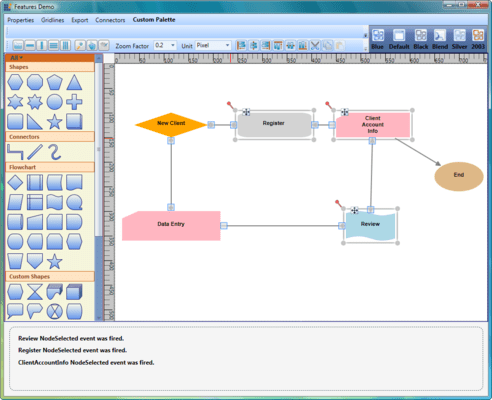
Create Visio-like diagrams with ease. Syncfusion Essential Diagram for WPF has the ability to present feature-rich diagrams. It provides an intuitive user-interaction model for creating and editing diagrams with XAML and data-binding support. Syncfusion Essential Diagram for WPF’s programmatic interface also places at your disposal many useful commands and methods that enable the performance of functionalities such as printing, data binding, serialization, and automatically laying out algorithms.



Opinión media:   basada en: 1 opinión.
Desde
₩990,600

Nuestros precios Standard están indicados abajo. Inicia una sesión para ver sus precios con descuento.

Precio en Vea: Todos los precios | Solo renovaciones

Syncfusion Essential Diagram for WPF 2012 Vol 2 (V10.2.0.56) - Binary   *

Añadir a la Cesta ₩ 990,600 1 Developer License - with 1 Year Subscription  * Descarga (595.0 MB)
Añadir a la Cesta ₩ 448,300 1 Developer Annual Subscription Renewal License (for subscriptions soon to expire or up to 30 days past expiration)  * Verificar Descarga (29 KB)
Añadir a la Cesta ₩ 743,000 1 Developer Reinstatement of Lapsed Subscription License (for subscriptions lapsed longer than 30 days up to one year)  * Verificar Descarga (29 KB)

Syncfusion Essential Diagram for WPF 2012 Vol 2 (V10.2.0.56) with Source Code   *

Añadir a la Cesta ₩ 1,433,400 1 Developer License with Source Code - with 1 Year Subscription  * Descarga (595.0 MB)
Añadir a la Cesta ₩ 647,500 1 Developer Annual Subscription Renewal License (for subscriptions soon to expire or up to 30 days past expiration) with Source Code  * Verificar Descarga (29 KB)
Añadir a la Cesta ₩ 1,075,000 1 Developer Reinstatement of Lapsed Subscription License (for subscriptions lapsed longer than 30 days up to one year) with Source Code  * Verificar Descarga (29 KB)

Syncfusion Essential Diagram for WPF 2012 Vol 2 (V10.2.0.56) - Binary Site License   *

Añadir a la Cesta ₩ 22,137,000 Site License - with 1 Year Subscription - Allows upto 500 Developers at a single address  * Verificar Descarga (595.1 MB)
Añadir a la Cesta ₩ 8,854,800 Site Annual Subscription Renewal License (for subscriptions soon to expire or up to 30 days past expiration) - Allows upto 500 Developers at a single address  * Verificar Descarga (29 KB)
Añadir a la Cesta ₩ 19,923,300 Site Reinstatement of Lapsed Subscription License (for subscriptions lapsed longer than 30 days up to one year) - Allows upto 500 Developers at a single address  * Verificar Descarga (29 KB)

Syncfusion Essential Diagram for WPF 2012 Vol 2 (V10.2.0.56) with Source Code Site License   *

Añadir a la Cesta ₩ 33,205,400 Site License with Source Code - with 1 Year Subscription - Allows upto 500 Developers at a single address  * Verificar Descarga (595.1 MB)
Añadir a la Cesta ₩ 13,282,200 Site Annual Subscription Renewal License (for subscriptions soon to expire or up to 30 days past expiration) with Source Code - Allows upto 500 Developers at a single address  * Verificar Descarga (29 KB)
Añadir a la Cesta ₩ 29,884,900 Site Reinstatement of Lapsed Subscription License (for subscriptions lapsed longer than 30 days up to one year) with Source Code - Allows upto 500 Developers at a single address  * Verificar Descarga (29 KB)

Nuestros precios incluyen servicio técnico de ComponentSource y, para la mayoría de los productos disponibles para descarga, una copia de seguridad en línea y una actualización GRATUITA a la nueva versión si ésta se publica en un período de 30 días después de la compra.  Todas las ventas están sujetas a nuestros Términos y condiciones standard y a nuestra Política de devolución. Por favor, póngase en contacto con nosotros si necesita alguna opción de licencia no ofrecida en la lista, como por ejemplo volumen de licencias y versiones anteriores.

Nuestros precios Standard están indicados arriba. Inicia una sesión para ver sus precios con descuento.

 *

Please note: Syncfusion Essential Diagram insludes Windows Forms, Silverlight, WPF and ASP.NET components.

What’s new in Essential Diagram 2012 Volume 1?

  • HTML 5 Diagram Modes - Essential Diagram has two HTML 5-enhanced modes: SVG (Scalable Vector Graphics) mode and Canvas mode—which utilizes the CANVAS element. You can choose the mode that is best suited to your particular needs and required performance.
  • Export to Image - The Diagram control can export the current layout in the diagram area to multiple image formats, specifically .jpeg, .bmp, and .png.
  • Polyline Support - When in SVG mode, Essential Diagram can support polylines—multiple lines connected by intermediate points—for straight and orthogonal line connectors. The intermediate points in a polyline are visually represented as vertices.
  • Printing Support - Essential Diagram gives you the ability to print a diagram layout when in SVG mode; this includes nodes, line connectors, custom shapes and custom content.
  • Saving and Loading Diagram Edits - In SVG mode, the Diagram control can save and reload information regarding changes to nodes and line connectors to and from a database.
  • Data Binding - Diagram data binding has been enhanced to support the ADO.NET Entity Model.

 *

Syncfusion Essential Diagram for WPF Appearance
Several customizable options are provided to change the look and feel of different portions of a diagram, enabling the creation of professional-looking diagrams that reflect style patterns commonly used in business.

Syncfusion Essential Diagram for WPF Graphical Objects
Essential Diagram for WPF has various graphical objects such as nodes, line connectors, and decorator shapes, which can be used to create interactive diagrams.
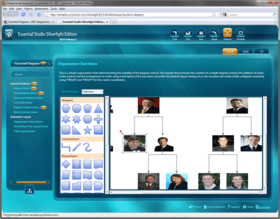
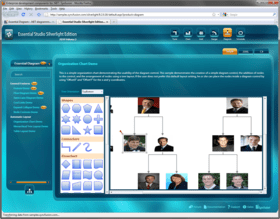
  • Connection Ports
  • Decorator Shapes
  • Line Connectors
  • Polyline
  • Line Bridging
  • Nodes

Syncfusion Essential Diagram for WPF Command Architecture
Essential Diagram for WPF provides several commands that enable users to easily perform commonly used operations.

  • Alignment Commands
  • Nudge Commands
  • Sizing Commands
  • Spacing Commands
  • Undo and Redo Commands
  • Z-Order Commands
  • Clipboard Commands

Syncfusion Essential Diagram for WPF Symbol Palette
The symbol palette is a large collection of predefined nodes. It allows dragging and dropping nodes and line connectors, making them easier to manage. Custom symbols can also be added to the symbol palette. It also supports grouping and filtering symbols.

  • Customization
  • Symbol Palette Filter
  • Symbol Palette Group
  • Symbol Palette Items

Syncfusion Essential Diagram for WPF Data Binding and Tree Layout
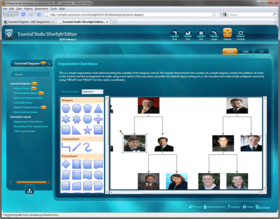
Automatically arrange nodes by using the Directed-Tree and Hierarchical-Tree layouts. Essential Diagram for WPF supports binding to an XML data source and generating a tree view of the XML data. It also supports binding a business object, with all its collections, using a hierarchical data template with tree-layout algorithms.

  • Business Object Data Binding
  • Directed Tree Layout
  • Hierarchical Tree Layout
  • Radial Tree Layout
  • Table Layout
  • XML Data Binding

Syncfusion Essential Diagram for WPF Interactive Diagram
Build interactive diagrams to provide users with a rich run-time experience. Enable Essential Diagram's built-in zooming and panning features to let end-users zoom and pan diagrams. Horizontal and vertical gridlines and rulers are also supported. Enable label editing to allow end-users to edit labels at run time. Several measurement units are also provided.

  • Context Menu
  • Event Mechanism
  • Gridlines
  • Grouping
  • Layers
  • Label Editor
  • Measurement Units
  • Panning
  • Reset
  • Rulers
  • Zooming

Syncfusion Essential Diagram for WPF Load and Save
Essential Diagram supports exporting a diagram into various formats. Users can save a page in XAML format and store it for future use. Using the Load option, a saved page can then be loaded back to the current view. Users can also print the diagram page. A print-preview of the diagram page can be viewed before executing the Print command.

  • Exporting
  • Loading
  • Print and Print Preview
  • Saving

Syncfusion Essential Diagram for WPF Transformations
Essential Diagram for WPF supports various transformations, such as translation, rotation, and resizing.

  • Resizing
  • Rotation
  • Translation

Atención

Para su comodidad, hemos incluido enlaces a Google Translate para traducir la información del producto que todavía tenemos que traducir. Por favor, tenga en cuenta que traducciones automáticas no siempre son totalmente exactas.
Con la tecnología de
Requiere Flash en Firefox y Opera

Búsqueda de productos

Escriba palabras de búsqueda:

¿Por qué comprar en ComponentSource?

ComponentSource ofrece un único servicio global, utilizado por más de 1.000.000 de desarrolladores en todo el mundo.

Más Información | Sobre Nosotros

Galería de capturas de pantalla

Haga clic para obtener una vista previa completa

Captura de pantalla Syncfusion Essential Diagram - WPF - 2012 Captura de pantalla Syncfusion Essential Diagram - WPF - 2012 Captura de pantalla Syncfusion Essential Diagram - WPF - 2012 Captura de pantalla Syncfusion Essential Diagram - WPF - 2012 Captura de pantalla Syncfusion Essential Diagram - WPF - 2012
Award