Syncfusion Essential Edit - .NET Component - 2008

by Syncfusion - 상품타입: Component / .NET WinForms / 100% Managed Code

주의 : 이 제품정보에는 한글안내가 포함되어 있지 않습니다.
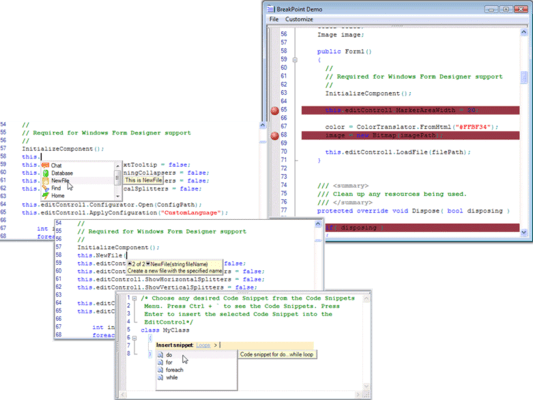
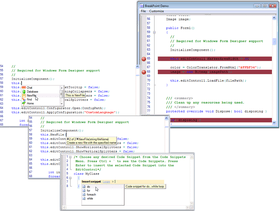
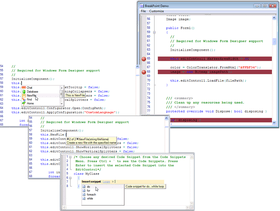
Syncfusion Essential Edit - .NET Component - 2008 의 스크린샷Add Syntax highlighted editing functionality to your applications. Syncfusion Essential Edit is a syntax highlighting edit control that is designed to be extensible and easy to use. Syncfusion Essential Edit does not derive from the Rich Edit control. It is written from the ground up to be extensible and powerful. Features Multi-level Undo / Redo and rich formatting options. It comes with syntax files for commonly used languages and configuration can be done easily through a simple configuration file.


536,800₩
통화 선택

일반 적인 소비자 가격은 하기에 표시되어 있습니다. 고객님의 할인가격은 표시 하시려면 로그인 해주시기 바랍니다.

Syncfusion Essential Edit 2008 Vol. 3

주문 ₩ 536,800 1 Developer License - with 1 Year Subscription 다운로드 (193.1 MB)
주문 ₩ 265,700 1 Developer Annual Subscription Renewal License (for subscriptions soon to expire or up to 2 weeks past expiration) 확인 다운로드 (29 KB)
주문 ₩ 322,100 1 Developer Reinstatement of Lapsed Subscription License (for subscriptions lapsed longer than 2 weeks) 확인 다운로드 (29 KB)
주문 ₩ 159,400 1 Developer License without Subscription Upgrade from previous version 확인 다운로드 (193.1 MB)

Syncfusion Essential Edit 2008 Vol. 3 with Source Code

주문 ₩ 970,600 1 Developer License with Source Code - with 1 Year Subscription 다운로드 (193.1 MB)
주문 ₩ 374,200 1 Developer Annual Subscription Renewal License (for subscriptions soon to expire or up to 2 weeks past expiration) with Source Code 확인 다운로드 (29 KB)
주문 ₩ 582,400 1 Developer Reinstatement of Lapsed Subscription License (for subscriptions lapsed longer than 2 weeks) with Source Code 확인 다운로드 (29 KB)
주문 ₩ 224,500 1 Developer License without Subscription Upgrade from previous version with Source Code 확인 다운로드 (193.1 MB)

본 제품은 GSA Schedule 가격으로 제공해 드릴수 있습니다.가격에는 ComponentSource의 기술지원 요금이 포함되어 있습니다. 또한 다운로드 판매를 하고 있는 상품의 대부분은 온라인 백업요금이 포함되어 있어서 구입날로부터 30일 이내에 새로운 버전이 발매된 경우 무료로 업그레이드해 드리고 있습니다.  모든 주문에 대해서 당사표준 계약조건 반품조건 의 내용이 적용됩니다. 다음의 경우,고객 서비스로연락하시기 바랍니다. (상기의 리스트에 게재되지 않은 대량의 라이센스나 구 버전 등의 라이센스 옵션이 필요한 경우)

일반 적인 소비자 가격은 상기에 표시되어 있습니다. 고객님의 할인가격은 표시 하시려면 로그인 해주시기 바랍니다.

What’s new in Syncfusion Essential Edit 2008 Vol. 3?

Essential Edit Windows

  • New Office 2007 style scrollbars - Edit adds support for Office 2007 style scrollbars with complete support for visual styles and color schemes.

What’s new in Syncfusion Essential Edit 2008?

  • Complete Visual Studio 2008 support
  • Support for selecting a line by clicking on the line number
  • Option to control the filtering of Intellisense dropdown items
  • New support for inserting extended characters using Alt+Num pad key combination

What's new in V5?

  • Improved Office 2007 support - V5 expands on the Microsoft Office 2007 functionality currently available in Essential Studio. In addition to a full fidelity Ribbon control there is expanded support for Microsoft Office 2007 look and feel across controls. The Docking Manager, GroupBar, Editors and more can all be switched to the Office 2007 look with no code
  • Vista compatibility - Starting with the install which offers complete and seamless integration with Vista's UAC features to provide you the best possible install experience, all Syncfusion controls have been tested on and are 100% compatible with Vista. Recompile your applications with the new release and get ready to release to Vista users
  • Updates & bug fixes - V5 has solid updates and bug fixes for every product in Essential Studio. Recompile with the latest version to benefit from improved stability, better documentation and improved performance

What's new in V4.2x?

  • Smart indentation and AutoText formatting support for additional ease of use
  • New Visual Studio 2005-like Code Snippets feature
  • Utilize the Edit control in new ways using the ability to export the display to an image

What's new in V4.1x?

  • Now supports Visual Studio 2005!

Syntax highlighting - Syncfusion Essential Edit offers fully configurable syntax highlighting for general text editing purposes. Syntax highlighting greatly improves the readability of any text and has found its way into several commercial applications. With Syncfusion Essential Edit you can add syntax highlighting to your Windows Forms applications with ease. All it takes is a configuration file and a few lines of code.

Configuration files - Configuration files control how Syncfusion Essential Edit interprets and displays text. Using configuration files is an easy way to configure Essential Edit to handle custom syntax elements. Syncfusion Essential Edit provides syntax configuration files for several commonly used languages and scripts such as VB, VB.NET, C#, C, C++, HTML and XML. You can easily use our syntax configuration model to create a configuration file that will make Syncfusion Essential Edit support your custom script or language.

Formatting settings - Syncfusion Essential Edit offers complete control over formatting. While the major syntax groups are defined using syntax configuration files, these defaults can be overridden by users using intuitive formatting dialogs that are provided. End users have complete control over the formatting of syntax elements in much the same manner as Visual Studio.NET.

Undo / Redo support - Syncfusion Essential Edit supports multiple levels of Undo / Redo. The default Edit control in Windows supports just one level of Undo / Redo. This makes Syncfusion Essential Edit a better choice for all your editing needs even if you do not need the syntax highlighting. Users will greatly appreciate having the ability to undo and redo changes at will. Syncfusion Essential Edit will greatly improve the usability of any application that has any form of text editing.

Collapse / expand support - In recent years there has been an explosion in the need to edit formats such as XML and HTML. These formats are hierarchical in nature. Hierarchical data fits naturally into a tree like structure for display. Object oriented code that is structured into classes and methods, properties etc is also very similar in structure. Visual Studio.NET took this into account and introduced a great editor that has collapse / expand support for C# and VB.NET.

Syncfusion Essential Edit includes support for collapsing and expanding sections of the text as individual nodes. This feature can be used to add support for collapse / expand editing to any syntax group. This is a much sought after feature and can greatly improve the usability of your application.

Visual Studio.NET style Intellisense - Intelli-sense is a great productivity feature in Visual Studio.NET. With Essential Edit it is easy to add Intelli-sense support in your application.

Search / Replace dialog - Syncfusion Essential Edit comes with a pre-built Find/Replace dialog that is almost identical to the one that comes with Visual Studio.NET. You can also programmatically access all this functionality should you need to provide a different user interface.

Gutter area - Syncfusion Essential Edit provides a gutter area that can be customized for application needs. By default marker settings and search display markers are displayed in the gutter area.

Line number display - Syncfusion Essential Edit has support for the display and resolution of line numbers.

Scrolling support - Essential Edit has excellent scrolling support. It has full support for Intelli-mouse scrolling. Syncfusion Essential Edit also supports Microsoft Office like accelerated scrolling.

Syncfusion Essential Edit source code version comes with full source code - Essential Edit offers complete integration of the source code with the product. You have the ability to step into the source code directly from your application with the Assembly Manager technology. Also includes support and extension hints with reference to the source code.


지원

Annual Subscription Renewal: for subscriptions soon to expire or up to 2 weeks past expiration.

Reinstatement of lapsed subscription: for subscriptions lapsed longer than 2 weeks.

Support for Syncfusion products is available through a Direct-Trac support system. Support is also available by e-mail and phone. Direct-Trac is a developer support system that is uniquely tailored for developer needs. Support incidents can be created and tracked to completion 24 hours a day, 7 days a week.

상품검색

검색어를 입력해주세요:

화면 바로가기 갤러리

Award