by Syncfusion - Product Type: Component / ASP.NET WebForms / ASP.NET AJAX (ATLAS) / ASP.NET MVC / .NET WinForms / .NET WPF / Silverlight / 100% Managed Code
Syncfusion Essential Grid for Windows Forms by Syncfusion
URLs: syncfusion-essential-grid-for-windows-forms, syncfusion essential grid for windows forms, syncfusionessentialgridforwindowsforms, syncfusion
Add an Excel-like, cell-oriented, light-weight, virtual, data-bound grid to your Windows Forms applications. Syncfusion Essential Grid for Windows Forms offers Microsoft Excel-like grid functionality and high-performance grouping support for both flat and hierarchical data sources. Syncfusion Essential Grid for Windows Forms allows extremely detailed customization down to the cell level. Multilevel undo/redo, shared scrollbar support, data/view separation, floating cells, multiple cell types, and extensibility are features that are included in Syncfusion Essential Grid for Windows Forms.

Syncfusion Essential Grid for Windows Forms General Features
Essential Grid for Windows Forms supports all standard grid control features. In addition, Essential Grid also possesses features such as support for Undo/Redo and OLE Drag-and-drop.

Alpha Blend and Background - Essential Grid for Windows Forms supports alpha blending and background bitmaps. The alpha value can be applied to individual cells or base styles by changing the interior cell attribute. Users can also switch the grid to a 'transparent' mode that skips all backgrounds in cells. Only the text inside the cells, borders and grid lines will be displayed.
Banner Cells - Banner cells allow the user to combine the background of neighboring cells to display a background image or gradient brush. Users can load an image from a file on disk and display it in the cell as a gradient among cells or create custom cell backgrounds.
Cell Styles - Essential Grid for Windows Forms is a Cell-Oriented control and allows you to apply styles at the cell level. Individual cells can be customized in different formats. Every cell in a grid control is associated with a list of attributes that affect the appearance of the grid cells.
Covered Cell - Multiple cells can be covered to exhibit the behavior of a single cell. This makes it easy to display special items such as titles and bitmaps such that they occupy multiple cells. Covered cells blend seamlessly with Essential Grid's keyboard navigation model. Covered cells can also host any Essential Grid control type. They can be interactively created and cleared by end users.
Freeze Rows and Columns - Frozen columns and rows stay stationary much like the default headers when the rest of the grid is scrolled. They are very useful when an application requires header rows or columns in addition to default headers. Frozen columns are moved to the far left of the grid and remain there when the grid is scrolled.
GDI+ - All Essential Grid for Windows Forms drawing code is implemented using GDI+. GDI+ is the C++ based version of its predecessor GDI (Graphics Device Interface).GDI+ is an improved 2D graphics environment with advanced features such as anti-aliased 2D graphics, floating point coordinates, gradient shading, more complex path management, and intrinsic support for modern graphics-file formats like JPEG and PNG. This enables Essential Grid cells to display gradients, rotate text and support transparency. Some grid components use GDI interop, with Essential Grid for Windows Forms, users will find no such "hidden" code. Use of GDI+ in all aspects makes Essential Grid more extensible. Users can easily add code that customizes or extends a drawing selectively without any GDI interop issues.
Grid Control Style - The appearance of Essential Grid for Windows Forms can be enhanced by applying one of the several styles available.
Grid List Control and AutoComplete - Essential Grid for Windows Forms can simulate a listbox control. All three listbox modes are supported: One, multi-simple and multi-extended. The listbox can be bound to any collection or ADO.NET table. The grid listbox can be used as the listbox part of a Combo box with auto-complete support. Both the 'Drop-Down with autocomplete support' style and the 'Drop-Down List' style known from regular Combo boxes are supported.
Hide Rows and Columns - Users can resize a row or column until it disappears and then double click the header border to make it re-appear. Rows and columns can be programmatically hidden using method calls. Interactive hiding of rows and columns is a very user-friendly feature that greatly enhances the usability of grids that have extensive details.
Keyboard Interface - Essential Grid for Windows Forms provides extensive support for keyboard handling. Arrow keys-move current cell, PageUp/PageDown key-scroll grid by page, F2-activate/deactivate cell, F4+ALT-Drop-Down/Close-UP cell, CTRL + Arrow keys-move to first/last, row/column, SHIFT + Arrow keys-select cell, DELETE key-delete cell, CTRL+X, CTRL+V, CTRL+C, INSERT key and DELETE key support common clipboard operations etc. All keyboard operations can be customized.
MDI Support - Essential Grid for Windows Forms extends its support to (MDI) Multiple Document Interface by allowing users to work with multiple grid controls at the same time.
Merged Cells - Merged cells allow users to display adjoining cells with like values as a single cell. The merging is dynamic. If a cell's value changes, the grid will automatically adjust the merged cells.
Mouse Operation - Essential Grid for Windows Forms mouse and hit test operations are implemented using a special MouseController pattern. This allows easy plug-in of custom mouse operations pertaining to different hit test contexts. As Cursor Moves Over Button-Button Appearance Changes-Users Get Tactile Feedback This architecture fully supports the Windows Forms Framework with events such as MouseHover, MouseLeave and MouseEnter.
MS Excel Import and Export - The Grid control contents can be exported to MS Excel. Microsoft Excel file contents can also be imported to the Grid control.
PDF Export - Essential Grid for Windows Forms contents can be exported to a PDF file. It also supports drawing custom header and footer.
OLE DND and Clipboard - Essential Grid for Windows Forms provides complete clipboard support. Users can Copy or Paste inside the grid and from or to other OLE (Object Linking and Embedding) DND (Drag-and-Drop)-enabled applications that understand text format. OLE DND between two Essential Grid for Windows Forms includes a custom format that allows users to copy or move complete style information including covered cells. Essential Grid for Windows Forms also provides hooks for the easy addition of support for custom data formats.
Print Support - Essential Grid for Windows Forms provides complete support for printing and print preview. There is a special mode to display the grid in gray scale. This is especially useful when printing a grid using black ink. The gray scale print will exhibit finer discrimination between cells when compared to prints in regular color mode. It also offers options to view the divided layout of a grid into pages at run time.
Property Grid - Essential Grid for Windows Forms cell properties can be set and displayed using the standard Windows Forms 'Property Grid'. Multiple cells can be formatted at one time just as in Microsoft Excel. Wherever possible, Essential Grid takes advantage of existing framework classes. This ensures a consistent user interface and also reduces the effort required to effectively use the product.
Record Navigation Bar- A MS Access-like Record Navigation Bar lets users scroll records in a table. The total number of records can also be displayed in the navigation bar next to the current record number.
Resize Rows and Columns - Columns and rows can be interactively resized. Essential Grid for Windows Forms supports Undo of the Size action. This can be achieved by double-clicking the header borders. Users can also size multiple columns at a time by selecting the required columns and sizing one column from that selection. Resize support for rows and columns is especially useful in light of the excellent support for the Undo/Redo command in Essential Grid for Windows Forms. Users can alter grid layout to suit their needs.
Serialization - Essential Grid for Windows Forms supports versioned serialization of grid data to binary, xml and SOAP (Simple Object Access Protocol) formats.
Split Views - The Grid Control view can be split into different sections using the SplitterControl in Essential Studio.
Virtual Mode - The Grid Control can quickly display huge volumes of data in the virtual mode. The data can be stored in an external data structure and supplied on demand. In virtual mode, users can bind the Grid Control to any external data without having to give it over the data source. The Grid Control can easily support billions of rows without compromising performance. Virtual mode can also be used in combination with a regular grid or a data-bound grid. Users can choose to supply specific cells on-demand whereas other calls can be loaded from the grid internally.
Zooming Grid - The grid content can be zoomed in and out as required. Options available are percent zooming at grid level and zooming at cell level.
Grid Selection Modes - Essential Grid for Windows Forms offers different kinds of selection modes such as RowOnly, ColumnOnly, CellOnly and so on.
Excel-Like Fill Series - Essential Grid for Windows Forms can be enabled with excel like fill series, which will be helpful to manipulate the sequential values, for number, date and time. It has a behavior to choose between copy series and fill series, where as the Copy-Series will copy the number value to other cells and the Fill-Series will fill the sequential numbers or date just like the MS-Excel does.
Essential Grid for Windows Forms supports several cell types, including Header Text, Static, Text Box, Check Box, Numeric Up-Down, Push Button, and Combo Box. Additionally, users may derive more cell types from the classes.
Button Edit Cell
Cell Buttons
Chart Cell
Check Box
Color Picker
Combo Box
Currency Cells
Link Label Cell
Date-Time Picker Cells
Grid Drop-Down
Grid in Cells
Header Text
In-Place Calendars
Mask Edit
Month Calendar
Numeric Up-Down
Password Cell
Picture Box Cell
Progress Bar Cell
DropDown Calculator Cell
Push Button
Radio-Button Cell
Rich-Text Cell
Slider Cell
Static Text
UI-Type Editor Cell
Web-Browser Cell
XHTML Cell
Essential Grid for Windows Forms supports MS Excel-like formulas on each cell. It also supports cross-sheet references and named ranges. You can easily add custom functions to its function library.
Cross-Sheet Reference - A formula cell can be defined with values referenced from another grid. In such cases, multiple grids can either be in worksheet format or individual grids laid out on a form.
Formula Function Library - Essential Grid for Windows Forms comes with an extensive Formula Function Library whose functions can be nested in expressions. In addition to existing functions, custom functions can also be defined and included. The Essential Grid Formula Engine has helper methods that can be used to retrieve lists of values and compute formulas to manage custom functions.
Formula Cell - A Formula in a Grid control refers to a well-defined algebraic expression based on grid cell values or functions of the Function Library enclosed in Grid Framework. Complete formula support is provided in GridControl using Formula Cells. Every cell in a grid (or a few specific cells) can be defined as a Formula Cell. The default setting of the Grid Control treats all Formula cells as Text Boxes unless the cell value is prefixed with an 'equal' sign.
Named Range - Unique names can be assigned to a single cell or cell range and used in formula or cells within a grid.
MS Office Simulation
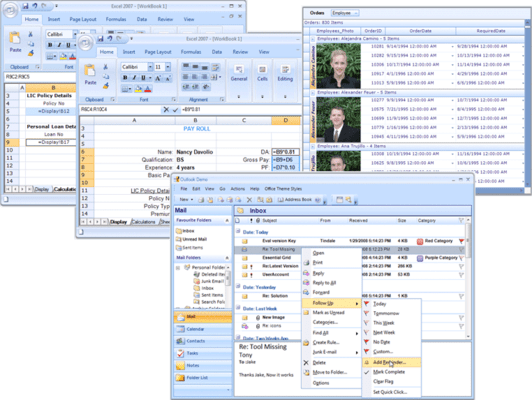
Essential Grid simulates popular Microsoft applications. Users will find its interface to be friendly and familiar.
Accelerated Scrolling
Cell Float Mode
Format Cell Dialog
Grid Workbook
IntelliMouse Scrolling
MS Access Simulation
Multilevel Undo-Redo
MS Excel Clipboard
MS Excel Simulation
Scrolling Tip Thumb Tracking
Shared Scroll Bar
Document View Support
Dynamic Splitters
Cell Attributes
Essential Grid for Windows Forms is implemented using a cell-oriented architecture that allows intricate customization at the cell level.
Cell AutoSize Mode
Cell Allow Enter Mode
Cell Base Style
Cell Borders
Cell Choice List
Cell Format
Cell Image List
Cell Interior
Cell Text Alignment
Cell Text Color
Cell Text Orientation
Cell Types
Cell Wrap Text Mode
Read Only
Show Buttons
Data Binding
Data binding to the grid can be achieved with a single line of code. The grid supports all kinds of 'lists' from IList-derived types to ADO.NET data source instances. The grid automatically discovers the schema of the data source at run time, including any relations set up between tables in a data source, and renders the grid's content automatically. You can alter the grid's schema to hide columns and include unbound columns.
Conditional Formatting
Custom Collection
Data Source
Date-Time Picker and Boolean Cells
Filter Bar
Sort By Display Member
Foreign Key Drop-Down
Generic Collection
Hierarchy
Hierarchy Index
Image
LINQ Support
Multiple Rows per Record
Multiple Header Cells
Pass-Through Grouping
Grid Grouping Support
Essential Grid offers flexible support for grouping both flat and hierarchical data sources. It supports expression fields, filters, multicolumn sorting, grouping, nested tables/hierarchies, and custom summaries.
Add New Record
ADO.NET Relation
Base Style
Calculate Summary
Cell Data Serialization
Custom Cell Range
Custom Group Layout
Drag-and-Drop Column Header
Error Indicator
Expression Field
Filter
Foreign Key Relation
Grid Grouping Control Style
Grid Optimization
Grouping
Group by Column
Hierarchical Display
Key Navigation
MS Excel Export
MS Word Export
Multiple Rows and Columns per Record
Multiple Stacked Headers
Parent Record Synchronization
Preview Rows
Record Category Synchronization
Schema Serialization
Sort
Grid Field Chooser
Save or Restore CompareOperator States
Multiple Record Selection
Multiple Record Deletion
Filter On Lost Focus
Excel-Like Filter
Filter Optimization
IList Grouping Optimization
Please note: Syncfusion Essential Grid includes Windows Forms, ASP.NET, WPF, Silverlight and ASP.NET MVC components.
What’s new in Essential Grid 2012 Volume 1?
JSON Suppot in ASP.NET - The AJAX Grid control allows you to increase grid performance. It has two modes: server and JSON. The JSON mode can be enabled to handle paging, sorting, grouping and filtering.
Editing via Unbound Columns in ASP.NET MVC - Editing via unbound columns allows you to make changes to multiple fields in a grid at the same time. Editing, updating and deleting are controlled by buttons on the row itself. You can edit or delete fields associated with a single data record by using these buttons instead of the toolbar.
Add an Excel-like, cell-oriented, light-weight virtual data-bound grid to your Windows Forms applications.
Pricing: Syncfusion Essential Grid for Windows Forms 2012 Vol 1 (V10.1.0.44) - Binary 1 Developer License - with 1 Year Subscription, Syncfusion Essential Grid for Windows Forms 2012 Vol 1 (V10.1.0.44) - Binary 1 Developer Annual Subscription Renewal License (for subscriptions soon to expire or up to 30 days past expiration), Syncfusion Essential Grid for Windows Forms 2012 Vol 1 (V10.1.0.44) - Binary 1 Developer Reinstatement of Lapsed Subscription License (for subscriptions lapsed longer than 30 days up to one year), Syncfusion Essential Grid for Windows Forms 2012 Vol 1 (V10.1.0.44) with Source Code 1 Developer License with Source Code - with 1 Year Subscription, Syncfusion Essential Grid for Windows Forms 2012 Vol 1 (V10.1.0.44) with Source Code 1 Developer Annual Subscription Renewal License (for subscriptions soon to expire or up to 30 days past expiration) with Source Code, Syncfusion Essential Grid for Windows Forms 2012 Vol 1 (V10.1.0.44) with Source Code 1 Developer Reinstatement of Lapsed Subscription License (for subscriptions lapsed longer than 30 days up to one year) with Source Code, Syncfusion Essential Grid for Windows Forms 2012 Vol 1 (V10.1.0.44) - Binary Site License Site License - with 1 Year Subscription - Allows upto 500 Developers at a single address, Syncfusion Essential Grid for Windows Forms 2012 Vol 1 (V10.1.0.44) - Binary Site License Site Annual Subscription Renewal License (for subscriptions soon to expire or up to 30 days past expiration) - Allows upto 500 Developers at a single address, Syncfusion Essential Grid for Windows Forms 2012 Vol 1 (V10.1.0.44) - Binary Site License Site Reinstatement of Lapsed Subscription License (for subscriptions lapsed longer than 30 days up to one year) - Allows upto 500 Developers at a single address, Syncfusion Essential Grid for Windows Forms 2012 Vol 1 (V10.1.0.44) with Source Code Site License Site License with Source Code - with 1 Year Subscription - Allows upto 500 Developers at a single address, Syncfusion Essential Grid for Windows Forms 2012 Vol 1 (V10.1.0.44) with Source Code Site License Site Annual Subscription Renewal (for subscriptions soon to expire or up to 30 days past expiration) with Source Code - Allows upto 500 Developers at a single address, Syncfusion Essential Grid for Windows Forms 2012 Vol 1 (V10.1.0.44) with Source Code Site License Site Reinstatement of Lapsed Subscription (for subscriptions lapsed longer than 30 days up to one year) with Source Code - Allows upto 500 Developers at a single address
Evals & Downloads: Read the Syncfusion Site License Agreement, Read the Syncfusion Essential Grid help file, Read the Syncfusion Company brochure - Requires Acrobat Reader, View the Syncfusion Studio Comparison Matrix - Requires Acrobat Reader, Read the Syncfusion Essential XlsIO brochure - Requires Acrobat Reader, Read the Syncfusion Essential Grouping brochure - Requires Acrobat Reader, Read the Syncfusion Essential Grid brochure - Requires Acrobat Reader, Read the Syncfusion Essential Studio brochure - Requires Acrobat Reader, Read the Syncfusion License Agreement - Requires Acrobat Reader, Download the Syncfusion Essential Studio 2012 Vol 1 (V10.1.0.44) evaluation on to your computer - Expires After 30 Days
Operating System for Deployment: Windows 7, Windows Vista, Windows XP, Windows ME, Windows 2000, Windows NT 4.0
Architecture of Product: 32Bit
Product Type: Component
Component Type: ASP.NET WebForms, ASP.NET AJAX (ATLAS), ASP.NET MVC, .NET WinForms, .NET WPF, Silverlight, 100% Managed Code
Built Using: Visual C# .NET
Compatible Containers: Microsoft Visual Studio 2010, Microsoft Visual Studio 2008, Microsoft Visual Studio 2005, Microsoft Visual Basic 2010, Microsoft Visual Basic 2008, Microsoft Visual Basic 2005, Microsoft Visual C++ 2010, Microsoft Visual C++ 2008, Microsoft Visual C++ 2005, Microsoft Visual C# 2010, Microsoft Visual C# 2008, Microsoft Visual C# 2005, Delphi 8.0, C#Builder, .NET Framework 4.0, .NET Framework 3.5, .NET Framework 3.0, .NET Framework 2.0, Silverlight 4, Silverlight 3
Product Class: User Interface Components
Keywords: syncfusion windows forms grid, syncfusion grid windows, essential grid windows, buy syncfusion grid windows, buy essential grid windows, renew syncfusion grid windows, renew essential grid windows, syncfusion grid windows upgrade, essential grid windows upgrade, syncfusion grid windows distributor, essential grid windows distributor, syncfusion grid windows reseller, essential grid windows reseller, syncfusion grid windows pricing, essential grid windows pricing
Syncfusion Sync fusion
datagrid controls, datatable controls, datagrid components, datatable components, datagrid, data grid, data table, net gridview, net datagrid, data grid, grid control, net datatable, c# gridview, c# datagrid, asp.net datagrid, grid asp, vb.net datagrid
Spreadsheet spread sheet worksheet workbook excel lotus 123 1-2-3 xls xl
Part numbers: PC-513205-435224 513205-435224 PC-513205-435228 513205-435228 PC-513205-435238 513205-435238 PC-513205-435226 513205-435226 PC-513205-435231 513205-435231 PC-513205-435240 513205-435240 PC-513205-435242 513205-435242 PC-513205-435243 513205-435243 PC-513205-435244 513205-435244 PC-513205-435245 513205-435245 PC-513205-435246 513205-435246 PC-513205-435247 513205-435247
Publisher
Primary Category
Related Products
Related Categories
ComponentSource offers a unique global service, used by over 1,000,000 software developers worldwide.