by Syncfusion - Product Type: Component / ASP.NET WebForms / ASP.NET AJAX (ATLAS) / ASP.NET MVC / .NET WinForms / .NET WPF / Silverlight / 100% Managed Code
Syncfusion Essential Schedule for Windows Forms is available as part of Syncfusion Essential Studio Enterprise Edition and Syncfusion Essential Studio User Interface Edition.
If you require more information please Contact Us
Syncfusion Essential Schedule for Windows Forms by Syncfusion
URLs: syncfusion-essential-schedule-for-windows-forms, syncfusion essential schedule for windows forms, syncfusionessentialscheduleforwindowsforms, syncfusion
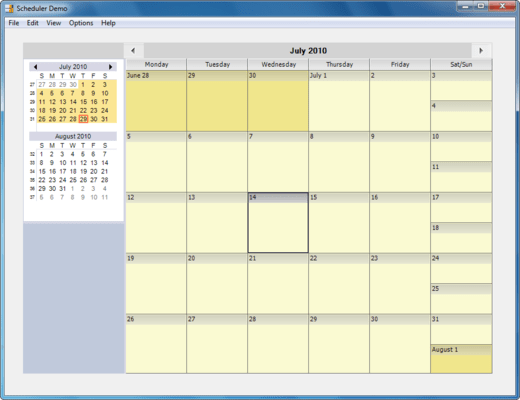
Create Outlook-like calendar UI in your Windows Forms applications. Syncfusion Essential Schedule for Windows Forms is a UI control library that lets you add scheduling support for your applications. The support includes creating new appointments in code and letting the user drag the appointments around to reschedule them. Syncfusion Essential Schedule for Windows Forms also includes a header for browsing through adjacent days. You can have both timed and untimed (all-day) appointments.

Syncfusion Essential Schedule for Windows Forms Schedule Control Functional Regions
Caption Panel - Placed at the top of the ScheduleControl, this panel also includes the forward and backward navigation buttons.
Caption Panel for Schedule Control - Docked to the left of the ScheduleControl by default, this panel includes multiple navigation calendars and a splitter Control. The number of calendars displayed in this panel is determined by its client height and by default displays two calendars. Custom controls can also be included in the Navigation Panel
Syncfusion Essential Schedule for Windows Forms Schedule Grid View
Month View - Displays the Schedules for any particular month.
Week View - Displays the Schedules for the seven days in a week, against time intervals of one hour.
WorkWeek - Displays a five day workweek against time intervals of one hour.
Day View - Schedule for a single day are displayed, for the respective hour.
Custom Week - The schedule for variable number of days is displayed. The days can be contiguous or random.
Schedule Control Functional Regions
Schedule Grid View
Syncfusion Essential Schedule for Windows Forms Appointments
The appointments can be set at both designtime and runtime. At runtime the appointments are entered using the Enter Appointment dialog, using which the various features of an appointment can be defined. There are two types of appointments: Item - Appointment for a particular time frame in a day and AllDay Item - Appointment for the entire day.
Syncfusion Essential Schedule for Windows Forms Appointment Label
An appointment label denotes the category of the appointment, with unique colors for individual categories. Some of the categories included are Business, Travel Required, Needs Preparation and Anniversary.
Syncfusion Essential Schedule for Windows Forms Appointment Alert
Alerts can be raised when the appointment time approaches, while using the ScheduleControl. These alerts produce snoozes as a reminder for the End User.
Syncfusion Essential Schedule for Windows Forms Recurring Appointments
The ScheduleControl offers options for including recurring appointments, while entering a new appointment or while editing an existing appointment. The recurrence pattern and the recurrence range can be varied as desired.
Syncfusion Essential Schedule for Windows Forms Schedule Segments
The ScheduleControl offers complete flexibility in defining the time frame for an appointment, ranging from 2 mins. The time frame can be entered in terms of hours and minutes.
Syncfusion Essential Schedule for Windows Forms Schedule Culture
The Date formatting in the ScheduleControl can be formatted on the basis of any culture.
Syncfusion Essential Schedule for Windows Forms Appearance
The appearance of various regions of the ScheduleControl can be customized as desired. Pre-defined appearance setting templates can also be used for this purpose.
Syncfusion Essential Schedule for Windows Forms Drag-and-Drop
Complete drag drop support is available, while using the ScheduleControl. Scheduled appointments can be moved from one day to another, in any of the Schedule Grid Views.
Syncfusion Essential Schedule for Windows Forms Spanned-Label at Top for AllDayItems
The ScheduleControl offers functionality to perform selection even horizontally spanning multiple dates. The added AllDayItem will get displayed as a label at the top of the schedule grid similar to the behavior as MS Outlook does.
Please note: Syncfusion Essential Schedule for Windows Forms also includes Silverlight, WPF, ASP.NET MVC and ASP.NET components.
What’s new in Syncfusion Essential Schedule for Windows Forms 2010 vol 3?
Fixes
ScheduleAppointmentClick event is not triggerred properly when right clicked.
Switching to WeekView from DayView always sets to the week of current date.
ScheduleControl malfunctioning on rebinding.
Issue with AllDay flag in ScheduleAppointmentForm.
Create Outlook-like calendar UI in your Windows Forms applications.
Evals & Downloads: Read the Syncfusion Site License Agreement, Read the Syncfusion Company brochure - Requires Acrobat Reader, View the Syncfusion Studio Comparison Matrix - Requires Acrobat Reader, Read the Syncfusion Essential Studio brochure - Requires Acrobat Reader, Read the Syncfusion License Agreement - Requires Acrobat Reader, Download the Syncfusion Essential Studio 2012 Vol 1 (V10.1.0.44) evaluation on to your computer - Expires After 30 Days
Operating System for Deployment: Windows 7, Windows Vista, Windows XP, Windows ME, Windows 2000, Windows NT 4.0
Architecture of Product: 32Bit
Product Type: Component
Component Type: ASP.NET WebForms, ASP.NET AJAX (ATLAS), ASP.NET MVC, .NET WinForms, .NET WPF, Silverlight, 100% Managed Code
Built Using: Visual C# .NET
Compatible Containers: Microsoft Visual Studio 2010, Microsoft Visual Studio 2008, Microsoft Visual Studio 2005, Microsoft Visual Basic 2010, Microsoft Visual Basic 2008, Microsoft Visual Basic 2005, Microsoft Visual C++ 2010, Microsoft Visual C++ 2008, Microsoft Visual C++ 2005, Microsoft Visual C# 2010, Microsoft Visual C# 2008, Microsoft Visual C# 2005, Delphi 8.0, C#Builder, .NET Framework 4.0, .NET Framework 3.5, .NET Framework 3.0, .NET Framework 2.0, Silverlight 4, Silverlight 3
Product Class: User Interface Components
Keywords: syncfusion essential Schedule for windows forms, essential Schedule for windows forms
Syncfusion Sync fusion
Calendar calendaring calendars Scheduling Schedule Schedules
ComponentSource offers a unique global service, used by over 1,000,000 software developers worldwide.