Syncfusion Essential Studio Windows Forms Edition - .NET - 2008

de Syncfusion - Tipo de producto: Componente / .NET WinForms / 100% Managed Code / JavaScript / AJAX

Por favor note que la información sobre este producto no está disponible en español.
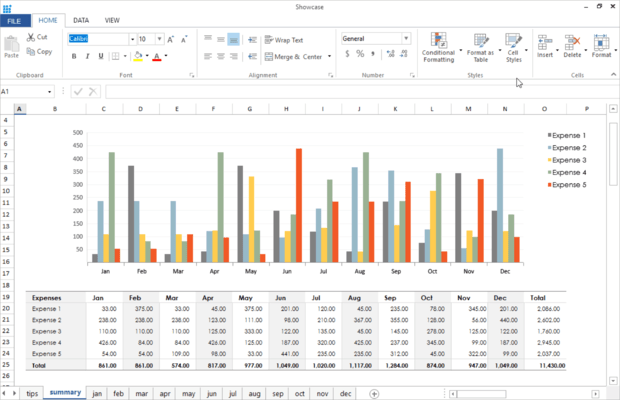
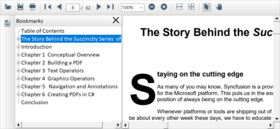
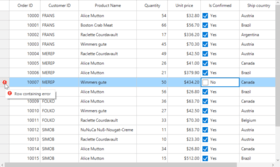
Captura de pantalla Syncfusion Essential Studio Windows Forms Edition - .NET - 2008Enhance your WinForms apps with grids, Office 2007- and VS.NET-style UI controls, charts, syntax-editors, diagrams, grouping, and much more. Syncfusion Essential Studio Windows Forms Edition lets you accelerate the development cycle with Windows Forms components geared to building enterprise-class desktop applications. Add sophisticated grids, Office 2007- and VS.NET-like controls, charting, diagramming, syntax-editing, Excel reporting, high-performance summaries, and HTML rendering capabilities to your .NET apps. This comprehensive suite features full support for Visual Studio 2008 and includes a one-year subscription for unlimited technical support and updates. Full 100% C# source code is available.

Opinión media:  Opinión Media para Syncfusion Essential Studio Windows Forms Edition - .NET - 2008 basada en: 1 opinión.

Desde
$975.10
Precio en

Nuestros precios Standard están indicados abajo. Inicia una sesión para ver sus precios con descuento.

Syncfusion Essential Studio Windows Forms Edition 2008 Vol. 3 - Binary

Añadir a la Cesta $ 975.10 1 Developer License (with 1 Year Subscription) Descarga (193.1 MB)
Añadir a la Cesta $ 436.10 1 Developer Annual Subscription Renewal License (for subscriptions soon to expire or up to 2 weeks past expiration) Verificar Descarga (29 KB)
Añadir a la Cesta $ 585.06 1 Developer Reinstatement of Lapsed Subscription License (for subscriptions lapsed longer than 2 weeks) Verificar Descarga (29 KB)

Syncfusion Essential Studio Windows Forms Edition 2008 Vol. 3 with Source Code

Añadir a la Cesta $ 1,269.10 1 Developer License with Source Code (with 1 Year Subscription) Descarga (193.1 MB)
Añadir a la Cesta $ 534.10 1 Developer Annual Subscription Renewal License (for subscriptions soon to expire or up to 2 weeks past expiration) with Source Code Verificar Descarga (29 KB)
Añadir a la Cesta $ 761.46 1 Developer Reinstatement of Lapsed Subscription License (for subscriptions lapsed longer than 2 weeks) with Source Code Verificar Descarga (29 KB)

Este producto esta disponible con precios reservados al GSA Schedule.Nuestros precios incluyen servicio técnico de ComponentSource y, para la mayoría de los productos disponibles para descarga, una copia de seguridad en línea y una actualización GRATUITA a la nueva versión si ésta se publica en un período de 30 días después de la compra.  Todas las ventas están sujetas a nuestros Términos y condiciones standard y a nuestra Política de devolución. Por favor, póngase en contacto con nosotros si necesita alguna opción de licencia no incluida en la lista anterior, incluida la compra por volumen de licencias y versiones anteriores.

Nuestros precios Standard están indicados arriba. Inicia una sesión para ver sus precios con descuento.

What’s new in Syncfusion Essential Studio Windows Forms Edition 2008 Vol. 3?

Grid Windows

  • DateTime Format Parsing - Specify various DateTime formats for parsing user input in a DateTime cell value using the ParseFormats property.
  • Row Column Visibility - Check the presence of a set of rows and columns by obtaining dictionaries with various visible rows and columns using GridViewLayout.VisibleRowsList and GridViewLayout.VisibleColumnsList.
  • Performance Improvements - Performance under virtual-mode scenarios can be improved by using GridNewVolatileData implementation.  Frequently accessed properties will be faster using the AllowViewStyleCacheBaseStyleValues property.
  • FormulaEngine Changes for the IF function - A new property has been added, AllowShortCircuitIFs, that indicates whether additional work should be done to guarantee the unused alternative is not computed in an IF function call. Currently, if an IF function call involves nested Functions in its arguments, all the arguments are evaluated. Setting this new property avoids the unnecessary calculation. Also, support for calculating an IF function with two arguments has been added.

Tools windows:

  • Outlook 2007 style Group Bar collapsible navigation-Group bar supports complete Outlook 2007 emulation including support for sliding.
  • Microsoft Office 2007 style Message Box -Message Box has an all new Office 2007 style for a consistent user interface look and feel.  Easily replace standard message boxes with the new Message Box to greatly enhance visual appeal.
  • AutoComplete Control – Matching from multiple columns-Autocomplete control provides new automation modes for matching items from multiple columns and for highlighting matched text.
  • Super ToolTip- RightToLeft Support -Super ToolTip now supports regular ToolTip for displaying in right-to-left languages.
  • Samples Enhancement - Most of the samples have been revamped to give a consistent look and feel in order to show all the features.

Chart Windows

  • New Clustered 3-D View -Visualize 3-D data clearly with the new clustered rendering mode.   A series of data will be clearly spaced along the z-axis to improve visual clarity.
  • Rich Border Styles -Enhance the appearance of charts using rich border styles built into the chart.  Thirteen different border styles are included with extensive customization options.
  • Enhanced Scale Break Feature -The Scale Break feature has been enhanced to better reflect real-world data display.
  • Horizontal Error Bars -Error bars are used to visually highlight data boundaries plotted on a chart.  This release adds support for horizontal error bars in addition to vertical error bars, which were already supported.
  • Samples Enhancement - Most of the samples have been revamped to give a consistent look and feel in order to clearly show all the features.

Diagram Windows

  • Improved Visio Stencil Import -Import and conversion of Visio stencils into Essential Diagram EDP files has been greatly improved.
  • Advanced Property Editor -The Diagram property editor has been enhanced to allow access to all model-related objects for easy customization.
  • Pinpoint Visibility -The Pinpoint display associated with diagram nodes can be controlled by toggling visibility.

Edit Windows

  • New Office 2007 Style ScrollBars - Edit adds support for Office 2007-style scrollbars with complete support for visual styles and color schemes.

Schedule Windows

  • New Month View support -Provides support for displaying appointments by month.
  • Blocked Time Appointment -Gives you the ability to block specific appointments so they cannot be deleted or removed.
  • Showing Appointment Event -This new event allows you to easily show your own appointment editing form.  Previously, you had to derive classes to display your own form.
  • AllowAdjustAppointmentWithMouse Property -This new property allows you to easily control whether the user can or cannot change an appointment; this is accomplished by using the mouse to drag appointments around.

PDF Windows

  • PDF Booklet - Added support for booklets in PDF.  Booklets are documents with multiple pages arranged on sheets of paper that, when folded, present the correct page order.
  • Improved HTML to PDF conversion - HTML to PDF conversion using MSHTML and Essential PDF has been greatly improved.  User credentials are now supported for working with Active Directory authentication.
  • 3-D Annotations - 3-D annotations are the means by which 3-D artwork is represented in a PDF document.  You can now embed collections of 3-D objects such as those used in CAD software.
  • Digital Signature - Creating and signing PDF documents with digital signatures is now supported.  Incremental signatures and multiple signatures are also supported.

XLSIO Windows

  • Support for compound File format in Managed code-This change enables medium-trust support for XlsIO.
  • Support for Scrolling to particular row or Column-This version provides support for scrolling to a particular row or column in a large worksheet while opening it in Excel.
  • Support for getting Used Range of Data without formatting-Added support for obtaining a range from rows or columns in a data spreadsheet that excludes empty cells containing formatting.

DocIO Windows

  • New - Read .docx files -Added support to read MS Office 2007 files.
  • Support for Nested Mail Merge -Create personalized letters and pre-addressed envelopes or mailing labels.
  • Support for Text Box Fill Effects -Added support for reading and writing textbox-fill effects.
  • Support for Image Hyperlinks -Image-based hyperlinks that mask complex URL’s and enhance readability of documents are now supported.
  • Convert from Doc to HTML format -This is a vastly enhanced Microsoft Word-to-HTML file converter.
  • Manipulate Document Comments -Ability to remove or replace document comments.
  • Advanced Find and Replace feature -Find and Replace have been greatly enhanced.  Using the FindNext method, it is now possible to locate text within a specific paragraph or table.

Calculate Windows

  • Changes for the IF function -A new property has been added, AllowShortCircuitIFs, that indicates whether additional work should be done to guarantee that an unused alternative is not computed in an IF function call. Currently, if an IF function call involves nested functions in its arguments, all the arguments are evaluated.  Setting this new property avoids unnecessary calculations.   Also, support for calculating an IF function with two arguments has been added.

Essential Studio Windows Forms Edition includes the following libraries – each with a unique and useful feature set - in one great package:

  • Essential Tools – Extensive collection of user interface controls including Office 2007-like controls, IE7-like tabs, VS-like docking windows, and more.
  • Essential Grid - Fully customizable industry-standard grid control with extensive Excel-like feature set and data binding capabilities.
  • Essential Chart – Full-fledged business chart component with a full set of chart types, 3D, data binding support, several export formats, etc. High performance and fully customizable.
  • Essential Diagram – Diagramming package with several built-in symbol palettes and layouts that let you create diagrams programmatically or let your users visually create diagrams, as in Visio.
  • Essential Edit - Enhanced editor control with support for Visual Studio-like syntax highlighting, Intellisense, outlining, bookmarks, etc.  Lets you specify config files for custom languages.
  • Essential Grouping - A grouping engine that can work with live data and provide summaries, filtered and grouped views of data, etc. Can act as a data source for UI controls.
  • Essential XlsIO - A native, high-performance .NET framework library that can read and write Microsoft Excel files (BIFF 8 and XLSX format).
  • Essential HTMLUI - A 100% native .NET Windows Forms HTML display engine that also supports CSS. Use this instead of the MSHTML ActiveX to create rich webpage-like interfaces.

Benefits of working with Syncfusion:

  • Standardize to simplify: One vendor, one license, one suite of .NET components.  Syncfusion’s wide range of solidly built components allows developers to streamline their toolkits and reduce dependence on multiple vendors.
  • Trusted architects: Industry-leading architects ensure each product is built for the most demanding of environments.
  • Full source code: 100% C# source code available, enabling seamless integration of our libraries with your projects.
  • Solid support infrastructure: First-rate tech support is available via Syncfusion’s online tracking system Direct-Trac, email, and phone.  No per-incident charges.  Syncfusion also provides an extensive knowledgebase, FAQs, and forums.
  • Built with the future in mind: Syncfusion components are geared towards long-lifecycle applications and architected to meet high standards for flexibility and long-term maintainability.
  • Flexible licensing model: Straight-forward per-developer licensing, with no runtimes, server deployment fees, or royalties.  Each licensee may install on multiple personal machines.

Technical Support - Each Syncfusion license includes a one-year subscription for unlimited technical support and updates.  Support for Syncfusion products is available 24 / 5 through a custom-built support system, with responses guaranteed within a single business day. Support is also available by e-mail and phone. Syncfusion’s Direct-Trac system can be used to create support incidents and track them to completion 24 hours a day, 7 days a week and allows Syncfusion licensees to maintain a complete overview of their support history.

Syncfusion suites - Syncfusion also offers several additional Essential Studio options: Essential Studio ASP.NET Edition, Essential Studio BackOffice Edition (for processing data and developing integration solutions with Microsoft Office and Adobe PDF), Essential Studio WPF Edition, and Essential Studio Enterprise Edition (all Syncfusion component libraries plus Essential TestStudio, which enables automated testing of Syncfusion controls using Mercury Quick Test Professional).


Búsqueda de productos

Escriba palabras de búsqueda:

Galería de capturas de pantalla

Award