經 Syncfusion - 產品類型: 構件 / ASP.NET WebForms / ASP.NET AJAX (ATLAS) / ASP.NET MVC / .NET WinForms / .NET WPF / Silverlight / 100% 受控代碼
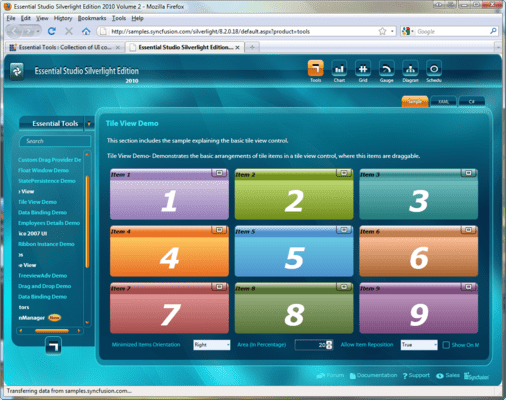
Ribbons, editors, file upload controls, and more for Silverlight applications. Syncfusion Essential Tools for Silverlight lets you create stunning line-of-business Silverlight applications with a wide range of components, including a ribbon, docking manager, tabs, editors, check lists, a group bar, date/time editor, range slider, panels, skin manager, brush selector, treeview, taskbar, file upload, calendar editor, heat map, menus, HTML host and color picker.

我們的常規價格如下。 請登錄後查看打折後的價格。
| 加入購物車 | ₩ 990,600 | 1 Developer License - with 1 Year Subscription * | 下載 (595.0 MB) | |
| 加入購物車 | ₩ 448,300 | 1 Developer Annual Subscription Renewal License (for subscriptions soon to expire or up to 30 days past expiration * | 驗證 | 下載 (29 KB) |
| 加入購物車 | ₩ 743,000 | 1 Developer Reinstatement of Lapsed Subscription License (for subscriptions lapsed longer than 30 days up to one year) * | 驗證 | 下載 (29 KB) |
| 加入購物車 | ₩ 1,433,400 | 1 Developer License with Source Code - with 1 Year Subscription * | 下載 (595.0 MB) | |
| 加入購物車 | ₩ 647,500 | 1 Developer Annual Subscription Renewal License (for subscriptions soon to expire or up to 30 days past expiration) with Source Code * | 驗證 | 下載 (29 KB) |
| 加入購物車 | ₩ 1,075,000 | 1 Developer Reinstatement of Lapsed Subscription License (for subscriptions lapsed longer than 30 days up to one year) with Source Code * | 驗證 | 下載 (29 KB) |
| 加入購物車 | ₩ 22,137,000 | Site License - with 1 Year Subscription - Allows upto 500 Developers at a single address * | 驗證 | 下載 (595.1 MB) |
| 加入購物車 | ₩ 8,854,800 | Site Annual Subscription Renewal License (for subscriptions soon to expire or up to 30 days past expiration) - Allows upto 500 Developers at a single address * | 驗證 | 下載 (29 KB) |
| 加入購物車 | ₩ 19,923,300 | Site Reinstatement of Lapsed Subscription License (for subscriptions lapsed longer than 30 days up to one year) - Allows upto 500 Developers at a single address * | 驗證 | 下載 (29 KB) |
| 加入購物車 | ₩ 33,205,400 | Site License with Source Code - with 1 Year Subscription - Allows upto 500 Developers at a single address * | 驗證 | 下載 (595.1 MB) |
| 加入購物車 | ₩ 13,282,200 | Site Annual Subscription Renewal (for subscriptions soon to expire or up to 30 days past expiration) with Source Code - Allows upto 500 Developers at a single address * | 驗證 | 下載 (29 KB) |
| 加入購物車 | ₩ 29,884,900 | Site Reinstatement of Lapsed Subscription (for subscriptions lapsed longer than 30 days up to one year) with Source Code - Allows upto 500 Developers at a single address * | 驗證 | 下載 (29 KB) |
我們的價格包括ComponentSource的技術支持。對於大多數可下載的產品,還提供線上備份和免費升級為新版本,若新版本在購買後的30日內發佈的話。 所有銷售都是按照我們的標準條款 進行的,並且適用我們的退貨政策. 請 聯繫我們 若您需要任何未在列出的License選擇,包括批量License及以前的版本。
我們的常規價格見上。 請登錄後查看打折後的價格。
Please note: Syncfusion Essential Tools includes Windows Forms, WPF, Silverlight, ASP.NET MVC and ASP.NET components.
What’s new in Essential Tools 2012 Volume 1?
Syncfusion Essential Tools for Silverlight Ribbon Control
The ribbon control enables developers to add an Office-like ribbon interface to Silverlight applications. It also ships with several Office themes.
Syncfusion Essential Tools for Silverlight Tabs
The TabControlAdv control enables users to display the content of multiple pages within a limited area. It ships with a rich feature set, including multiple tab-strip placements, automatic text rotation on vertical placements, drag-and-drop tab items, item-header images with multiple alignments, in-place editing of headers, tab-list context menus, and scrolling support.
Syncfusion Essential Tools for Silverlight Group Bar
The group bar is a UI for grouping a collection of commands within categories. It displays these categories within collapsible panels. The group bar lets you recreate the popular Microsoft Outlook bar interface in applications. Each panel in a group bar can host a number of commands or any other control, such as a calendar.
Syncfusion Essential Tools for Silverlight Checked List Box
The check list box control is a list box with check boxes. It includes list box items and allows multiple items to be selected.
Syncfusion Essential Tools for Silverlight Editors
All editor controls have been architected to provide a simple and powerful means for capturing data input, and validating and displaying data with the appropriate formatting. They include the integer text box, double text box, AutoComplete, masked text box, percent text box, currency text box, numeric up-down, and domain up-down controls.
Syncfusion Essential Tools for Silverlight Date-Time Edit
The date-time edit control enables users to capture date-time input in a Silverlight application. It ships with a variety of built-in features, including custom date-time formats, different cultures, a built-in calendar to navigate through dates, empty date options, and customizable carets.
Syncfusion Essential Tools for Silverlight Range Slider
Range Slider is a slider control with two thumbs showing a selected range. It lets users input two values, typically an upper and a lower bound for two thumbs, thus providing enhanced feature support for a standard slider control.
Syncfusion Essential Tools for Silverlight Panels
The fish-eye panel is a toolbar-like control that magnifies a child element when the pointer hovers over it.
Syncfusion Essential Tools for Silverlight Skin Manager
The Silverlight Skin Manager framework provides a convenient way to apply a consistent visual appearance across the application. Skin Manager applies skin for both the Syncfusion and Silverlight Framework controls.
Syncfusion Essential Tools for Silverlight Brush Selector
The brush selector control is a UI control similar to the color picker control used in graphics software. It has a sub-control, named Brush Edit, with similar properties.
Syncfusion Essential Tools for Silverlight Docking Manager
The docking manager control lets you add Visual Studio-like docking functionality to applications.
Syncfusion Essential Tools for Silverlight Tree View
The TreeViewAdv control implements a tree UI with advanced customization capabilities. Its feature set includes dragging and dropping, multi-node selection, and in-line editing support. It supports adding images--such as left, right, expand, and collapse images. It also provides built-in support for sorting and searching tree nodes.
Syncfusion Essential Tools for Silverlight Taskbar
A taskbar is similar to a group bar in its ability to host a collection of grouped command items. The look and feel, however, is closer to the Windows XP Taskbar. Just like the group bar, taskbar boxes can be expanded and collapsed.
Syncfusion Essential Tools for Silverlight Uploading Files
The file upload control is used to upload multiple files simultaneously. With the auto-upload feature, file uploading can be performed automatically upon selection, eliminating the need to click the Upload button. Other features of this control include asynchronous file uploading, a thumbnail view of uploaded images, size limits on files to be uploaded, and restrictions on file types.
Syncfusion Essential Tools for Silverlight Calendar Edit
The calendar edit control implements a classic calendar control with certain advanced features. Any date ranging from year 0 to year 9999 A.D. can be displayed. The control displays a calendar that users can utilize to navigate to any day of any year.
Syncfusion Essential Tools for Silverlight Heat Map
A heat map is a graphical representation of data where the values taken by a variable in a two-dimensional map are represented as colors.
Syncfusion Essential Tools for Silverlight Menu Package
The Menu package contains three controls--menu, toolbar, and context menu controls. These controls enable users to choose from a list of commands or options.
Syncfusion Essential Tools for Silverlight HTML Host
The HTML host acts as a container for hosting HTML content inside a Silverlight environment. It has the ability to navigate to any Web URL, parse HTML tags, and display them in Silverlight.
Syncfusion Essential Tools for Silverlight Color Picker
The color picker control provides a rich visual interface for color selection. The structure of the control represents a palette with ToolTip support and a More Colors option.
」技術提供發佈者
首要類別
相關產品
相關類別