by Syncfusion - 상품타입: Component / ASP.NET WebForms / ASP.NET AJAX (ATLAS) / ASP.NET MVC / .NET WinForms / .NET WPF / Silverlight / 100% Managed Code
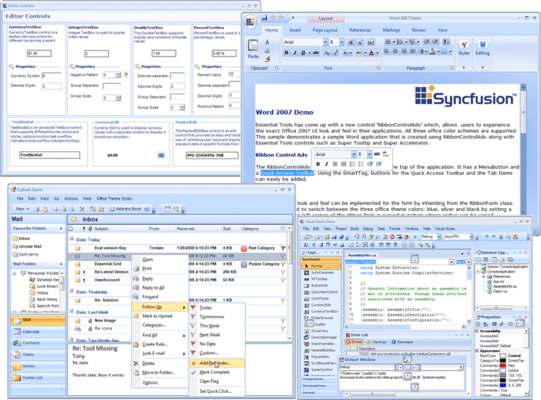
A rich set of UI controls to let you create rich interactive Windows Forms applications with the latest look and feel like Office, Visual Studio .Net, Outlook etc. Syncfusion Essential Tools for Windows Forms is an extensive collection of nearly 80 user-interface components. You can easily create robust and usable application interfaces such as those emulating Visual Studio.NET and Microsoft Office. All the editor controls have been architected to provide a simple and feature-rich means for capturing data input, validating, and displaying appropriate formatting. Syncfusion Essential Tools for Windows Forms allows users to add Visual Studio.NET type controls that can be docked to applications. Any control can be set as a docking window. Docking layouts can be hosted within forms, user controls, or any derivative of the container-control type. An advanced designer allows users to harness full WYSIWYG configuration of a docked layout.
일반 적인 소비자 가격은 하기에 표시되어 있습니다. 고객님의 할인가격은 표시 하시려면 로그인 해주시기 바랍니다.
| 주문 | ₩ 1,078,700 | 1 Developer License - with 1 Year Subscription * | 다운로드 (595.0 MB) | |
| 주문 | ₩ 488,100 | 1 Developer Annual Subscription Renewal License (for subscriptions soon to expire or up to 30 days past expiration * | 확인 | 다운로드 (29 KB) |
| 주문 | ₩ 809,000 | 1 Developer Reinstatement of Lapsed Subscription License (for subscriptions lapsed longer than 30 days up to one year) * | 확인 | 다운로드 (29 KB) |
| 주문 | ₩ 1,560,800 | 1 Developer License with Source Code - with 1 Year Subscription * | 다운로드 (595.0 MB) | |
| 주문 | ₩ 705,100 | 1 Developer Annual Subscription Renewal License (for subscriptions soon to expire or up to 30 days past expiration) with Source Code * | 확인 | 다운로드 (29 KB) |
| 주문 | ₩ 1,170,600 | 1 Developer Reinstatement of Lapsed Subscription License (for subscriptions lapsed longer than 30 days up to one year) with Source Code * | 확인 | 다운로드 (29 KB) |
| 주문 | ₩ 24,104,700 | Site License - with 1 Year Subscription - Allows upto 500 Developers at a single address * | 확인 | 다운로드 (595.1 MB) |
| 주문 | ₩ 9,641,900 | Site Annual Subscription Renewal License (for subscriptions soon to expire or up to 30 days past expiration) - Allows upto 500 Developers at a single address * | 확인 | 다운로드 (29 KB) |
| 주문 | ₩ 21,694,200 | Site Reinstatement of Lapsed Subscription License (for subscriptions lapsed longer than 30 days up to one year) - Allows upto 500 Developers at a single address * | 확인 | 다운로드 (29 KB) |
| 주문 | ₩ 36,157,000 | Site License with Source Code - with 1 Year Subscription - Allows upto 500 Developers at a single address * | 확인 | 다운로드 (595.1 MB) |
| 주문 | ₩ 14,462,800 | Site Annual Subscription Renewal (for subscriptions soon to expire or up to 30 days past expiration) with Source Code - Allows upto 500 Developers at a single address * | 확인 | 다운로드 (29 KB) |
| 주문 | ₩ 32,541,300 | Site Reinstatement of Lapsed Subscription (for subscriptions lapsed longer than 30 days up to one year) with Source Code - Allows upto 500 Developers at a single address * | 확인 | 다운로드 (29 KB) |
가격에는 ComponentSource의 기술지원 요금이 포함되어 있습니다. 또한 다운로드 판매를 하고 있는 상품의 대부분은 온라인 백업요금이 포함되어 있어서 구입날로부터 30일 이내에 새로운 버전이 발매된 경우 무료로 업그레이드해 드리고 있습니다. 모든 주문에 대해서 당사표준 계약조건 및 반품조건 의 내용이 적용됩니다. 다음의 경우,고객 서비스로로 연락 주시기 바랍니다. (대량의 라이센스나 구 버전 등의 라이센스 옵션이 필요한 경우)
일반 적인 소비자 가격은 상기에 표시되어 있습니다. 고객님의 할인가격은 표시 하시려면 로그인 해주시기 바랍니다.
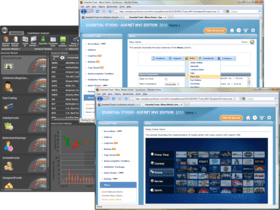
Please note: Syncfusion Essential Tools includes Windows Forms, WPF, Silverlight, ASP.NET MVC and ASP.NET components.
What’s new in Essential Tools 2012 Volume 1?
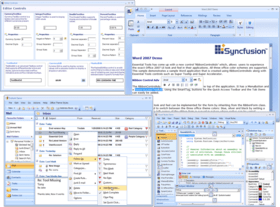
Syncfusion Essential Tools for Windows Forms Office Controls
Essential Tools includes Office controls to design your applications with the theme of the Microsoft Office user interfaces.
Syncfusion Essential Tools for Windows Forms Docking Package
The Docking Package consists of the Essential Tools docking windows architecture. It allows users to add Visual Studio.NET-type controls that can be docked to Windows Forms applications. Any control can be set as a docking window. Docking layouts can be hosted within forms, user controls, or any derivative of the container-control type. An advanced designer allows users to harness full WYSIWYG (What You See Is What You Get) configuration of a docked layout.
Syncfusion Essential Tools for Windows Forms Ribbon Control
The RibbonControl functions like the Microsoft Ribbon Control and serves as an optimal alternative for menus, task panes, and tool strips.
Syncfusion Essential Tools for Windows Forms Super Accelerator
The Super Accelerator component is used to accelerate the click event of items by using a single key stroke without the pointer hovering over it.
Syncfusion Essential Tools for Windows Forms Tabbed MDI Package
The Tabbed MDI (Multiple Document Interface) package provides a new Tabbed MDI layout mode (as an alternative to the default 'Cascade' and 'Tiled' modes) popularized by VS.NET. This framework was built with great consideration for ease of use. You do not have to modify your existing MDI applications in any way to enable Tabbed MDI mode. With a single method call, you can switch between Tabbed and regular MDI layout modes. Syncfusion's Tabbed MDI framework will retain the MDI scheme when in tabbed mode. The child forms will still be MDI children of the parent (they will not be moved into a tab control; this results in loss of MDI functionality like merged menus, or switching using 'CTRL-?'), thereby enhancing your applications without interfering with the general MDI scheme. The Tabbed MDI framework provides users with the exact functionality and appearance of VS.NET tabbed child windows.
Syncfusion Essential Tools for Windows Forms MultiColumnTreeView
MultiColumnTreeView is an advanced treeview control with multiple columns. This control displays the contents in the form of tree with additional columns displaying related data for the tree nodes.With its robust features, it gives a visually appealing tree structure. It supports almost all the features of the treeview control like settings images, check box and option buttons, help text capabilities, Gutter space, Indent Space, advanced drag-and-drop UI support, context-menu association, gradient backgrounds and multiple border styles, etc.,
Syncfusion Essential Tools for Windows Forms Editor Package
The Editor package is a comprehensive collection of controls most commonly used in creating data entry forms. All editor controls have been architected to provide a simple and powerful means for capturing data input, validating, and displaying appropriate formatting. They also support data binding, internationalization, and localization. Web Forms and ASP.NET versions of some data editors are also included in this package.
Syncfusion Essential Tools for Windows Forms Command Bars
The Command Bars package includes the Command Bars framework. Command bars implement the framework support that is required for creating Visual Studio.NET-type dockable or floatable menus and toolbars. A command bar, in itself, provides only the dockable host; it is up to the user to implement the menu or toolbar that imparts the command bar its functionality. The Essential Tools Menus Package uses the command bars framework for creating XP menus and toolbars.
Syncfusion Essential Tools for Windows Forms Layout Manager
The Layout Manager package provides a comprehensive set of layout managers that manage advanced layouts on a form. The layout management support of Windows Forms such as docking, anchoring, and padding is adequate for many layout management needs. However, your complex layout management needs can be met by the following layout managers that provide full design-time support.
Syncfusion Essential Tools for Windows Forms Menu Package
The Essential Tools Menu Package comes with the Windows Menus framework, which provides users with the latest Office and Windows style as well as functionality for menus, toolbars, and context menus.
Syncfusion Essential Tools for Windows Forms Super ToolTip
The Super ToolTip control enables users to provide ToolTip information. It is composed of three sections, namely a header, body, and footer.
Syncfusion Essential Tools for Windows Forms Scroller Frame
The Scroller Frame control offers the ability to include horizontal and vertical scroll bars with an Office-style to any scrollable control. The control comes with three different styles that offer context menu support. The scroll bars can be displayed with a size gripper. The distance for scrolling up, down, right, and left can also be defined.
Syncfusion Essential Tools for Windows Forms Mini-Toolbar
The MiniToolBar is a custom toolbar that includes tools for fast and easy access. The Essential Tools MiniToolbar can host a wide range of controls ranging from buttons to panels.
Syncfusion Essential Tools for Windows Forms Tree Package
The Tree package provides an advanced Tree View control with numerous appearance options, extensive customization capabilities, and a data-bound mode that supports data binding by taking a relational data source with rows and columns (Data Set, Data View, Array List) and grouping the rows based on one or more specified fields.
Syncfusion Essential Tools for Windows Forms Navigation Package
The Navigation package includes controls such as group bars, group views, and TaskBars. These are primarily used for implementing command lists where each command is represented by an image or text. The group bar implements a tab-type container that can serve as a host for a collection of group views or other Windows Forms controls. The group view is an extensively customizable list-type control capable of cloning the above listed popular command interfaces. The TaskBar may be used for displaying standard command items or as a container that can host several other controls.
Syncfusion Essential Tools for Windows Forms Notification Package
The Notification package consists of controls providing visual feedback to the user regarding the status of application events. Common applications of the Notification package include enhanced progress bars, splash screens, and customized message boxes with animations.
Syncfusion Essential Tools for Windows Forms Wizard Package
The Wizard Package provides controls that use the Wizard interface (a series of tabs laid out with next, back, and other buttons) popularized by many Windows-based applications. The Wizard control lets users quickly create such applications.
에서 제공개발처/발매처
주요 카테고리
관련 상품
관련 카테고리