經 Syncfusion - 產品類型: 構件 / ASP.NET WebForms / ASP.NET AJAX (ATLAS) / ASP.NET MVC / .NET WinForms / .NET WPF / Silverlight / 100% 受控代碼
Add ribbons, docking, editors, menus, MDI, and much more to your WPF applications. Syncfusion Essential Tools for WPF is a collection user interface components for the WPF framework, including docking managers, ribbons, tree views, editors, tab controls, group bars, wizards, skin managers, and much more. You can easily create robust and user-friendly application interfaces that emulate Visual Studio .NET and Microsoft Office. Syncfusion Essential Tools for WPF also extends full support to XAML and offers extensive customization options for templates.

我們的常規價格如下。 請登錄後查看打折後的價格。
| 加入購物車 | 5,362 元 | 1 Developer License - with 1 Year Subscription * | 下載 (595.0 MB) | |
| 加入購物車 | 2,427 元 | 1 Developer Annual Subscription Renewal License (for subscriptions soon to expire or up to 30 days past expiration * | 驗證 | 下載 (29 KB) |
| 加入購物車 | 4,022 元 | 1 Developer Reinstatement of Lapsed Subscription License (for subscriptions lapsed longer than 30 days up to one year) * | 驗證 | 下載 (29 KB) |
| 加入購物車 | 7,759 元 | 1 Developer License with Source Code - with 1 Year Subscription * | 下載 (595.0 MB) | |
| 加入購物車 | 3,505 元 | 1 Developer Annual Subscription Renewal License (for subscriptions soon to expire or up to 30 days past expiration) with Source Code * | 驗證 | 下載 (29 KB) |
| 加入購物車 | 5,819 元 | 1 Developer Reinstatement of Lapsed Subscription License (for subscriptions lapsed longer than 30 days up to one year) with Source Code * | 驗證 | 下載 (29 KB) |
| 加入購物車 | 119,831 元 | Site License - with 1 Year Subscription - Allows upto 500 Developers at a single address * | 驗證 | 下載 (595.1 MB) |
| 加入購物車 | 47,933 元 | Site Annual Subscription Renewal License (for subscriptions soon to expire or up to 30 days past expiration) - Allows upto 500 Developers at a single address * | 驗證 | 下載 (29 KB) |
| 加入購物車 | 107,848 元 | Site Reinstatement of Lapsed Subscription License (for subscriptions lapsed longer than 30 days up to one year) - Allows upto 500 Developers at a single address * | 驗證 | 下載 (29 KB) |
| 加入購物車 | 179,747 元 | Site License with Source Code - with 1 Year Subscription - Allows upto 500 Developers at a single address * | 驗證 | 下載 (595.1 MB) |
| 加入購物車 | 71,899 元 | Site Annual Subscription Renewal License (for subscriptions soon to expire or up to 30 days past expiration) with Source Code - Allows upto 500 Developers at a single address * | 驗證 | 下載 (29 KB) |
| 加入購物車 | 161,772 元 | Site Reinstatement of Lapsed Subscription License (for subscriptions lapsed longer than 30 days up to one year) with Source Code - Allows upto 500 Developers at a single address * | 驗證 | 下載 (29 KB) |
我們的價格包括ComponentSource的技術支持。對於大多數可下載的產品,還提供線上備份和免費升級為新版本,若新版本在購買後的30日內發佈的話。 所有銷售都是按照我們的標準條款 進行的,並且適用我們的退貨政策. 請 聯繫我們 若您需要任何未在列出的License選擇,包括批量License及以前的版本。
我們的常規價格見上。 請登錄後查看打折後的價格。
Please note: Syncfusion Essential Tools includes Windows Forms, WPF, Silverlight, ASP.NET MVC and ASP.NET components.
What’s new in Essential Tools 2012 Volume 1?
Syncfusion Essential Tools for WPF Docking Manager
The Docking Manager is an advanced container control that automatically lays out its children within docked panels, just as seen in Visual Studio .NET. This element can be used in XAML, just as easily as it is used in grid or canvas elements. The attached properties can be used to specify the dock state and position of the child elements. End-users can then fully customize the user interface by dragging the dock panels to different locations within the container, floating and arranging them within tabs in the dock panel, or hiding the dock panel. The dock panels can also operate in AutoHide mode.
Syncfusion Essential Tools for WPF Document Container
The Document Container framework supports both multiple document interfaces (MDIs) and tabbed document interfaces (TDIs). Though MDI is not supported in the 3.5 framework, the document container has the ability to develop MDI applications in WPF. It can load any type of content, such as flow documents and any UI elements. It also ships with sophisticated default window switching styles such as Vista Flip and Visual Studio.
Syncfusion Essential Tools for WPF Editors
Create professional, user-friendly data editing forms using several of the advanced editors available in Essential Tools. These editors are a comprehensive collection of controls that can be used in creating data-entry forms. All editor controls have been architected to provide a simple and powerful means for capturing data input, as well as validating and displaying data input with the appropriate formatting. They also ship with support for data binding, templates, and styles, to change the appearance of the control.
Syncfusion Essential Tools for WPF Taskbar
The TaskBar control is similar to the group bar control in that it can host a collection of grouped command items. The look and feel, however, is closer to the Windows taskbar. Besides command items, any custom control can be placed inside the taskbar. Just like the group bar, taskbar boxes can be expanded and collapsed.
Syncfusion Essential Tools for WPF Tab Control
TabControlExt is a control that can define multiple pages for the same area of a window. It contains the TabItemExt control, which is used to define tab items with different visual styles such as One Note Type, Visual Studio and Office. When a tab-item header is selected, the corresponding tab item’s data will be displayed.
Syncfusion Essential Tools for WPF Vector Images
Vector images are collections of many scalable individual objects; rather than using pixels, these objects use mathematical relationships and equations between connecting points and paths to describe an image. This is why they always render at the highest quality.
Syncfusion Essential Tools for WPF Range Slider
Range Slider is a slider control with two thumbs that show a selected range. It lets users input two values, typically an upper and a lower bound for two thumbs, thus providing enhanced feature support for the standard slider control.
Syncfusion Essential Tools for WPF Check List Box
The Check List Box control implements a classic list box with added check boxes, allowing multiple items to be selected.
Syncfusion Essential Tools for WPF Ribbon
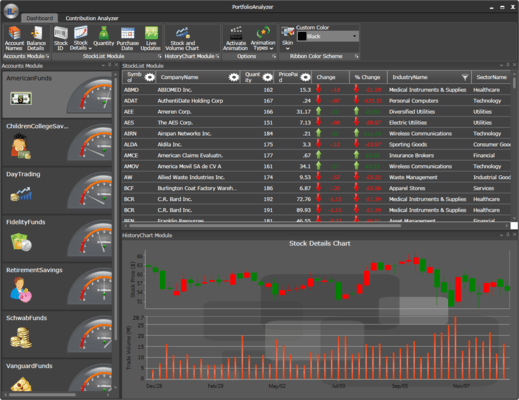
A ribbon is a collection of controls and behaviors that together implement the latest Office-style menus and toolbars in an application. It is designed to make commands more accessible. Commands can be easily organized into logical groups, which are rendered under tabs. Some tabs can also be displayed on a need-only basis.
Syncfusion Essential Tools for WPF Tree View
The TreeViewAdv control implements a tree UI with advanced customization capabilities. Advanced features such as drag-and-drop, multi-node selection, and inline editing support are also available. It also has a feature for adding images, and it contains the built-in ability to perform item sorting on a tree view.
Syncfusion Essential Tools for WPF Groupbar
The GroupBar control is a user interface element that groups a collection of commands within categories and displays those commands within collapsible panels. It lets you recreate the popular Microsoft Outlook bar interface in your application. Each panel in a group bar can host a number of commands or any other control, such as a calendar.
Syncfusion Essential Tools for WPF Gallery
A gallery is a useful control for displaying categorized collections of objects as thumbnail views. It also comes with built-in animation when laying out child items.
Syncfusion Essential Tools for WPF Tab Splitter
The Tab Splitter control is similar to the Visual Studio-style split view for tabbed groups.
Syncfusion Essential Tools for WPF Notify Icon
The Notify Icon control supports different animations and shapes. It allows an icon to be added in the notification tray of a system with different animation and shape formats.
Syncfusion Essential Tools for WPF Tile View
The Tile View control for WPF is capable of hosting tile view items. The main feature of these items is their capacity to host any kind of content. Also, they are draggable, so they can be rearranged.
」技術提供發佈者
首要類別
相關產品
相關類別