von SyncRO Soft - Produkttyp: Anwendung / Developer Application
Cross Platform file history and version control management system. Syncro SVN Client makes it easier to share documents and code between content authors or developers. This multiplatform Subversion front-end allows you to browse repositories, check for changes, commit changes, update your working copy and examine the revision history. Features include: full SVN repository support for SVN versions: checkout, export, import, copy, mkdir, rename, branch, tag and delete support etc. It also includes a synchronize view which helps you spot all incoming and outgoing changes.
Unsere regulären Preise werden nachstehend angezeigt. Bitte melden Sie sich an um Ihre ermäßigten Preise zu sehen.
| In den Einkaufswagen | $ 58.41 | 1 Named User License & 1 year Support & Maintenance Pack (SMP) * | Download (219.2 MB) | |
| In den Einkaufswagen | $ 55.44 | 5-9 Named User License & 1 year Support & Maintenance Pack (SMP) - price per license * | Download (219.2 MB) | |
| In den Einkaufswagen | $ 52.47 | 10-19 Named User License & 1 year Support & Maintenance Pack (SMP) - price per license * | Download (219.2 MB) | |
| In den Einkaufswagen | $ 49.50 | 20-49 Named User License & 1 year Support & Maintenance Pack (SMP) - price per license * | Download (219.2 MB) | |
| In den Einkaufswagen | $ 2,940.30 | 1 Site Wide License (Allows Unlimited Users at a Single Physical Address) & 1 year Support & Maintenance Pack (SMP) * | Download (219.2 MB) |
| In den Einkaufswagen | $ 34.65 | 1 Named User License & 1 year Support & Maintenance Pack (SMP) Upgrade from any previous version * | Prüfen | Download (219.2 MB) |
| In den Einkaufswagen | $ 32.67 | 5-9 Named User License & 1 year Support & Maintenance Pack (SMP) Upgrade from any previous version - price per license * | Prüfen | Download (219.2 MB) |
| In den Einkaufswagen | $ 31.68 | 10-19 Named User License & 1 year Support & Maintenance Pack (SMP) Upgrade from any previous version - price per license * | Prüfen | Download (219.2 MB) |
| In den Einkaufswagen | $ 29.70 | 20-49 Named User License & 1 year Support & Maintenance Pack (SMP) Upgrade from any previous version - price per license * | Prüfen | Download (219.2 MB) |
| In den Einkaufswagen | $ 14.85 | 1 Named User License Support & Maintenance Pack (SMP) Renewal * | Prüfen | Download (219.2 MB) |
| In den Einkaufswagen | $ 13.86 | 5-9 Named User License Support & Maintenance Pack (SMP) Renewal - price per license * | Prüfen | Download (219.2 MB) |
| In den Einkaufswagen | $ 13.86 | 10-19 Named User License Support & Maintenance Pack (SMP) Renewal - price per license * | Prüfen | Download (219.2 MB) |
| In den Einkaufswagen | $ 12.87 | 20-49 Named User License Support & Maintenance Pack (SMP) Renewal - price per license * | Prüfen | Download (219.2 MB) |
| In den Einkaufswagen | $ 593.01 | 1 Site Wide License (Allows Unlimited Users at a Single Physical Address) Support & Maintenance Pack (SMP) Renewal * | Prüfen | Download (219.2 MB) |
Unsere Preise beinhalten einen technischen Support durch ComponentSource und für die meisten herunterladbaren Produkte zusätzlich ein Online-Backup sowie eine kostenlose Aktualisierung auf die neue Version, sofern sie binnen 30 Tagen nach dem Kauf freigegeben werden. Die angezeigten Preise sind zuzüglich aller Steuern. Für mehr Information zu eventuell anfallende Steuern, gehen Sie bitte auf diese Webseite. Alle Verkäufe unterliegen unseren Standardgeschäftsbedingungen und unseren Rückgaberegeln. Treten Sie bitte mit uns in Kontakt , wenn Sie eine Lizenzierungsoption anfordern möchten, die in der obigen Liste nicht aufgeführt ist, einschließlich Mehrplatzlizenzen und ältere Versionen.
Unsere regulären Preise werden oben angezeigt. Bitte melden Sie sich an um Ihre ermäßigten Preise zu sehen.
What's new in Syncro SVN Client V7?
What's new in Syncro SVN Client V5.1?
Version 5.1 of Syncro SVN Client improves working copy load time, automatically refreshes the working copy on external file changes, makes repository browsing more responsive, adds support for repository imports at file level, adds support for replacing resources, improves handling of obstructed resources, improves history support, allows creating branches/tags directly from the repository and offers options to print and save as image a revision graph.
What's new in Syncro SVN Client V5.0?
What's new in Syncro SVN Client V4.2?
What's new in Syncro SVN Client V4.1?
What's new in Syncro SVN Client V4.0?
Syncro SVN Client V4.0 adds Subversion 1.5 features like merge tracking, sparse checkout and relative URLs for the svn:externals property and a merge wizard which simplifies the SVN merge operations.
Key features
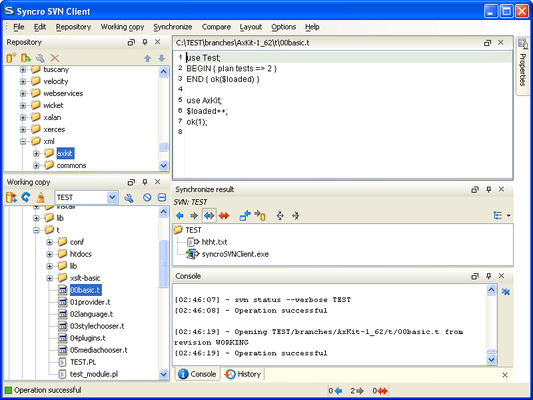
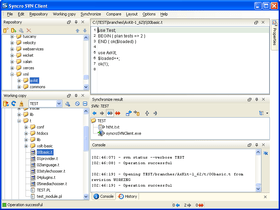
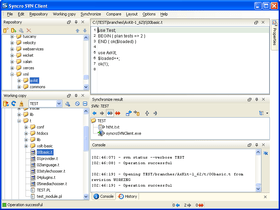
Flexible Layout of the User Interface - The Syncro SVN Client is composed of several views allowing you to browse the Subversion repositories and your local working copies, compare and merge modifications, check the revision history. All views are dockable, meaning that you can move them to create the optimal layout for your use case.
SVN Repository Browsing - You can add multiple SVN repositories to the list accessed through different protocols (SVN, SVN + SSH, HTTP(S)) and browse them in parallel. In this way you can identify the resources you need to checkout, or even create branches or tags directly in the repository.
Synchronize with SVN Repository - In the synchronize view you can see the overall status of your working copy resources when compared to the repository resources. The view focuses on incoming and outgoing changes, where incoming ones are the changes that other users have committed since you last updated your working copy. The outgoing changes are the modifications you made to your working copy as a result of editing, removing or adding resources.
SVN Resource History - In Subversion, both files and directories are versioned and have a history. If you want to examine the history for a selected resource and find out what happened at a certain revision you can use the History view.
Local Working Copy of a SVN Repository - Each author that shares the SVN repository with other authors works on a local copy of the repository called a working copy of the repository. The local copy must be synchronized with the repository by committing the local changes to the repository and by updating the local copy with the changes committed by other authors on the repository.
Author Information at Line Level - Sometimes you need to know not only what lines have changed, but also who changed specific lines in a file. The Annotations view displays the author and the revision number that changed every line in a file the last time. The view is synchronized with the History view and the source code view: clicking in any view updates the current selection in the other two views so that the author name and the revision number are displayed for any line of the source code view.
Check Differences Between Local Version and Repository Version - One of the most common requirements in project development is to see what changes have been made to the files from your working copy or to the files from the repository. You can examine these changes after a synchronize operation with the repository, by using the Open in Compare Editor action from the contextual menu.
Visual Conflict Editing - An update operation may bring the local copy of a file in a conflict state. The conflict state can be resolved more quickly if the conflicts are edited visually in a compare view which presents the two conflicting versions side by side like a Diff application. In the compare view the user decides for each conflict the variant which will remain and will be finally committed to the repository: the local one, the repository one or a manually edited combination of the two variants.
Revision Graph - The history of a SVN resource can be viewed as a graph in the form of a tree. One node of the graph represents a revision of that resource committed to the trunk or one of the branches of the SVN repository. The icon and the background color of a graph node represent the operation that generated a revision. A graph node contains also the repository path and the revision number.

Hersteller
Primärkategorie
Zugehörige Produkte
Zugehörige Kategorien
ComponentSource bietet einen einzigartigen, globalen Service an, der weltweit von über 1.000.000 Entwicklern benutzt wird.