Syncro SVN Client - Application - V4.0

by SyncRO Soft - 상품타입: 어프리케이션 / Developer Application

주의 : 이 제품정보에는 한글안내가 포함되어 있지 않습니다.
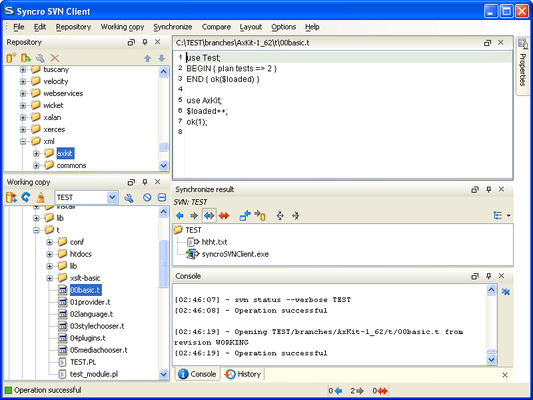
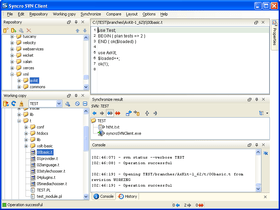
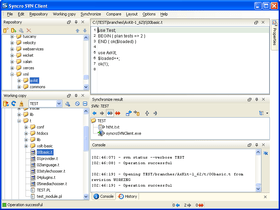
Syncro SVN Client - Application - V4.0 의 스크린샷Cross Platform file history and version control management system. Syncro SVN Client makes it easier to share documents and code between content authors or developers. This multiplatform Subversion front-end allows you to browse repositories, check for changes, commit changes, update your working copy and examine the revision history. Features include: full SVN repository support for SVN versions 1.3 and 1.4: checkout, export, import, copy, mkdir, rename, branch, tag and delete support etc. It also includes a synchronize view which helps you spot all incoming and outgoing changes.

83,600₩
통화 선택

일반 적인 소비자 가격은 하기에 표시되어 있습니다. 고객님의 할인가격은 표시 하시려면 로그인 해주시기 바랍니다.

Syncro SVN Client V4.0

주문 ₩ 83,600 1 Named User License & 1 year Maintenance Pack 다운로드 (95.7 MB)
주문 ₩ 79,400 5-9 Named User License & 1 year Maintenance Pack - price per license 다운로드 (95.7 MB)
주문 ₩ 75,100 10-19 Named User License & 1 year Maintenance Pack - price per license 다운로드 (95.7 MB)
주문 ₩ 70,900 20-49 Named User License & 1 year Maintenance Pack - price per license 다운로드 (95.7 MB)
주문 ₩ 4,210,300 1 Site Wide License (Allows Unlimited Users at a Single Physical Address) & 1 year Maintenance Pack 다운로드 (95.7 MB)

Syncro SVN Client V4.0 Upgrades

주문 ₩ 49,600 1 Named User License & 1 year Maintenance Pack Upgrade from previous version 확인 다운로드 (95.7 MB)
주문 ₩ 46,800 5-9 Named User License & 1 year Maintenance Pack Upgrade from previous version - price per license 확인 다운로드 (95.7 MB)
주문 ₩ 45,400 10-19 Named User License & 1 year Maintenance Pack Upgrade from previous version - price per license 확인 다운로드 (95.7 MB)
주문 ₩ 42,500 20-49 Named User License & 1 year Maintenance Pack Upgrade from previous version - price per license 확인 다운로드 (95.7 MB)

Syncro SVN Client V4.0 Renewals

주문 ₩ 21,300 1 Named User License Maintenance Pack Renewal 확인 다운로드 (95.7 MB)
주문 ₩ 19,800 5-9 Named User License Maintenance Pack Renewal - price per license 확인 다운로드 (95.7 MB)
주문 ₩ 19,600 10-19 Named User License Maintenance Pack Renewal - price per license 확인 다운로드 (95.7 MB)
주문 ₩ 18,100 20-49 Named User License Maintenance Pack Renewal - price per license 확인 다운로드 (95.7 MB)
주문 ₩ 849,200 1 Site Wide License (Allows Unlimited Users at a Single Physical Address) Maintenance Pack Renewal 확인 다운로드 (95.7 MB)

본 제품은 GSA Schedule 가격으로 제공해 드릴수 있습니다.가격에는 ComponentSource의 기술지원 요금이 포함되어 있습니다. 또한 다운로드 판매를 하고 있는 상품의 대부분은 온라인 백업요금이 포함되어 있어서 구입날로부터 30일 이내에 새로운 버전이 발매된 경우 무료로 업그레이드해 드리고 있습니다.  모든 주문에 대해서 당사표준 계약조건 반품조건 의 내용이 적용됩니다. 다음의 경우,고객 서비스로연락하시기 바랍니다. (상기의 리스트에 게재되지 않은 대량의 라이센스나 구 버전 등의 라이센스 옵션이 필요한 경우)

일반 적인 소비자 가격은 상기에 표시되어 있습니다. 고객님의 할인가격은 표시 하시려면 로그인 해주시기 바랍니다.

What's new in Syncro SVN Client V4.0?
Syncro SVN Client V4.0 adds Subversion 1.5 features like merge tracking, sparse checkout and relative URLs for the svn:externals property and a merge wizard which simplifies the SVN merge operations.


Key features

  • Full SVN repository support for SVN versions 1.3 and 1.4: checkout, export, import, copy, mkdir, rename, branch, tag and delete support. 
  • The working copy view allows you to filter items and operate the whole range of SVN actions over the current selection.
  • Synchronize view helps you spot right away all incoming and outgoing changes.
  • SVN Properties table allows you to change all standard SVN properties and define your own.
  • Supported communication protocols include SSL, HTTP/HTTPS, File.
  • Responsive GUI. The actions on the repository do not freeze the user interface.
  • Includes an easy-to-use visual diff/merge tool. Can also compare images.
  • Support for merging the current working copy with a set of tags or revisions.
  • Browse and manage multiple repositories at once.
  • Easy management of more than one working copy.
  • Fast set up of the working copies.
  • Enhanced history revision details including a history graph of all revisions.
  • Independent from the command line subversion client.
  • Cross platform. Windows, Mac OS X and Linux are supported.

Flexible Layout of the User Interface - The Syncro SVN Client is composed of several views allowing you to browse the Subversion repositories and your local working copies, compare and merge modifications, check the revision history. All views are dockable, meaning that you can move them to create the optimal layout for your use case.

SVN Repository Browsing - You can add multiple SVN repositories to the list accessed through different protocols (SVN, SVN + SSH, HTTP(S)) and browse them in parallel. In this way you can identify the resources you need to checkout, or even create branches or tags directly in the repository.

Synchronize with SVN Repository - In the synchronize view you can see the overall status of your working copy resources when compared to the repository resources. The view focuses on incoming and outgoing changes, where incoming ones are the changes that other users have committed since you last updated your working copy. The outgoing changes are the modifications you made to your working copy as a result of editing, removing or adding resources.

SVN Resource History - In Subversion, both files and directories are versioned and have a history. If you want to examine the history for a selected resource and find out what happened at a certain revision you can use the History view.

Local Working Copy of a SVN Repository - Each author that shares the SVN repository with other authors works on a local copy of the repository called a working copy of the repository. The local copy must be synchronized with the repository by committing the local changes to the repository and by updating the local copy with the changes committed by other authors on the repository.

Author Information at Line Level - Sometimes you need to know not only what lines have changed, but also who changed specific lines in a file. The Annotations view displays the author and the revision number that changed every line in a file the last time. The view is synchronized with the History view and the source code view: clicking in any view updates the current selection in the other two views so that the author name and the revision number are displayed for any line of the source code view.

Check Differences Between Local Version and Repository Version - One of the most common requirements in project development is to see what changes have been made to the files from your working copy or to the files from the repository. You can examine these changes after a synchronize operation with the repository, by using the Open in Compare Editor action from the contextual menu.

Visual Conflict Editing - An update operation may bring the local copy of a file in a conflict state. The conflict state can be resolved more quickly if the conflicts are edited visually in a compare view which presents the two conflicting versions side by side like a Diff application. In the compare view the user decides for each conflict the variant which will remain and will be finally committed to the repository: the local one, the repository one or a manually edited combination of the two variants.

Revision Graph - The history of a SVN resource can be viewed as a graph in the form of a tree. One node of the graph represents a revision of that resource committed to the trunk or one of the branches of the SVN repository. The icon and the background color of a graph node represent the operation that generated a revision. A graph node contains also the repository path and the revision number.


상품검색

검색어를 입력해주세요: