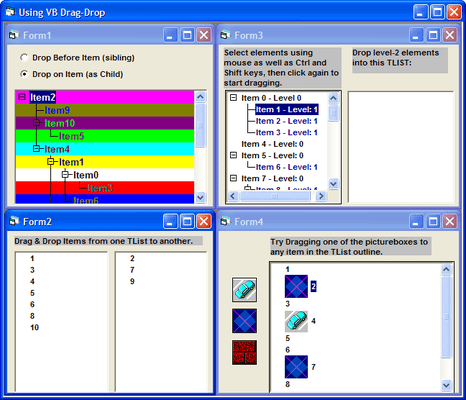
Screenshot Preview

TList Pro

by Bennet-Tec Information Systems - 상품타입: Component / ActiveX OCX

주의 : 별도의 안내가 없는 경우에는 영어제품 입니다.

*

Organize data with a combination List, Tree, and Grid component. TList Pro allows you to display items in a list hierarchically, to organize and display logically grouped elements. Use TList to create directory trees in the style of Windows File Manager or Windows Explorer. TList Pro supports drag and drop, sorting, printing, and more.


$391.02
통화 선택

일반 적인 소비자 가격은 하기에 표시되어 있습니다. 고객님의 할인가격은 표시 하시려면 로그인 해주시기 바랍니다.

TList 8 OCX   *

주문 $ 391.02 1 Developer License  * 다운로드 (10.6 MB)
주문 $ 587.02 1 Developer License with Subscription Updates  * 다운로드 (10.6 MB)
주문 $ 196.00 Subscription Renewal  * 확인 다운로드 (29 KB)
주문 $ 245.00 1 Developer Upgrade License from TList 7 OCX  * 확인 다운로드 (10.6 MB)
주문 $ 343.00 1 Developer Upgrade License from TList 6 OCX  * 확인 다운로드 (10.6 MB)

가격에는 ComponentSource의 기술지원 요금이 포함되어 있습니다. 또한 다운로드 판매를 하고 있는 상품의 대부분은 온라인 백업요금이 포함되어 있어서 구입날로부터 30일 이내에 새로운 버전이 발매된 경우 무료로 업그레이드해 드리고 있습니다.  모든 주문에 대해서 당사표준 계약조건 반품조건 의 내용이 적용됩니다. 다음의 경우,고객 서비스로연락하시기 바랍니다. (상기의 리스트에 게재되지 않은 대량의 라이센스나 구 버전 등의 라이센스 옵션이 필요한 경우)

일반 적인 소비자 가격은 상기에 표시되어 있습니다. 고객님의 할인가격은 표시 하시려면 로그인 해주시기 바랍니다.

 *

What's new in TList V8.0.20?

  • Updated Documentation
  • New Feature: Smooth Scroll support for tall items - TList 8 provides support for scrolling in either a row-by-row manner or in a smooth pixel based manner. Moreover TList 8 can be set to automatically recognize tall cells and intelligently adjust the scrolling mechanism in response to the height of the data currently in view.

What's New in V8.0?

Windows Vista Support

  • TList 8 OCX is first TList OCX edition formally designed, tested and supported for use under Microsoft Vista and Windows 2008 Server.
  • TList 8  OCX is formally supported for use under Windows 95, 98, 2000, NT 4, ME, XP, Windows 2003 Server, Vista and Windows 2008 Server (for use in 32 bit applications, but running on either 32 or 64 bit platforms)

Enhanced Data Entry - grid navigation while editing

  • Excel Style Navigation between Grid cells while editing
  • User may simply move from cell to cell with arrow and tab keys while remaining in Edit Mode

Type Ahead Combobox Data Entry

  • TList can now support TypeAhead selection of combobox items during Data Entry and will also filter the displayed items as user is typing

Enhanced ToolTips Support

  • Custom tooltips for each grid cell plus enhanced tool tip styles and events

Row Resizing

  • Allow end-users to resize rows by dragging on row dividers

Non Scrolling Columns

  • Columns may be frozen on the left while allowing remaining columns to horizontally scroll

3D Gridlines

  • New presentation styles - 3-D style GridLines
  • Improve visibility for display over graphic or gradient background

New features in V7.0:

  • Visual Studio .Net Support
  • Windows XP Support
  • Grid Cell Navigation and Selection
  • Enabling / Disabling Rows and / or Cells
  • Coupling of Navigation and Editing
  • 3-D TreeLines support
  • 3-D Shadowed Text Support
  • OLE Drag Drop
  • Column Dragging
  • Enhanced Format Support
  • Automatic Hierarchic Numbering of Row Headers
  • Multi-Column Sorting
  • Checkbox Sorting
  • Offset property for each column
  • Grid References by Value Name
  • Enhanced Control over Scrolling

New in V6.5:

Now in TList 6.5 edition, TList 6/Pro adds built-in supportfor data entry objects. Data Entry / editing may be set to any of 5 styles

  • TextBox Editing
  • Checkbox Selection
  • ComboBox / Drop Down List Selection
  • Date / Time / Calendar Selection
  • Increment / Decrement Spin Button

The Data Entry style may be set for any column, row, or individual grid cell Each data entry object may be further customized with a host of options such as minimum / maximum text length, 2 or 3-state checkbox, checkbox state pictures, time/date selector format, minimum and maximum values, data formatting and much more. Data entry support is further enhanced by a full set of data validation events, both before, during, and after data entry. In addition the TList 6.5 edition introduces support for Smart Formatting, automatically formatting data items based on the underlying data value. Depending on data values TList can automatically set the color, font, picture, or displayed text for any cell.

TList 6/Pro: (32 bit OCX only) New Features in TList 6/Pro (32 bit)

  • MS TreeView Syntax Support- Great for new TList users. New TListTreeView object supports MS TreeView Syntax TreeView project converter converts existing MS TreeView projects to TListTreeView in seconds
  • Move Items - Simplified Rearranging of Tree Now it's easy to programmatically move nodes with one line of code
  • Automated Editing - just turn on EditMode property to allow in-place editing for Tree or Grid Cells without any code ( trappable events offer support for additional programmatic control over eding process)
  • Node Objects and Collections - New node objects and collections provide for more object oriented programming and additional mechanisms for tree manipulation
  • Enhanced Sorting - Now apply sorting specifications by heirarchic level not just for individual parents

Standard Features:

  • Printing - very flexible printing support - Headers/footers, scaled output, odd/even pages,..
  • RTF support inside any TList item
  • TList1.ItemCellDef.RTFStyle = 1
  • Automated Drag and Drop - no code required to drag and drop within TList or between TLists
  • Improved Sorting - sort CaseSensitive, Case Insensitive, or Numeric
  • DBCS support - 16 bit character sets - works in Japanese, Chinese, etc
  • VisualRoot property - specifies a node as Root of tree (user can only see and access items subordinate to that node
  • Expand to Level - Expand/Collapse entire tree to specified level of heirarchy
  • New CellDef Backgrounds - GradientStyle, GradientColorFrom and GradientColorTo properties were added to every Celldef
  • PictureAlignment style - setting TLPICTUREALIGNMNENT_TILE (12) tiles a picture on the background of every cell
  • RowDef object - allows changing formatting for entire Grid Row
  • LastSubItemIndex property - tells you the index of the last of some item
  • ToolTipsDelay - allows the specification of a delay period when showing ToolTips

TList 4 - Tree/ List / Grid (available in 32 bit OCX format) (includes all features of TList 3/Pro) Highlights:

  • Blazing speed - match it against any other list or Outline control, there is no comparison. TList 4 is fast. We're testing with over 500,000 items in a list
  • Unlimited Hidden data elements for each item - any data type - even object references
  • Hidden Element support - by item or Mark category
  • Level Def settings to specify fonts, images etc based on indentation levels (this is in addition to current settings on an item by item basis)
  • Full Grid/Column support
  • All of TList can be set up as a heirarchic grid, or individual items can have child grids
  • Multi-Line word wrapping within cells
  • Distinct colors, fonts etc for every cell
  • Columns are resizable by users dragging (this can be turnned off)
  • Hidden Row and Columns
  • Specify Cell borderstyle
  • Supports both text and images in cells
  • Identify row/column clicked on
  • Include images and text in every cell
  • Virtual item support - cuts down on memory and improves speed for really huge trees (as I said, we're testing with hundreds of thousands of items)
  • Internet - ability to associate a URL with each item. Means if you embed TList in a web page you can just click on an item to jump to that page. No VB Script or anything needed
  • TLDesign Application - makes it super easy (even for non-programmers) to build a tree file specifying the entire list, all images, all properties, etc. This can be loaded into tlist with 1 line of code
  • Background Image - can be tiled, centered, stretched, etc
  • Transparent Background - great for multimedia
  • OLE Drag & Drop

TList 3/Pro additional features: (available as VBX/16 bit or OCX 16/32 bit) (includes all features of TList 3/standard)

  • In-Place Editing - Allows users to actually modify the text directly within the TList control itself, full support for KeyUp, KeyDown, and KeyPress events
  • Sorting - TList's ItemSorted property provides full control over sorting based on visible or hidden data for each outline branch
  • Searching - TList supports searches in the visible text and even the hidden data values, search for complete strings or substrings
  • Clipboard support - TList actually allows cut and paste via the clipboard, paste a copy of your Tree (text only) into a word processor
  • File I/O - Quickly and easily save or load a complete tree, or branch of a tree; TList optimizes data storage to save space and even supports standard sequential file and can store multiple trees in a single file
  • Caption - TList now supports an optional Caption at the top of the control
  • Titles bar - TList now supports an optional horizontally scrolling title bar (contains text and graphics)
  • Mark Array Support - TList now supports the assigning of items to 'Mark' categories, each with its own additional Mark Picture and Mark Tag; Mark Pictures are displayed on the far left of the control in addition to any item picture or folder

TList 3 Standard: (16 bit VBX only)

  • Supports any number of images - assign a distinct bitmap or icon to each item
  • Images of varied sizes - each item may have a different or same size image
  • Multiple fonts and colors - each item may be displayed using a distinct font and combination of font attributes (bold, italic, color, strikethrough, etc.) Even vary the background color of the items
  • MultiSelect - while the standard outline supports only one selection, TList supports multiple selections just like Windows File Manager
  • Drag-and-Drop - using the standard drag-and-drop mechanisms and TList's internal TreeBuffers, you can copy and paste tree structures to reorganize your outline, or even copy outline elements between multiple TList controls
  • Controlled refresh - manipulate the control as desired behind the scenes and then refresh. No need for your end users to watch painfully as items are added or changed
  • Turn off text and use TList as a picture oriented listbox, in effect a toolbox of image buttons
  • Multi-Line text - with definable word wrap width
  • Store user definable data (numeric or string) with each item

주의

제품 리뷰의 한국어 번역이 완료되지 않는 제품은 Google통역 서비스와 연동되어 표시되어 있습니다.통역 기계에 의한 자동 번역인 관계로 한국어 표기가 조금 부자연 스러운 점 양해 바랍니다.
에서 제공
FireFox와 Opera에서는 Flash가 필요합니다.

상품검색

검색어를 입력해주세요:

Quick 링크

개발처/발매처

주요 카테고리

관련 상품

관련 카테고리

ComponentSource에서 구입하는 이유?

ComponentSource는 세계 1,000,000명 이상의 개발자에게 각종 글로벌 서비스를 제공합니다.

상세 | About Us

화면 바로가기 갤러리

클릭해서 이미지를 확대

 Tlist - ActiveX  - V8.0의 스크린샷  Tlist - ActiveX  - V8.0의 스크린샷  Tlist - ActiveX  - V8.0의 스크린샷  Tlist - ActiveX  - V8.0의 스크린샷  Tlist - ActiveX  - V8.0의 스크린샷
Award