Screenshot Preview

TRICHORD

by Change Vision - 상품타입: 어프리케이션

 *

TRICHORD products are not available for sale from May 31st, 2010, this product is going to be provided for free.
Please download the free version by clicking here

주의 : 별도의 안내가 없는 경우에는 영어제품 입니다.

*

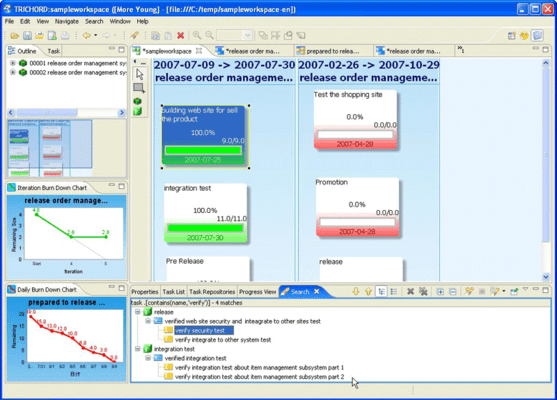
A project management application. TRICHORD is a simple Agile project management tool that helps developers and managers to track status at a glance from three viewpoints ( Time, Task, Team ), using "Kanban Board" (a Just-In-Time pull control method in Toyota Production System).TRICHORD has three main features. The Kanban Board feature which visualizes the project's task status intuitively, like cards on a wall. The Burndown Chart feature visualizes the amount of remaining tasks and the project's velocity and the Niko-niko Calendar feature visualizes the team's mood and serves as a simple twitter-like SNS communication center for the project.

 *

TRICHORD 1.3 New Features

  • Ability to merge Task Kanban Data - The ability to merge Task Kanban helps you manage multiple revisions of the information of Task Kanban efficiently. If you and other team members have the same cards on each TRICHORD, this merge function enables you to import the information from cards that others have updated to your cards. You always have the latest and accurate Kanban data to work on. Merge can be preceded automatically or manually.
  • New shortcut keys for Zoom-in - The shortcut keys for Zoom-in used to be the "Ctrl++" in Kanban. They no longer work and new Zoom-in shortcut keys are "Ctrl+=".
  • Show a notice message for read-only access when you access read-only workspace, you will receive a notice message says thatthe workspace is read-only.
  • Ability to edit Properties - A new menu to edit properties of Cards/Lanes has been added. You can detach the PropertyView from the screen and have it placed at a center of screen or wherever it is conveniently for you to edit.
  • Card Size - Now you can show Cards in two different sizes. You can change the card size depending on what you do. For example, by showing the "DONE" cards in small size, you will be able to make Kanban Space bigger and maximize the efficiently of the space you work on.
  • Deadline Icon for Task - The Deadline Icon used to be shown on Task Card if the status was not DONE even after it passed the deadline. In this version, the Deadline icon always shows on all Task Cards that have set deadline and the status is not DONE.
  • Default estimate time for Task - When creating a new task, it comes with "1" estimate time and "1" remaining time by default.
  • Initial Task - When you create new additional tasks after the iteration has already started, the initial task would be "false" as default.
  • Improvements on showing current Iteration area When you open Story Kanban, the screen will scroll down automatically to show you the current Iteration area without letting you scroll it by yourself.
  • Exporting WebReport - You can now export WebReport from TRICHORD install directory.

 *

Kanban
Task Kanban is a dashboard. First you breakdown tasks and make them into cards then paste them on the Task Kanban. There are three lanes in the Kanban, To do, Doing and Done. By placing task cards in lanes depending on the task status, you can see the status of these tasks clearly at a glance. TRICHORD has two more kanbans, Story Kanban that indicates the project progress by Timeboxes and Feature Kanban that indicates by Release and iteration plans.

Burn down chart
Burn down chart is a graph that visualizes the amount of work remaining. The vertical axis indicates the amount of work remaining and the horizontal axis indicates the time. By plotting the amount of work remaining everyday, it visualizes how long it will take to complete the project. There are also two more charts, Daily burn chart that visualizes the work remaining in each day and one that visualizes the amount of work remaining by Timeboxes.

Niko-niko Calendar
It visualizes mood of the team by everyone inputting their feelings and mood for a day with colorful smiley face icons and comments.

Web report
TRICHORD exports projects status into a document that can be seen on web browsers.


 *

Basic Functions

  • Manage multi projects by switching workspaces
  • Anyone in a team can go on by switching users
  • Print out Kanban, Burn down charts
  • Simple manage method by using XML
  • Using Eclipse Rich Client Platform give you the flexibility on operation
  • Easy upgrade to the latest version via network

Features of Kanban

  • Common features - TRICHORD visualizes task by using Kanban.
    Use cards for tasks which is more instinctive than writing tasks in lists
    Display tasks in colored cards and in lanes
    Icons for completed task cards
    Copy & Paste the task cards to reuse as new iteration plans arise
    Ability to zoom In/out freely
    Alert when someone modifies
  • Feature Kanban
    Supports your planning based on Release term and features by card metaphor
    Automatically generate the amount of To do's/Done's from the status of story
    Visualize the status of feature by generating the status of story
  • Story Kanban
    Supports your planning based on Iteration term and stories by card metaphor
    Automatically generate the amount of To do's/Done's from the status of tasks
    Display the project speed every iterations
  • Task Kanban - Kanban
    Manage and track tasks within an iteration
    Easy to operate tasks by using drag & drop
    Display the status of task (To do, Doing or Done) by the position of task cards
    Show involved stories by a line color of cards
  • Task Kanban - Lists
    Use tabular form to input the remaining hours of task
    Display the task status by line colors

Features of Burn down chart

  • Iteration burn down chart - Show the quantity of remaining stories per iteration in one release in a graph
    You can tell if all stories will be complete or not within the release at a glance
    Automatically updates the chart with the latest status of task cards
  • Daily burn down chart - Indicate the quantity of remaining tasks per day within an iteration
    You can tell if all tasks will be complete or not within an iteration at a glance
    Automatically updates the chart with the latest status of task cards

Niko-niko Calendar

  • It visualizes how everyone in team is doing by smiley icons and comments. When you take a look at a calendar, you can tell the mood of team as a whole.
    You can change the indication period of calendar

Web report

  • TRICHORD exports multi workspaces onto HTML reports as Web report. This document is a summary that indicates the latest status of multiple projects. Also you can see the detailed information of each project in chart.
    It supports the utility of both of command line and GUI to go with your environment.

주의

제품 리뷰의 한국어 번역이 완료되지 않는 제품은 Google통역 서비스와 연동되어 표시되어 있습니다.통역 기계에 의한 자동 번역인 관계로 한국어 표기가 조금 부자연 스러운 점 양해 바랍니다.
에서 제공
FireFox와 Opera에서는 Flash가 필요합니다.

상품검색

검색어를 입력해주세요:

Quick 링크

개발처/발매처

주요 카테고리

관련 상품

ComponentSource에서 구입하는 이유?

ComponentSource는 세계 1,000,000명 이상의 개발자에게 각종 글로벌 서비스를 제공합니다.

상세 | About Us

Award Award