by The Imaging Source - Product Type: Component / ActiveX OCX / DLL
TX Text Control ActiveX Professional by The Imaging Source
Give your application the ability to read, edit, and create documents in industry standard formats like MS Word DOCX, DOC, RTF, HTML and XML. TX Text Control ActiveX includes the ability to export all documents can be exported to print-ready Adobe PDF documents without any third-party software. The fully programmable component supports nested tables, document sections, images, text frames, drag and drop, headers and footers, bulleted and numbered lists and MS Word compatible mail merge fields for database applications. Typical applications include mail merge, PDF creation, document conversion or WYSIWYG word processing.
TX Text Control ActiveX is a royalty-free programming component that offers an extensive palette of word processing features.
It gives your application the ability to read, edit and create documents in most popular formats such as RTF, Microsoft Word (including Microsoft Word XP), HTML, CSS and XML. In addition, TX Text Control ActiveX can convert these file formats to PDF.
TX Text Control ActiveX supports all major word processing features like tables, headers & footers, hyperlinks, bullets, numbered lists, zoom, page view, image import/export and OLE objects. Virtually all office, database or web applications can make use of these sophisticated word processing features.
The Professional Edition has these features in addition to the Standard Edition features:
Common Word Processing Features
Headers and Footers
Hypertext Links
Supported File Formats
Microsoft Word (DOC)
Supported Programming Languages
Microsoft Visual C++
Features of TX Text Control ActiveX
TX Text Control ActiveX gives control for tables - Text in tables can be formatted in any way, which is required, allowing for paragraphs with varying typefaces, indentations and line spacing. Images as well as macro fields and OLE objects can also be pasted into tables. Frames and shadows can be added to single cells. To place text in columns, frames can be made invisible
Character and Paragraph Formatting - All character formats, including foreground and background colors are available and can be freely combined. Flexible paragraph formatting such as indentation, four different types of tabs, variable line and paragraph spacing, and paragraph frames offer a variety of possibilities for arranging paragraphs
HTML Filter - The HTML filter makes the TX Text Control ActiveX Collection ideal for internet and intranet applications. A simple WWW browser is included as an example program. The HTML filter is also an important improvement for normal word processing, as HTML is increasingly becoming a standard text format
Zoom in/out - The TX Text Control ActiveX Collection includes a zoom in/out mechanism. All word processing functions, including text input, are available, independent of the zoom level you set
Images within a Text - The TX Text Control ActiveX Collection is especially useful for positioning images in a text. Images can be positioned as characters within a line of text, or at a given position on a page. The flow of text around an image is controlled via a dialog box. Images can be re-scaled
For the import of images - TX Text Control ActiveX Collection supports the file formats: TIFF, BMP and Windows metafiles. Images which have been positioned within a text can be stored embedded in an RTF file, or as linked image files (TIFF, BMP, WMF)
OLE Controls in the Text - With the 32 Bit version OLE controls can be positioned like images
Mail Merge, Hypertext and Data Bases - The TX Text Control ActiveX Collection supports the use of macro fields. You can simply and quickly realize hypertext and mail merge applications with the assistance of macro fields. Moreover, macro fields are easily connected to databases so that you can store (formatted) text in a database field or display the contents of a database field
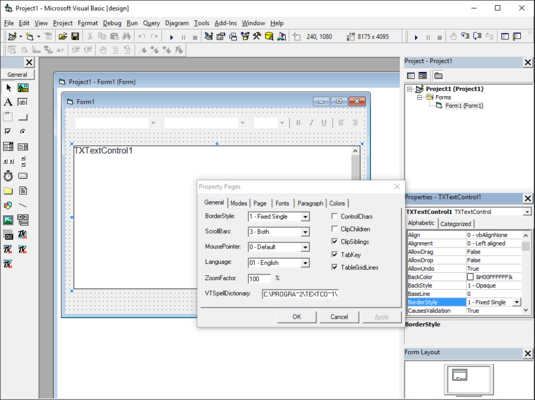
Integrated Dialog Boxes - Integrated dialog boxes, for setting paragraph, text and table formatting, as well as for searching and replacing are an integrated component of the TX Text Control ActiveX Collection
Database support - TX Text Control ActiveX Collection can, in conjunction with databases, be used as a database browser. The records of a database can be read, displayed, altered and then stored again. There is also the possibility of storing the complete contents of a TX Text Control ActiveX, including all the paragraph and character formatting information in one data field.
File Formats and Data Exchange - Problem free data exchange with other word processing programs is achieved via the Rich Text File format (RTF, version 1.4). In this way the formatting attributes remain preserved to the greatest possible extent. This is also valid for the exchange of formatted text via the clipboard. In addition to the RTF-format though, the TX Text Control ActiveX Collection supports its own file format and imports and exports ASCII and HTML files
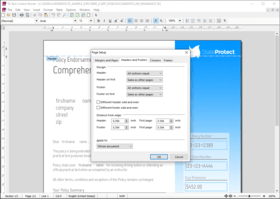
Programmable Headers and Footers (professional version only) - Headers and footers are now fully integrated. They can be edited by double-clicking them, and can be modified programmatically. Numerous options are adjustable, like changing the frame style, specifying a separate header for the first page, or automatically displaying page numbers. Headers and footers are loaded from and saved to Word, RTF and TX files
Hyperlinks and Bookmarks (professional version only) - FieldType and FieldTypeData properties. These properties provide new types of marked text fields, and specialized fields for hyperlinks, targets, and page numbers. It is now possible to insert and edit hyperlinks and targets, which makes Text Control the perfect tool for email programs and intranet applications
Drag and Drop (professional version only) - Properties are available for integrating fully customizable drag & drop functionality into your application. All types of drag & drop can be used, for instance drag & drop text editing, or the insertion of files by dragging them from the Windows explorer
Word 2000 Support (professional version only) - Files can be loaded and saved directly in the .DOC file format of Microsoft Word. All available Text Control features are supported, including the addition of tables, images, headers & footers, and OLE objects. All versions of Word from Word 6 and Wordpad up to Word 2000 are supported
Centered Document View - Text Control now offers an additional page view that centers the document in the control's window
Access Properties of Embedded Objects - With the new ObjectItem method, it is now possible to not only insert OLE objects and let the text flow around them, but also access their properties from program code
Bulleted and Numbered Lists - TX Text Control ActiveX provides comprehensive support for bullets and numbered lists. Lists can be incremented and numbered automatically. Virtually every conceivable attribute of the bullets and numbered lists can be user defined including the type and shape of bullet. They can be used from program code, or via the integrated dialog box and buttons on the button bar. Numbered lists and bullets may contain any of TX Text Control ActiveX vast formatting options.
Internet Features - With TX Text Control ActiveX, you can create applications that do not have to be installed on every single computer, but which run directly in Microsoft Internet Explorer.
TX Text Control ActiveX contains everything you need to easily create Internet Explorer based applications:
Code-signed CAB file for easy browser-based installation
Apartment threaded ActiveX
Full support for IObjectSafety interfaces in Internet Explorer
Sample programs for Visual Basic ActiveX documents and HTML/VBScript
Versatile new print method
Tables - Text Control ActiveX enables you to include tables in your documents. Text in a table can contain virtually any kind of formatting that normal text can: multiple paragraphs with different fonts, indents and line spacing. Even images, macro fields and OLE objects can be inserted. Frames and shading can be separately adjusted for each individual table cell. Making the table frames invisible allows text to be set in columns
HTML filter - With the HTML filter, TX Text Control ActiveX can be used to create Intranet and Internet applications. It is also an important extension for normal word processors because HTML is becoming increasingly important as a standard format. The Standard version of TX Text Control ActiveX can load and save HTML files, and convert them from and to any of the other supported file formats. Clicking on a hyperlink causes a FieldClicked event to be sent, with the link target as a parameter. In addition, the Professional version lets you insert and edit hyperlinks and targets
Word Filter - The Word Filter, which is part of the professional version, enables the loading and saving of files directly in the .DOC file format of Microsoft Word. All available Text Control ActiveX features are supported, including the addition of tables, images, headers & footers, and OLE objects. All versions of Word from Word 6 and Wordpad up to Word 2000 are supported
What's New in TX Text Control V14?
Section Formatting: A document can be split into several sections to enable different page sizes and margins and different headers and footers in the same document.
Headers and Footers: The contents and the alignment of headers and footers can be different for each section. Also each section can have a special header and a special footer for the section's first page. If a section does not need its own header or footer, its header or footer can be connected with the header or footer of the previous section.
WordprocessingML Format: TX Text Control supports the WordprocessingML part of the Microsoft Office Open XML format. This format is a ZIP compressed XML format for word processing and is used as standard format of Microsoft Word. A TextControl can load and save files (.docx extension) and blocks of memory containing documents formatted with this format.
Import and Export of Heiler HighEdit Fields:TX Text Control also supports the import and export of Heiler HighEdit fields contained in RTF documents. The names of these fields are available through the FieldTypeData property, if the field is of the type txFieldHighEdit.
Import and Export of Microsoft Word Fields: TX Text Control now supports importing and exporting Microsoft Word fields contained in Microsoft Word and RTF documents.
Background Printing: Additional contents such as images or watermarks can be printed on a page of a document. An application can add its own PrintPageEventHandler to a PrintDocument
What's new in TX Text Control V13.0?
True Browser-based Rich Text Editing - Create full featured word processing apps that run in MSIE
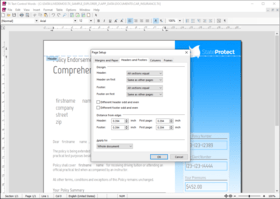
Paragraph Formatting - Set multiple new paragraph attributes with shipped dialog box
Horizontal and Vertical Ruler Bars - Set margins, height of headers and footers and width and height of table cells
Contemporary Application Look and Feel - Create slick and highly usable applications with the new styling options
Hypertext Links in PDF Documents - Convert hypertext links to their PDF pendants on export
Clipboard Import - Import HTML formatted text directly from the clipboard
Text Fields and Hypertext Targets - Multiple field handling improvements
New and Updated Features in V12
Text Frames - Freely placeable and programmable text frames can be inserted and positioned as characters or geometrically relative to a paragraph or a page
Anchored Images - Images can be anchored to a specific paragraph and thus maintain their geometrical position, in relation to the paragraph to which they are anchored
New Object Attribute Dialog Box - New built-in dialog box for all image, text frame and object attributes. Settings such as size, layout, position, filename, format, resolution and compression can be adjusted Image Improvements - Simply switch between the image position modes: convert an image inserted as character to an image at a fixed position or anchor it to a paragraph using the new dialog box
Table Formatting - Now it is possible to insert page breaks inside of a table, keep table rows together on one page and to specify the table cell height
For information on the different features in the different editions please browse the TX Text Control ActiveX Edition Feature Matrix the in the Evals & Downloads section.
New and updated features in V11
Nested Tables - View and edit complex documents, such as datasheets. All text filters (HTML, RTF, DOC and PDF) have been improved
Multi-level Undo and Redo - Get full access to the actions history from program code
Improved PDF Export - Set image resolution and document security
Improved JPEG Export - Set image resolution and image compression
Improved Ruler Bar - Add a modern look and feel to end-user applications
New Features in Version 10.0
TX Text Control ActiveX vs TX Text Control.NET
The most important change in TX Text Control ActiveX V10.0 is that there are now two distinct versions: TX Text Control ActiveX* and TX Text Control .NET. Each version has three editions: Standard, Professional and Enterprise.
New and updated features in TX Text Control ActiveX V10.0
New PDF export - Save documents directly to Adobe PDF
New Windows XP button bar - Give your applications a fresh Windows XP look and feel
Updated HTML filter with stylesheets - Stylesheets are now supported for both import and export
New image export (JPEG, PNG, BMP and WMF) - Export images to a user defined format
* - Please note that 'TX Text Control ActiveX' was formely called 'TX Text Control'. The name change was necessary to differentiate between the ActiveX and the new .NET version of TX Text Control.
New features make TX Text Control ActiveX more flexible and improve TX Text Control's usability for both developer and end user. Note that TX Text Control ActiveX is now available in 2 versions, standard and professional, the applicable features are indicated in the Features html page from the Evals and Demos section above.
New Features in Version 9.0
Stylesheets
New Button Bar
New Table Features
Adjustable Word Wrapping
Integrated JPEG / PNG Support
No more DLL calls
PartNumbers: PC-504636-143571 504636-143571 PC-504636-143583 504636-143583 PC-504636-143575 504636-143575 PC-504636-143591 504636-143591 PC-504636-143579 504636-143579 PC-504636-143585 504636-143585 PC-504636-143595 504636-143595 PC-504636-143596 504636-143596 PC-504636-143587 504636-143587 PC-504636-143589 504636-143589 PC-504636-143593 504636-143593 PC-504636-143594 504636-143594
Publisher PartNumbers: TX ActiveX Pro TX ActiveX Pro Sub TX ActiveX Pro Sub Post TX ActiveX Pro Sub Pre TX ActiveX Pro Team TX ActiveX Pro Team Sub TX ActiveX Pro Team Sub Post TX ActiveX Pro Team Sub Pre Upd TX ActiveX Pro Upd TX ActiveX Pro Sub
PurchaseOptions: TX Text Control V14.0 SP1 ActiveX Professional Edition 1 Developer License , TX Text Control V14.0 SP1 ActiveX Professional Edition 1 Developer License - with 1 Year Subscription , TX Text Control V14.0 SP1 ActiveX Professional Edition 4 Developer Team License , TX Text Control V14.0 SP1 ActiveX Professional Edition 4 Developer Team License - with 1 Year Subscription , TX Text Control V14.0 SP1 ActiveX Professional Edition 1 Developer License Upgrade from V9, V10, V11, V12 and V13 Standard/Professional (or V14 Standard) , TX Text Control V14.0 SP1 ActiveX Professional Edition 1 Developer License Upgrade from V9, V10, V11, V12 and V13 Standard/Professional (or V14 Standard) - with 1 Year Subscription , TX Text Control V14.0 SP1 ActiveX Professional Edition 4 Developer Team License Upgrade from V9, V10, V11, V12 and V13 Standard/Professional (or V14 Standard) , TX Text Control V14.0 SP1 ActiveX Professional Edition 4 Developer Team License - with 1 Year Subscription Upgrade from V9, V10, V11, V12 and V13 Standard/Professional (or V14 Standard) , TX Text Control ActiveX - Professional Edition Subscription Renewals 1 Developer License - Pre Expiry , TX Text Control ActiveX - Professional Edition Subscription Renewals 1 Developer License - Post Expiry - only available 30 days after the expiry date , TX Text Control ActiveX - Professional Edition Subscription Renewals 4 Developer Team License - Pre Expiry , TX Text Control ActiveX - Professional Edition Subscription Renewals 4 Developer Team License - Post Expiry - only available 30 days after the expiry date
Resources: Read the TX Text Control ActiveX help file, Read the TX Text Control Editions Comparison - Requires Acrobat Reader, Read the TX Text Control DATEV Success Story, Read the TX Text Control Success Stories - Office, Read the TX Text Control Success Stories - Office 2, Read the TX Text Control Success Stories - Medical, Read the TX Text Control Success Stories - Education, Download the TX Text Control ActiveX V14.0 evaluation on to your computer - Displays Nag Screens
Operating System for Deployment: Windows Vista, Windows XP, Windows 2000, Windows 98, Windows NT 4.0, Windows 95
Architecture of Product: 16Bit, 32Bit
Product Type: Component
Component Type: ActiveX OCX, DLL
Built Using: MFC V4.0
General: Supports Apartment Model Threading
Compatible Containers: Microsoft Visual Studio .NET, Microsoft Visual Studio 6.0, Microsoft Visual Studio 97, Microsoft Visual Basic .NET, Microsoft Visual Basic 6.0, Microsoft Visual Basic 5.0, Microsoft Visual Basic 4.0, Microsoft Visual C++ .NET, Microsoft Visual C++ 6.0, Microsoft Visual C++ 5.0, Microsoft Visual C++ 4.0, Microsoft Visual C# .NET, Delphi 6.0, Delphi 5.0, Delphi 4.0, Delphi 3.0, .NET Framework 1.0
Product Class: User Interface Components
Search Items: New Product Jan 03, New Product May 04, New Product Aug 05
Keywords: pdf XML Extensible Markup The Imaging Source Europe Text word words processing textbox Corporate Partner Rich Text Box MS Word Import Export PDF Mail merge Reporting MS Office Automation textcontrol RTF rich text edit The Imaging Source (formerly DBS) TX Text Control TXText word processing write formatting textbox unicode PDF txtextcontrol
Publisher
Primary Category
Related Products
Related Categories