Screenshot Preview

VARCHART XNet ASP.NET

by NETRONIC Software - 상품타입: Component / ASP.NET WebForms / .NET Class

주의 : 별도의 안내가 없는 경우에는 영어제품 입니다.

*

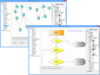
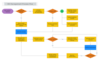
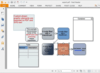
Add network diagram functionality to your application. VARCHART XNet lets you graphically display, edit and print your data in the form of network diagrams to display scenarios such as computer networks, workflow or class diagrams. The built-in layout algorithm and the integrated scheduling module are ideal for PERT diagrams in project management. You can implement an initial graphical representation of your data in a matter of minutes. Nearly all graphical layout options of VARCHART XNet can be configured with the convenient help of property pages.

$2,545.45
통화 선택

일반 적인 소비자 가격은 하기에 표시되어 있습니다. 고객님의 할인가격은 표시 하시려면 로그인 해주시기 바랍니다.

VARCHART XNet ASP.NET V4.4 (Build 0237)   *

주문 $ 2,545.45 1 Developer License  * 다운로드 (55.6 MB)
주문 $ 1,272.73 1 Additional Developer License  * 확인 다운로드 (55.6 MB)
주문 $ 509.09 1 Developer Upgrade License from V4.3  * 확인 다운로드 (55.6 MB)
주문 $ 890.91 1 Developer Upgrade License from V4.2  * 확인 다운로드 (55.6 MB)
주문 $ 1,272.73 1 Developer Upgrade License from V4.1 or below  * 확인 다운로드 (55.6 MB)

VARCHART XNet ASP.NET - Maintenance and Support Service   *

주문 $ 763.64 1 Annual Maintenance and Support Service License  * 다운로드 (29 KB)

VARCHART XNet ASP.NET - Runtime Licenses   *

주문 $ 1,043.64 1 Runtime License (price per license 1-2)  * 다운로드 (20 KB)
주문 $ 803.73 1 Runtime License (price per license 3-4)  * 다운로드 (20 KB)
주문 $ 626.82 1 Runtime License (price per license 5-9)  * 다운로드 (20 KB)
주문 $ 476.64 1 Runtime License (price per license 10-24)  * 다운로드 (20 KB)
주문 $ 334.73 1 Runtime License (price per license 25-49)  * 다운로드 (20 KB)
주문 $ 237.36 1 Runtime License (price per license 50-99)  * 다운로드 (20 KB)
주문 $ 163.55 1 Runtime License (price per license 100-249)  * 다운로드 (20 KB)
주문 $ 636.36 1 Developer Academic License  * 확인 다운로드 (55.6 MB)

가격에는 ComponentSource의 기술지원 요금이 포함되어 있습니다. 또한 다운로드 판매를 하고 있는 상품의 대부분은 온라인 백업요금이 포함되어 있어서 구입날로부터 30일 이내에 새로운 버전이 발매된 경우 무료로 업그레이드해 드리고 있습니다.  모든 주문에 대해서 당사표준 계약조건 반품조건 의 내용이 적용됩니다. 다음의 경우,고객 서비스로연락하시기 바랍니다. (상기의 리스트에 게재되지 않은 대량의 라이센스나 구 버전 등의 라이센스 옵션이 필요한 경우)

일반 적인 소비자 가격은 상기에 표시되어 있습니다. 고객님의 할인가격은 표시 하시려면 로그인 해주시기 바랍니다.

 *

What's New in VARCHART XNet V4.4

  • In the object vcMapEntry the property pattern has been implemented. The property allows you to assign or retrieve hatching patterns to pattern maps
  • An unexpected end of program could occur with a reset when simultaneously one or more clusters were collapsed

What's New in VARCHART XNet V4.3

  • When objects are created dynamically at runtime, frames that surround link formats can now be switched off.

What's New in VARCHART XNet V4.2

  • The new version allows you to display the legend on screen. The legend may be positioned in a window of its own above the diagram or may be attached to one of the four border areas.
  • The concept of generating data driven appearances of objects by map tables was enhanced by the option to define ranges of values. This entails smaller and more versatile maps.
  • Anti-aliasing for fonts can be switched on and off.
  • When setting up a page, a page to be printed can be padded by empty space for a more balanced page layout.
  • The extended system print dialog can now be activated in the print output. Both, the print preview and the print dialog allow to select several page ranges to be printed.
  • The diagram size of PNG files that can be generated does no longer depend on the available size of the main memory.
  • Extended world view functions now allow to scroll the world view in either horizontal or vertical direction. The world view optionally may be positioned in a window of its own above the diagram or may be attached to one of the four border areas.
  • The VARCHART XNet .NET edition and VARCHART XNet.ASP.NET edition use the .NET framework 2.0 instead of the .NET framework 1.1 (as in previous versions).

What's New in VARCHART XNet V4.1

  • New Editions - From V4.1 onwards of VARCHART XNet developers will benefit from the .NET and ASP.NET editions as well as from the proven ActiveX edition. The removal of the intermediate layer (interoperability assembly)makes component integration much easier.
  • Graphical User Interface - Fields in nodes and boxes can now be highlighted more emotively using the new transparent colors.
  • Datafields, Data Sets and Data Types - You can draw upon one of three fields of keys for clearly identifying data sets. It is also now possible to change the names of data fields during run time.
  • Help from our Runtime Dialogs, e.g. Print Dialog. - The VcHelpRequested event is used to enable the application to call its own help pages when the user presses the F1 key in one of the dialog boxes during runtime.
  • Automatic Conversion of the Date Output Format - The default for the date format is taken from the Windows configuration
  • Improved Visualization of Grouping with Group Outlines - Group outlining identifies the expansion and collapse of groups. Groups are arranged either horizontally or vertically depending on the chosen direction of flow (from left to right or from top to bottom). Version 4.1 makes it easier to manage large structures thanks to individual collapsing and expanding.

What's New in VARCHART XNet V4.0

  • Extended Data Tables - Up to this version the data of a diagram had to be fitted into two tables. The new version is based on a relational data model that allows to combine up to 90 tables.
    The data fields of a table can be used:
    • to annotate nodes
    • in filters and maps
  • Support of GDI+ - The support of GDI+ allows for color gradients in nodes. It improves font mapping and also entails a more effective graphics export.
  • Customizable Matrix Layout for the Legend -The legend of a chart can be positioned outside the chart and becomes visible in prints and exported charts. The new version allows to define the layout of the legend in the shape of a well structured matrix.
  • Further Enhancements
    • Parametrization of times for the tooltip to occur and on change of objects; tooltip on clicking
    • AutoSchedule can be switched on or off by API
    • Performance enhancements

 *

VARCHART XNet lets you graphically display, edit and print data in the form of network diagrams.

Implement an initial graphical representation of your data in a matter of minutes. Nearly all graphical layout options of VARCHART XNET can be configured with the comfortable help of property pages.

The powerful application programming interface (API) offers even more options that can be modified at run time. You can set all options to be adjusted by the user. Events let your application react to your customer's interactions (for example, to validate data).

Benefit from the wide range of design options:

  • The appearance of nodes (color, format, background, font, graphics file) can be specified by a variety of options. It can be made dependent on data in the form of logical expressions or assignment tables. Annotations, symbols or graphics can be added to nodes
  • The four different link types (FF, FS, SF, and SS) can be shown graphically. Annotations can be added to links. The appearance of links can vary
  • Positions of nodes and links can be kept in data fields to be stored and restored
  • Automatic layout of nodes to maintain clarity in large or complicated networks
  • Groups can be clustered for display
  • The nodes can be arranged in chronological order

The value and usefulness of network diagrams increase by their degree of interactivity. Let the user

  • Edit the data of nodes and links
  • Create, delete or move nodes and links
  • Sort and group nodes
  • Change the flow direction between horizontal and vertical
  • Zoom and autoscroll in the diagram
  • Navigate via the worldview
  • Preview and layout pages for printing
  • Export the diagram to the formats: VMF, WMF, JPG, BMP, EPS, GIF, PCX, PNG, TIF
  • Place text or graphics boxes in the diagram in order to display additional information
  • Drag nodes and links into a different instance of VARCHART XNet or into an instance of VARCHART XTree or VARCHART XGantt
  • Collapse and expand groups

The integrated scheduler lets you calculate the Early Start, Early Finish, Late Start, Late Finish, Total Float and Free Float. The calculation is based on the duration of the various activities, their logical dependencies and the project start or project end.


주의

제품 리뷰의 한국어 번역이 완료되지 않는 제품은 Google통역 서비스와 연동되어 표시되어 있습니다.통역 기계에 의한 자동 번역인 관계로 한국어 표기가 조금 부자연 스러운 점 양해 바랍니다.
에서 제공
FireFox와 Opera에서는 Flash가 필요합니다.

상품검색

검색어를 입력해주세요:

ComponentSource에서 구입하는 이유?

ComponentSource는 세계 1,000,000명 이상의 개발자에게 각종 글로벌 서비스를 제공합니다.

상세 | About Us

Award