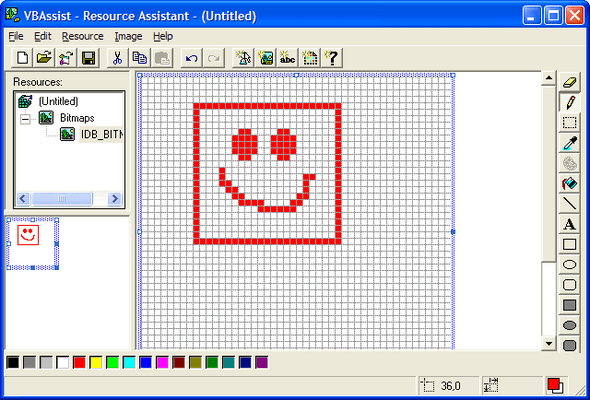
Screenshot Preview

VBAssist

by Infragistics - 상품타입: Add-In

주의 : 별도의 안내가 없는 경우에는 영어제품 입니다.

*

Provide advanced tools to maximize productivity. VBAssist is a Visual Basic add-in that includes a host of enhanced plug-in productivity tools all aimed at reducing the time you spend developing applications. It attaches itself both visually and functionally to Visual Basic. It provides advanced tools to maximize your productivity but does not alter Visual Basic functionality in any way. You can still use all of the standard Visual Basic functions.


$179.00
통화 선택

일반 적인 소비자 가격은 하기에 표시되어 있습니다. 고객님의 할인가격은 표시 하시려면 로그인 해주시기 바랍니다.

VBAssist V5.03   *

주문 $ 179.00 1 Developer License  *
메이커 제품 번호: 02502
다운로드 (5.8 MB)

가격에는 ComponentSource의 기술지원 요금이 포함되어 있습니다. 또한 다운로드 판매를 하고 있는 상품의 대부분은 온라인 백업요금이 포함되어 있어서 구입날로부터 30일 이내에 새로운 버전이 발매된 경우 무료로 업그레이드해 드리고 있습니다.  모든 주문에 대해서 당사표준 계약조건 반품조건 의 내용이 적용됩니다. 다음의 경우,고객 서비스로연락하시기 바랍니다. (상기의 리스트에 게재되지 않은 대량의 라이센스나 구 버전 등의 라이센스 옵션이 필요한 경우)

일반 적인 소비자 가격은 상기에 표시되어 있습니다. 고객님의 할인가격은 표시 하시려면 로그인 해주시기 바랍니다.

 *

VBAssist 5.0 offers exciting new features such as the Accelerator Assistant, which makes it a snap to manage accelerators on your forms. With the click of a button, you can identify and resolve conflicts.

Another new feature, Property Tips displays a design time tooltip containing the user-defined subset of a control's properties. New Project Control View provides multiple drill down paths to view your projects' forms, modules, classes and controls, as well as code. The Zoom Assistant magnifies and allows the capture of selected areas of the screen. And the Work Space Assistant saves valuable screen "real estate" by hiding IDE Windows until you need them.

VBAssist 5.0 gives you instant access to a wide range of design tools to help focus and speed up time-consuming development tasks. Control Alignment and Visual Tab Assistants enable you to work more productively - whether you are developing applications for personal use or large corporate projects. VBAssist works hand in hand with all Visual Basic tools, including standard and customer controls.

  • Tab Order Assistant - Saves hours of time by making cumbersome tab tasks as simple as "view, point and click". View and modify tab order directly on the form
  • Control Alignment Assistant - Quickly create cleaner user interfaces with an easy-to-use palette of alignment, sizing and grouping tools - the richest set of alignment tools available and now with multiple levels of undo
  • Resource Assistant - Provides a complete facility for creating and editing resource files (bitmaps, icons, cursors, and string tables). It allows for the direct editing of image, icon and cursor properties of forms and controls
  • Clipboard History Assistant - Saves clipboard items for easy re-use. Enables cutting, copying and pasting of controls (along with their code) in one easy step
  • Comment Assistant - Makes for simpler and more consistent commenting for code that's easier to work with throughout its life cycle
  • Control Array Assistant - Speeds up repetitive tasks with a "point and click" visual tool. This provides for the visual creation, deletion, renaming, compressing, modifying and merging of control arrays
  • Data Binding Assistant - Speeds development with an easy-to-use visual binding method that lets you see your data properties at a glance and assign data fields to controls
  • Common Dialog Wizard - Speeds up application building by automatically generating code to display common dialog boxes. This ensures code standardization and accuracy
  • Auto Project Save - Averts possible disaster by saving projects at timed intervals or via user prompts
  • Code Assistant Accelerates development by allowing for easy, logical access to (and ruse of) pre-tested, approved code sections

VBAssist is an enhanced development environment for Visual Basic 5. By extending Visual Basic's visual approach to program design and maximizing the programming power of each mouse click, VBAssist builds on the strengths of Visual Basic to make you the most productive Windows application developer you can be.

VBAssist is a Visual Basic Add-In that attaches itself both visually and functionally to Visual Basic. It provides advanced tools to maximize your productivity but does not alter Visual Basic functionality in any way. You can still use all of the standard Visual Basic functions.

VBAssist's tools fall into the following general categories:

Code and Resource Tools

  • Code Assistant - helps you maintain Code Libraries. Its Visual Clipboard provides a convenient area for assembling code from multiple sources. You can organize code items into logical groups and search for code using keywords. In addition, you can organize your source code into separate code libraries for each project. These code libraries can be shared within a workgroup across a network
  • Comment Assistant - helps you block out multiple lines of code with a single click. This becomes an invaluable feature when debugging code. You can also store frequently used or standardized comments which can be placed on top, bottom or at the right of selected code with the touch of a button
  • Common Dialog Wizard - automatically generates code to display common dialogs. It uses a step-by-step method to visually guide you through the dialog's creation
  • Resource Assistant - helps you create and edit resources within any .RES file included in your project directly from within Visual Basic. In addition, you can use Resource Assistant's rich editing environment to edit resources such as bitmaps and icons found on your forms

Control Tools

  • Accelerator Assistant - helps you maintain keyboard accelerators used on your Visual Basic forms. It lets you view current accelerator settings as well as identify accelerator conflicts
  • Control Alignment Assistant - allows you to size containers or forms to child controls. Offset fields allow you to specify the exact distance of a child control relative to its parent boundaries. This provides more precise placement of controls and makes it easier to align controls across containers
  • Control Array Assistant - enables you to visually create and maintain control arrays right on you Visual Basic form via a right-mouse menu interface
  • Property Tips - enables you to quickly inspect property settings of controls on forms using a "Balloon Help/ToolTip" metaphor
  • Tab Order Assistant - enables you to view and modify the tab order of controls right on your form via a right-mouse menu interface

Database Tools

  • Data Binding Assistant - lets you visually bind controls on forms to DataSources via a right-mouse menu interface

Environment Tools

  • Auto Project Save - automatically saves your Visual Basic project at the interval you specify
  • Clipboard History Assistant - keeps track of items that are either cut or copied to the Clipboard History. When an item is cut or copied to the Windows Clipboard, VBAssist automatically detects this and adds it to the Clipboard History
  • Project Control View - enables you to view the status of your Visual Basic projects and project groups at a glance. It allows you to view information from the point of view of either the project(s) or the controls
  • Work Space Assistant - helps you get the most out of limited screen space. Commonly used windows, such as the properties window, project window and control toolbox can be automatically hidden in the corners of your screen when they are not in use
  • Zoom Assistant - provides a software magnifying-glass that helps you create a more accurate and precise visual interface.

주의

제품 리뷰의 한국어 번역이 완료되지 않는 제품은 Google통역 서비스와 연동되어 표시되어 있습니다.통역 기계에 의한 자동 번역인 관계로 한국어 표기가 조금 부자연 스러운 점 양해 바랍니다.
에서 제공
FireFox와 Opera에서는 Flash가 필요합니다.

상품검색

검색어를 입력해주세요:

ComponentSource에서 구입하는 이유?

ComponentSource는 세계 1,000,000명 이상의 개발자에게 각종 글로벌 서비스를 제공합니다.

상세 | About Us

화면 바로가기 갤러리

클릭해서 이미지를 확대

 VBAssist - Add-In - V5.0의 스크린샷  VBAssist - Add-In - V5.0의 스크린샷  VBAssist - Add-In - V5.0의 스크린샷  VBAssist - Add-In - V5.0의 스크린샷  VBAssist - Add-In - V5.0의 스크린샷
Award