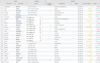
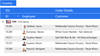
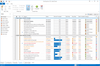
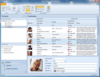
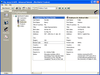
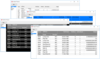
Screenshot Preview

VIBlend Data Grid for Windows Forms

by VIBlend - 상품타입: Component / .NET WinForms

주의 : 별도의 안내가 없는 경우에는 영어제품 입니다.

*

Advanced hierarchical data grid component with powerful features and rich customization. VIBlend DataGrid for WinForms is easy to integrate and use regardless of whether you want to add functionality to an existing Windows Forms application or planning to start your next great project. DataGrid is ideal for building data-driven applications. It supports advanced data bindings to multiple data source types. You can visualize a database table, bind to a generic collection or populate the grid's content through APIs without using any data binding. You can also create Pivot Tables with multi-level hierarchies on rows and columns, and multiple value (fact) fields.

$195.02

일반 적인 소비자 가격은 하기에 표시되어 있습니다. 고객님의 할인가격은 표시 하시려면 로그인 해주시기 바랍니다.

통화 선택 표시하고 있습니다. 전체 가격 | 리뉴얼 가격

VIBlend Data Grid 8.0.0 for Windows Forms and 1 Year subscription   *

주문 $ 195.02 1 Developer License - includes 1 year Subscription (Technical support and free upgrades)  * 다운로드 (28.5 MB)
주문 $ 175.52 2-3 Developer License, price per developer - includes 1 year Subscription (Technical support and free upgrades)  * 다운로드 (28.5 MB)
주문 $ 165.77 3-4 Developer License, price per developer - includes 1 year Subscription (Technical support and free upgrades)  * 다운로드 (28.5 MB)
주문 $ 146.26 4-10 Developer License, price per developer - includes 1 year Subscription (Technical support and free upgrades)  * 다운로드 (28.5 MB)
주문 $ 126.76 11-49 Developer License, price per developer - includes 1 year Subscription (Technical support and free upgrades)  * 다운로드 (28.5 MB)
주문 $ 107.26 50+ Developer License, price per developer - includes 1 year Subscription (Technical support and free upgrades)  * 다운로드 (28.5 MB)

VIBlend Data Grid 8.0.0 for Windows Forms Subscription Renewal Licenses   *

주문 $ 97.51 1 Developer Renewal License - extends 1 year Subscription (Technical support and free upgrades)  * 확인 다운로드 (124 KB)
주문 $ 87.76 2-3 Developer Renewal License, price per developer - extends 1 year Subscription (Technical support and free upgrades)  * 확인 다운로드 (124 KB)
주문 $ 82.89 3-4 Developer Renewal License, price per developer - extends 1 year Subscription (Technical support and free upgrades)  * 확인 다운로드 (124 KB)
주문 $ 73.14 4-10 Developer Renewal License, price per developer - extends 1 year Subscription (Technical support and free upgrades)  * 확인 다운로드 (124 KB)
주문 $ 63.39 11-49 Developer Renewal License, price per developer - extends 1 year Subscription (Technical support and free upgrades)  * 확인 다운로드 (124 KB)
주문 $ 53.64 50+ Developer Renewal License, price per developer - extends 1 year Subscription (Technical support and free upgrades)  * 확인 다운로드 (124 KB)

가격에는 ComponentSource의 기술지원 요금이 포함되어 있습니다. 또한 다운로드 판매를 하고 있는 상품의 대부분은 온라인 백업요금이 포함되어 있어서 구입날로부터 30일 이내에 새로운 버전이 발매된 경우 무료로 업그레이드해 드리고 있습니다.  모든 주문에 대해서 당사표준 계약조건 반품조건 의 내용이 적용됩니다. 다음의 경우,고객 서비스로로 연락 주시기 바랍니다. (대량의 라이센스나 구 버전 등의 라이센스 옵션이 필요한 경우)

일반 적인 소비자 가격은 상기에 표시되어 있습니다. 고객님의 할인가격은 표시 하시려면 로그인 해주시기 바랍니다.

 *

What's New in VIBlend DataGridView 8.0

  • Added: Metro Blue Theme
  • Added: Metro Green Theme
  • Added: Metro Red Theme
  • Added: DataGridView ColorPickerEditor
  • Improved: Help Documentation
  • Improved: DataGridView Export to Excel

What's New in VIBlend DataGridView 6.0

  • Added data binding using Indexed properties to DataGridView.
  • Added checkbox filtering to DataGridView.
  • Added new case sensitive filtering comparison operators to DataGridView.
  • Added support for Totals and Sub Totals to DataGridView.
  • Added currency, percentage, fixed-point and number editors to DataGridView.
  • Added DataGridView navigation with Home, End, PageUp, PageDown keys.
  • Added ability to set a custom theme to the DataGridView CheckBoxEditor.
  • Added ThreeState mode to DataGridView CheckBoxEditor
  • Improved DataGridView Localization

What's New in VIBlend DataGridView 4.7.0

  • Major update of the Help Documentation
  • New How-To Tutorials
  • New VS 2010 Examples projects
  • New Examples
  • Various fixes and improvement

What's New in VIBlend DataGrid for WinForms 4.6.0

  • Added support for Visual Studio 2010
  • DataGridView changes - In this version VIBlend extended the HierarhcyItem mouse click events. Previously, the grid was raising only the ItemClick and ItemDoubleClick events.

These two events are replaced by the following set of events:

  • HierarchyItemMouseUp
  • HierarchyItemMouseDown
  • HierarchyItemMouseClick
  • HierarchyItemMouseDoubleClick

VIBlend also added several improvements in the in-place cell editors' infrastructure. Specifically we added the following activation and deactivation events:

  • Click on selected cell (MOUSE_CLICK_SELECTED_CELL)
  • Enter key activation (KEY_PRESS_ENTER
  • Esc key deactivation (KEY_PRESS_ESC)

The default activation and deactivation flags for the built-in cell editors where modified to use the new activation events.

Please, note that these are breaking changes. If you are using an earlier version of VIBlend Controls for Windows Forms you will have to make minor changes to your code.

New in version 4.6 are the HierarchyItems and Cells selection changed events:

  • DataGridView.HierarchyItemSelectionChanged
  • DataGridView.CellSelectionChanged

 *

VIBlend DataGrid for WinForms Features:

  • Visual styles, Themes and Animations
  • Office 2007 Style Themes
  • Comprehensive Hierarchical data visualization
  • Hierarchies on Rows and on Columns
  • Sorting
  • Filtering
  • Data Binding to multiple data source types
  • Virtual Mode
  • Keyboard navigation
  • Tooltips
  • Cell Types & Cell Editors
  • Cell styles, Properties and Formatting
  • Cells Conditional Formatting
  • Cells Merge
  • Nested grids
  • Drag & Drop
  • Fixed Hierarchies
  • Fixed Items (fixed rows & fixed columns)
  • Pivot Tables support
  • Built-in data aggregation functions
  • Export to Microsoft Excel 2003 & 2007

Themes - VIBlend DataGrid for WinForms ships with a set of professionally designed themes. In addition, designing your own theme has never been easier. Each theme is stored in XML format which makes it easy to customize and distribute.

Multi-Level Hierarchies on Rows and Columns - DataGrid is one of the few components on the market which comes with full support of hierarchies on both Rows and Columns. DataGrid can handle hundreds of thousands of Items on rows and columns, and Hierarchies can be up to 1024 nodes deep. You can build hierarchies through databinding, design time or programmatically. A rich set of APIs provides unprecedented fine grain control at runtime.

Fixed Hierarchies (Headers) - DataGrid allows you to set the Columns, and the Rows Hierarchies as Fixed. A Fixed hierarchy is not affected by the position of the respective scrollbar. For example, if the Columns Hierarchy is fixed, and the user moves the vertical scrollbar, all rows and the respective grid cells will be scrolled. However, the Columns hierarchy will stay at its original position. This feature, is very useful when working with large amounts of data.

Fixed Items (Fixed Rows & Fixed Columns) - In addition to fixed hierarchies, DataGrid allows you to designate some hierarchy items (rows and/or columns) as fixed. Fixed items are individual rows or columns that are not scrollable. They are extremely useful when you have a larger number of rows or columns, and visual comparison between certain rows and columns is desired.

Sorting by Rows or Columns - DataGrid provides built-in sorting capabilities. The sorting works in both bound and unbound mode. You can sort by columns, and by rows. Each column and row has a Sorting property that allows you to enable or disable the sorting functionality. In addition, DataGrid keeps track on the original sort order, and you can always see the data in original (unsorted) order. The sorting algorithm automatically detects if you are sorting numbers or text data, and applies a proper comparison. In addition, the sorting APIs are extensible, and allow you to plug-in your own sorting comparer.

Filtering - DataGrid ships with an advanced, and extensible filtering framework. The filtering functionality works in both bound and unbound mode, and you can filter by any column or row. DataGrid provides built-in filters, and filter expression definition UI for the most common numerical and text data types. Extensible APIs allow you to build your own filters, and even complicated filtering expressions, for any custom data type.

Header Items Drag & Drop - Drag & Drop operations on Row and Column header items is fully supported. You can easily enable or disable drag & drop and control the runtime behavior through a set of events.

Customizable Grid Cells - DataGrid ships with built-in editors for several grid cell types: simple cell, editable text field, combobox, date time, checkbox. In addition, you can add images, change fonts and colors, handle navigation events, and more.

Header Items Customization - DataGrid allows you to customize almost every visual aspect of a Header Item. You can add images, change alignment, fonts, colors, override the theme styles and more.

Cell Images - You can create a great looking grid view with cell images, editable fields, animations and themes entirely through a visual designer, and with minimal or no programming.

Grid Cells Conditional Formatting - DataGrid allows you to define named groups of grid cells, rows and/or columns, and apply conditional formatting to an entire group. You can define unlimited number of groups. DataGrid ships with eight build-in conditional formatting color scales. The programming model is very flexible and extensible. It allows you to create your own color scales and formatting rules, and apply them to various cell and item groups.


주의

제품 리뷰의 한국어 번역이 완료되지 않는 제품은 Google통역 서비스와 연동되어 표시되어 있습니다.통역 기계에 의한 자동 번역인 관계로 한국어 표기가 조금 부자연 스러운 점 양해 바랍니다.
에서 제공
FireFox와 Opera에서는 Flash가 필요합니다.

상품검색

검색어를 입력해주세요:

Quick 링크

개발처/발매처

주요 카테고리

관련 상품

관련 카테고리

ComponentSource에서 구입하는 이유?

ComponentSource는 세계 1,000,000명 이상의 개발자에게 각종 글로벌 서비스를 제공합니다.

상세 | About Us