by JetBrains - 상품타입: 어프리케이션
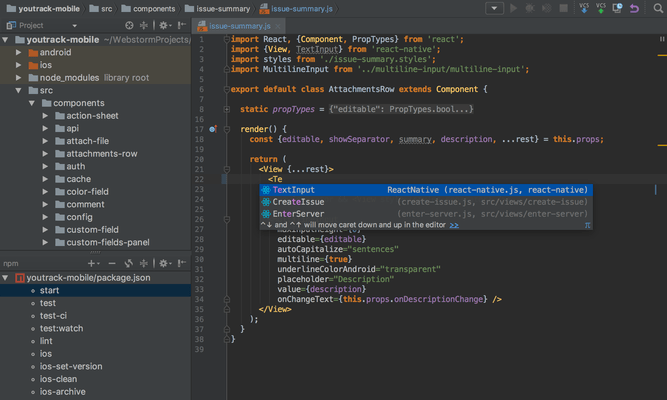
Professional IDE (Integrated Development Environment) for Web developers. WebStorm helps you to easily create Web sites by letting you edit HTML, CSS and JavaScript, navigate through files easily and use auto completion for everything in your code. WebStorm also notifies you about code problems on the fly and easily handles complicated languages mixtures e.g. HTML markup or SQL inside a JavaScript. WebStorm tracks any changes made to your source files, protecting you from any accidental losses or modifications, even if made by other applications. At any time you can inspect the history of either a particular file or directory and rollback to any of its previous versions with WebStorm. WebStorm can also set version labels.
일반 적인 소비자 가격은 하기에 표시되어 있습니다. 고객님의 할인가격은 표시 하시려면 로그인 해주시기 바랍니다.
| 주문 | $ 48.02 | 1-9 Personal User License - price per license - includes one year of free product upgrades (for individual developers purchasing the license with their own funds and for their personal use) * 메이커 제품 번호: WS001NSV03 |
다운로드 (279.6 MB) | |
| 주문 | $ 47.53 | 10-19 Personal User License - price per license - includes one year of free product upgrades (for individual developers purchasing the license with their own funds and for their personal use) * 메이커 제품 번호: WS001NSV03 |
다운로드 (279.6 MB) | |
| 주문 | $ 47.04 | 20-49 Personal User License - price per license - includes one year of free product upgrades (for individual developers purchasing the license with their own funds and for their personal use) * 메이커 제품 번호: WS001NSV03 |
다운로드 (279.6 MB) |
| 주문 | $ 97.02 | 1-9 Commercial User License - price per license - includes one year of free product upgrades * 메이커 제품 번호: WS000NSV03 |
다운로드 (279.6 MB) | |
| 주문 | $ 96.03 | 10-19 Commercial User License - price per license - includes one year of free product upgrades * 메이커 제품 번호: WS000NSV03 |
다운로드 (279.6 MB) | |
| 주문 | $ 95.04 | 20-49 Commercial User License - price per license - includes one year of free product upgrades * 메이커 제품 번호: WS000NSV03 |
다운로드 (279.6 MB) |
| 주문 | $ 28.42 | 1-9 Personal Subscription Renewal - price per license - one year of free product upgrades (for individual developers purchasing the license with their own funds and for their personal use) * 메이커 제품 번호: WS001RS |
확인 | 다운로드 (279.6 MB) |
| 주문 | $ 28.42 | 10-19 Personal Subscription Renewal - price per license - one year of free product upgrades (for individual developers purchasing the license with their own funds and for their personal use) * 메이커 제품 번호: WS001RS |
확인 | 다운로드 (279.6 MB) |
| 주문 | $ 28.42 | 20-49 Personal Subscription Renewal - price per license - one year of free product upgrades (for individual developers purchasing the license with their own funds and for their personal use) * 메이커 제품 번호: WS001RS |
확인 | 다운로드 (279.6 MB) |
| 주문 | $ 48.02 | 1-9 Commercial Subscription Renewal - price per license - one year of free product upgrades * 메이커 제품 번호: WS000RS |
확인 | 다운로드 (279.6 MB) |
| 주문 | $ 48.02 | 10-19 Commercial Subscription Renewal - price per license - one year of free product upgrades * 메이커 제품 번호: WS000RS |
확인 | 다운로드 (279.6 MB) |
| 주문 | $ 48.02 | 20-49 Commercial Subscription Renewal - price per license - one year of free product upgrades * 메이커 제품 번호: WS000RS |
확인 | 다운로드 (279.6 MB) |
가격에는 ComponentSource의 기술지원 요금이 포함되어 있습니다. 또한 다운로드 판매를 하고 있는 상품의 대부분은 온라인 백업요금이 포함되어 있어서 구입날로부터 30일 이내에 새로운 버전이 발매된 경우 무료로 업그레이드해 드리고 있습니다. 모든 주문에 대해서 당사표준 계약조건 및 반품조건 의 내용이 적용됩니다. 다음의 경우,고객 서비스로로 연락 주시기 바랍니다. (대량의 라이센스나 구 버전 등의 라이센스 옵션이 필요한 경우)
일반 적인 소비자 가격은 상기에 표시되어 있습니다. 고객님의 할인가격은 표시 하시려면 로그인 해주시기 바랍니다.
What's new in WebStorm V3.0?
What's new in WebStorm V2.0?
HTML/HTML5/CSS
DOM- and Schema-Based Code Completion - Based on its deep knowledge of HTML/XHTML and XML code, WebStorm is capable of completing:
Validation and Quick-Fixes - WebStorm detects and suggests auto-fixes for such problems as:
Whenever you see a bulb, hit Alt+Enter to see what WebStorm suggests
Show Content - Quick Definition Lookup on a CSS ID immediately shows a popup displaying the actual styles defined for this particular ID; when invoked on an image file reference, you will see an image preview. This works both in code and in completions lists.
Zen Coding - WebStorm allows you to use the power and speed of Zen coding. All abbreviations are available for creating new content and for wrapping an existing structure. Having difficulty understanding where the styles come from for a particular tag in your page? Right-click it and choose Show Applied Styles for Tag. This command opens a tree-view of all styles that are applied to the tag by CSS, with all possible overrides.
Extract Embedded Styles - Allows you to clean your HTML code by moving styles embedded inside tags to either the current file <style> section or to a linked external .css file. Simply invoke 'Extract Embedded CSS' quick-fix, specify CSS selector and the destination for the new CSS class.
JavaScript
DOM-Based, Browser-Specific Completion - JavaScript code completion for keywords, labels, variables, parameters and functions is DOM-based and supports popular browsers specifics (IE, Firefox, etc.) The completion is available for both standard and user-defined functions in *.js files, HTML event handlers and everywhere else where appropriate.
Code Navigation and Usage Search - Numerous code navigation and usage search options:
JavaScript Refactoring
Refactoring capabilities provided for JavaScript allow you to easily modify the code structure as well as undo the modifications. Some refactorings available for JavaScript code and *.js files are:
Code Inspections and Quick-Fixes - To ensure better code quality, JetBrains WebStorm catches common errors in your JavaScript code on the fly and offers quick-fixes for them.
JavaScript Debugger Based on Mozilla - With JetBrains WebStorm you can debug JavaScript code utilizing the complete range of features:
Extended Frameworks Support - The following extended JavaScript frameworks are supported: JQuery, YUI, Prototype, DoJo, MoTools, Qooxdoo, and Bindows.
Some specific features include:
More Than Code
Batch Code Analysis - No need to click through all the files or deploy to a server to spot errors and warnings. Start Code Analysis for the whole source tree, select Inspections to run, and see all results in a single view.
Language Mixing/Injection - Support for any "outer" and "inner" language in your PHP code - enjoy full coding assistance for CSS, JavaScript, SQL, etc. outside of php code blocks and inside php string literals.
Spellchecker - Integrated spellchecker verifies texts in tags, code strings and comments to avoid misspellings and typos on your web pages. To ensure better code readability even variable names, CSS classes and IDs are spell-checked. To configure spellchecker specify the options for 'Spelling' inspection in Inspections settings.
Smart Environment
FTP and Remote Files Syncronization - Open files from a remote host, FTP, or a mounted network drive using simple configuration and an intuitive user interface. Edit project files locally and deploy back to a remote server using automatic synchronization on file save or on demand.
Version Control Systems Integration - WebStorm supports most popular Version Control Systems:
All the tedious tasks (adding, removing, deleting files) are performed automatically. A built-in visual merge tool resolves all conflicts in a quick and intuitive manner. The changes made locally are highlighted as you type in the editor gutter, providing intuitive navigation and a 2-click rollback for individual changes.
The following features are available no matter what VCS you use:
에서 제공