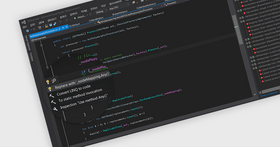
Screenshot Preview

WebStorm - 概要

經 JetBrains - 產品類型: 應用程式

概要

 *

WebStorm by JetBrains

URLs: webstorm, jetbrains

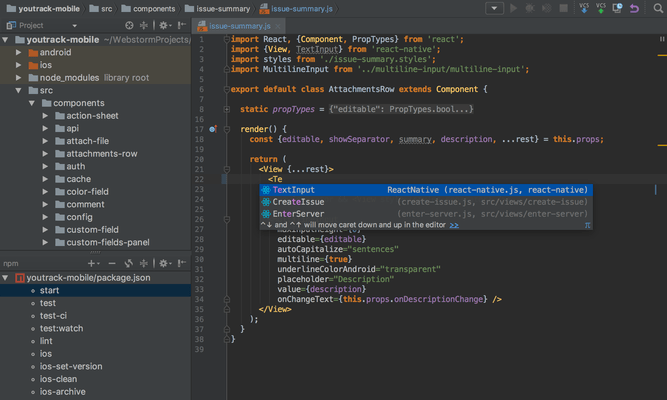
Professional IDE (Integrated Development Environment) for Web developers. WebStorm helps you to easily create Web sites by letting you edit HTML, CSS and JavaScript, navigate through files easily and use auto completion for everything in your code. WebStorm also notifies you about code problems on the fly and easily handles complicated languages mixtures e.g. HTML markup or SQL inside a JavaScript. WebStorm tracks any changes made to your source files, protecting you from any accidental losses or modifications, even if made by other applications. At any time you can inspect the history of either a particular file or directory and rollback to any of its previous versions with WebStorm. WebStorm can also set version labels.

HTML/HTML5/CSS

DOM- and Schema-Based Code Completion - Based on its deep knowledge of HTML/XHTML and XML code, WebStorm is capable of completing:

styles

file references

tag names

closing tags

attributes

In CSS, code completion works for:

classes

HTML IDs

keywords

values

properties

Validation and Quick-Fixes - WebStorm detects and suggests auto-fixes for such problems as:

invalid CSS selector format

invalid CSS properties

unused CSS class definitions

invalid local anchors and more...

missing required attributes

invalid attributes or illegal values

Wrong references to files in links

Duplicate attributes

Whenever you see a bulb, hit Alt+Enter to see what WebStorm suggests

Show Content - Quick Definition Lookup on a CSS ID immediately shows a popup displaying the actual styles defined for this particular ID; when invoked on an image file reference, you will see an image preview. This works both in code and in completions lists.

Zen Coding - WebStorm allows you to use the power and speed of Zen coding. All abbreviations are available for creating new content and for wrapping an existing structure. Having difficulty understanding where the styles come from for a particular tag in your page? Right-click it and choose Show Applied Styles for Tag. This command opens a tree-view of all styles that are applied to the tag by CSS, with all possible overrides.

Extract Embedded Styles - Allows you to clean your HTML code by moving styles embedded inside tags to either the current file <style> section or to a linked external .css file. Simply invoke 'Extract Embedded CSS' quick-fix, specify CSS selector and the destination for the new CSS class.

JavaScript

DOM-Based, Browser-Specific Completion - JavaScript code completion for keywords, labels, variables, parameters and functions is DOM-based and supports popular browsers specifics (IE, Firefox, etc.) The completion is available for both standard and user-defined functions in *.js files, HTML event handlers and everywhere else where appropriate.

Code Navigation and Usage Search - Numerous code navigation and usage search options:

Go to declaration - navigates to where the function, variable or label in question is declared with a simple hotkey or Ctrl+Click.

Go to symbol - navigates to any symbol in project code using search patterns, including asterisk (*) or CamelHump abbreviations.

Find/Highlight Usages - locates other places in your entire project where a JavaScript symbol, label or file is used, with quick preview and instant navigation to the actual usages.

JavaScript Refactoring

Refactoring capabilities provided for JavaScript allow you to easily modify the code structure as well as undo the modifications. Some refactorings available for JavaScript code and *.js files are:

Move/Copy

Safe Delete

Extract embedded script into file

Rename

Extract Variable/Function

Inline Variable/Function

Code Inspections and Quick-Fixes - To ensure better code quality, JetBrains WebStorm catches common errors in your JavaScript code on the fly and offers quick-fixes for them.

JavaScript Debugger Based on Mozilla - With JetBrains WebStorm you can debug JavaScript code utilizing the complete range of features:

Breakpoints in HTML and JavaScript

Customizable breakpoint properties: suspend mode, conditions, pass count and more

Frames, variables and watches views in JavaScript debugger UI

Runtime evaluation of JavaScript expressions

Extended Frameworks Support - The following extended JavaScript frameworks are supported: JQuery, YUI, Prototype, DoJo, MoTools, Qooxdoo, and Bindows.

Some specific features include:

Code completion for every framework

JSDoc and DoJo style type annotations support for better code completion and parameter type information

Quick Documentation lookup for JSDoc and DoJo style commands

More Than Code

Batch Code Analysis - No need to click through all the files or deploy to a server to spot errors and warnings. Start Code Analysis for the whole source tree, select Inspections to run, and see all results in a single view.

Language Mixing/Injection - Support for any "outer" and "inner" language in your PHP code - enjoy full coding assistance for CSS, JavaScript, SQL, etc. outside of php code blocks and inside php string literals.

Spellchecker - Integrated spellchecker verifies texts in tags, code strings and comments to avoid misspellings and typos on your web pages. To ensure better code readability even variable names, CSS classes and IDs are spell-checked. To configure spellchecker specify the options for 'Spelling' inspection in Inspections settings.

Smart Environment

FTP and Remote Files Syncronization - Open files from a remote host, FTP, or a mounted network drive using simple configuration and an intuitive user interface. Edit project files locally and deploy back to a remote server using automatic synchronization on file save or on demand.

Version Control Systems Integration - WebStorm supports most popular Version Control Systems:

Subversion

Perforce

Git

CVS

All the tedious tasks (adding, removing, deleting files) are performed automatically. A built-in visual merge tool resolves all conflicts in a quick and intuitive manner. The changes made locally are highlighted as you type in the editor gutter, providing intuitive navigation and a 2-click rollback for individual changes.

The following features are available no matter what VCS you use:

Integrated changelists - group your changes into multiple change lists for better ogranisation

Shelved changes - set aside some changes to restore them later on

Repository Changes view - see what has been committed by other team members

Incoming Changes view - see the code changes not yet integrated into your local copy

Outdated Changes Notification - get warned that a file you are working with has been changed after your last sync.

Local History - WebStorm tracks any changes made to your source files, protecting you from any accidental losses or modifications, even if made by other applications. At any time you can inspect the history of either a particular file or directory and rollback to any of its previous versions. You can also set version labels.

What's new in WebStorm V3.0?

Node.JS - Debug and validate server-side JavaScript (Node.JS apps)

JSLint - JavaScript code quality tool integrated in the IDE. Checks your code as you edit it

Smart Duplicated Code Detector - For JavaScript, CSS and HTML

CoffeeScript - CoffeeScript is a programming language that compiles to JavaScript and enhances its brevity and readability, while also adding some sophisticated features like array comprehension and pattern matching.

JavaScript Unit Testing - Filter and view test results, navigate from results to source code

FTP/SFTP Sync Improved - Sync with Local / Sync with Deployed context menus added in Project view and Remote Host view.

XSLT - XSLT 2.0 support enhanced with XSLT Debugger

What's new in WebStorm V2.0?

New JavaScript specification - EcmaScript 5 - Recently JavaScript specification was incrementally advanced with a common coding pitfalls prevention mode (aka "strict mode"). WebStorm will help you use these new productive features. If the IDE finds a "use strict" statement in your JavaScript file, the editor will mark as errors all accesses of undefined global variables, duplicated parameters / property names, and usages of the delete operator for unqualified variables.

Organizer for JavaScript libraries - To help you organize your work with JavaScript Libraries, WebStorm now includes a simple-to-use libraries organizer.

SASS 3 Support - Sass is an extension of CSS3, adding nested rules, variables, mixins, selector inheritance, and more. It's translated to well-formatted, standard CSS using PhpStorm. WebStorm supports Find usages and rename for mixins and SCSS variables, as well as inspections for unresolved mixins and variables.

Mercurial Support - Pulling and pushing changes from IDE, visual merging.

Leaner CSS - LESS provides extension to CSS with variables, mixins, operations and nested rules, and uses CSS syntax.

Relax NG for XML - Relax NG is an alternative to W3C XML Schema language, which is said to be very complex and hard to learn/use/maintain. WebStorm provides completion and validation of XML documents associated with Relax NG schemas. It also allows editing Relax NG files in XML with on-the-fly error checking, completion, documentation lookup and more.

New Git Log UI - Now you will be able to filter changes by branch, tag or developer, highlight changes made in a specific folder, or show differences right in the IDE.

GitHub Integration - Now you'll be able to check out your existing GitHub repository right from the IDE and auto-open it as a project.

Professional IDE (Integrated Development Environment) for Web developers.

Pricing: WebStorm V3.0 Personal Licenses 1-9 Personal User License - price per license - includes one year of free product upgrades (for individual developers purchasing the license with their own funds and for their personal use), WebStorm V3.0 Personal Licenses 10-19 Personal User License - price per license - includes one year of free product upgrades (for individual developers purchasing the license with their own funds and for their personal use), WebStorm V3.0 Personal Licenses 20-49 Personal User License - price per license - includes one year of free product upgrades (for individual developers purchasing the license with their own funds and for their personal use), WebStorm V3.0 Commercial Licenses 1-9 Commercial User License - price per license - includes one year of free product upgrades, WebStorm V3.0 Commercial Licenses 10-19 Commercial User License - price per license - includes one year of free product upgrades, WebStorm V3.0 Commercial Licenses 20-49 Commercial User License - price per license - includes one year of free product upgrades, WebStorm Renewals Personal Licenses 1-9 Personal Subscription Renewal - price per license - one year of free product upgrades (for individual developers purchasing the license with their own funds and for their personal use), WebStorm Renewals Personal Licenses 10-19 Personal Subscription Renewal - price per license - one year of free product upgrades (for individual developers purchasing the license with their own funds and for their personal use), WebStorm Renewals Personal Licenses 20-49 Personal Subscription Renewal - price per license - one year of free product upgrades (for individual developers purchasing the license with their own funds and for their personal use), WebStorm Renewals Commercial Licenses 1-9 Commercial Subscription Renewal - price per license - one year of free product upgrades, WebStorm Renewals Commercial Licenses 10-19 Commercial Subscription Renewal - price per license - one year of free product upgrades, WebStorm Renewals Commercial Licenses 20-49 Commercial Subscription Renewal - price per license - one year of free product upgrades

Evals & Downloads: Read the WebStorm License Agreement, Download the WebStorm Mac V3.0 evaluation on to your computer - Expires After 45 Days, Download the WebStorm Linux V3.0 evaluation on to your computer - Expires After 45 Days, Download the WebStorm Windows V3.0 evaluation on to your computer - Expires After 45 Days

Operating System for Deployment: Windows 7, Windows Vista, Windows XP, Red Hat Enterprise Linux 5.x, Red Hat Enterprise Linux 4.x, RedHat Linux 9.x, RedHat Linux 8.x, SUSE Linux 11, SUSE Linux 10.x, Ubuntu 10.x, Ubuntu 9.x, Mac OS X

Architecture of Product: 32Bit

Product Type: Application

Keywords: web storm, webstorm, jetbrains webstorm, webstorm ide, webstorm 1.0, webstorm distributor, webstorm reseller, webstorm jetbrains, webstorm user license, webstorm developer license, webstorm commercial license, webstorm personal license, webstorm licensing

jetbrains, jet brains, intellij, intellij idea, resharper, teamcity, team city, rubymine, ruby mine, youtrack, dottrace, dot trace, jetbrains idea, intellij download

Development

HTML Editing Edit editor

Part numbers: PC-535618-426832 535618-426832 PC-535618-426834 535618-426834 PC-535618-426836 535618-426836 PC-535618-426838 535618-426838 PC-535618-426840 535618-426840 PC-535618-426842 535618-426842 PC-535618-431839 535618-431839 PC-535618-431840 535618-431840 PC-535618-431841 535618-431841 PC-535618-431842 535618-431842 PC-535618-431843 535618-431843 PC-535618-431844 535618-431844

Mfr. Part No: WS000NSV03 WS000RS WS001NSV03 WS001RS

注意

還未完成翻譯的產品說明, 我們提供了Google 翻譯的連結方便您使用. 但請注意, 自動翻譯有時候可能會有翻譯錯誤.
由「」技術提供
在Firefox 和Opera 需要Flash.

產品搜索

輸入搜索詞:

快速連結

發佈者

首要類別

相關產品

相關類別

為什麼從ComponentSource購買?

ComponentSource 提供獨特的全球國際服務, 在世界各地共有超過1,000,000 開發者客戶.

更多訊息 | 關於我們

獎勵 獎勵