WpfDiagram

by MindFusion Group - Product Type: Component / .NET WPF / 100% Managed Code / Source Code

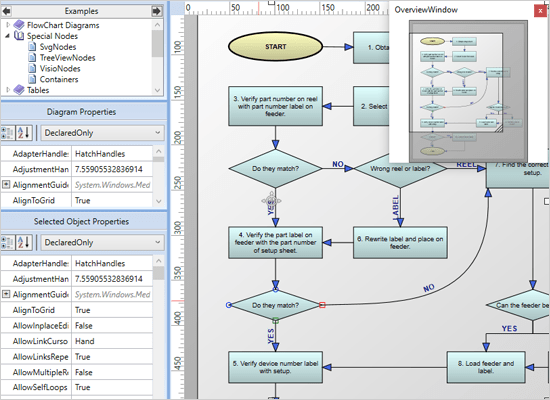
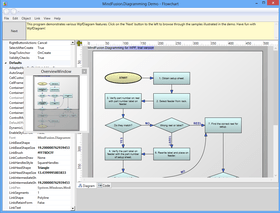
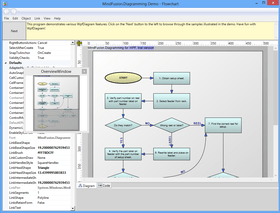
Screenshot of WpfDiagram - .NET - V2.0Add advanced diagramming capabilities to your WPF applications. WpfDiagram is a WPF component that draws all types of flow diagrams like entity-relationship (ER), workflow, algorithms, flowcharts, IVR systems, database charts object hierarchies, relationships and many more. WpfDiagram offers numerous appearance properties, events, save/load options and automatic layouts. WpfDiagram can also draw tables, has many predefined shapes, scroll, zoom, undo/redo capabilities and many more.Visual Studio 2008 compatible (VS2008). C# Source code available.

From
914,200₩
Price in

Our regular prices are shown below. Please logon to see your discounted prices.

WpfDiagram V2.0

Add to Cart ₩ 914,200 1 Developer License (12 months of free upgrades included) Download (11.0 MB)
Add to Cart ₩ 1,676,000 4 Developer Team License (12 months of free upgrades included) Download (11.0 MB)
Add to Cart ₩ 2,894,900 8 Developer Team License (12 months of free upgrades included) Download (11.0 MB)
Add to Cart ₩ 5,332,700 1 Site Wide Subscription License (Allows Unlimited Developers at a Single Physical Address) (12 months of free upgrades included) Download (11.0 MB)
Add to Cart ₩ 9,675,100 1 Enterprise Subscription License (Unlimited number of developers of an enterprise at all its physical addresses) (12 months of free upgrades included) Download (11.0 MB)

WpfDiagram V2.0 with Source Code

Add to Cart ₩ 1,752,200 1 Developer License with Source Code (12 months of free upgrades included) Download (11.7 MB)
Add to Cart ₩ 2,514,000 4 Developer License with Source Code (12 months of free upgrades included) Download (11.7 MB)
Add to Cart ₩ 3,732,900 8 Developer License with Source Code (12 months of free upgrades included) Download (11.7 MB)
Add to Cart ₩ 6,170,700 1 Site Wide License (Allows Unlimited Developers at a Single Physical Address) with Source Code (12 months of free upgrades included) Download (11.7 MB)
Add to Cart ₩ 10,513,100 1 Enterprise Subscription License (Unlimited number of developers of an enterprise at all its physical addresses) with Source Code (12 months of free upgrades included) Download (11.7 MB)

WpfDiagram - Upgrade / Subscription Renewal

Add to Cart ₩ 609,500 1 Upgrade / Subscription Renewal (12 months subscription, for all license types) Verify Download (29 KB)

This product is available on the GSA Pricing ScheduleOur prices include ComponentSource technical support and, for most downloadable products, an online backup and a FREE upgrade to the new version if it is released within 30 days of your purchase.  All sales are made on our standard Terms and Conditions and subject to our Return Policy. Please contact us if you require any licensing option not listed above including volume licensing and previous versions.

Our regular prices are shown above. Please logon to see your discounted prices.

WpfDiagram features the latest generation WPF graphical presentation tools provided by the .NET platform. As a result the programming process has become easier and quicker, the final diagrams are more attractive and lively.

WpfDiagram Uses include:

  • workflow processes
  • object hierarchies and relationships
  • graphs and networks
  • entity-relationship / database charts
  • IVR systems
  • industrial automation processes,
  • genealogy trees
  • algorithms and flowcharts
  • organizational schemes
  • XML documents
  • classification hierarchies

WpfDiagram Main Features:

User Interaction

  • Several user interaction modes
  • Node modification constraints
  • Scrolling and zooming
  • Panning
  • Automatic scrolling while dragging objects with the mouse
  • Alignment to grid
  • Multiple selection
  • Tool-tips
  • Docking points can be defined for nodes
  • Mouse button mapping
  • Undo/Redo support
  • Copy and paste to/from Windows clipboard

Programming

  • Programmatic access to the diagram objects and selections
  • Numerous properties for customizing appearance and behavior
  • Numerous utility methods
  • Path finding and cycle detection
  • Rich event set

Store and retrieve diagrams into/from

  • Files on disk
  • .NET streams
  • ASCII strings
  • XML documents

Output

  • To the screen via Windows Presentation Foundation
  • Printing and print preview
  • To browser via the utility WebChart library
  • Create bitmap images
  • Create HTML image maps

Diagram Elements

  • Use any WPF UIElement as a diagram node
  • Control hosts allow using .NET controls as diagram nodes
  • 87 predefined node shapes
  • Tables with unlimited number of rows and columns
  • Merge of table cells
  • Custom diagram item types
  • Arrows can comprise multiple segments
  • Arrow segments can be straight lines or curves
  • Behavior
  • Tables can be scrolled
  • In-place text editing
  • Ability to set selection handles behaviour
  • Lock diagram elements
  • Expand / collapse of object hierarchies
  • Read-only mode supported
  • Dynamic positioning of arrows relative to linked nodes

Automatic Layout

  • Layered graph layout
  • AnnealLayout layout
  • Spring-Embedder graph layout
  • Radial layout
  • Directional tree layout
  • Grid layout
  • Orthogonal graph layout
  • Automatic arrow routing

Appearance

  • Various text alignment styles
  • Text can be laid-out in polygonal areas
  • Styled HTML-like text formatting
  • Different styles for visual indication of a selected object
  • Z-order
  • Nodes can display images and text
  • Customizable fonts and colors
  • Rich choice of pen and brush styles
  • Ability to define custom node shapes
  • User-assigned mouse cursors
  • Custom painting of nodes
  • Shadows
  • Arcs over link intersection points
  • Transparent nodes
  • Invisible nodes
  • Shape libraries

Behavior

  • Tables can be scrolled
  • In-place text editing
  • Ability to set selection handles behaviour
  • Lock diagram elements
  • Expand / collapse object hierarchies
  • Read-only mode supported
  • Dynamic positioning of arrows relative to linked nodes

Diagram Structure

  • Link nodes to nodes
  • Link table rows to table rows
  • Link table rows to nodes
  • Unconnected arrows

Hierarchical grouping

  • Attaching nodes to other nodes
  • Attaching nodes to arrow control points
  • Attaching nodes to arrow segments

Product Search

Enter search words:

Development Savings

Read our White Paper on
calculating ROI

Lines of Code: 150,000
Person Months: 150
Labor Cost: $750,000

Functions Required:

Effort per 1,000 LoC:

Labor Cost per Month:

Award