by MindFusion Group - Product Type: Component / .NET WPF / 100% Managed Code / Source Code
WpfDiagram by MindFusion Group
URLs: wpfdiagram, mindfusion
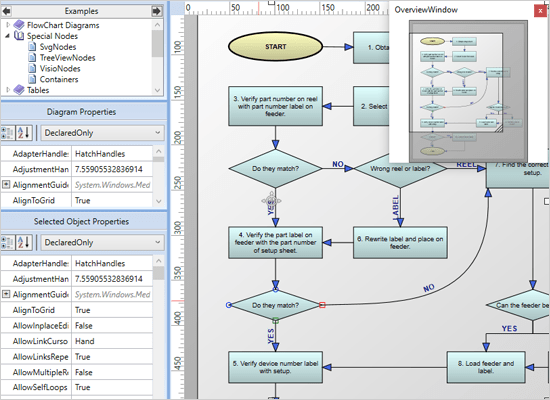
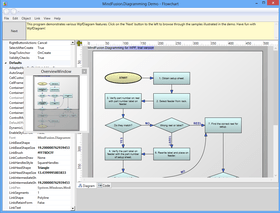
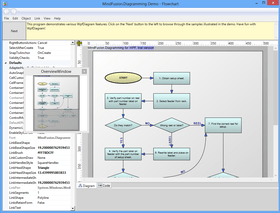
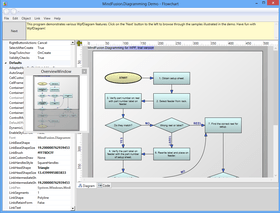
Add advanced diagramming capabilities to your WPF applications. WpfDiagram is a WPF component that draws all types of flow diagrams like entity-relationship (ER), workflow, algorithms, flowcharts, IVR systems, database charts object hierarchies, relationships and many more. WpfDiagram offers numerous appearance properties, events, save/load options and automatic layouts. WpfDiagram can also draw tables, has many predefined shapes, scroll, zoom, undo/redo capabilities and many more.WpfDiagram C# Source code available. Buy MindFusion WpfDiagram and obtain 12 months of free upgrades. MindFusion WpfDiagram renewals will extend your WpfDiagram subscription for another year. WpfDiagram Enterprise and WpfDiagram Site Licenses also available.
WpfDiagram features the latest generation WPF graphical presentation tools provided by the .NET platform. As a result the programming process has become easier and quicker, the final diagrams are more attractive and lively.
WpfDiagram Uses include:
workflow processes
object hierarchies and relationships
graphs and networks
entity-relationship / database charts
IVR systems
industrial automation processes,
genealogy trees
algorithms and flowcharts
organizational schemes
XML documents
classification hierarchies
WpfDiagram Main Features:
User Interaction
Several user interaction modes
Node modification constraints
Scrolling and zooming
Panning
Automatic scrolling while dragging objects with the mouse
Alignment to grid
Multiple selection
Tool-tips
Docking points can be defined for nodes
Mouse button mapping
Undo/Redo support
Copy and paste to/from Windows clipboard
Programming
Programmatic access to the diagram objects and selections
Numerous properties for customizing appearance and behavior
Numerous utility methods
Path finding and cycle detection
Rich event set
Store and retrieve diagrams into/from
Files on disk
.NET streams
ASCII strings
XML documents
Output
To the screen via Windows Presentation Foundation
Printing and print preview
To browser via the utility WebChart library
Create bitmap images
Create HTML image maps
Diagram Elements
Use any WPF UIElement as a diagram node
Control hosts allow using .NET controls as diagram nodes
87 predefined node shapes
Tables with unlimited number of rows and columns
Merge of table cells
Custom diagram item types
Arrows can comprise multiple segments
Arrow segments can be straight lines or curves
Behavior
Tables can be scrolled
In-place text editing
Ability to set selection handles behaviour
Lock diagram elements
Expand / collapse of object hierarchies
Read-only mode supported
Dynamic positioning of arrows relative to linked nodes
Automatic Layout
Layered graph layout
AnnealLayout layout
Spring-Embedder graph layout
Radial layout
Directional tree layout
Grid layout
Orthogonal graph layout
Automatic arrow routing
Appearance
Various text alignment styles
Text can be laid-out in polygonal areas
Styled HTML-like text formatting
Different styles for visual indication of a selected object
Z-order
Nodes can display images and text
Customizable fonts and colors
Rich choice of pen and brush styles
Ability to define custom node shapes
User-assigned mouse cursors
Custom painting of nodes
Shadows
Arcs over link intersection points
Transparent nodes
Invisible nodes
Shape libraries
Behavior
Tables can be scrolled
In-place text editing
Ability to set selection handles behaviour
Lock diagram elements
Expand / collapse object hierarchies
Read-only mode supported
Dynamic positioning of arrows relative to linked nodes
Diagram Structure
Link nodes to nodes
Link table rows to table rows
Link table rows to nodes
Unconnected arrows
Hierarchical grouping
Attaching nodes to other nodes
Attaching nodes to arrow control points
Attaching nodes to arrow segments
What's new in WpfDiagram V3.01?
Preserve Order in Tree Layouts - A TreeLayout can keep the original geometric order of child nodes when arranging them under their parent. This can be used to arrange tree branches in a specific order by first positioning them in increasing horizontal or vertical positions.
Selection Improvements - Set Behavior to SelectOnly to let users select existing items, but not modify them or draw new ones.
What's new in WpfDiagram V3.0?
Visual Studio 2012 support.
Themes and theme editor.
Node effects.
Multi-page diagrams and tabbed views.
Multiple labels per link.
Layers and layer list-view control.
One-way graph layout.
Parallelization of layout algorithms.
Magnifier tool.
What's new in WpfDiagram V2.8.2?
Rotate attached nodes
SaveToXml method saves the definition of custom Shapes
If NegatedY is set, the vertical Ruler scale displays negated Y coordinates
In-place TextBox control wraps text to multiple lines by default
Diagram control automatically added to the Visual Studio toolbox by the installer
What's new in WpfDiagram V2.8?
Virtualize diagram items
Id property added to DiagramItem
FindLinkById and FindNodeById methods
Lane headers can be anchored to the top-left of the viewport
Improved path-finding for long links in QuickRouter
StartPoint and EndPoint properties added to DiagramLink
What's new in WpfDiagram V2.7?
Automatic node alignment - If AutoAlignNodes is enabled, the node currently being drawn or resized is aligned to another node so that a pair of their vertical or horizontal sides become collinear. To specify the maximal distance at which nodes are aligned, set the AutoAlignDistance property. The pair of aligned nodes is indicated visually by drawing an alignment guide using the pen assigned to AlignmentGuidePen.
Fractal tree layout - FractalLayout is a tree layout algorithm that places child nodes symmetrically around their parent node. Nodes at the lowest level are arranged directly in a circle around their parent. At the upper level, the already arranged nodes form branches that are arranged in a circle around the new parent node. The algorithm is recursively repeated till the highest level is reached. If nodes in the tree have a uniform number of children, the end result has a fractal-like appearance (subsets of the graph look like scaled-down copies of the whole graph). You can choose which node should be displayed at the center of the topmost circle by setting the Root property. If it is not specified, the algorithm automatically selects a root that leads to more balanced distribution of nodes.
Miscellaneous
Specify start and end nodes in LayeredLayout via the StartNode and EndNode properties.
GetAllIncomingLinks and GetAllOutgoingLinks methods added to DiagramNode.
Self-loop links that connect TableNode rows or TreeViewNode items are now routed around the node preserving their correct end points.
Links automatically align to the center of table rows or tree-view items when AutoSnapLinks is enabled.
Diagram.Viewport returns the currently visible region of the diagram.
Draw with the right or middle mouse button by setting RightButtonAction or MiddleButtonAction to Draw.
What's new in WpfDiagram V2.6?
CompositeLayout multi-level graph layout algorithm
Improved alignment in FlowchartLayout branches
OrthogonalLayout improved to create less link bends
CircularLayout can dynamically select appropriate radius
KeepLaneSizes property added to SwimlaneLayout
Support for resizing multiple nodes simultaneously
What's new in WpfDiagram V2.5.2?
Define node shapes using Visio-like shape formulas
Define node shapes through PathGeometry objects
Improved support for nodes with non-uniform size in SpringLayout
Improved symmetry in SpringLayout
SetZoomFactor zooms the diagram with specified pivot point
What's new in WpfDiagram V2.5.1?
Export diagrams to Visio XML Drawing format
Links snap to nearest node
Control length of U-bends in QuickRouter
InchDivisions property added to Ruler
Event for copying hosted controls to clipboard
What's new in WpfDiagram V2.5?
Swimlane layout
SwimlaneLayout can be used to arrange process diagrams in which nodes representing activities are placed in swimlanes representing resources. By default, the algorithm works with the diagram's LaneGrid, but its SwimlaneGrid property can be set to any class that implements ISwimlaneGrid. This allows applying the layout to a custom-drawn grid rendered through a custom control template, or one composed of locked background nodes.
CascadeLayout algorithm
CascadeLayout places nodes on a virtual grid and arranges links orthogonally, such that if the source graph is planar all links are guaranteed to have no more than two bends and will not intersect. By default the layout method arranges nodes in rows and link segments in columns; this can be changed by setting the Orientation property.
TriangularLayout algorithm
TriangularLayout places nodes on a virtual grid, such that if the source graph is planar, all links are guaranteed to have a single segment and not intersect. If the graph is not planar, its intersecting links can be optionally segmented and bended in order to improve readability. The layout method places the nodes from the external face on a triangle and recursively adds the rest of the nodes as vertices of internal triangles. As a result, it is very effective for near maximal-planar (a.k.a. triangular) graphs.
HierarchicalLayout algorithm
HierarchicalLayout places nodes on user-defined levels, such that if the source graph is level-planar, all links are guaranteed to have a single segment and not intersect. The layout method requires that for each node LayoutTraits contains a HierarchicalLayoutTraits.Level entry specifying the level, and no two connected nodes must be on the same level.
Miscellaneous
OrthogonalLayout results have been greatly improved for nonplanar and high vertex-degree graphs.
LinkType adds supports for Bezier links to SpringLayout.
The swimlane grid can be printed by setting the EnableLanes property of PrintOptions.
The text of lane headers can be edited by the user if LaneGrid.AllowInplaceEdit is enabled.
TextBrush has been moved to the base DiagramItem class and now it is a dependency property.
EnumAllCycles method added to PathFinder.
Table cells now derive their default text attributes from the CellTextStyle property.
What's new in WpfDiagram V2.4?
Templated Nodes
The TemplatedNode class represents nodes whose appearance is set through Xaml data templates. This class is useful mostly as a base type of custom nodes. However it is not abstract and can be used directly if the text -related properties defined in DiagramItem are sufficient for your purposes. The appearance of such nodes can be set through their Template property or the NodeTemplate property of the Diagram class.
WmfExporter component
The WmfExporter class creates a Windows Metafile (WMF) drawing from the content of a Diagram. The exporter enumerates all graphics primitives contained in the WPF visual tree and creates corresponding WMF records. This enables custom graphics and hosted controls to be rendered in WMF too.
What's new in WpfDiagram V2.3.3?
Export to SVG
The SvgExporter class creates a Scalable Vector Graphics (SVG) drawing from the content of a Diagram. The exporter enumerates all graphics primitives contained in the WPF visual tree and creates corresponding SVG elements. This enables custom graphics are hosted controls to be rendered in SVG too.
Other improvements in WpfDiagram V2.3.3:
If LayoutTraits[SpringLayoutTraits.Frozen] is set, SpringLayout ignores forces acting on a node but still consider the node's repulsion force on other nodes
The SerializeControl and DeserializeControl events let you save information for controls hosted in DiagramNodeAdapter objects
The AnimatedLayout sample project demonstrates how to use SpringLayout for animation and partial layout
What's new in WpfDiagram V2.3.2?
Support for .NET 4
The package now includes a .NET 4 version of the MindFusion.Diagramming assemblies, available in the VS2010 subfolder of the installation folder. These assemblies can also be used in applications that target the .NET 4 Client Profile. The VS2010 folder also includes sample projects for Visual Studio 2010. Version 3 of the .NET runtime is still supported.
Styling
This version enables styling of diagram items through the WPF styling system. Now DiagramItem provides a Style property, which can be set to an instance of the System.Windows.Style class. The style can contain setters for the Brush, Stroke*, Text* and Font* dependency properties that were introduced in the last release. Using the style's TargetType attribute it is also possible to define a global style in the window or application resource dictionaries for each type of node.
Other Improvements:
ContainerNode now provides an UpdateBounds overload that also includes links in the new node boundaries.
A new ZoomToRect overload can center the specified rectangle in the current viewport.
The MouseInputMode property of DiagramNodeAdapter specifies which control should process mouse input.
Fixed support for browser applications in the Internet zone.
What's new in WpfDiagram V2.3.1?
New properties for better integration with the WPF programming model: Font (replaced by FontFamily, FontSize, FontStretch, FontStyle, FontWeight), TextFormat (replaced by TextAlignment, TextVerticalAlignment, TextWrapping and TextTrimming), Pen (replaced by Stroke, StrokeThickness, StrokeDashStyle and various Stroke*Cap properties)
TextPadding specifies the padding of text within the text's bounding rectangle
OriginConnection and DestinationConnection properties added to DiagramLink
auto-scrolling in the Overview control has been improved
The Overview control can be scrolled programmatically using its ScrollTo method
ClipText property added to ShapeNode
GetNearestNode returns the node nearest to the specified point
SetBounds method can set a node's Bounds without changing the position of attached nodes
What's new in WpfDiagram V2.3?
Support for custom arrowheads.
Adjustment handles styling.
Granularity property added to QuickRouter.
MinimumNodeSize specifies the minimum size of nodes that can be set by the user interactively.
IntermediateShape arrowheads are now displayed for Bezier links too.
The DrawArrowhead method lets you render arrowhead shapes when custom-drawing.
What's new in WpfDiagram V2.2?
The TreeViewNode class represents nodes that can display hierarchical data
Added predefined shapes that implement the BPMN notation
FlowchartLayout recognizes program code -like patterns in the graph and arranges it as a flowchart
TopologicalLayout arranges a graph according to its topological ordering
A much faster link routing algorithm has been implemented
Behavior can be set to Pan to allow panning without holding down ALT
ShapeNode.ClipImage specifies whether the Image should be clipped
TableNode rows can be highlighted when clicked or by setting the HighlightedRow property
LinkHitDistance specifies the furthest distance from links that would be considered a hit
Ruler.NodesAligned event raised when the user aligns nodes using the alignment guide
DiagramNode.ReassignAnchorPoints distributes links evenly among the available anchor points
A new CreateImage overload allows exporting scaled images type of the Image property of nodes changed from BitmapSource to ImageSource
The GridColor property has been replaced by GridPen now the ItemAdded event is raised also when items are added programmatically
What's new in WpfDiagram V2.1.1?
DiagramView lets you display multiple views of a Diagram
Create organizational charts as in MS Office
TreeLayout can arrange full binary trees in a grid
SizeSyncMode sets how resizing a node reflects on its hosted UIElement
What's new in WpfDiagram V2.1?
OrthogonalLayout graph layout algorithm
CircularLayout graph layout algorithm
Support for resizable background lanes and grids
DisableMirroring constraint added to NodeConstraints
Margins property added to PdfExporter
Customizable title of the print preview window
LinkTextEdited event added
ContainerNode.UnfoldedSize property added
Add advanced diagramming capabilities to your WPF applications.
Pricing: WpfDiagram V3.01 1 Developer Subscription License (12 months of free upgrades included), WpfDiagram V3.01 4 Developer Team Subscription License (12 months of free upgrades included), WpfDiagram V3.01 8 Developer Team Subscription License (12 months of free upgrades included), WpfDiagram V3.01 1 Site Wide Subscription Subscription License (Allows Unlimited Developers at a Single Physical Address) (12 months of free upgrades included), WpfDiagram V3.01 1 Enterprise Subscription Subscription License (Unlimited number of developers of an enterprise at all its physical addresses) (12 months of free upgrades included), WpfDiagram V3.01 with Source Code 1 Developer Subscription License with Source Code (12 months of free upgrades included), WpfDiagram V3.01 with Source Code 4 Developer Subscription License with Source Code (12 months of free upgrades included), WpfDiagram V3.01 with Source Code 8 Developer Subscription License with Source Code (12 months of free upgrades included), WpfDiagram V3.01 with Source Code 1 Site Wide Subscription License (Allows Unlimited Developers at a Single Physical Address) with Source Code (12 months of free upgrades included), WpfDiagram V3.01 with Source Code 1 Enterprise Subscription Subscription License (Unlimited number of developers of an enterprise at all its physical addresses) with Source Code (12 months of free upgrades included), WpfDiagram Upgrade/1 Year Subscription Renewal 1 Developer Subscription Renewal License (12 months of free upgrades included), WpfDiagram Upgrade/1 Year Subscription Renewal 4 Developer Team Subscription Renewal License (12 months of free upgrades included), WpfDiagram Upgrade/1 Year Subscription Renewal 8 Developer Team Subscription Renewal License (12 months of free upgrades included), WpfDiagram Upgrade/1 Year Subscription Renewal 1 Site Wide Subscription Subscription Renewal License (Allows Unlimited Developers at a Single Physical Address) (12 months of free upgrades included), WpfDiagram Upgrade/1 Year Subscription Renewal 1 Enterprise Subscription Subscription Renewal License (Unlimited number of developers of an enterprise at all its physical addresses) (12 months of free upgrades included), WpfDiagram with Source Code Upgrade/1 Year Subscription Renewal 1 Developer Subscription Renewal License with Source Code (12 months of free upgrades included), WpfDiagram with Source Code Upgrade/1 Year Subscription Renewal 4 Developer Subscription Renewal License with Source Code (12 months of free upgrades included), WpfDiagram with Source Code Upgrade/1 Year Subscription Renewal 8 Developer Subscription Renewal License with Source Code (12 months of free upgrades included), WpfDiagram with Source Code Upgrade/1 Year Subscription Renewal 1 Site Wide Subscription Renewal License (Allows Unlimited Developers at a Single Physical Address) with Source Code (12 months of free upgrades included), WpfDiagram with Source Code Upgrade/1 Year Subscription Renewal 1 Enterprise Subscription Subscription Renewal License (Unlimited number of developers of an enterprise at all its physical addresses) with Source Code (12 months of free upgrades included)
Evals & Downloads: Read the WpfDiagram Help file, Read the WpfDiagram End User License Agreement, Download the WpfDiagram V3.01 evaluation on to your computer - Output Displays Evaluation Label
Operating System for Deployment: Windows 8, Windows 7, Windows Vista, Windows XP, Windows Server 2003, Windows 2000
Architecture of Product: 32Bit, 64Bit
Product Type: Component
Component Type: .NET WPF, 100% Managed Code, Source Code
Built Using: Visual C# .NET
Compatible Containers: Microsoft Visual Studio 2012, Microsoft Visual Studio 2010, Microsoft Visual Studio 2008, Microsoft Visual Basic 2012, Microsoft Visual Basic 2010, Microsoft Visual Basic 2008, Microsoft Visual C++ 2012, Microsoft Visual C++ 2010, Microsoft Visual C++ 2008, Microsoft Visual C# 2012, Microsoft Visual C# 2010, Microsoft Visual C# 2008, .NET Framework 4.5, .NET Framework 4.0, .NET Framework 3.5
Product Class: User Interface Components
Keywords: wpfdiagram, mindfusion wpfdiagram, mindfusion wpf diagram, buy wpfdiagram, buy mindfusion wpfdiagram, buy mindfusion wpf diagram, wpfdiagram upgrade, mindfusion wpfdiagram upgrade, mindfusion wpf diagram upgrade, wpfdiagram developer, mindfusion wpfdiagram developer, mindfusion wpf diagram developer, wpfdiagram site, mindfusion wpfdiagram site, mindfusion wpf diagram site, wpfdiagram enterprise, mindfusion wpfdiagram enterprise, mindfusion wpf diagram enterprise, wpfdiagram distributor, mindfusion wpfdiagram distributor, mindfusion wpf diagram distributor,wpfdiagram reseller, mindfusion wpfdiagram reseller, mindfusion wpf diagram reseller
Flow Diagramming diagram diagrams flowchart
Part numbers: PC-518289-558566 518289-558566 PC-518289-558569 518289-558569 PC-518289-558584 518289-558584 PC-518289-558572 518289-558572 PC-518289-558593 518289-558593 PC-518289-558578 518289-558578 PC-518289-558575 518289-558575 PC-518289-558587 518289-558587 PC-518289-558581 518289-558581 PC-518289-558590 518289-558590 PC-518289-558595 518289-558595 PC-518289-558597 518289-558597 PC-518289-558599 518289-558599 PC-518289-558601 518289-558601 PC-518289-558603 518289-558603 PC-518289-558605 518289-558605 PC-518289-558607 518289-558607 PC-518289-558609 518289-558609 PC-518289-558611 518289-558611 PC-518289-558613 518289-558613
ComponentSource offers a unique global service, used by over 1,000,000 software developers worldwide.