Xceed DataGrid for WPF - Summary

by Xceed Software - Product Type: Component / .NET WinForms / .NET Class / .NET WPF / 100% Managed Code

Summary

Xceed DataGrid for WPF by Xceed Software

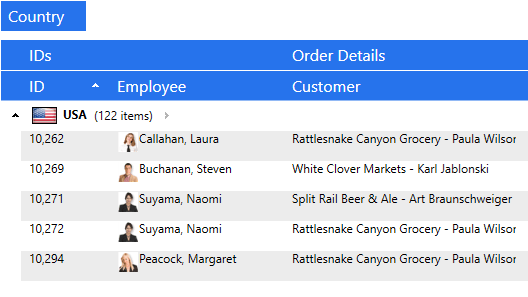
Display and edit data in 2D or 3D layouts. Xceed DataGrid for WPF (Windows Presentation Foundation) is a grid control that in addition to traditional table and card views like Vista, XP, Media Center, or classic styles, allows you to present and edit data in 3D layouts. Features include: rich in-place editing; grouping with UI virtualization; production-quality views (table and card), built-in data validation. It also includes a WPF date picker and a calendar control. Xceed DataGrid for WPF offers compatibility with bound and unbound data sources; flexible object model and fully extensible with reusable parts. Xceed DataGrid for WPF Express Edition is free, please, visit the 'Evals and Downloads' Section for instructions on how to obtain your free license. Full C# and XAML source code available in the Blueprint Edition.

Please, note that Xceed DataGrid for WPF Standard Edition is free, please, visit the 'Evals and Downloads' Section for instructions on how to obtain your free license

Xceed DataGrid for WPF Main Features:

WPF / .NET Technology:

Created entirely for WPF and .NET 3.0, written in C# and XAML. Supports .NET 3.5 as well

Complete source code is available in the Blueprint Edition. (Only available with the Professional Edition.)

True lookless WPF control, 100% stylable and templatable. You can completely change the way the entire control looks and behaves. Create 3D rolodex, carousel, timeline views, etc.

Supports UI virtualization, even when grouping data, so only elements currently in view are created and kept, meaning faster loading time, uses less memory.

Design-time support in Visual Studio 2008. (New in version 1.3)

XBAP-friendly, CLS compliant, and uses no unsafe blocks. No special permissions are required, so it can run within the limited permission set granted to XBAP applications.

Based on a flexible and extensible object model, with modular and reusable visual elements.

The datagrid's cells are true WPF content controls, so they can contain anything.

Supports the WPF command infrastructure, for example letting you map a toolbar button to "enter edit" in a cell.

Comprehensive documentation fully integrated into Visual Studio .NET is provided.

Supports Right-To-Left and Inking.

Supports regional settings including numbers, money type, dates, etc.

Includes a variety of VB.NET and C# sample applications to get you started.

All error handling works through .NET exception classes.

Can also be used in your Windows Forms applications.

Views and themes

Presents data and lets users edit it in any 2D or 3D layout you can imagine.

Ships with two 2D views (traditional table view and card view). Achieve the look of traditional XP or Vista applications with a true native WPF control.

Ships with all Microsoft Windows themes: Classic (NT), Luna (XP), Aero (Vista), and Royale (Media Center).

Project template for Visual Studio that sets up a new theme project so you can create your own. A tutorial on creating a custom theme is also included to help you get started. (VB.NET template new in version 1.3)

Office 2007 and Windows Media Player 11 themes. (New in version 1.1; only available in the Professional Edition.)

New Zune theme. (New in version 1.2)

New Glass theme, which allows for quick and easy branding of the datagrid: insert custom bitmaps while overlaying a glass effect containing the grid’s user interface elements.(New in version 1.2; only available in the Professional Edition.)

Includes the commented XAML source code to the card and table view styles and templates, so you have a great starting point for developing your own.

Rich in-place editing

Features rich in-place editing that works in all views.

Provides configurable keyboard and mouse edit commands.

Programmatic control over edit mode. (New in version 1.2.)

Provides Excel-like default keyboard and mouse edit behavior, including F2, Esc (cancel edit on a cell and restore the original value), Double-Esc (cancel edit on the entire row and restore the original values), and Enter.

Allows you to specify a different visual template for a cell being edited.

Cell editors can be displayed without entering edit mode, under a variety of conditions such as a mouse hover over the cell or row, the cell or row becoming current, the row being edited, or always.

Single-click edit mode allows entering edit mode and activating items such as check, text, and combo boxes with one click.

Automatically selects the appropriate editor control depending on the field data type.

Insertion row / card object allows for quick entry of new data.

Includes a rich DatePicker / Calendar control.

Triggers meaningful edit events for both rows and cells.

Manages “null” and “DbNull” values.

Any portion of the grid can be made read-only.

Data grouping

Supports hierarchical, multi-level grouping in all views.

Customizable group-level configurations with header and footer support. (New in version 1.2)

Supports UI virtualization, preserving memory and reducing load time, even when grouping.

Supports custom grouping criteria, to allow your code to group together rows with your own conditions.

Interactive, hierarchical “Group-by” row allows end-users to easily create and manipulate groups themselves. Adapted for all included views.

Programmatic control over expanding and collapsing groups. (New in version 1.2)

Grouping can be controlled via code.

Input validation

Includes built-in data validation, at the cell or row level.

Error display is integrated with the included views.

You can completely style the way a cell or row looks when a validation error occurs.

Can validate on any criteria, including the values of other cells.

Validation error messages are overridable and localizable.

Expandable and compatible with custom validation rules you have already built.

Card view Features

Defaults to cards stacked into columns, with horizontal scrolling.

Two types of card view styles are included: compact card view (borderless cards with column separator lines) and standard card view (cards with borders, but no separator lines).

Supports grouping with multiple levels. Group-by row includes built-in list of columns, so end-users can still group by columns and reorder fields even if there are no column headers. Group headers flow within the card list.

Cards can be independently sized, each card sizing itself to its content.

Resizable cards in CardView. (New in version 1.2)

Allows you to hide empty fields on a per-card basis.

Insertion card lets users quickly add new data to the grid.

Table view Features

Fixed columns. (New in version 1.1; only available in the Professional Edition.)

Includes an Outlook-style table view with all the typical elements you would expect.

Column headers support drag-and-drop column reordering, column resizing, click-to-sort, and dragging to "Group-by" row.

Row margin selects and resizes rows, and displays icons indicating that the row is current, is being edited, is an insertion, or has a validation error.

Provides horizontal and vertical Grid line brush and grid line thickness properties.

Automatically changes a row’s height to fit the contents of the largest cell.

Other features

Full keyboard navigation is possible through cells and rows. Navigation can be limited to cell-only or row-only, or navigation can be disabled.

Allows multiple-field sort and custom criteria sort.

Provides easy manipulation of the grid's current row.

Scrolls the view to any cell, row, group, or column.

Provides fixed, non-scrolling header and footer regions into which you can put any number and type of row or card.

Additional included controls

Includes a rich DatePicker / Calendar control that is 100% stylable and templatable.

Data binding and unbound support

Fully supports WPF data binding

Excel-like end-user filtering automatically filters items contained in the underlying data source. (New in version 1.3; only available in the Professional Edition

Displays, edits, and works with bound data, unbound data, or a combination of both simultaneously

Can be bound directly to an array of simple types such as String, Decimal, DateTime, TimeSpan, Guid, or Primitive (e.g., SByte, Byte, Int32, etc.), and will show the value of those types in one column

Automatically obtains and synchronizes bound data from any .NET source, including jagged arrays, any object that implements IListSource or IList, and any ADO.NET DataSet, DataTable, DataView, or DataViewManager object

Can intercept, parse, and modify data being synchronized with the database from the grid

What's New in Xceed DataGrid for WPF V2.0?

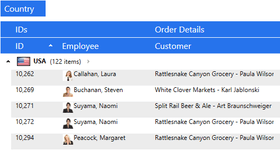
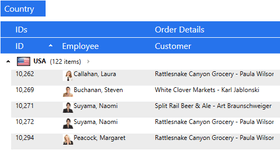
Each datarow—whether in the main grid or in any detail grid—can have an unlimited number of detail grids attached to it. Futhermore, detail grids can have “sibling” or “child” detail grids, or both, and also support headers and footers, grouping, sorting, and autofiltering, as well as custom detail relations and different styles for the data items contained in each same-level detail. Finally, custom grouping in grid and details is supported.

What's New in Xceed DataGrid for WPF V1.3?

Both the Professional and the Express Edition feature Visual Studio 2008 and Expression Blend design-time support, in addition to a scroll tip, which displays information about the first visible row in the viewport when the grid is scrolled. Finally, a VB.NET template with a tutorial is provided for setting up a new theme project for creating custom themes, complementing the already available C# template.

Available exclusively to owners of the Professional Edition is the addition of Excel-like end-user automatic filtering, which filters items in the underlying data source.

What's New in Xceed DataGrid for WPF V1.x?

Enhanced sorting, grouping, and scrolling performance, as well as the ability to control whether end-users can sort, group or re-order columns, and a custom CollectionView that provides fine-grained and efficient control over the grid’s underlying data source

Advanced features—such as Office 2007 (blue, silver, and black) and Windows Media Player 11 themes, and fixed columns—are also now available with a Vanguard subscription

PartNumbers: PC-517607-146509 517607-146509 PC-517607-146475 517607-146475 PC-517607-146476 517607-146476 PC-517607-146477 517607-146477 PC-517607-146478 517607-146478 PC-517607-146479 517607-146479 PC-517607-146480 517607-146480 PC-517607-146481 517607-146481 PC-517607-146482 517607-146482 PC-517607-146483 517607-146483 PC-517607-146484 517607-146484 PC-517607-146485 517607-146485 PC-517607-146486 517607-146486 PC-517607-146487 517607-146487 PC-517607-146488 517607-146488 PC-517607-146489 517607-146489 PC-517607-146490 517607-146490 PC-517607-146491 517607-146491 PC-517607-146492 517607-146492 PC-517607-146493 517607-146493 PC-517607-146499 517607-146499 PC-517607-146500 517607-146500 PC-517607-146501 517607-146501 PC-517607-146502 517607-146502 PC-517607-146503 517607-146503 PC-517607-146494 517607-146494 PC-517607-146495 517607-146495 PC-517607-146496 517607-146496 PC-517607-146497 517607-146497 PC-517607-146498 517607-146498 PC-517607-146504 517607-146504 PC-517607-146505 517607-146505 PC-517607-146506 517607-146506 PC-517607-146507 517607-146507 PC-517607-146508 517607-146508

Publisher PartNumbers: XDGP1B-20 XDGP1L-20 XDGP1R-20 XDGP1S-20 XDGP1V-20 XDGP1Y-20 XDGP1Z-20 XDGP4B-20 XDGP4L-20 XDGP4R-20 XDGP4S-20 XDGP4V-20 XDGP4Y-20 XDGP4Z-20 XDGP8B-20 XDGP8L-20 XDGP8R-20 XDGP8S-20 XDGP8V-20 XDGP8Y-20 XDGP8Z-20 XDGPSB-20 XDGPSL-20 XDGPSR-20 XDGPSS-20 XDGPSV-20 XDGPSY-20 XDGPSZ-20 XDGPVB-20 XDGPVL-20 XDGPVR-20 XDGPVS-20 XDGPVV-20 XDGPVY-20 XDGPVZ-20

PurchaseOptions: Xceed DataGrid for WPF Professional V2.0 - Royalty Free Licenses 1 Developer License , Xceed DataGrid for WPF Professional V2.0 - Royalty Free Licenses 4 Developer Team License , Xceed DataGrid for WPF Professional V2.0 - Royalty Free Licenses 8 Developer Team License , Xceed DataGrid for WPF Professional V2.0 - Royalty Free Licenses 20 Developer Team License , Xceed DataGrid for WPF Professional V2.0 - Royalty Free Licenses 1 Site Wide License (Allows Unlimited Developers at upto 2 Physical Addresses) , Xceed DataGrid for WPF Professional V2.0 - Royalty-Free Licenses - Product + 1yr Vanguard 1 Developer License , Xceed DataGrid for WPF Professional V2.0 - Royalty-Free Licenses - Product + 1yr Vanguard 4 Developer Team License , Xceed DataGrid for WPF Professional V2.0 - Royalty-Free Licenses - Product + 1yr Vanguard 8 Developer Team License , Xceed DataGrid for WPF Professional V2.0 - Royalty-Free Licenses - Product + 1yr Vanguard 20 Developer Team License , Xceed DataGrid for WPF Professional V2.0 - Royalty-Free Licenses - Product + 1yr Vanguard 1 Site Wide License (Allows Unlimited Developers at upto 2 Physical Addresses) , Xceed DataGrid for WPF Professional V2.0 - Royalty-Free Licenses - Blueprint Edition 1 Developer License , Xceed DataGrid for WPF Professional V2.0 - Royalty-Free Licenses - Blueprint Edition 4 Developer Team License , Xceed DataGrid for WPF Professional V2.0 - Royalty-Free Licenses - Blueprint Edition 8 Developer Team License , Xceed DataGrid for WPF Professional V2.0 - Royalty-Free Licenses - Blueprint Edition 20 Developer Team License , Xceed DataGrid for WPF Professional V2.0 - Royalty-Free Licenses - Blueprint Edition 1 Site Wide License (Allows Unlimited Developers at upto 2 Physical Addresses) , Xceed DataGrid for WPF Professional V2.0 - Subscription Renewals Before Expiration - 1 year Vanguard 1 Developer License , Xceed DataGrid for WPF Professional V2.0 - Subscription Renewals Before Expiration - 1 year Vanguard 4 Developer Team License , Xceed DataGrid for WPF Professional V2.0 - Subscription Renewals Before Expiration - 1 year Vanguard 8 Developer Team License , Xceed DataGrid for WPF Professional V2.0 - Subscription Renewals Before Expiration - 1 year Vanguard 20 Developer Team License , Xceed DataGrid for WPF Professional V2.0 - Subscription Renewals Before Expiration - 1 year Vanguard 1 Site Wide License (Allows Unlimited Developers at upto 2 Physical Addresses) , Xceed DataGrid for WPF Professional V2.0 - Subscription Renewals Before Expiration - Blueprint Edition 1 Developer License , Xceed DataGrid for WPF Professional V2.0 - Subscription Renewals Before Expiration - Blueprint Edition 4 Developer Team License , Xceed DataGrid for WPF Professional V2.0 - Subscription Renewals Before Expiration - Blueprint Edition 8 Developer Team License , Xceed DataGrid for WPF Professional V2.0 - Subscription Renewals Before Expiration - Blueprint Edition 20 Developer Team License , Xceed DataGrid for WPF Professional V2.0 - Subscription Renewals Before Expiration - Blueprint Edition 1 Site Wide License (Allows Unlimited Developers at upto 2 Physical Addresses) , Xceed DataGrid for WPF Professional V2.0 - Subscriptions and Upgrades - 1 year Vanguard 1 Developer License , Xceed DataGrid for WPF Professional V2.0 - Subscriptions and Upgrades - 1 year Vanguard 4 Developer Team License , Xceed DataGrid for WPF Professional V2.0 - Subscriptions and Upgrades - 1 year Vanguard 8 Developer Team License , Xceed DataGrid for WPF Professional V2.0 - Subscriptions and Upgrades - 1 year Vanguard 20 Developer Team License , Xceed DataGrid for WPF Professional V2.0 - Subscriptions and Upgrades - 1 year Vanguard 1 Site Wide License (Allows Unlimited Developers at upto 2 Physical Addresses) , Xceed DataGrid for WPF Professional V2.0 - Subcriptions and Upgrades - Blueprint Edition 1 Developer License , Xceed DataGrid for WPF Professional V2.0 - Subcriptions and Upgrades - Blueprint Edition 4 Developer Team Licens

Resources: Read the Xceed License Agreement, Download the Xceed DataGrid V2.0 for WPF Express Edition - Free Developer License installer and instructions on how to obtain your free license, Download the Xceed Ultimate Suite 2008 v3 evaluation on to your computer - Expires after 45 days

Operating System for Deployment: Windows Vista, Windows XP, Windows 2000, Windows NT 4.0

Architecture of Product: 32Bit

Product Type: Component

Component Type: .NET WinForms, .NET Class, .NET WPF, 100% Managed Code

Built Using: Visual C# .NET

Compatible Containers: Microsoft Visual Studio 2008, Microsoft Visual Studio 2005, Microsoft Visual Basic 2008, Microsoft Visual Basic 2005, Microsoft Visual C++ 2008, Microsoft Visual C++ 2005, Microsoft Visual C# 2008, Microsoft Visual C# 2005, .NET Framework 3.5, .NET Framework 3.0, .NET Framework 2.0

Product Class: Business Components

Search Items: Free Product, New Version Jan 03, New Version Dec 03, New Product Sep 05

Keywords: Xceed Software Spreadsheet spread sheet worksheet workbook excel lotus 123 1-2-3 xls xl Grid Grids Table Tables DataGrid DataGrids Professional Partner Xceed DataGrid for WPF

Product Search

Enter search words:

Quick Links

Award