Xceed SmartUI

by Xceed Software - 상품타입: Component / ActiveX OCX

주의 : 별도의 안내가 없는 경우에는 영어제품 입니다.
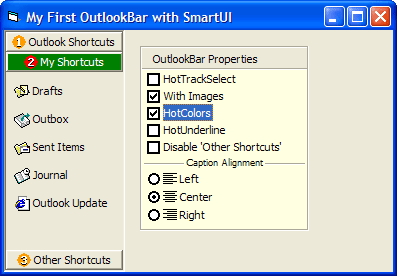
Xceed SmartUI - ActiveX - V2.0 의 스크린샷Every visual control a VB6 developer needs to build rich user interfaces. Xceed SmartUI provides VB6 developers with a modular framework of visual controls for building rich state-of-the-art user interfaces. It includes MenuBars, ToolBars, TreeViews, OutlookBars, StatusBars, PropertyLists, Tabs and many more all based on the same remarkably flexible core control. Use its WYSIWYG designer to easily create your own sophisticated Office XP-style or classic UI elements.


1,142,600₩
통화 선택

일반 적인 소비자 가격은 하기에 표시되어 있습니다. 고객님의 할인가격은 표시 하시려면 로그인 해주시기 바랍니다.

Xceed SmartUI V2.0

주문 ₩ 1,142,600 1 Developer License
메이커 제품 번호: XSUI1S-20
다운로드 (96.8 MB)
주문 ₩ 2,856,700 4 Developer Team License
메이커 제품 번호: XSUI4S-20
다운로드 (96.8 MB)
주문 ₩ 4,570,800 8 Developer Team License
메이커 제품 번호: XSUI8S-20
다운로드 (96.8 MB)
주문 ₩ 9,141,700 20 Developer Team License
메이커 제품 번호: XSUIVS-20
다운로드 (96.8 MB)
주문 ₩ 27,272,900 1 Site Wide License (Allows Unlimited Developers at a Single Physical Address)
메이커 제품 번호: XSUISS-20
다운로드 (96.8 MB)

Xceed SmartUI V2.0 + 1 year Vanguard

주문 ₩ 1,752,100 1 Developer License
메이커 제품 번호: XSUI1V-20
다운로드 (96.8 MB)
주문 ₩ 4,380,400 4 Developer Team License
메이커 제품 번호: XSUI4V-20
다운로드 (96.8 MB)
주문 ₩ 7,008,600 8 Developer Team License
메이커 제품 번호: XSUI8V-20
다운로드 (96.8 MB)
주문 ₩ 14,017,300 20 Developer Team License
메이커 제품 번호: XSUIVV-20
다운로드 (96.8 MB)
주문 ₩ 28,034,700 1 Site Wide License (Allows Unlimited Developers at upto 2 Physical Addresses)
메이커 제품 번호: XSUISV-20
다운로드 (96.8 MB)

본 제품은 GSA Schedule 가격으로 제공해 드릴수 있습니다.가격에는 ComponentSource의 기술지원 요금이 포함되어 있습니다. 또한 다운로드 판매를 하고 있는 상품의 대부분은 온라인 백업요금이 포함되어 있어서 구입날로부터 30일 이내에 새로운 버전이 발매된 경우 무료로 업그레이드해 드리고 있습니다.  모든 주문에 대해서 당사표준 계약조건 반품조건 의 내용이 적용됩니다. 다음의 경우,고객 서비스로연락하시기 바랍니다. (상기의 리스트에 게재되지 않은 대량의 라이센스나 구 버전 등의 라이센스 옵션이 필요한 경우)

일반 적인 소비자 가격은 상기에 표시되어 있습니다. 고객님의 할인가격은 표시 하시려면 로그인 해주시기 바랍니다.

Xceed SmartUI allows VB6 developers to build rich, reusable Office 2000 or Office XP style user interfaces. It not only includes all the latest UI controls you need, but also provides an extraordinarily modular and versatile framework for quickly and easily creating your own controls either visually with its WYSIWYG designer, or by code.

Xceed SmartUI offers an incredible amount of flexibility over the look and feel of its controls or the controls created with it. Through the use of a rock-solid, windowless and lightweight core control, user interfaces built with Xceed SmartUI end up very fast, glitch-free and use minimal resources.

These and many other unique and "developer-friendly" features make Xceed SmartUI the absolute essential tool for user interface development.

Find out more about some of its controls:

  • MenuBars and popups
  • ToolBars
  • Treeviews
  • OutlookBars
  • StatusBars
  • PropertyLists
  • PropertyToolBoxes
  • Smart ListBoxes
  • OptionLists
  • TabStrips
  • MS Coolbar integration
  • Win2K summary list
  • FrontPage Viewbar

Features

Included controls and objects

  • Every modern control for your Visual Basic 6 applications, including menubars, popup menus, toolbars, treeviews, Outlook bars, statusbars, property lists, property tool boxes, smart listboxes, optionlists, tabstrips, Coolbar integration, Win2k summary lists and Frontpage viewbars
  • Over a dozen sub-controls including buttons, checkboxes, dropdown combos, etc.
  • Create flexible custom horizontal or vertical scrollbars
  • Create menus that adapt to user's behavior like Win2K
  • Menus created with Xceed SmartUI are true Windows menus, not simulated
  • All tools work with the same properties, methods and events and use the same logical methodology making it a breeze to learn and re-use in all your projects
  • Real-time WYSIWYG. Add items to your treeviews, menus and other controls in design time. No more compile + run phases to see if object looks the way you want it to
  • Every control is flexible and the look and feel is fully customizable

Create your own controls

  • Design, create and customize your own controls right on your Visual Basic form without writing any code. Use either the designer's property pages or write code that uses the logically designed properties, methods and events
  • Create any control with a vertical or horizontal item orientation
  • Transform objects of one type of control to another without changing your already tested/existing code

ActiveX technology

  • Designed for Microsoft Visual Basic 6
  • The single fully self-contained ActiveX control requires no external DLLs other than the VB6 runtime you distribute with your applications. It does not require MFC, common control DLLs or anything else
  • 100% Unicode support (including on Win98) and RightToLeft support
  • Supports Large Fonts
  • Provides extremely complete and organized property pages for visual programming
  • All controls are windowless for minimum use of resources and the ability to display many controls on your form without lag. Do more and put more on your forms with Xceed SmartUI
  • All constants, enumerations and types are built-in. Code completion, property categories, help strings and context-sensitive F1-help are fully supported

Object model

  • The object model's basic building blocks are the universal smart control that can appear in any shape or form, as well as the smart items that appear in the smart control
  • Every control provided with Xceed SmartUI is in reality a customization of the base smart control
  • The source code on how to build each included control is included in the lessons
  • Having one control ensures that there are far less bugs and makes Xceed SmartUI and your application much more stable than using separate components

Other features

  • By setting a single property, you can change the look of and all your SmartUI-based controls to the pixel-perfect look and feel of Office 2000 or Microsoft Office XP
  • Precise control over the dimensions of the items in your controls
  • Control the visibility, selection state and mouse hovering behavior of each item in your controls
  • Save and load templates (created either from code or the designer) of your custom built controls and re-use them in your other projects
  • Obtain Imagelists from internally saved image lists, common controls or even another SmartUI
  • Maintain consistency across applications by saving UI Design as reusable objects

Documentation and samples

  • Complete, comprehensive documentation provided in an MSDN style HTML format which is fully context-sensitive so that pressing F1 on a keyword in your IDE opens up the manual to the appropriate topic
  • 21 complete lessons to get you up to speed fast on using any of the controls

상품검색

검색어를 입력해주세요:

개발 코스트 계산


ROI 계산을 참고해주세요.

코드행 수: 23,800
인월 : 24
인건비: $119,000

필요한 기능:

1000행 당 인월:

1개월당 인건비:

화면 바로가기 갤러리

Award