by Xceed Software - Product Type: Component / ActiveX OCX
Xceed SmartUI by Xceed Software
Every visual control a VB6 developer needs to build rich user interfaces. Xceed SmartUI provides VB6 developers with a modular framework of visual controls for building rich state-of-the-art user interfaces. It includes MenuBars, ToolBars, TreeViews, OutlookBars, StatusBars, PropertyLists, Tabs and many more all based on the same remarkably flexible core control. Use its WYSIWYG designer to easily create your own sophisticated Office XP-style or classic UI elements.

Xceed SmartUI allows VB6 developers to build rich, reusable Office 2000 or Office XP style user interfaces. It not only includes all the latest UI controls you need, but also provides an extraordinarily modular and versatile framework for quickly and easily creating your own controls either visually with its WYSIWYG designer, or by code.
Xceed SmartUI offers an incredible amount of flexibility over the look and feel of its controls or the controls created with it. Through the use of a rock-solid, windowless and lightweight core control, user interfaces built with Xceed SmartUI end up very fast, glitch-free and use minimal resources.
These and many other unique and "developer-friendly" features make Xceed SmartUI the absolute essential tool for user interface development.
Find out more about some of its controls:
MenuBars and popups
ToolBars
Treeviews
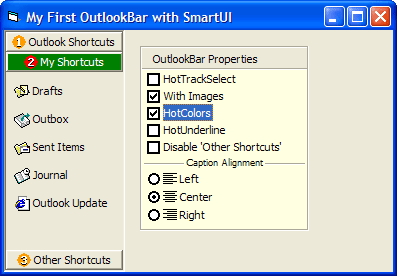
OutlookBars
StatusBars
PropertyLists
PropertyToolBoxes
Smart ListBoxes
OptionLists
TabStrips
MS Coolbar integration
Win2K summary list
FrontPage Viewbar
Features
Included controls and objects
Every modern control for your Visual Basic 6 applications, including menubars, popup menus, toolbars, treeviews, Outlook bars, statusbars, property lists, property tool boxes, smart listboxes, optionlists, tabstrips, Coolbar integration, Win2k summary lists and Frontpage viewbars
Over a dozen sub-controls including buttons, checkboxes, dropdown combos, etc.
Create flexible custom horizontal or vertical scrollbars
Create menus that adapt to user's behavior like Win2K
Menus created with Xceed SmartUI are true Windows menus, not simulated
All tools work with the same properties, methods and events and use the same logical methodology making it a breeze to learn and re-use in all your projects
Real-time WYSIWYG. Add items to your treeviews, menus and other controls in design time. No more compile + run phases to see if object looks the way you want it to
Every control is flexible and the look and feel is fully customizable
Create your own controls
Design, create and customize your own controls right on your Visual Basic form without writing any code. Use either the designer's property pages or write code that uses the logically designed properties, methods and events
Create any control with a vertical or horizontal item orientation
Transform objects of one type of control to another without changing your already tested/existing code
ActiveX technology
Designed for Microsoft Visual Basic 6
The single fully self-contained ActiveX control requires no external DLLs other than the VB6 runtime you distribute with your applications. It does not require MFC, common control DLLs or anything else
100% Unicode support (including on Win98) and RightToLeft support
Supports Large Fonts
Provides extremely complete and organized property pages for visual programming
All controls are windowless for minimum use of resources and the ability to display many controls on your form without lag. Do more and put more on your forms with Xceed SmartUI
All constants, enumerations and types are built-in. Code completion, property categories, help strings and context-sensitive F1-help are fully supported
Object model
The object model's basic building blocks are the universal smart control that can appear in any shape or form, as well as the smart items that appear in the smart control
Every control provided with Xceed SmartUI is in reality a customization of the base smart control
The source code on how to build each included control is included in the lessons
Having one control ensures that there are far less bugs and makes Xceed SmartUI and your application much more stable than using separate components
Other features
By setting a single property, you can change the look of and all your SmartUI-based controls to the pixel-perfect look and feel of Office 2000 or Microsoft Office XP
Precise control over the dimensions of the items in your controls
Control the visibility, selection state and mouse hovering behavior of each item in your controls
Save and load templates (created either from code or the designer) of your custom built controls and re-use them in your other projects
Obtain Imagelists from internally saved image lists, common controls or even another SmartUI
Maintain consistency across applications by saving UI Design as reusable objects
Documentation and samples
Complete, comprehensive documentation provided in an MSDN style HTML format which is fully context-sensitive so that pressing F1 on a keyword in your IDE opens up the manual to the appropriate topic
21 complete lessons to get you up to speed fast on using any of the controls
PartNumbers: PC-513379-95722 513379-95722 PC-513379-95723 513379-95723 PC-513379-95724 513379-95724 PC-513379-95725 513379-95725 PC-513379-95726 513379-95726 PC-513379-95727 513379-95727 PC-513379-95728 513379-95728 PC-513379-95729 513379-95729 PC-513379-95730 513379-95730 PC-513379-95731 513379-95731
Publisher PartNumbers: XSUI1S-20 XSUI1V-20 XSUI4S-20 XSUI4V-20 XSUI8S-20 XSUI8V-20 XSUISS-20 XSUISV-20 XSUIVS-20 XSUIVV-20
PurchaseOptions: Xceed SmartUI V2.0 1 Developer License , Xceed SmartUI V2.0 4 Developer Team License , Xceed SmartUI V2.0 8 Developer Team License , Xceed SmartUI V2.0 20 Developer Team License , Xceed SmartUI V2.0 1 Site Wide License (Allows Unlimited Developers at a Single Physical Address) , Xceed SmartUI V2.0 + 1 year Vanguard 1 Developer License , Xceed SmartUI V2.0 + 1 year Vanguard 4 Developer Team License , Xceed SmartUI V2.0 + 1 year Vanguard 8 Developer Team License , Xceed SmartUI V2.0 + 1 year Vanguard 20 Developer Team License , Xceed SmartUI V2.0 + 1 year Vanguard 1 Site Wide License (Allows Unlimited Developers at upto 2 Physical Addresses)
Resources: Read the Xceed SmartUI help file, Read the Xceed License Agreement, Download the Xceed Ultimate Suite 2008 v4 evaluation on to your computer - Expires after 45 days
Operating System for Deployment: Windows Vista, Windows XP, Windows ME, Windows 2000, Windows 98, Windows NT 4.0, Windows 95
Architecture of Product: 32Bit
Product Type: Component
Component Type: ActiveX OCX
Built Using: Visual Basic V6.0
General: OCX96 Compatible, Supports Component Categories, Supports Apartment Model Threading
Compatible Containers: Microsoft Visual Studio 6.0, Microsoft Visual Basic 6.0
Product Class: User Interface Components
Search Items: New Version Feb 03, New Product Oct 04
Keywords: Xceed Software User Interface Collections UI User Interface UI Toolbar tool bar tool-bar Toolbars Menu Menus Ribbon Ribbonbar Professional Partner Xceed SmartUI
Publisher
Primary Category
Related Products
Related Categories