Xenocode Virtual Application Studio - Application - 2008

by Code Systems - 상품타입: 어프리케이션

주의 : 이 제품정보에는 한글안내가 포함되어 있지 않습니다.
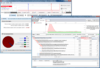
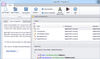
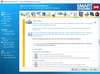
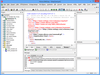
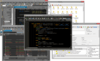
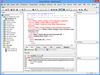
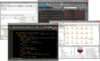
Xenocode Virtual Application Studio - Application - 2008 의 스크린샷Convert your Windows, .NET, Java, Flash, Shockwave or other Windows-compatible application into a self-contained virtual appliance that runs instantly. Xenocode Virtual Application Studio lets you deploy your application, data files, settings, and runtimes in a single executable. It dramatically simplifies application deployment and maintenance by shipping a single executable that runs immediately anywhere. No more "DLL hell", separate setups, or missing dependencies. Xenocode Virtual Application Studio also lets you execute .NET and Java applications with no runtime present and convert Flash and Shockwave applications into native x86 executables.

497,800₩
통화 선택

일반 적인 소비자 가격은 하기에 표시되어 있습니다. 고객님의 할인가격은 표시 하시려면 로그인 해주시기 바랍니다.

Xenocode Virtual Application Studio 2008 - includes one year of Maintenance (free upgrades and web-based support)

주문 ₩ 497,800 Xenocode Virtualization Starter Kit (includes 1 Developer License Xenocode Virtual Application Studio and 5 Xenocode Virtual OS End User Licenses) 다운로드 (36.2 MB)
주문 ₩ 39,900 1 Xenocode Virtual OS End User License 다운로드 (36.2 MB)
주문 ₩ 598,600 1 Xenocode Virtual Application Studio Developer License and 25 Xenocode Virtual OS End User Licenses 다운로드 (36.2 MB)
주문 ₩ 1,995,300 1 Xenocode Virtual Application Studio Developer License and 100 Xenocode Virtual OS End User Licenses 다운로드 (36.2 MB)
주문 ₩ 8,978,900 1 Xenocode Virtual Application Studio Developer License and 500 Xenocode Virtual OS End User Licenses 다운로드 (36.2 MB)
주문 ₩ 37,412,200 1 Xenocode Virtual Application Studio Developer License and 2500 Xenocode Virtual OS End User Licenses 다운로드 (36.2 MB)

Xenocode Virtual Application Studio Maintenance Renewals

주문 ₩ 98,800 Xenocode Virtualization Starter Kit (includes 1 Developer License Xenocode Virtual Application Studio and 5 Xenocode Virtual OS End User Licenses) - 1 Year Maintenance Renewal 확인 다운로드 (29 KB)
주문 ₩ 10,000 1 Xenocode Virtual OS End User License - 1 Year Maintenance Renewal 확인 다운로드 (29 KB)
주문 ₩ 149,600 1 Xenocode Virtual Application Studio Developer License and 25 Xenocode Virtual OS End User Licenses - 1 Year Maintenance Renewal 확인 다운로드 (29 KB)
주문 ₩ 498,800 1 Xenocode Virtual Application Studio Developer License and 100 Xenocode Virtual OS End User Licenses - 1 Year Maintenance Renewal 확인 다운로드 (29 KB)
주문 ₩ 2,176,000 1 Xenocode Virtual Application Studio Developer License and 500 Xenocode Virtual OS End User Licenses - 1 Year Maintenance Renewal 확인 다운로드 (29 KB)
주문 ₩ 9,353,000 1 Xenocode Virtual Application Studio Developer License and 2500 Xenocode Virtual OS End User Licenses - 1 Year Maintenance Renewal 확인 다운로드 (29 KB)
주문 ₩ 20,000 1 Xenocode Virtual OS End User License - 2 Year Maintenance Renewal 확인 다운로드 (29 KB)
주문 ₩ 359,200 1 Xenocode Virtual Application Studio Developer License and 25 Xenocode Virtual OS End User Licenses - 2 Year Maintenance Renewal 확인 다운로드 (29 KB)
주문 ₩ 957,800 1 Xenocode Virtual Application Studio Developer License and 100 Xenocode Virtual OS End User Licenses - 2 Year Maintenance Renewal 확인 다운로드 (29 KB)
주문 ₩ 4,309,900 1 Xenocode Virtual Application Studio Developer License and 500 Xenocode Virtual OS End User Licenses - 2 Year Maintenance Renewal 확인 다운로드 (29 KB)
주문 ₩ 17,957,900 1 Xenocode Virtual Application Studio Developer License and 2500 Xenocode Virtual OS End User Licenses - 2 Year Maintenance Renewal 확인 다운로드 (29 KB)

본 제품은 GSA Schedule 가격으로 제공해 드릴수 있습니다.가격에는 ComponentSource의 기술지원 요금이 포함되어 있습니다. 또한 다운로드 판매를 하고 있는 상품의 대부분은 온라인 백업요금이 포함되어 있어서 구입날로부터 30일 이내에 새로운 버전이 발매된 경우 무료로 업그레이드해 드리고 있습니다.  모든 주문에 대해서 당사표준 계약조건 반품조건 의 내용이 적용됩니다. 다음의 경우,고객 서비스로연락하시기 바랍니다. (상기의 리스트에 게재되지 않은 대량의 라이센스나 구 버전 등의 라이센스 옵션이 필요한 경우)

일반 적인 소비자 가격은 상기에 표시되어 있습니다. 고객님의 할인가격은 표시 하시려면 로그인 해주시기 바랍니다.

What’s new in Virtual Application Studio 2008?

  • MSI generation: Build Windows Installer MSI packages directly within the Virtual Application Studio environment. Setup packages support Start Menu and desktop shortcut creation, application executable installation, and shell file associations.
  • Jukeboxing: Easily virtualize product suites such as Microsoft Office and OpenOffice and expose multiple startup files within a single virtual executable. Automatically activate multiple applications on startup with "shotgun" launch support.
  • Internet Explorer 6 Emulation Mode: New Internet Explorer 6 shell emulation mode allows the IE6 web browser to run side-by-side with IE7, and to run on the Windows Vista operating system.
  • Pre-fabricated application library: Automatically synthesize virtual machines for popular Windows applications with a few clicks. The new pre-fabricated application wizard gets you started quickly, with no need to snapshot popular applications.
  • Rich metadata customization: Enhanced metadata customization support includes improved icon resource handling and custom metadata management. Metadata support is fully interoperable with Postbuild 2008.
  • Enhanced virtualization capabilities: New virtual machine features include comprehensive support for virtualizing Windows Services and environment variables.
  • Compatibility with the latest applications and components: The virtual machine kernel has been upgraded to support the latest applications, operating systems, and runtime platforms, including the .NET Framework 3.5.

What's new in Xenocode Virtual Application Studio 2007 SP2?

  • This update introduces major updates to the Xenocode virtualization engine, including the ability to virtualize major Windows applications like Microsoft Office, Mozilla Firefox, and popular runtimes and components

Features

  • Deploy a single file that runs right away - Improve the user download and startup experience by packaging all application files, settings, runtimes, and components into a single executable that runs immediately
  • Convert .NET Framework and Java-based to native x86 executables - Make your Java and/or .NET-based application execute just like a native executable, with no separate installation steps or runtime versioning conflicts. Execute multiple runtime versions concurrently with no conflicts
  • Eliminate annoying Vista UAC prompts - Deploying in a Xenocode virtual appliance eliminates requirements for access to privileged system resources, relieving users of annoying Vista UAC prompts
  • Deploy instantly on USB drives - Improve mobile worker productivity by placing your virtual appliance onto a USB drive.  Run your application immediately on remote PCs, with no setups, administrative privileges or driver installations

Advanced virtualization engine

  • Generate a native executable- No "player" software or other separate components are required to execute your virtual appliance. Run your appliance just like a native binary
  • Filesystem and registry virtualization - "Windows-on-Windows" virtualization environment simulates Windows filesystem and registry subsystems, including process-local, isolated versions of privileged resources. Apply merge or override semantics to govern interaction with the host device
  • Unprecedented performance -Unlike whole-machine virtualization, Xenocode Low-Overhead Virtualization (LOV) technology allows virtualized applications to execute at virtually the same speed as non-virtualized binaries. No host OS is required, drastically reducing appliance size
  • User-mode virtual machine -Xenocode virtualization takes place entirely in user-mode. No device drivers or privileged operations are required for Xenocode virtual appliances to execute

Get started quickly

  • One-click component configuration - Add popular runtimes, components, and viewers such as the .NET Framework 1.1, 2.0, and 3.0, Java, Flash, and Shockwave with a single click
  • Application snapshotting -Configuring even the most complex application is as easy as setting it up. Virtual Appliance Studio's snapshotting feature takes "before and after" images of your system and automatically constructs the appliance configuration
  • Easy filesystem and registry setup - Configure virtual appliance contents with a simple drag-and-drop. Pre-configure application settings with direct registry editing
  • Leverage existing Xenocode investments -With compatible configuration file formats, it's easy to migrate settings between Postbuild and Virtual Appliance Studio

상품검색

검색어를 입력해주세요:

Quick 링크

개발처/발매처

주요 카테고리

관련 상품