by DevExpress (Developer Express) - Product Type: Component / .NET WinForms
XtraPivotGrid Suite by DevExpress (Developer Express)
URLs: xtrapivotgrid, devexpress
Multi-Dimensional data analysis for .NET. The XtraPivotGrid Suite is a comprehensive data analysis, data mining, and visual reporting solution for WindowsForms applications. It was engineered from the ground up to provide a unique bridge between on-screen forms and printed reports. With it, your users can break down raw data in any manner they require using easy-to-understand Windows commands and instantly render the desired output to a printer. By incorporating the XtraPivotGrid in your application, you can deliver an almost endless array of reports - both on-screen and in printed form - without hassles or aggravation.
The XtraPivotGrid Suite is a comprehensive data analysis, data mining, and visual reporting solution for Windows Forms applications. With it, your users can break down raw data in any manner they require using easy-to-understand Windows commands and instantly render the desired output to a printer.
OLAP Data Source Support - Microsoft Analysis Services (OLAP) data sources are now fully supported by the XtraPivotGrid. If bound to such a data source, a pivot grid control delegates all data management and calculations to the server side. This feature greately increases your application's performance if you are dealing with a large dataset. In this case, it may take a long time for a client machine to reclaculate data. It is much faster to request server-side data recalculation and then simply display the downloaded result.
Quickly Display Table Data into Fully Customizable Visual Reports - The XtraPivotGrid Suite allows your end users to slice and dice data in a manner similar to that found in MS Excel®. It has the ability to convert hard to read and difficult to dissect dataset information into compact and summarized visual reports - making your applications far more usable and more effective at addressing your customer’s real-time business analysis needs. And just as important, with the XtraPivotGrid, users can easily change a report's layout visually in order to examine data from different/multiple perspectives. The benefits of this are two-fold - first, you never again have to foresee all possible report scenarios your end-users might require (saving you time and increasing your productivity) and second, your users will not have to deal with hard to use and overly complex reporting tools to answer their business questions.
Control the Level of Detail - By default, the row and column axes contain each unique value in the source column. With the XtraPivotGrid, you can quickly simplify a report by merging values. For instance, you might have a report containing survey data in which the respondent's age represents an important characteristic. End-users may not want to browse through each and every unique age and instead want to see the ages of respondents in intervals such as 21-30, 31-40, etc. Instead of viewing sales by each unique date, they may want to view the sales for just the first few months. The axis can be customized in almost any fashion and the most common customizations need only a single property to be modified for its implementation.
Print and Render the XtraPivotGrid with Ease - The XtraPivotGrid is not just about on-screen data analysis. With it, you can export data to numerous formats and render its contents to paper just like a traditional WYSIWYG report.
Printing support is available via the XtraPrinting Library (must be purchased separately)
Export to the XLS, XML, TXT, HTM and PDF
Multi-cell selection and data export via the clipboard
The XtraPivotGrid can be embedded into reports produced with the XtraReports Suite to create cross-tab reports
Arrange Values Hierarchically - See Raw or Summarized Data in a Single Report - Businesses have unique requirements and no two entities will analyze information in the same exact way. Your end-users may want to analyze sales for each product or each product category. They may want to view yearly data or see more detailed data by viewing the data for each month in a year. Using traditional reporting/database tools, you would often be forced to create a myriad of different reports to deliver the appropriate solution to your customers - but that’s no longer the case with the XtraPivotGrid. Since the visual control offers your end-users total runtime customization flexibility, not a single report layout needs to be modified to view data at different detail levels. You simply place fields at lower detail levels on the column or row area. Field values are automatically arranged into a tree structure with expandable parents. End-users are free to expand and collapse child groups to see more summarized or raw reports.
Automatic and Manually Specified Totals - To improve the development experience, the XtraPivotGrid ensures your ability to deliver superior capabilities with minimal coding. Among the many features available in the component library is its ability to display grand totals for each row and column automatically. On the rare occasion that the built-in summary computation engine does not address a specific business requirement, you can display any number of totals for any value group.
Sort Data and Display Top Rows - Easily Access the Most Important Information - The PivotGridControl automatically sorts row and column values so you can easily locate required data. Comprehensive data analysis, however, often requires a two-way approach to data navigation in that you may need to find data by a specific value or find a value by its data. To allow for the latter approach, the PivotGridControl introduces a unique feature - sorting values by their corresponding grand totals. This means the product you'll see first is not the one which starts with an A or Z, but rather the one that has the most or least sales. This of course is just the beginning to more effective and efficient data analysis. You can also specify the number of top rows that are displayed. So you can view a specific number of best-selling or worst-selling products for each year, month, customer, etc. You can concentrate on only the most important information and avoid being overload with a lot of surplus data.
Filter Data - Filter Out the Values Used to Calculate Summaries on the Fly - The goal was to radically simplify runtime data analysis and provide end-users with superior customization options. You will find that with its built-in visual filtering option, your end-users can manipulate reports on the fly using an easy to understand and familiar visual metaphor.
Hide unnecessary values in the axes. Yet another mechanism that allows end-users to focus only on the most important data
Filter the data against which calculations are based. To allow your end-users manage this capability visually, the PivotGridControl has a Filter Panel Region. This pane was specifically designed to contain fields that aren't currently used in the report, and when required, can be dropped onto the report to automatically alter the base data used in the calculations
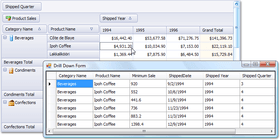
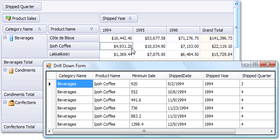
Drill Down - Take a Look at the Data Behind a Summary - The XtraPivotGrid is designed to transform table data into a summarized report. At the same time, it allows you to do the reverse. With just a single line of code, you can take a look at the records that were used to calculate cell values. With a few more lines of code, you can display this data within a standard DataGrid control, the advanced XtraGrid control or any other control designed for displaying table data. This feature brings complete data browsing flexibility within a single report - from different detail levels in a summarized report to the original raw data used to create the report itself. End-users are free to analyze every aspect and level of their data.
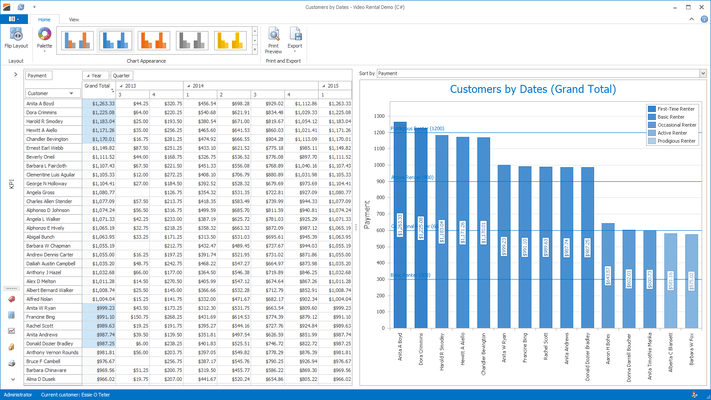
Visualize your data using the PivotGrid and the XtraCharts Suite - The XtraPivotGrid allows the data it displays to be visualized using the XtraCharts Suite. This is possible because the PivotGrid can act as a data source for other controls. When used in this manner, it provides data from the current selection. Since IBindingList is supported, bound controls are automatically updated when cell selection changes. The pivot grid returns data in a form that is easily consumed by the XtraCharts Suite. This means that there are three fields and these fields hold series names, arguments and values. Thus, you can simply bind an XtraChart to an XtraPivotGrid, map three fields to the appropriate properties and run the application. The pivot grid's current selection will be automatically visualized by the bound chart.
What's new in XtraPivotGrid Suite v2011 vol 1?
Asynchronous Mode - Asynchronous Mode is now available when using the WinForms Pivot Grid Control - allowing you to process data in a background thread. This ensures that your application does not freeze and allows for end-user interaction during complex Pivot Grid operations.
Export/Printing Performance Boost - With this release, DevExpress have significantly improved print and export performance - between 75 to 95% when compared to previous versions. Note that the more rows there are in a Pivot Grid, the greater performance boost you will get.
Sort by Summary Default Order - You can now specify a default sort order when using the Sorting by Summaries feature. Field values are automatically arranged in this order when sorting by summaries is enabled for a field.
What's new in XtraPivotGrid Suite v2010 vol 2?
New Filtering Mode for Grouped Fields - DXperience v2010 vol 2 introduces a new Group Filter feature, which provides a new default filtering mechanism for field groups. Each group of fields has a single filter drop-down invoked when clicking the filter button in the header of the first field within the group. The drop-down presents values for all group fields in a tree-like manner, allowing end-users to distinguish between equal field values that correspond to different values of a parent field.
ADOMD.NET Support for OLAP Binding - Previously, the WinForms Pivot Table Control was able to connect to OLAP cubes using the OLE DB data provider. With this release, we have introduced full support for Microsoft ADOMD.NET. In addition to performance benefits, ADOMD.NET allows you to retrieve format strings and properties of OLAP members from the server. Switching from OLE DB to ADOMD.NET does not require much effort. Simply create an appropriate data source object, specify the connection string (the same you used with OLE DB) and assign the data source to the Pivot Grid Control.
Filtering and Sorting in the Customization Form - Field headers displayed in the Customization Form now display sort glyphs and filter buttons to allow data shaping operations directly from the Field List.
Adding and Removing Filter Items - By default, filter drop-downs display unique values from the underlying data field. In DXperience v2010 vol 2, we have introduced two new events allowing you to manage these drop-down lists. With these events, you can add or remove items, edit their captions and change their checked state.
Single-Item Selection Mode for Filter Drop-Down Lists - You can now force filter drop-down lists to behave like simple combo boxes – thus prohibiting end-users from making multiple selections.
Delayed Updates of the Bound Chart Control - When the Pivot Grid Control is bridged with the Chart Control, it can be set to export data only from selected cells. In this instance, the Chart Control is updated immediately each time the selection in the Pivot Grid Control is changed. Rapid selection changing (for instance, when an end-user is expanding selection with the mouse) causes a sequence of frequent Chart Control updates. You can now optionally set a delay between changes to the pivot grid’s selection and updates of the bound Chart Control to allow end-users to select the required cell blocks without updating the chart until the selection is complete.
Disabling Specific Customization Form Layouts - You can now specify which Customization Form layouts are available to end-users via the Layout menu.
What's new in XtraPivotGrid Suite v2010 vol 1?
Full Support for Visual Studio 2010 and .NET Framework Client Profile
What’s new in XtraPivotGrid Suite v2009 vol 3?
Disable Sorting in OLAP Mode - By default, Pivot Grid controls automatically sort field values (row and column headers) in either ascending or descending order. This can be replicated functionality when working with OLAP cubes since they can define their own value order. To handle these instances, our Pivot Grid controls allow you to disable header value sorting thus keeping the value sequence defined by the data source.
Improved Memory Utilization - Previously, our Pivot Grid controls loaded the entire underlying dataset into the memory, regardless of which data needed to be displayed on screen. With this release, only the visible field data is being loaded which dramatically decreases memory consumption, especially for data sources with a large number of data fields (properties).
WinForms Control - Improved Cell Multi-selection - Prior to v2009 vol 3, you could only use this mechanism to add cells to the current selection. This feature now works both ways, allowing you to deselect arbitrary cell blocks.
What’s new in XtraPivotGrid Suite v2009 vol 2?
Excel 2007 Style Customization Window - The XtraPivotGrid's customization window now has a new operation mode that mimics the appearance and behavior of Microsoft Excel 2007 Pivot Tables.
New Capabilities of Filter Dropdowns - This release extends the Pivot Grid's filter dropdowns with the following new features:
Incremental search support.
Context menu allowing end-users to inverse the currently applied filter.
An optional combo box specifying whether to show or hide selected items.
The ability to select multiple items by pressing the SHIFT or CTRL key when clicking or navigating. After items have been selected, their check state can be reversed by pressing SPACE.
Suppressing Empty Columns When Displaying Trends - When displaying trends (summary variations), the first column or row in each group is always empty because there are no preceding values to calculate the difference. You can now suppress these empty cells by toggling a single option.
Common Changes Across Multiple WinForms Components
Seven New Skinning Options for Windows Forms Controls – DevExpress have introduced 7 new professional Skins/Themes in DXperience v2009 vol 2.
Expression Editor Now Available in Grids - In previous versions, the only way to specify unbound column values was to handle an event and write the appropriate code. The same applied if you needed conditional formatting driven from complex criteria. With this new release, DevExpress WinForms controls now allow you to address both these requirements using an intuitive design-time editor. An updated version of the DevExpress Expression Editor (the first version was introduced in XtraReports v2008 vol 2) is now available to the main WinForms Grid controls. You can use it to specify formulas for unbound column values or to set up conditional formatting. The DevExpress controls that support this new feature are the XtraGrid and XtraPivotGrid. For unbound columns, you can also enable the end-user customization of expressions. Simply enable an appropriate option and the column's header menu will include a link to the Expression Editor.
New Functions - Not only have DevExpress shared the Expression Editor between the main WinForms Grid controls, DevExpress have also extended the supported function set with about 50 new functions. These include the following:
Math: Abs, Cos, Sin, Atn, Exp, Log, Rnd, Tan, Power, Sign, Round, Ceiling, Floor, Acos, Asin, Atn2, BigMul, Cosh, Log10, Sinh, Tanh.
String: PadLeft, PadRight, IsNullOrEmpty, Ascii Char, ToStr, Replace, Reverse, Insert, CharIndex, Remove.
DateTime: GetDate, GetMilliSecond, GetSecond, GetMinute, GetHour, GetDay, GetMonth, GetYear, GetDayOfWeek, GetDayOfYear, GetTimeOfDay, Now, UtcNow, Today, AddTimeSpan, AddTicks, AddMilliSeconds, AddSeconds, AddMinutes, AddMinutes, AddHours, AddDays, AddMonths, AddYears.
What’s new in XtraPivotGrid Suite v2009 vol 1?
Improved Data Editing Functionality - You can specify when editor buttons should be displayed in data cells. They can be visible for all cells, for the focused cell or when entering edit mode. Different editors can be assigned to cells corresponding to the same field. Note that different editors can be used for edit and browsing modes. Keyboard activation of cell editors is now possible. You can now specify individual column width. Several events and event parameters have been added making it easier for you to control changes to cell values.
What’s new in XtraPivotGrid Suite v2008 vol 3?
Improved Sorting by Summary - Sorting by summary is a very powerful data analysis feature that makes it easy to locate the best or worst performance indicators. Previously, DevExpress OLAP controls had a limitation in this area - you could only sort data by grand totals. There was also no built-in end-user UI, so you needed to write code to make this feature available to end-users. With v2008 vol 3, you can sort field values against any data column or row. You can further specify the desired sort order in code or use the built-in UI elements to offer sorting options to end-users.
What’s new in XtraPivotGrid Suite v2008 vol 2?
Inplace Editing and Data Validation - With v2008 vol 2, the XtraPivotGrid introduces more flexibility for those requiring data editing. You can now embed individual XtraEditors within cells in order to initiate in-cell editing. The XtraPivotGrid's Editor API is pretty much the same as that found in the XtraGrid or other DevExpress data editing control. You simply assign an editor to a pivot grid field and this editor appears in corresponding cells. All data editing features, including advanced Data Validation are available to you. Due to the unique nature of the XtraPivotGrid control, you must handle a specially designed event to save your changes to the database. By introducing data editing within XtraPivotGrid cells, you can now visually enhance your "reports." For instance, on-screen reports can be easier to analyze if you embed progress bars into individual cells.
OLAP Support Enhancements -If an OLAP cube contains KPI (key performance indicator) information, the XtraPivotGrid can now automatically recognize it and display it in an appropriate format. If a bound cube has multiple localized versions, the XtraPivotGrid automatically fetches a version appropriate for the current client culture. If this automatic localization option does not meet your requirements, you can control the localization process manually.
Running Totals - With v2008 vol 2, end-users have extended freedom in report customization and thus data analysis. You can now enable Running totals for required fields or even allow users to determine which total calculation mechanism is most appropriate for their current data analysis task. What's great about Running Totals in an interactive control like the XtraPivotGrid is that total values depend upon the order of values and, at the same time, end-users can change that order by sorting, grouping or filtering. Thus, with Running Totals you don't get one more way to present data. With this feature, end-users can produce an endless array of reports they couldn't generate previously.
What’s new in XtraPivotGrid Suite v2008 vol 1?
Custom Group Intervals - XtraPivotGrid now supports a grouping feature wherein all records with unique values are grouped into a single row or column. In addition to joining identical values into groups, you can also use predefined grouping intervals - e.g. months, years, etc. In version v2008 vol 1, the control provides you with even more flexibility. By handling a specially designed event, you can easily define custom group intervals.
Custom Totals in OLAP Mode - For column and row fields, the XtraPivotGrid control allows you to calculate custom totals. You can now define custom totals and the control will calculate them on the client side.
Drill-Down Functionality in OLAP Mode - XtraPivotGrid now publishes methods allowing you to access data that was used to calculate summaries within a particular cell.
Printing in Both Portrait and Landscape Mode - It's now easier to customize printed page settings, as the XtraPivotGrid control introduces properties to change paper size, orientation and margin.
What's New in XtraPivotGrid Suite v2007 vol. 3?
Select Multiple Cell Blocks - When this mode is enabled, end-users can select multiple cell blocks by clicking cells while pressing the CTRL button.
Report Interactivity Improvements - End-users can now specify the functions to be used to calculate cell values - which reduces the amount of work on your end, since you need only to populate the control with the desired fields. End-users will be able to create any report with just a few mouse clicks.
Advanced Filter Editor Dialog - A new filter editor - Prefilter - allows your end-users to build complex filter criteria with an unlimited number of filter conditions combined by any logical operators. The resulting filter condition is combined with filter conditions defined by individual fields. Previously, end-users could only apply a filter by selecting/deselecting field values using check boxes and as such, it was quite hard to filter out numeric or date-time values that fell within a specified range. With the new filter dialog, however, these tasks are now simple and straightforward - just a matter of specifying a couple of filter conditions.
XtraSpellChecker - RichTextBox Is Now Supported. In addition to all previously supported controls (standard TextBox, Developer Express TextEdit and MemoEdit), you can now use the spell checker with the standard RichTextBox.
Improved Performance against Large Text Fields - The XtraSpellChecker's performance no longer varies based upon the size of text within the target control. The spell checker only considers the currently visible text, which significantly improves performance against large text fields.
What's New in XtraPivotGrid Suite v2007 vol. 2?
Visualize your data using the PivotGrid and the XtraCharts Suite - The XtraPivotGrid now allows the data it displays to be visualized using the XtraCharts Suite. This is now possible because the PivotGrid can act as a data source for other controls. When used in this manner, it provides data from the current selection. Since IBindingList is supported, bound controls are automatically updated when cell selection changes. The pivot grid returns data in a form that is easily consumed by the XtraCharts Suite. This means that there are three fields and these fields hold series names, arguments and values. Thus, you can simply bind an XtraChart to an XtraPivotGrid, map three fields to the appropriate properties and run the application. The pivot grid's current selection will be automatically visualized by the bound chart.
Easy Row and Column Selection - End-users can now select a row or a column by simply clicking the corresponding header. Multiple row/column selection has also been made easier. End-users can simply press a header and then drag the mouse pointer to extend selection.
Multi-Dimensional data analysis for .NET.
Pricing: XtraPivotGrid Suite Subscription Renewal for one year (for Subscriptions soon to expire or just expired), XtraPivotGrid Suite Subscription Renewal for one year (for Subscriptions soon to expire or just expired) - with Source code
Evals & Downloads: Read the Developer Express License Agreement - Requires Acrobat Reader, Read the XtraPivotGrid Suite help file, Download the DXperience v2011 vol 2 (V11.2.8) evaluation on to your computer - Expires After 30 Days
Operating System for Deployment: Windows 7, Windows Vista, Windows XP, Windows Server 2003, Windows 2000
Architecture of Product: 32Bit
Product Type: Component
Component Type: .NET WinForms
Compatible Containers: Microsoft Visual Studio 2010, Microsoft Visual Studio 2008, Microsoft Visual Studio 2005, Microsoft Visual Basic 2010, Microsoft Visual Basic 2008, Microsoft Visual Basic 2005, Microsoft Visual C++ 2010, Microsoft Visual C++ 2008, Microsoft Visual C++ 2005, Microsoft Visual C# 2010, Microsoft Visual C# 2008, Microsoft Visual C# 2005, .NET Framework 4.0, .NET Framework 3.5, .NET Framework 3.0, .NET Framework 2.0
Product Class: Business Components
Keywords: devexpress pivot, devexpress pivotgrid, xtrapivotgrid, devexpress olap, xtrapivotgrid suite, pivotgridcontrol, xtrapivot, xtrapivotgrid suite with susbcription
devexpress, developer express, dxperience, devexpress.com, devexpress controls, devexpress download, www.devexpress.com, devexpress dxperience, devexpress suite, devexpress components, devexpress tools, devexpress universal, devexpress upgrade
On-Line Analytical OLAP analysis analyze analyse
datagrid controls, datatable controls, datagrid components, datatable components, datagrid, data grid, data table, net gridview, net datagrid, data grid, grid control, net datatable, c# gridview, c# datagrid, asp.net datagrid, grid asp, vb.net datagrid
Mining analyze analyse analysis データ分析
Part numbers: PC-516222-379276 516222-379276 PC-516222-379278 516222-379278
Publisher
Primary Category
Related Products
Related Categories
ComponentSource offers a unique global service, used by over 1,000,000 software developers worldwide.