by DevExpress (Developer Express) - Product Type: Component / .NET WinForms / .NET Class / 100% Managed Code
XtraPrinting Library by DevExpress (Developer Express)
URLs: xtraprinting-library, xtraprinting library, xtraprintinglibrary, devexpress
Add advanced printing functionality to your applications. XtraPrinting Library is a 100% C# data rendering and visualization system, built specifically for Visual Studio .NET and designed to bring your User Interface to the printed page. Once you start using the XtraPrinting Library, you will be able to print the contents of advanced visual controls such as the XtraGrid and XtraTreeList with ease - without hassles, and thus offer your end-users a nearly unlimited series of "reports" without actually having to create a single report using a traditional report writer.
The XtraPrinting Library is a 100% C# data rendering and visualization system, built specifically for Visual Studio .NET and designed to bring your User Interface to the printed page. Once you start using the XtraPrinting Library, you will be able to print the contents of advanced visual controls such as the XtraGrid and XtraScheduler with ease, and thus offer your end-users a nearly unlimited series of "reports" without actually having to create a single report using a traditional report writer. With visual controls like the XtraGrid and XtraTreeList, you already have a wealth of data on-screen - which users can manipulate as they see fit: They can summarize data on any column, display Master/Detail Info, group and sort against any column, etc. In the end, this is the essence of a banded report - and with the XtraPrinting Library you can render the contents of your XtraGrid and XtraTreeList to paper - and never have to write a banded report again.
With the XtraPrinting Library, you can print and render the following Developer Express controls:
XtraGrid (Card and Grid View)
XtraCharts
XtraScheduler
XtraPivotGrid
XtraTreeList
XtraVerticalGrid
XtraLayoutControl
And the following standard controls:
DataGrid
RichTextBox
ListView
TreeView
Here is a brief list of other features available to you when using the XtraPrinting Library:
Export report to various formats
Export and send via e-mail
Create a report that contains the following elements (bricks): Brick, DrawableBrick, PageRegionBrick, PageImageBrick , PageInfoBrick , CustomBrick, EmptyBrick, SimpleBrick , CheckBoxBrick , TextBrick , ImageBrick
Print or render multiple controls within a single report. This can be done by using the specially designed CompositeLink
Set report parameters via the Page Setup dialog window
Multiple methods for page number display
Print reports with or without a preview
Modify report characteristics while in preview mode
Fully control scaling and zooming
Display a fixed number of report pages on screen regardless of window size
Fill pages with the color specified in the Color Selection dialog
Ability to create the custom brick type
UI skinning is available. The Print Preview dialog and all other UI elements are built using controls from the Developer Express .NET product line. Thus, the end-user interface delivered with the XtraPrinting Library uses the skinning capabilities found in products like the XtraGrid Suite
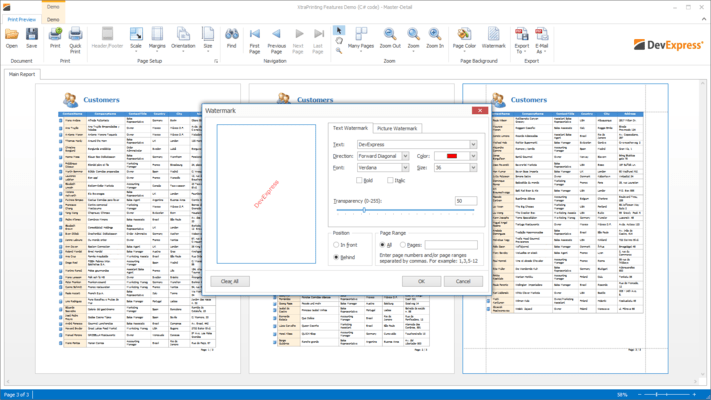
Ribbon UI can be integrated into the Print Preview window
Export options allow you to specify how a report or a link will be exported to the CSV, HTML, Image, MHT, PDF, RTF, TXT and XLS formats. You can also customize Email settings. These settings will be used when you send a report as an image or PDF attachment. Note that the XtraPrinting Library ships with built-in dialogs that enable end-users to modify these options
What's new in XtraPrinting Library v2011 vol 1?
Visual Studio 2010 Skin – This version introduces a Visual Studio style Application Wide Skin.
WinForms Project Wizard for Visual Basic -With this release, DevExpress have introduced a new Wizard to help you get started building Visual Basic based applications when using DevExpress WinForms controls.
What's new in XtraPrinting Library v2010 vol 2?
WinForms Project Wizard for C# - With this release, DevExpress have introduced a new Wizard to help you get started building C# based applications when using DevExpress WinForms controls.
What's new in XtraPrinting Library v2010 vol 1?
Full Support for Visual Studio 2010 and .NET Framework Client Profile
What’s new in XtraPrinting Library?
Storing Watermarks and Header/Footer Options - When a report is previewed in a Print Preview form, it is possible for end-users to insert a watermark into it, as well as add page numbers, current date/time and other information using the Header/Footer form. Once adjusted in a single report, these settings look fine. However, if end-users want to do the same for another report, they need to repeat all previously executed actions. With v2008 vol 3, you are now able to programmatically save Watermark and Header/Footer options into a file, stream or the system registry.
Improved Print Preview Form - The following changes have been made to the Print Preview Form's status bar:
The Page Number and Page Count information items are now united with the following format: "Page X of Y".
The progress bar, which is running when a report is being created, is now skinned and embedded into the status bar.
There is a Stop button near the progress bar. Pressing this button terminates report generation.
What’s new in XtraPrinting Library v2008?
Export to XLS - Support for Native Data Formatting - Previously, the XtraPrinting Library exported its data to XLS either as strings, or numbers. Now, if numeric or date-time data is exported, information about the corresponding format strings is embedded into the resulting XLS file.
What's new in XtraPrinting System v2007 vol 3?
Saving and Loading Generated Documents - With v2007 vol 3, the XtraPrinting Library allows you to save a report document from the Print Preview to its internal file format (*.prnx), and then load it within another Print Preview form.
RTF Export Improvements - The RTF export module was totally re-written and now produces genuine WYSIWYG results. The document is now correctly broken down into pages. Previously, the document was exported to RTF as a single page and page headers and footers were ignored. Cells are now represented by frames with absolute positioning instead of nested tables. This makes it easier to edit documents and significantly improves text editor performance against exported files. Watermarks are now supported (both text and images).
Image Export Improvements - Export to graphic files is now more flexible. You can control the following attributes:
Whether a document should be exported into a single image or into multiple images, page by page
Whether to separate pages from one another with a border when exporting a document into a single image file
The resolution to be used for generated images
What's new in XtraPrinting System v2007 vol 2?
HTML Export Improvements -The most significant innovation in HTML export is that HTML output has become much simpler now. Previously, even the simplest single-cell elements rendered themselves as tables. From now on, there is a single table that joins all smaller elements. Simple elements render themselves as cells within that table. These changes result in reduced HTML page size and more accurate data alignment. Additionally, this significantly reduces the risk of having problems with browsers that fail to handle deeply nested tables. And one more "side effect" is reduced memory consumption during export operations.
Add advanced printing functionality to your applications.
Pricing: XtraPrinting Library Subscription Renewal for one year (for Subscriptions soon to expire or just expired), XtraPrinting Library Subscription Renewal for one year (for Subscriptions soon to expire or just expired) - with Source code
Evals & Downloads: Read the Developer Express License Agreement - Requires Acrobat Reader, Read the XtraPrinting Library help file, Download the DXperience v2011 vol 2 (V11.2.8) evaluation on to your computer - Expires After 30 Days
Operating System for Deployment: Windows 7, Windows Vista, Windows XP, Windows 2000, Windows NT 4.0
Architecture of Product: 32Bit
Product Type: Component
Component Type: .NET WinForms, .NET Class, 100% Managed Code
Compatible Containers: Microsoft Visual Studio 2010, Microsoft Visual Studio 2008, Microsoft Visual Studio 2005, Microsoft Visual Basic 2010, Microsoft Visual Basic 2008, Microsoft Visual Basic 2005, Microsoft Visual C++ 2010, Microsoft Visual C++ 2008, Microsoft Visual C++ 2005, Microsoft Visual C# 2010, Microsoft Visual C# 2008, Microsoft Visual C# 2005, .NET Framework 4.0, .NET Framework 3.5, .NET Framework 3.0, .NET Framework 2.0
Product Class: Business Components
Keywords: xtraprinting, xtraprinting library, printingsystem, printbarmanager, printribboncontroller, devexpress print, devexpress printing, devexpress print preview, xtrapriting library subscription, xtraprinting library subscription with source
devexpress, developer express, dxperience, devexpress.com, devexpress controls, devexpress download, www.devexpress.com, devexpress dxperience, devexpress suite, devexpress components, devexpress tools, devexpress universal, devexpress upgrade
Print Preview Printing previews prints
Reporting Reports Report
Part numbers: PC-512478-379284 512478-379284 PC-512478-379286 512478-379286
Publisher
Primary Category
Related Products
Related Categories
ComponentSource offers a unique global service, used by over 1,000,000 software developers worldwide.