by Developer Express - 상품타입: Component / .NET WinForms / .NET Class
주의 : 별도의 안내가 없는 경우에는 영어제품 입니다.
Windows Forms및 ASP.NET개발자를 위한 차세대 보고 플랫폼. XtraReports는 최종 사용자가 가능한 한 짧은 시간에 멋진 보고서를 작성하도록 도우며, 오늘날 가장 강력한 보고 솔루션에서 원하는 기능을 모두 얻어낼 수 있습니다. XtraReports Suite는 Microsoft® Visual Studio .NET과 완벽하게 통합되어 일반 Windows® Forms 응용 프로그램을 빌드할 때와 완전히 똑같은 방법으로 보고서를 빌드할 수 있습니다. XtraReports는 동일한 코드 편집기(C#, VB.NET 또는 J#), 동일한 Property Grid, 동일한 컴포넌트 툴상자, 동일한 배치의 툴바를 사용하며, Visual Studio IDE자원을 모두 사용할 수 있습니다.

평균
1 리뷰.
일반 적인 소비자 가격은 하기에 표시되어 있습니다. 고객님의 할인가격은 표시 하시려면 로그인 해주시기 바랍니다.
| 주문 | ₩ 468,800 | 1 개발자 라이센스 | 다운로드 (166.9 MB) | |
| 주문 | ₩ 690,800 | 1 개발자 라이센스 - 소스코드 포함 | 다운로드 (166.9 MB) |
가격에는 ComponentSource의 기술지원 요금이 포함되어 있습니다. 또한 다운로드 판매를 하고 있는 상품의 대부분은 온라인 백업요금이 포함되어 있어서 구입날로부터 30일 이내에 새로운 버전이 발매된 경우 무료로 업그레이드해 드리고 있습니다. 모든 주문에 대해서 당사표준 계약조건 및 반품조건 의 내용이 적용됩니다. 다음의 경우,고객 서비스로연락하시기 바랍니다. (상기의 리스트에 게재되지 않은 대량의 라이센스나 구 버전 등의 라이센스 옵션이 필요한 경우)
일반 적인 소비자 가격은 상기에 표시되어 있습니다. 고객님의 할인가격은 표시 하시려면 로그인 해주시기 바랍니다.
What’s new in XtraReports Suite 2008 vol 2?
What’s new in XtraReports Suite vol 1?
New Cross-Tab Control - The new XRPivotGrid control is powered by the XtraPivotGrid Suite and allows you to design hassle-free cross-tab reports. This control is a better alternative to the previously available ways in which to build cross-tab reports. Because the XRPivotGrid wraps the XtraPrivotGrid Suite as a native report control, it's now infinitely easier to create and customize cross-tab reports, both in Visual Studio and within the End-User Report Designer.
Improved ASP.NET Reporting
New Styles and Style Overriding - Added a StylePriority property to every report control, and now control properties may override the corresponding properties of a style assigned to a control.
Better Control Over Report Layouts
What's New in XtraReports Suite v2007 vol. 3?
ASP.NET Reporting - Major Improvements - significantly improved the ASP.NET capabilities of the XtraReports Suite. The main controls - ReportViewer and ReportToolbar - have been completely re-written to use the the ASPxperience Suite.
Complete AJAX Callback Support - The ReportViewer control now uses callbacks for all operations. For instance, page navigation is accomplished via callbacks, automatically.
Medium Trust Support - Since many web hosts do not grant Full Trust permission to their clients, now allow you to create reports that can be viewed and work at a Medium Trust permission level.
Cross-Band Controls (Line and Box) - Previously, to draw a continuous line across several bands, you had to place a Line control into each band and then carefully align lines to one another. With the new cross-band Line and Box controls, these tasks become a matter of placing a single control onto your report.
Built-in Data Filtering - In previous versions, if you wanted to apply filtering to a report, you needed to manually filter the underlying data source. Now provide a more straightforward solution - you can specify any filter condition when designing a report, by either assigning it to the FilterString property or using the Filter Editor dialog. The specified condition will be automatically applied to the underlying data source when the report is generated.
Anchor Control Edges to Band Edges - This feature allows you to better control complex report layout. For instance, this features can be used when multiple controls are displayed side by side and their height depends on their content. To make certain these controls have the same height, anchor them to the band's top and bottom edges. The control's height will then be adjusted with respect to the band's actual height.
What's New in XtraReports Suite v2007 vol. 2?
Side-by-side Sub-report Printing – Developer Express have completed a comprehensive internal re-design so that side-by-side printing of several sub-reports is now possible. It doesn't matter if sub-reports are all bound to different data sources. You simply align them to one another vertically and you're done - different reports will be rendered in parallel.
Report Merging - You can now use pages from different reports to create a single combined report. To accomplish this, you simply insert the desired pages from one report to the desired positions within another. You can combine more than two reports and there are no limits regarding page order. Note also that page settings, such as page orientation, can be mixed within the resulting report. At its simplest, this feature can be used to print multiple reports as a single report - within a single printer task. This can help ensure that two related reports will be printed one by one on your printer so that no other printer task will be able to get between them. More sophisticated usage scenarios include the ability to produce a complex report with arbitrary page order and different page layout types. The resulting report will have continuous page numbering so that the report will look as a single document. Note that all export features (such as export to PDF) fully support this new capability.
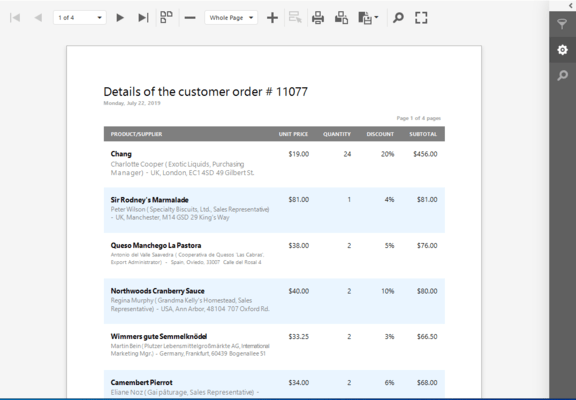
Report Scaling within the Preview Window - This feature has been available for most Developer Express controls since DXperience v2007 vol. 1. It is now available for the XtraReports Suite. End-users can scale reports directly within the Print Preview window. A custom popup dialog allows them to specify report width in pages or a custom zoom factor.
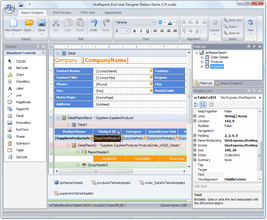
Ribbon Integration - The End User Report Designer allows you to incorporate the Ribbon UI within your application.
아주 사용하기 쉬운 보고서 디자이너를 제공하는 보고 도구인 XtraReports Suite는 MS Visual Studio IDE에 완전히 통합되어 있기 때문에, 디자이너에서 또는 코드를 통해 XtraReport 종속 클래스를 빌드하는 Windows Forms와 완전히 동일한 방법으로 보고서를 사용자 정의할 수 있습니다. 다른 주요 특징에는 CSV to XLS, HTML 및 PDF의 다양한 내보내기 포맷, 보고서를 ASP.NET 응용 프로그램에서 사용하는 기능, 보고서 작성 절차를 단순화해주는 여러 가지 마법사, BarCode 및 ZipCode 컨트롤에 붙이는 간단한 레이블에서부터 기타업체의 Windows Forms 컨트롤을 인쇄할 수 있는 기능까지 13개의 다양한 기본 보고서 컨트롤, 마스터 세부사항 및 하위 보고서 지원, 사용하기 쉬운 최종 사용자용 디자이너, 다중 열 보고서 등이 있습니다.
XtraReports Suites의 주요 기능에는 다음과 같은 것이 있습니다.
IDE로의 완벽한 통합:
보고서 컨트롤에는 다음이 포함됩니다.
사용할 수 있는 Band 유형:
ASP.NET 보고서의 편리한 빌드:
기본 End-user Designer - End-user Designer는 IDE 통합 디자이너와 동일한 기능 세트를 제공합니다. 기능에는 다음과 같은 것이 있습니다.
XtraReports로의 이주
XtraReports의 Import 기능을 사용하면 쉽게 현재의 보고 시스템을 XtraReports로 이주할 수 있습니다. MS Access로 작성된 보고서, Crystal 또는 Active 보고서는 XtraReport에서 직접 XtraReport로 쉽게 가져오고 변환할 수 있습니다. "Import..." 글자를 누르고 가져올 보고서를 선택하면 그대로 새로운 XtraReport 클래스를 프로젝트에 추가할 수 있습니다. 변환 관련 작업은 모두 XtraReports가 자동으로 수행합니다.
배포
XtraReprts는 GAC(global assembly cache)에 넣거나 "xcopy"를 사용하여 어셈블리를 배포하는 방법으로 쉽게 배포할 수 있습니다.
물론 배포의 편리성을 논할 때 비용 문제를 간과할 수 없습니다. 앞에서 언급한 것처럼, XtraReports는 이것을 무료로 WindowsForms, ASP.NET 및 End-User Designer에 사용할 수 있습니다.
추가 기능
미리 정의된 다양한 레이블이 제공됩니다. XtraReports를 사용하여 전자 우편 레이블, 스티커, 비즈니스 카드, 뱃지는 물론 어떤 종류의 레이블도 인쇄할 수 있습니다. 가장 많이 사용되는 미리 정의된 레이블 유형을 다양하게 갖춘 마법사를 제공합니다. 마법사는 AOne, Avery, Herma, Zweckfrom 및 기타 여러 레이블 표준(모두 합쳐서 1,500개가 넘습니다)을 지원합니다.