by Developer Express - Product Type: Component / .NET WinForms / .NET Class
XtraReports Suite by Developer Express
Next generation Reporting platform for Windows® Forms and ASP.NET developers. XtraReports was engineered to help you create stunning reports for your end-users in the shortest possible time - yet maintain all the capabilities you've come to expect from today's reporting solutions. With full Microsoft® Visual Studio .NET integration, XtraReports Suite allows you to build reports in the same exact way you build a typical Windows® Forms application. XtraReports uses the same code editor (C#, VB.NET or J#), the same Property Grid, the same component Toolbox, the same alignment toolbar, and all available Visual Studio IDE resources.
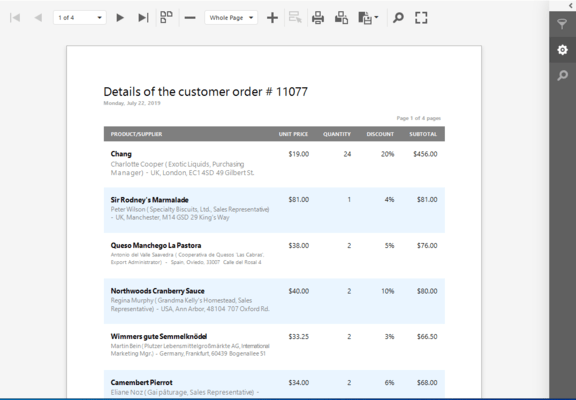
Reports in Windows Forms Applications - Once you have constructed a report, you can display it in your Windows Forms application using a separate Print Preview form. You can also use a specially designed Print Preview control to embed a report to any existing form.
ASP.NET Report Viewer - To display XtraReports on a web page, all you need to do is drop the ASP.NET Report Viewer control (that ships with the XtraReports Suite) onto a page and set its ReportName property to that of the report you want to display. You can use the Report Viewer control on any web page, even inside an HTML control since exported HTML does not use absolute positioning and uses HTML Tables instead. Using HTML tables instead of absolute positioning allows it to support NN4+ and IE4+ as well as other browsers on the market today.
Report Toolbar Control for Easy Navigation - In addition to the Report Viewer Developer Express also provide a Report Toolbar control, which can be placed anywhere on a Web form and then linked to a Report Viewer, thus giving the ability to print or export a report in any of the existing formats, as well as providing advanced navigation functionality.
Write into an HTTP Response - You may write PDF or HTML Report streams directly into an HTTP Response. This is particularly useful for PDF documents since it allows you to generate reports in PDF in real time, after the end-user requests the information.
Report Creation Tools
Full Visual Studio .NET Integration
An Intelligent Report Creation Wizard
Built-in Preview and HTML Views
Smart Tags for Every Control
In-Place Text Editing
Create Reports Programmatically from Scratch
Report Layout Options - The following band types are available to you when using the XtraReports Suite:
Detail Band
Group Footer, Group Header
Bottom Margin, Top Margin
Report Footer, Report Header
Page Footer, Page Header
And you can easily add detail reports that have most of these bands in them
The following report construction features are available:
Sub-Reports are Fully Supported
Sub-Reports can be printed side-by-side
Report Merging is fully supported
Detail Report Band - The Superb Alternative to Rusty Sub-reports
Multi-Column Reports
Drill-Down Reports
A Wide Range of Predefined Label Types
Report Elements - The following controls can be used in XtraReports:
XRTable - allows you to add auto-arranged tables thus providing a better data layout
XRChart - a chart control
XRBarCode - a bar code control
XRZipCode - displays zip codes; particularly useful for creating mail XRRichTextBox - allows you to display rich-formatted text in reports
Labels
XRShape - a control allowing you to build various shapes like arrows, stars, etc.
Subreport - allows you to reuse reports in multiple places
The XtraReports Suite provides advanced support for Developer Express products that can be printed via the XtraPrinting Library. Just drop and customize controls like the XtraGrid to get a complete report
Any .NET WindowsForms control can be embedded into reports
XRPageInfo - allows you to add information such as the page number, current date, etc.
XRLabel - a label control
XRCheckBox - a check box
XRPictureBox - allows you to display images in reports
XRLine - allows you to add horizontal or vertical lines to reports
XRPageBreak - allows you to insert manual page breaks into reports
XRPanel - a panel control
XRControl - the base for all controls. This controls serves as a panel which allows you to provide content of any type
Data Exchange
Flexible Data Source Support
Mail Merging / Embedded Fields
Export Your Data with Ease - to PDF, HTML, MHT, RTF, XLS, TXT, CSV, Image (BMP, JPEG, GIF, TIFF, PNG, EMF)
Data Shaping and Manipulation
Sort Data by Any Field
Summary Support
Group Data by Multiple Fields
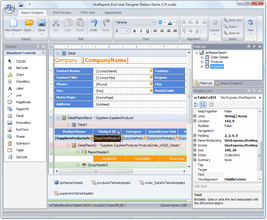
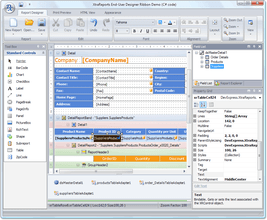
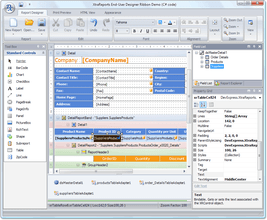
End-User Designer – TheXtraReports Suite ships with the End-User Report Designer that is Identical to the Integrated Designer in Microsoft visual Studio. As well as in integrated designer, the following UI elements are available to you:
Report Navigation Window
Field List Explorer Window
Active Status Bar
Properties Window
Toolbars
Toolbox
The End-User Designer provides the following features:
End-User Scripting
Report Zooming Functionality
Support for Skins
Reports can be created from scratch, saved and restored later
Miscellaneous Features
Advanced Styles and Style Sheets
Background and Watermarks
Bookmarks and a Document Map
Hyperlinks
Cross-references
No Need for COM or any other Complicated Registration Procedures -To distribute application using XtraReports - even if they include the XtraReports End User Designer - you simply need to place the XtraReports assemblies in the same location as your application using 'xcopy' or place the XtraReports assemblies in the global assembly cache (GAC).
Royalty-Free - The XtraReports Suite is available to you royalty free. Whether you are delivering a Windows® Forms app or an ASP.NET solution, you never have to pay a penny in royalties or deployment costs. All you need is to purchase a license for each developer who will be using it at design time.
Migrating to XtraReports - You can migrate your reporting system to XtraReports with ease - just use the Import feature of XtraReports. Reports written in the following tools can be imported:
Microsoft Access
Crystal Reports
Active Reports
What’s new in XtraReports Suite vol 1?
New Cross-Tab Control - The new XRPivotGrid control is powered by the XtraPivotGrid Suite and allows you to design hassle-free cross-tab reports. This control is a better alternative to the previously available ways in which to build cross-tab reports. Because the XRPivotGrid wraps the XtraPrivotGrid Suite as a native report control, it's now infinitely easier to create and customize cross-tab reports, both in Visual Studio and within the End-User Report Designer.
Improved ASP.NET Reporting
Client-Side Printing via Adobe® Plug-In - Printing a web report on the client side has always been a problem because a web browser used its own printing settings (e.g. paper kind, margins, etc.) to print a report which may have differed from the report's individual settings. So, end-users had to adjust page settings before every printing operation. For those using Internet Explorer with the Adobe Reader plug-in installed, this is no longer a problem. When a report is printed, XtraReports searches for the plug-in, and if found, first exports a report to PDF, and then prints the PDF file. In this instance all print settings are correctly passed from a report to the Print Dialog.
Web Farms and Web Gardens Support - To properly operate in web farms and web gardens, XtraReports v2008 vol 1 now stores its data in a Session, which can be adjusted to allow access by multiple processes simultaneously. As for web farms, it's now possible to specify a shared folder in the web application's Web.config file. If all servers of a web farm have read/write access to this folder, XtraReports may use it to store all necessary data.
New Styles and Style Overriding - Added a StylePriority property to every report control, and now control properties may override the corresponding properties of a style assigned to a control.
Better Control Over Report Layouts
Suppress empty or duplicate values
Remove page headers and page footers from pages with report header or footer
Keep master and detail reports together
What's New in XtraReports Suite v2007 vol. 3?
ASP.NET Reporting - Major Improvements - significantly improved the ASP.NET capabilities of the XtraReports Suite. The main controls - ReportViewer and ReportToolbar - have been completely re-written to use the the ASPxperience Suite.
Complete AJAX Callback Support - The ReportViewer control now uses callbacks for all operations. For instance, page navigation is accomplished via callbacks, automatically.
Medium Trust Support - Since many web hosts do not grant Full Trust permission to their clients, now allow you to create reports that can be viewed and work at a Medium Trust permission level.
Report Caching for Faster Navigation and Export Operations
Document Map Support (Bookmarks)
The Ability to Build Custom Report Toolbars
Cross-Band Controls (Line and Box) - Previously, to draw a continuous line across several bands, you had to place a Line control into each band and then carefully align lines to one another. With the new cross-band Line and Box controls, these tasks become a matter of placing a single control onto your report.
Built-in Data Filtering - In previous versions, if you wanted to apply filtering to a report, you needed to manually filter the underlying data source. Now provide a more straightforward solution - you can specify any filter condition when designing a report, by either assigning it to the FilterString property or using the Filter Editor dialog. The specified condition will be automatically applied to the underlying data source when the report is generated.
Anchor Control Edges to Band Edges - This feature allows you to better control complex report layout. For instance, this features can be used when multiple controls are displayed side by side and their height depends on their content. To make certain these controls have the same height, anchor them to the band's top and bottom edges. The control's height will then be adjusted with respect to the band's actual height.
What's New in XtraReports Suite v2007 vol. 2?
Side-by-side Sub-report Printing – Developer Express have completed a comprehensive internal re-design so that side-by-side printing of several sub-reports is now possible. It doesn't matter if sub-reports are all bound to different data sources. You simply align them to one another vertically and you're done - different reports will be rendered in parallel.
Report Merging - You can now use pages from different reports to create a single combined report. To accomplish this, you simply insert the desired pages from one report to the desired positions within another. You can combine more than two reports and there are no limits regarding page order. Note also that page settings, such as page orientation, can be mixed within the resulting report. At its simplest, this feature can be used to print multiple reports as a single report - within a single printer task. This can help ensure that two related reports will be printed one by one on your printer so that no other printer task will be able to get between them. More sophisticated usage scenarios include the ability to produce a complex report with arbitrary page order and different page layout types. The resulting report will have continuous page numbering so that the report will look as a single document. Note that all export features (such as export to PDF) fully support this new capability.
Report Scaling within the Preview Window - This feature has been available for most Developer Express controls since DXperience v2007 vol. 1. It is now available for the XtraReports Suite. End-users can scale reports directly within the Print Preview window. A custom popup dialog allows them to specify report width in pages or a custom zoom factor.
Ribbon Integration - The End User Report Designer allows you to incorporate the Ribbon UI within your application.
PartNumbers: PC-514544-146859 514544-146859 PC-514544-146862 514544-146862
Publisher PartNumbers: 137 138
PurchaseOptions: XtraReports Suite v2008 vol 1 (V8.1.6) 1 Developer License - Includes one year subscription , XtraReports Suite v2008 vol 1 (V8.1.6) 1 Developer License - with Source - Includes one year subscription
Resources: Read the Developer Express License Agreement, Download the DXperience v2008 vol 1 (V8.1.6) for Visual Studio 2005/2008 evaluation on to your computer - Expires After 30 Days
Operating System for Deployment: Windows Vista, Windows XP, Windows 2000
Architecture of Product: 32Bit
Product Type: Component
Component Type: .NET WinForms, .NET Class
Compatible Containers: Microsoft Visual Studio 2008, Microsoft Visual Studio 2005, Microsoft Visual Basic 2008, Microsoft Visual Basic 2005, Microsoft Visual C++ 2008, Microsoft Visual C++ 2005, Microsoft Visual C# 2008, Microsoft Visual C# 2005, .NET Framework 3.5, .NET Framework 3.0, .NET Framework 2.0
Product Class: Business Components
Search Items: New Product May 04, New Product Sep 05
Keywords: Reporting Reports Report Print Preview Printing previews prints Developer Express devexpress Database DB Management Enterprise Partner Xtra Reports Suite Report reporting extra
Publisher
Primary Category
Related Products
Related Categories