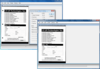
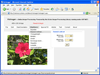
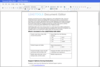
Convert PDF, Doc, TIFF, JPEG and more. LEADTOOLS ePrint Professional is an image/file converter that allows you to convert your images or documents from over 150 file formats including searchable PDF, DOC, HTML, TXT, Multi-page TIFF, JPG, GIF, PNG and many more. ePrint makes file conversion to searchable PDF easier from any application. It includes powerful PDF options such as PDF font embedding, bookmarks, watermarks, security, compression and more. Also included with ePrint is a free screen capture utility that sits on your Explorer toolbar. With LEADTOOLS ePrint Professional your file conversion possibilities are infinite because as long as you have a Windows application that prints, LEADTOOLS ePrint Professional can save the format you specify.
Convert PDF, Doc, TIFF, JPEG and more. ePrint Terminal Server Edition is perfect for companies needing to purchase multiple copies of ePrint without the hassle of installing it on each individual employee's computer. ePrint Terminal Server Edition provides system administrators with a centralized location for ePrint software installation as well as updates and upgrades. For example, if your company is headquarted in Chicago but you also have offices in Phoenix, Baltimore and New Jersey, you can install ePrint TS at one central office but users at all locations will be able to use it without having to actually install the software.
Convert PDF, Doc, TIFF, JPEG and more. LEADTOOLS ePrint is an image/file converter that allows you to convert your images or documents from over 150 file formats including searchable PDF, DOC, HTML, TXT, Multi-page TIFF, JPG, GIF, PNG and many more. LEADTOOLS ePrint API provides software developers an installation API to provide control of the ePrint features that are installed, including ePrint installation folder, name of the installation, output file formats supported and many other features. ePrint API does not include the "OEM" features.
Publisher: LEAD Technologies Primary Category: Imaging Product Type: Component / Add-In / ASP.NET AJAX (ATLAS) / .NET WinForms / .NET Class / .NET WCF / .NET WPF / Silverlight / .NET WF / DLL / VC++ Class Library
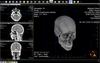
Complete medical imaging and PACS client/server SDK. LEADTOOLS PACS Imaging SDK consists of LEADTOOLS Medical Imaging with added DICOM PACS functionality including a PACS enabled Web Viewer Framework SDK and the DICOM PACS client/server Framework SDK. LEADTOOLS PACS Imaging SDK includes everything developers need to create end to end enterprise PACS solutions.
Publisher: LEAD Technologies Primary Category: Imaging Product Type: Component / Add-In / ASP.NET AJAX (ATLAS) / .NET WinForms / .NET Class / .NET WPF / DLL / VC++ Class Library
Provide 2-D and 3-D vector imaging for loading, viewing, modifying and saving vector files to memory/disk in native vector format. LEADTOOLS Vector Imaging Pro SDK includes a low level API, and C++ Class library to add, edit, delete, rotate, translate, and scale objects. Group objects into layers. Change camera and lights. OpenGL, DirectX or GDI engines supported. Convert and save vector images to any of the over 150 raster file formats supported by LEAD.
Publisher: LEAD Technologies Primary Category: Imaging Product Type: Component / Add-In / ASP.NET AJAX (ATLAS) / .NET WinForms / .NET Class / .NET WPF / DLL / VC++ Class Library
Provide 2-D and 3-D vector imaging for loading, viewing, modifying and saving vector files to memory/disk in native vector format. LEADTOOLS Vector Imaging Pro SDK includes a low level API, and C++ Class library to add, edit, delete, rotate, translate, and scale objects. Group objects into layers. Change camera and lights. OpenGL, DirectX or GDI engines supported. Convert and save vector images to any of the over 150 raster file formats supported by LEAD.
Add professional graphics capability to your applications. THBImage control allows you to add professional graphics capability to your applications. Features include a PreviewScrollWindow for scrolling, Popup menu to access all zooming functions and integrated printing capabilities allowing you to print images with a single statement. You can copy/paste images from/to the clipboard, draw smooth shaded color gradients. THBImage products include .NET, C#, VB.NET, ActiveX, COM and Dll versions. Buying a license or upgrade license includes 1 Year product specific support and download access to software updates.
Add professional graphics capability to your applications. THBImage control allows you to add professional graphics capability to your applications. Features include a PreviewScrollWindow for scrolling, Popup menu to access all zooming functions and integrated printing capabilities allowing you to print images with a single statement. You can copy/paste images from/to the clipboard, draw smooth shaded color gradients. THBImage products include .NET, C#, VB.NET, ActiveX, COM and Dll versions. Buying a license or upgrade license includes 1 Year product specific support and download access to software updates
An advanced vector data processing component. THBVector holds one or more vector layers where each layer contains geometry objects and you can insert or delete layers. Geometry objects can be manually created and put into layers. You can create objects like point, line, line string, rectangle, polygon, polygon with holes, circle and ellipse. With THBVector you can edit, store, process, analyse your vector and geometry data . THBVector can render raster image data and vector data at more than 50 frames per second using DirectX or Toggle between DirectX and GDI rendering at runtime. THBVector is ideally suited for annotation purposes too.