by Actipro Software - Product Type: Component / .NET WPF / 100% Managed Code / Source Code
Actipro Wizard for WPF by Actipro Software
URLs: actipro-wizard-wpf, actipro wizard wpf, actiprowizardwpf, actipro
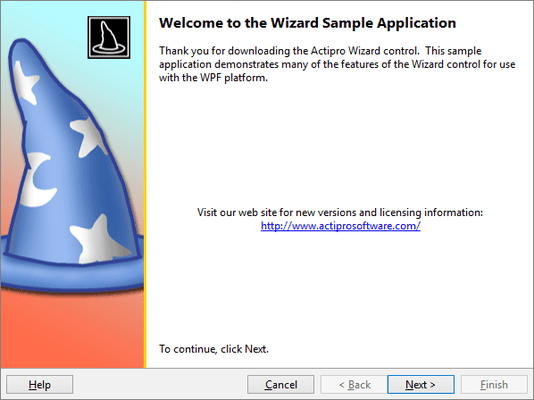
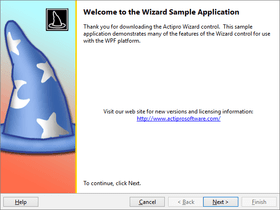
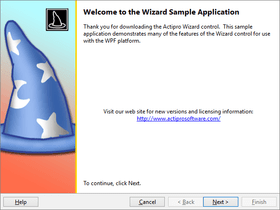
Create wizard dialogs in WPF (Windows Presentation Foundation). Actipro Wizard for WPF provides a framework for developing wizard dialogs in WPF that follow the Wizard97 specifications. Features include multiple page types, easy page sequencing, selection change processing, full control over button states, page titles that update the containing Window, theming, templating, animated page transitions, automatic layout, XAML/XBAP compatibility, and much more. Actipro Wizard WPF is part of the Actipro WPF Studio. All Actipro WPF component licenses include one year of free upgrades to any major/minor new versions. Actipro Wizard for WPF Source Code available. Run time Royalty Free.
Actipro Wizard for WPF is the premiere control for building wizard dialogs in Windows Presentation Foundation (WPF) that conform to the Wizard97 specification.
Actipro Wizard for WPF has been designed from the ground up to follow WPF best practices, be extremely configurable, and dramatically cut down on the time needed to implement a robust wizard dialog. From simple linear sequences of pages to more advanced decision-based page execution paths, Wizard can handle it all. It provides an amazing number of features that make the design and run-time experience for the developer and end user a positive one.
Actipro Wizard is the premiere control for building wizard dialogs in Windows Presentation Foundation (WPF) that conform to the Wizard97 specification.
Wizard has been designed from the ground up to follow WPF best practices, be extremely configurable, and dramatically cut down on the time needed to implement a robust wizard dialog. From simple linear sequences of pages to more advanced decision-based page execution paths, Wizard can handle it all. It provides an amazing number of features that make the design and run-time experience for the developer and end user a positive one.
Page and Button Features
Multiple built-in page types (exterior, interior, blank).
Page captions and descriptions that display in the header area of the page.
Page titles that can be used to update the title bar of the containing Window.
Multiple options for automated updating of the containing Window title bar text.
Global default settings for all button visibility and enabled states that can be overridden by page-specific settings.
Toggle button visibility and enabled states at run-time via code.
Uses WPF command model for handling all button clicks.
Multiple options for setting the default and cancel buttons on the containing Window to wizard buttons.
The Cancel and Finish buttons can set the appropriate Window.DialogResult and close the containing Window. This behavior can be changed.
Lazily initialize pages if needed.
Appearance Features
Numerous built-in animated page transition effect options, everything from simple fades to wedge wipes.
Ability to create custom page transition effects.
Randomly choose between multiple transitions or write custom logic to choose transitions for each page change.
Page transition duration and effect direction options.
Page transitions capable of reversing for backwards progress through pages.
Built-in default styles and templates for exterior and interior pages.
Ability to create custom styles and templates for any page as well as override defaults.
Ability to create custom styles and templates for the button container area to completely change its look and/or contents.
Ability to use custom button container templates to do things like align the Help button on the right side, or show the Finish button in the same space as the Next button.
Create completely custom page designs.
Create WPF-based slide show presentations using Wizard.
Navigation Features
WPF commands defined for going to the next or previous pages.
WPF commands for jumping forward to or backwards to a specific page, as indicated by its direct reference, name, or index.
Any wizard command can be assigned to custom controls such as Buttons, Hyperlinks, or MenuItems.
Default page sequencing which visits pages in their order by index can be overridden to support decision-based branching of page execution paths.
The next and previous pages for each page can be explcitly set by a direct reference, name, or index.
Two types of backwards progress page sequencing, normal and stack-based.
Disable pages to have Wizard skip over them when using default page sequencing.
Ability to programmatically get/set the selected page by reference or index.
Process selection changing/changed events at the general Wizard or WizardPage-specific levels.
Selection change events specify what caused the change, which pages are changing, and allow you to cancel the change or choose a new destination page.
Validate data on a page in the selection changing event.
Differentiation between forward and backward progress through wizard pages.
Easily navigate through pages using the mouse and/or keyboard forward/back buttons.
Layout, Globalization, and Accessibility Features
Adheres to the Wizard97 specification.
Easily create wizard user interfaces in XAML markup.
All parts of the wizard use automatic layout so that they are capable of growing as needed.
Right-to-left support is fully integrated for languages such as Hebrew or Arabic.
All text properties use localization attributes.
Follows the WPF accessibility model for UI automation.
Code and Requirements
Includes detailed documentation and a sample project that demos nearly every feature.
Written in 100% pure C# and is based on the Windows Presentation Foundation framework.
Requires the .NET 3.0 or 3.5 run-time framework.
Full XAML support and XBAP compatibility.
Extensive Visual Studio 2008 designer capabilities.
Visual Studio 2008
What's new in Actipro Wizard for WPF 2011.2?
App-Wide Themes - Actipro Themes includes professionally-designed themes that cover all system and Office themes including high contrast mode. The themes apply to all Actipro controls and optionally to native WPF controls.
Styles/Templates for Native WPF Controls - Enhanced styles and templates for all native WPF controls (TextBox, ToolBox, TreeView, etc.) are included. These styles can be automatically applied app-wide via a single line of code. Or you can choose to use them on specific controls only, accessible via pre-defined style keys.
Common Asset Pool - There are well over 800 asset resources for each of the system and Office themes supported. All custom and native control styles/templates use the same assets. This ensures that controls placed next to each other always render with similar colors that complement each other.
Advanced Tinting - Actipro Themes supports the tinting of any theme or portion of a theme towards a certain color. This means that you can take a built-in theme like the Office Silver theme, and make it a red one instead.
Appearance Improvements - Actipro Themes includes updated menu, toolbar, and statusbar appearances that were inspired by Visual Studio 2010’s look. The simplified design uses a darker workspace area, with lighter content areas in each docking window. This higher contrast appearance focuses the end user's eye on the content without distracting it with non-active UI elements, thus making for a more effective user interface.
What's new in Actipro Wizard for WPF 2010.2?
Added support for new Office 2010 blue/black/silver themes.
Fixed a bug that could occur if using stack-based page sequencing and canceling a backwards page change.
What's new in Actipro Wizard for WPF 2010.1?
Updated how implicit styles in AeroWizard are set up to apply to pages and the button container, allowing for custom AeroWizard templates while retaining the default styles.
Updated AeroWizardWindow to use shader effects for text outer glow
What's new in Actipro Wizard for WPF 2009.2?
Version 2009.2 adds designer support for Visual Studio 2010 and Expression Blend 3.
Create wizard dialogs in WPF (Windows Presentation Foundation).
Pricing: Actipro Wizard 2011.2 for WPF 1 Developer Subscription License (Includes 12 months of updates, both minor and major, email and forums based support and more), Actipro Wizard 2011.2 for WPF 1 Developer Subscription License, per license for 2 licenses (minimum quantity 2) (Includes 12 months of updates, both minor and major, email and forums based support and more), Actipro Wizard 2011.2 for WPF 1 Developer Subscription License, per license from 3 up to 4 licenses (minimum quantity 3) (Includes 12 months of updates, both minor and major, email and forums based support and more), Actipro Wizard 2011.2 for WPF 1 Developer Subscription License, per license from 5 up to 7 licenses (minimum quantity 5) (Includes 12 months of updates, both minor and major, email and forums based support and more), Actipro Wizard 2011.2 for WPF 8 or More Developer Subcription Licenses, Price per license (minimum quantity 8) (Includes 12 months of updates, both minor and major, email and forums based support and more), Actipro Wizard 2011.2 for WPF 1 Site Wide License (Allows Unlimited Developers at a Single Physical Address) (Includes 12 months of updates, both minor and major, email and forums based support and more), Actipro Wizard 2011.2 for WPF 1 Enterprise License (Allows Unlimited Developers throughout your entire organization, regardless of location) (Includes 12 months of updates, both minor and major, email and forums based support and more), Actipro Wizard 2011.2 for WPF 1 Blueprint License - (Source Code License) (Current Developer, Enterprise or Site License Subcriptions Required) (Includes 12 months of updates, both minor and major, email and forums based support and more), Actipro Wizard for WPF - Renewal 1 Developer Renewal License (if you have a current Developer Subscription or if your Developer Subscription expired within the past 30 days), Actipro Wizard for WPF - Renewal 1 Developer Renewal License, per license for 2 licenses (minimum quantity 2) (if you have a current Developer Subscription or if your Developer Subscription expired within the past 30 days), Actipro Wizard for WPF - Renewal 1 Developer Renewal License, per license from 3 up to 4 licenses (minimum quantity 3) (if you have a current Developer Subscription or if your Developer Subscription expired within the past 30 days), Actipro Wizard for WPF - Renewal 1 Developer Renewal License, per license from 5 up to 7 licenses (minimum quantity 5)(if you have a current Developer Subscription or if your Developer Subscription expired within the past 30 days), Actipro Wizard for WPF - Renewal 8 or More Developer Renewal License, Price per license (minimum quantity 8) (if you have a current Developer Subscription or if your Developer Subscription expired within the past 30 days), Actipro Wizard for WPF - Renewal 1 Site Wide Renewal License (if you have a current Site Wide Subscription or if your Site Wide Subscription expired within the past 30 days), Actipro Wizard for WPF - Renewal 1 Enterprise Renewal License (if you have a current Enterprise Subscription or if your Enterprise Subscription expired within the past 30 days), Actipro Wizard for WPF - Renewal 1 Blueprint Renewal License (if you have a current Blueprint Subscription or if your Blueprint Subscription expired within the past 30 days. You also need a Current Developer, Enterprise or Site License Subcription)
Evals & Downloads: Read the Actipro WPF Studio help file, Read the Actipro Software End User License Agreement, Download the Actipro WPF Studio 2011.2 evaluation on to your computer - Expires after 21 days
Operating System for Deployment: Windows 7, Windows Vista, Windows XP, Windows Server 2003
Architecture of Product: 32Bit, 64Bit
Product Type: Component
Component Type: .NET WPF, 100% Managed Code, Source Code
Built Using: Visual C# .NET
Compatible Containers: Microsoft Visual Studio 2010, Microsoft Visual Studio 2008, Microsoft Visual Studio 2005, Microsoft Visual Basic 2010, Microsoft Visual Basic 2008, Microsoft Visual Basic 2005, Microsoft Visual C++ 2010, Microsoft Visual C++ 2008, Microsoft Visual C++ 2005, Microsoft Visual C# 2010, Microsoft Visual C# 2008, Microsoft Visual C# 2005, .NET Framework 4.0, .NET Framework 3.5
Product Class: User Interface Components
Keywords: actipro wizard wpf, actipro wizard for wpf
Actipro Software
User Interface UI
Part numbers: PC-518147-423051 518147-423051 PC-518147-423053 518147-423053 PC-518147-423075 518147-423075 PC-518147-423077 518147-423077 PC-518147-423055 518147-423055 PC-518147-423057 518147-423057 PC-518147-423067 518147-423067 PC-518147-423069 518147-423069 PC-518147-423059 518147-423059 PC-518147-423079 518147-423079 PC-518147-423081 518147-423081 PC-518147-423061 518147-423061 PC-518147-423063 518147-423063 PC-518147-423065 518147-423065 PC-518147-423071 518147-423071 PC-518147-423073 518147-423073
Mfr. Part No: #1162 #1163 #1164 #1165 #1166 #1167 #1168 #1169