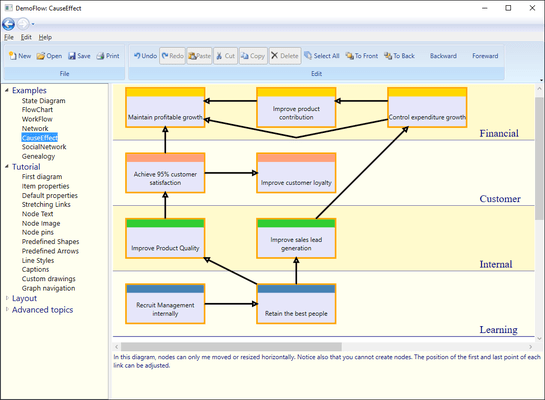
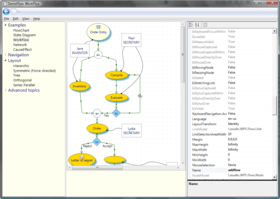
Screenshot Preview

AddFlow for WPF Standard - Summary

by Lassalle Technologies - Product Type: Component / .NET WPF / 100% Managed Code

Summary

AddFlow for WPF Standard by Lassalle Technologies

URLs: addflow-wpf-standard, addflow wpf standard, addflowwpfstandard, lassalle

Create interactive flowchart and workflow diagrams for your WPF applications. Addflow for WPF Standard is a Windows Presentation Foundation custom control that lets you quickly build flowchart enabled WPF applications like workflow diagrams, database diagrams, communication networks, organizational charts, process flow, state transitions diagrams, telephone call centers, CRM (Customer Relationship Management), expert systems, graph theory, quality control diagrams, etc. Addflow for WPF Standard is very easy to use, very light and it is designed to be very fast. Addflow for WPF Standard requires the Microsoft .NET Framework 4 and VS2010. Royalty free redistribution. Addflow for WPF Standard does not include LayoutFlow that is only as part of Addflow for WPF Professional. Addflow for WPF Standard is 64 bits compatible.

AddFlow for WPF Standard is a WPF custom control for creating flowchart diagram. It offers the following advantages:

A small deployment assembly. The size of the Lassalle.WPF.Flow.dll file is less than 150 Kb

A light programming interface

Speed: A design where nodes and links are not controls but just low-level DrawingVisual objects. Using DrawingVisual is the most lightweight way to perform drawing. A good choice if you need to create big diagrams (several thousands of nodes and links).

Full integration with the WPF environment

Runtime royalty free

The main difference between AddFlow for WPF Standard and AddFlow for WPF Professional is that AddFlow for WPF Professional includes Automatic Graph Layout functionality provided by LayoutFlow.

AddFlow for WPF Main Features

AddFlow for WPF Standard General Features

Drawings can be made interactively or programmatically.

Distinct shapes, styles, colors, font can be defined on a per item basis (for a node or a link) or as default properties for the control.

Use of the LINQ technology allowing you to traverse the graph in many ways.

Many properties allowing customizing the control (CanDrawNode, CanMoveNode, CanMultiLink, etc...) or an item (IsXSizeable, IsYSizeable, IsXMoveable, IsYMoveable, IsSelectable, IsStretchable, etc...)

AddFlow for WPF Standard Interactivity and display facilities

Multi selection

Multi-level Undo/Redo

Grid support

Nodes stay connected when moved or resized

Zooming

Scrolling, drag scrolling

AddFlow for WPF Standard Input/Output

XML serialization also via the free extension XMLFlow. The C# source code of XMLFlow is provided.

XAML exportation

AddFlow for WPF Standard Nodes

43 predefined shapes

Custom shapes (using Geometry objects)

Ability to display a text and an image in a node

Ability to associate DrawingVisual objects to the node Children collection

In-place edition

Text positioning options

Image positioning options

Tooltip

AddFlow for WPF Standard Links

15 predefined arrow styles

Custom arrow styles (using Geometry objects)

Stretchable links. A link can be composed of many segments. The user can interactively add or remove segments

Curved links (Bezier and Spline)

Reflexive links

Possibility to interactively change the origin node or the destination node of a link

Tooltip

Automatic Graph Layout (Professional version only)

AddFlow provides a set of several graph layout algorithms:

Hierarchic layout

Orthogonal layout

Symmetric layout

Series Parallel layout

Tree layout

Radial Layout

Each of these graph layout algorithms performs a layout on a graph. Performing a layout automatically positions its nodes (also called vertices) and links (also called edges).

What's New in AddFlow for WPF 1.3?

Rotation. If the CanRotateNode property of AddFlow is true (which is the case by default) and if the IsRotatableproperty of a node is true (which is the case by default), a node can be rotated programmatically, using the node RotationAngle property or interactively, using a handle placed at the right of the node. You may change the look of this rotation handle using the RotateHandleStyleproperty.When rotating nodes interactively, the SelectedNodesRotating event is fired and the IsRotatingNode property of AddFlow is true

Interactive zoom. This new release adds the possibility to zoom the diagram interactively with the mouse if the MouseSelection property of the AddFlow control is set to MouseSelection.Zoom

Interactive selection enhancement. A new property to accelerate the selection of items inside a rectangle drawn with the the mouse: CanSelectOnMouseMove. It is true by default. If false, the selection is made only at the MouseUp event (see for instance the “Stress” example in the demo)

AddFlow for WPF adds also two properties SelectionBoxStyle and ZoomingBoxStyle allowing defining the style of the rectangle used when selection items or zooming interactively with the mouse

What's New in AddFlow for WPF 1.2?

64-Bit Compatible: AddFlow for WPF is now compatible with 64bit systems.

What's New in AddFlow for WPF 1.1?

Jumps may be displayed at intersections of link segments

Panning mode: Can scroll the diagram directly with the mouse

Connectors and pins: You can know customize the shape of the pins used to connect create the links. And you can define for each node a connector object that contains several pins.

Create interactive flowchart and workflow diagrams for your WPF applications.

Pricing: AddFlow for WPF Standard V1.3 1 Developer License, AddFlow for WPF Standard V1.3 4 Developer Team License, AddFlow for WPF Standard V1.3 1 Site Wide License (Allows Unlimited Developers at a Single Physical Address), AddFlow for WPF Standard V1.3 1 Enterprise License (Allows Unlimited Developers Worldwide)

Evals & Downloads: Read the AddFlow for WPF help file, AddFlow for WPF Tutorial, Read the AddFlow for WPF End User License Agreement, Download the AddFlow for WPF V1.3 evaluation on to your computer - Displays Nag Screens

Operating System for Deployment: Windows 7, Windows Vista, Windows XP

Architecture of Product: 32Bit, 64Bit

Product Type: Component

Component Type: .NET WPF, 100% Managed Code

Built Using: Visual C# .NET

Compatible Containers: Microsoft Visual Studio 2010, Microsoft Visual Basic 2010, Microsoft Visual C++ 2010, Microsoft Visual C# 2010, .NET Framework 4.0

Product Class: Business Components

Keywords: addflow wpf standard, addflow wpf std, buy addflow wpf standard, addflow wpf standard reseller, addflow wpf standard distributor, upgrade addflow wpf standard, purchase addflow wpf standard

Lassalle Technologies Lasalle Lasal lassal Tech

Flow Diagramming diagram diagrams flowchart

Part numbers: PC-532200-359508 532200-359508 PC-532200-359517 532200-359517 PC-532200-359526 532200-359526 PC-532200-359535 532200-359535

Product Search

Enter search words:

Award