by DevExpress (Developer Express) - Product Type: Component / ASP.NET WebForms
ASPxGauges Suite by DevExpress (Developer Express)
URLs: aspxgauges-suite, aspxgauges suite, aspxgaugessuite, devexpress
Add gauges and digital dashboards to your ASP.NET applications. ASPxGauges Suite lets you place multiple gauges into one container and enable automatic arrangement. ASPxGauges Suite allows you to place multiple DevExpress Gauges into one container and enable automatic arrangement. ASPxGauges Suite (GaugeControl) includes State Indicator, Circular, Linear and Digital Gauges. Note that DevExpress Gauges can be freely resized while maintaining the highest level of quality, since the ASPxGauges Suite uses vector graphics for all gauge types. ASPxGauges Suite includes over 150 built-in presets and is extremely easy to use. With ASPxGauges Suite all you need to do is drop a DevExpress Gauge control onto a form. With a DevExpress Gauge you won't have to manually create elements, customize their appearance, size and layout, etc. Simply choose the template you like best and bind your control to data. ASPxGauges Suite Subscription includes the source code.

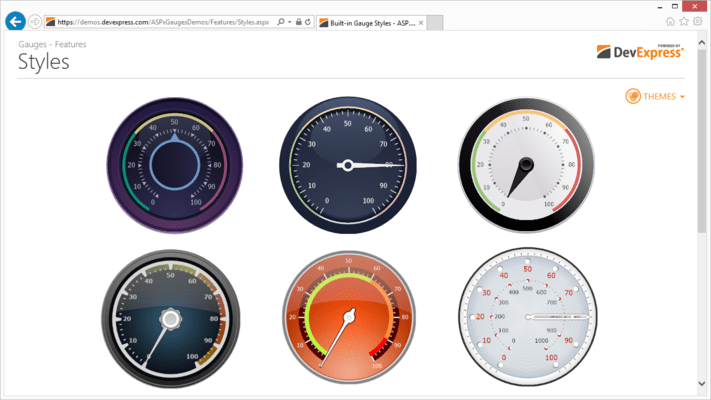
Circular gauges - The Gauge Control provides built-in presets for the following circular gauge types: Full, Three Quarters, Half, Quarter and Wide.
Gauge Scales - Depending on the preset you've selected, a gauge initially contains one or two scales. If you need more scales or if you are designing a Gauge from scratch, you can manually add a scale via the gauge's smart tag. Once scales have been created, you can click them to access their settings via the Properties window. This allows you to customize the following settings.
Upper and lower scale limits
Current value (can be bound to a data field)
Major tick mark visibility, appearance, frequency and label text format
Minor tick mark visibility, appearance and frequency
Scale dimensions and position
Additional Elements - The following elements are available for current value indicators.
Needles.
Markers.
Range bars (require an anchor value to be specified so that one end points to this value, while the other end points to the bound scale's current value).
You can further enhance your gauge by adding the following elements:
Freely-arranged text labels
Spindle caps
Embedded state indicator gauges
Linear Gauges - The Gauge Control provides built-in presets for horizontal and vertical Linear Gauges.
Gauge Scales - Depending on the preset you've selected, a gauge initially contains one or two scales. If you need more scales or if you are designing a Gauge from scratch, you can manually add a scale via the gauge's smart tag. Once scales have been created, you can click them to access their settings via the Properties window. This allows you to customize the following settings.
Upper and lower scale limits
Current value (can be bound to a data field)
Major tick mark visibility, appearance, frequency and label text format
Minor tick mark visibility, appearance and frequency
Scale dimenstions and position
Additional Elements - The following elements are available for current value indicators.
Level bars.
Markers.
Range bars (require an anchor value to be specified so that one end points to this value, while the other end points to the bound scale's current value).
You can further enhance your gauge by adding the following elements:
Freely-arranged text labels
Embedded state indicator gauges
Digital Gauges - The Gauge Control provides four types of digital gauges: seven-segment, fourteen-segment, 5x8 matrix and 8x14 matrix. All digital gauge types ship with multiple themes.
DevExpress Digital Gauge controls provides the following digital gauge settings:
The number of characters to be displayed
Character spacing
Customizable appearance for enabled and disabled segments
Data field used to supply display text (in data-bound mode)
State Indicator Gauges - The following are just a few examples of state indicator gauges shipped with the Gauge Control.
Process state indicators (e.g. traffic lights gauge).
Value level indicators (e.g. smiley gauge).
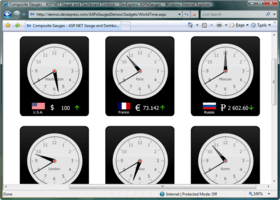
Clipart, allowing you to enhance your application usability by incorporating explanatory images (e.g. state flags or currency symbol gauges).
The main benefit of using State Indicator Gauges is that the DevExpress Gauge controls use vector graphics so that images will preserve their quality regardless of their current size which in turn saves you the trouble of adjusting images to the required control size or vice versa - adjusting controls so that they fit images. Once you start using DevExpress Gauges, you will never again worry about resizing issues when using resizable containers - state indicators are automatically resized with their parent control.
What's new in ASPxGauges Suite v2011 vol 1?
Custom Draw for Gauge Elements - Added a new event that allows you to manually draw gauge elements and thus fully redefine appearance.
Layout Enhancements - You now have a greater control over the layout of gauge elements in AutoLayout mode. You can specify padding and indent values when a gauge container automatically aligns individual gauge elements.
What's new in ASPxGauges Suite v2010 vol 2?
New Themes - introduced four new application wide themes including three Microsoft Office 2010-like styles.
What's new in ASPxGauges Suite v2010 vol 1?
Full Support for Visual Studio 2010 and .NET Framework Client Profile
Add gauges and digital dashboards to your ASP.NET applications
Pricing: ASPxGauges Suite Subscription Renewal for one year (for Subscriptions soon to expire or just expired), ASPxGauges Suite Subscription Renewal for one year (for Subscriptions soon to expire or just expired) - with Source code
Evals & Downloads: Read the Developer Express License Agreement - Requires Acrobat Reader, Read the ASPxGauges Suite help file, Download the DXperience v2011 vol 2 (V11.2.11) evaluation on to your computer - Expires After 30 Days
Operating System for Deployment: Windows 7, Windows Vista, Windows XP
Architecture of Product: 32Bit
Product Type: Component
Component Type: ASP.NET WebForms
Compatible Containers: Microsoft Visual Studio 2010, Microsoft Visual Studio 2008, Microsoft Visual Studio 2005, Microsoft Visual Basic 2010, Microsoft Visual Basic 2008, Microsoft Visual Basic 2005, Microsoft Visual C++ 2010, Microsoft Visual C++ 2008, Microsoft Visual C++ 2005, Microsoft Visual C# 2010, Microsoft Visual C# 2008, Microsoft Visual C# 2005, .NET Framework 4.0, .NET Framework 3.5, .NET Framework 3.0, .NET Framework 2.0
Keywords: devexpress gauge, devexpress gauges, aspx gauges, aspxgauges, gaugecontrol, aspxgauge, aspxgauges suite, aspxgauges suite subscription, aspxgauges suite subscription with source, aspxgauges renewal, aspxgauges upgrade, buy aspxgauges
devexpress, developer express, dxperience, devexpress.com, devexpress controls, devexpress download, www.devexpress.com, devexpress dxperience, devexpress suite, devexpress components, devexpress tools, devexpress universal, devexpress upgrade
Instrumentation instrument instruments
Part numbers: PC-528099-379088 528099-379088 PC-528099-379090 528099-379090