by DevExpress (Developer Express) - Product Type: Component / ASP.NET WebForms / .NET Class / Web Part / 100% Managed Code / AJAX
Add Outlook style grids to your ASP.NET applications. ASPxGridView and Editors Suite by Developer Express is a 100% C# based grid control for ASP.NET. DevExpress ASPxGridView supports Outlook style grouping - multi-column sorting and data summaries - with a built in data navigator and more. DevExpress ASPxGridView and Editors Suite is specifically designed to exploit all the capabilities built into ASP.NET. Once you start using DevExpress ASPxGridView and Editors Suite, you will be bringing an entirely new level of elegance, usability and functionality to your web applications. ASPxGridView and Editors Suite Licenses include 1 Year Subscription. ASPxGridView Source Code available.
Our regular prices are shown below. Please logon to see your discounted prices.
| Add to Cart | $ 107.79 | Subscription Renewal for one year (for Subscriptions soon to expire or just expired) | Verify | Download (139.8 MB) |
| Add to Cart | $ 136.22 | Subscription Renewal for one year (for Subscriptions soon to expire or just expired) - with Source code | Verify | Download (139.8 MB) |
Our prices include ComponentSource technical support and, for most downloadable products, an online backup and a FREE upgrade to the new version if it is released within 30 days of your purchase. All sales are made on our standard Terms and Conditions and subject to our Return Policy. Please contact us if you require any licensing option not listed, including volume licensing and previous versions.
Our regular prices are shown above. Please logon to see your discounted prices.
What's new in ASPxGridView and Editors Suite v2011 vol 1?
What's new in ASPxGridView and Editors Suite v2010 vol 2?
What's new in ASPxGridView and Editors Suite v2010 vol 1?
What’s new in ASPxGridView and Editors Suite v2009 vol 3?
What’s new in ASPxGridView and Editors Suite v2009 vol 2?
What’s new in ASPxGridView and Editors Suite v2009 vol 1?
What’s new in ASPxGridView and Editors Suite v2008 vol 3?
ASP.NET Grid View and HTML Editor for SharePoint - During the DXperience v2008 vol 3 development cycle, the ASP.NET team invested the resources necessary to enable the controls within SharePoint portals (built with both Windows SharePoint Services 3.0 and Microsoft Office SharePoint Services 2007). With this release, the controls can not only be intergrated into SharePoint pages but also provide SharePoint add-ons allowing codeless integration of the ASP.NET Grid View and HTML Editor controls. Current owners will receive a registration tool that can incorporate these controls in SharePoint portals. After registration, you can simply navigate to Site Settings to enable DevExpress features and then embed these controls where necessary.
The following codeless integration scenarios are now possible:
Section 508 and Web Accessiblity Initiative (WAI) Support is now available within the ASP.NET-AJAX product line. To enable accessibility, ASP.NET controls must obviously generate more code. For instance, many elements must include links simply to allow keyboard navigation. Because of this additional HTML code, accessibility rendering is disabled by default in advanced controls like the ASPxGridView. If you don't need accessibility support in your application, you will still have optimized rendering. If you need Section 508 and WAI compliance, simply toggle a single property to enable it.
Better Localization Support - now provide an easier way to localize all built-in dialogs in the HTML Editor, spell checker and all other controls. You need only to write a few lines of code to translate your application's UI into the desired language.
Faster Page Loading – Developer Express have combined a series of smaller scripts into larger files so that fewer requests are made to the server, resulting in faster page loading.
What’s new in ASPxGridView and Editors Suite v2008 vol 2?
What’s new in ASPxGridView and Editors Suite v2008 vol 1?
LINQ Server Mode - The ASPxGridView bound to a LinqDataSource web server control can now function in server mode. In this mode the grid fetches only those records that need to be displayed on-screen - giving you significant performance benefits against very large datasets. In previous versions, this could be done only with an XPO data source.
Sorting Against Group Summary Values - The ASPxGridView provides an API to sort group rows by their summary values. For instance, if a view is grouped by country, you can sort grouped rows so that countries having maximum sales appear at the top of the view.
Popup Edit Form - In v2008 vol 1, you can display Popup Edit Form as a modal dialog. In this mode, end-users must close the edit form before they can continue working with your application.
Data Shaping and Manipulation Enhancements
Export Improvements - In v2008 vol 1 we've added the ability to export only selected records.
Template Enhancements - Two new templates are now available. With their help, you can customize the grid's footer, as well as individual footer cells.
What's new in v2007 vol 3?
Popup Edit Forms - implemented a new record editing mode - Popup Edit Form. This mode combines the benefits of previously available in-line editing and Edit Forms:
Data Grouping and Sorting Enhancements - Group summaries can now be displayed within group footers under the corresponding column, thus providing more intuitive and efficient data presentation.
Grouping Intervals - Previously, when you grouped data against a column, a group per each unique column value was created. In vol 3, grouping has become more flexible, since now groups can be based on value intervals. For instance, date-time columns can be grouped by date, month, year or in Microsoft Outlook style. Text values can be grouped alphabetically, based on their first characters.
Custom Sorting - The ASPxGridView now allows you to implement custom sorting logic. You can use this new capability to provide custom grouping intervals, for instance.
Sort Data by Display Text - This feature is extremely useful when you use lookup editors in your grid. Instead of sorting by underlying IDs, the grid will now sort data based on its textual representation, thus greatly improving user experience.
Export Improvements
Easily Transmit Any Data onto the Client - A new server event - CustomJSProperties - enables you to declare custom client properties for the client grid control. You can specify these properties' values on the server side and then access them on the client, as you would do with built-in properties. This allows you to easily transmit any data to the client by writing very little code.
A New Button Control - The ASPxButton control extends the standard button's functionality. It provides an enhanced client API, supports the appearance customization mechanism and allows the editors to be automatically validated on the client side.
A New Spin Editor Control - The new ASPxSpinEdit control enables end-users to edit numeric values with ease by clicking increment and decrement buttons. This control's features include the following:
The ASPxSpinEdit control can work in floating point or integer mode. In integer mode, floating-point input is disabled and values are automatically rounded after they have been modified. In floating-point mode, culture-specific separators are supported.
Full Support for ASP.NET AJAX - The ASPxGridView has its own native implementation for callbacks, so it does not require the ASP.NET AJAX UpdatePanel to enable this functionality. The UpdatePanel is only useful if you want to synchronize the grid's contents with other controls. In such an instance, you simply place all related controls into a single panel and force the controls to send postbacks in response to user actions.
Callback State - The ASPxGridView does not use the standard View State mechanism. Instead, it implements its own smart state caching engine. This engine stores the difference between the control's initial and current state within a compressed "callback state". This implementation guarantees that the amount of information to be loaded onto the client is much smaller. This means that every action (every callback) is executed much faster when compared with competing grid controls for ASP.NET.
Flexible AJAX-Enabled API -The ASPxGridView provides client-side functions that raise callbacks to obtain data. The data from the server is then returned to client-side event handlers. You can use these handlers to update required controls on the client side. The clever bit is that end-users never know if a callback has been raised. Callbacks are done "in the background" and no part of the web page is reloaded. Since callbacks aren't visually indicated, it looks like no round-trips to the server have been initiated... And since many tasks require very little information to be sent, it seems like it is all done directly on the client.
Built-in Data Editing UI - Though the ASPxGridView is initially read-only, it's quite easy to enable its built-in data editing UI. You simply need to add a Command Column to the grid and select the commands (Edit, Delete, Insert) you want to be displayed within each row. That's it - end-users will be able to manage data records and edit data. Even when switched to edit mode, the ASPxGridView will automatically display appropriate commands (Update and Cancel).
Advanced Data Editors for In-place Editing and Standalone Usage - The Editors included within the ASPxGridView and Editors Suite have been designed to significantly reduce the amount of work you must perform. They provide the following features making it much easier to create a fully-functional and easy-to-use data editing form.
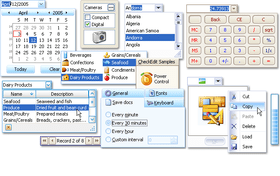
A wide range of controls - There are already over 10 controls included in the suite and there are more to come. By having a large number of controls at your disposal, you can ensure that you will always find the one that provides the best end-user experience. For instance, a dropdown calendar makes it much easier to input dates than a simple text editor..
The following editors are currently available.
Client-side adaptability - To reduce error risk and make it easier for end-users to enter data, you may need to dynamically change content in data editors. You may need to filter values in list boxes or populate combo boxes with different values depending upon other controls. To provide a superior user interface, these operations should be executed on the client.
Built-in data validation mechanism - Though the controls fully support standard Validator controls, they also have built-in validation functionality. You will not have to worry about aligning the validator control – there are two built-in error indication solutions including error frames and error icons. These error indication options allow us to build elegant in-grid validation as well as standalone data editor validation.
Multiple Edit Mode Layouts - When in edit mode, the ASPxGridView offers you total freedom in how individual editors are arranged. The following list highlights all available editor layout options, from the simplest to the most sophisticated:
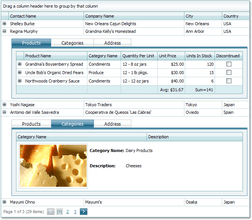
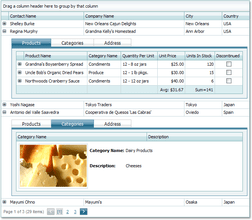
Master-Detail Data Representation - The Master-Detail option found in the ASPxGridView demonstrates the ease with which one can extend the ASPxGridView. This feature offers both simplicity and flexibility. With nearly no code, (one code line per one detail) you can build master-detail layouts of any complexity - with any number of nesting levels and any number of details at each level. In addition to this, you are not limited to displaying grids in details - Detail Rows can display any type of information, such as collapsible row preview sections.
Navigation and Selection
Layout Features
Publisher
Primary Category
Related Products
Related Categories