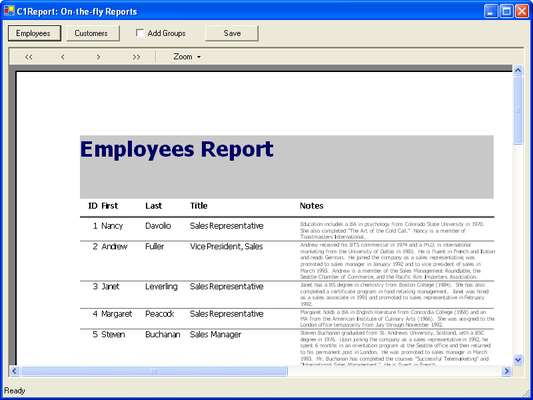
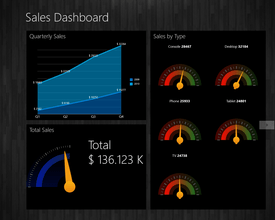
Screenshot Preview

ComponentOne Reports for WinForms - Summary

by ComponentOne - Product Type: Component / .NET WinForms / 100% Managed Code

ComponentOne Reports for WinForms is now officially part of ComponentOne Studio Enterprise and ComponentOne Studio for WinForms.

If you require 5 or more individual licenses for ComponentOne Reports for WinForms, please Contact Us for pricing and availability.

Summary

ComponentOne Reports for WinForms by ComponentOne

URLs: componentone-reports-winforms, componentone reports winforms, componentonereportswinforms, componentone

Adds powerful, flexible database reporting to your applications. ComponentOne Reports for WinForms allows you to quickly and easily create Microsoft Access-style database reports for your Visual Studio.NET applications. ComponentOne Reports for WinForms includes two components parts: the C1Report component, which generates Access-style database reports, and its companion Report Designer (C1Designer). The C1Designer is an application that can create, edit, load, and save report definition files that can be read directly by the C1Report component. ComponentOne Reports for WinForms also includes a migration utility to migrate your Crystal Reports applications to ComponentOne Reports for WinForms. Visual Studio 2005 and Visual Studio 2008 compatible (VS2005, VS2008)


ComponentOne Reports for WinForms is sold as part of ComponentOne Studio Enterprise and the ComponentOne Studio for WinForms.

ComponentOne Reports for WinForms allows you to:

Preview: ComponentOne Preview for .NET documents can be automatically loaded into a Web browser or your Windows application. Users can then easily zoom, pan, scroll, and navigate the document.

Format: You have full control of paragraph formats, fonts, colors alignment and justification, as well as options for scaling, cropping, tiling, aligning, and zooming graphics. You can also easily format tables, such as add custom contents to individual table cells, customize borders, merge cells, and span page breaks.

Print: Printing over the Web? No problem! You also get fast display and the ability to both move pages within a document, and to define and print complex page ranges.

Export: Export documents (including their font/paragraph formatting and tables) to RTF, HTML, and PDF formats. The HTML export filter also allows for paged HTML output, which generates a series of hyperlinked HTML pages.

The C1Report control can be distributed royalty-free with your applications.

Companion Report Designer (C1Designer)

Use the companion WYSIWYG Report Designer (C1Designer) to create, edit, load, and save report definition files. Report definition files are XML files that may contain multiple reports. The Report Designer can import report definitions from Microsoft Access MDB files and has a user interface similar to the Microsoft Access report designer, including a wizard that makes report creation a breeze. The Report Designer is not royalty-free; if you wish to distribute it as part of your applications, please contact ComponentSource.

Features

C1Report Component

The C1Report control reads report definitions stored in XML files, combines them with data from ADO/DAO recordsets or custom data sources, and generates reports that can be previewed, printed, or saved to files. It can create reports in HTML, DHTML, PDF, and Text file formats, as well as in a native VSPrinter7 format. The VSReport7 control supports most features found in Microsoft Access reports, such as:

A Microsoft Access-style banded-report model based on Groups, Sections, and Fields

Fields may be bound to simple and binary (object) database fields

Fields may contain expressions, including extensions for aggregate expressions (Sum, Max, Average, etc.), and have access to the control's object model

Reports may contain event handlers, making them independent of the host application

Reports may contain subreports

Reports may contain parameterized queries, allowing your users to customize the report by adding/limiting the data that should be included in the report

Report definitions may be saved within the control at design time, or loaded at run time from XML report definition files

Adds powerful, flexible database reporting to your applications.

Evals & Downloads: Read the ComponentOne Reports for .NET help file, ComponentOne Studio Enterprise and ComponentOne Report Designer Edition Case Study, ComponentOne Enterprise Framework document - Requires Acrobat Reader, ComponentOne Corporate Information document - Requires Acrobat Reader, Read End-User License Agreement for ComponentOne Software, Download the ComponentOne Studio for WPF 2010 v3 evaluation on to your computer - Expires after 30 days, Download the ComponentOne Studio for ASP.NET AJAX 2010 v3 evaluation on to your computer - Expires after 30 days, Download the ComponentOne Studio for WinForms 2009 v3 evaluation on to your computer - Expires after 30 days, Download the ComponentOne Studio for Mobile Devices 2009 v3 for .NET Evaluation on to your computer - Expires after 30 days, Download the ComponentOne Studio ActiveX 2010 v3 evaluation. Includes both 32 bit and 64 bit installers - Expires after 30 days

Operating System for Deployment: Windows Vista, Windows XP, Windows 2000

Architecture of Product: 32Bit

Product Type: Component

Component Type: .NET WinForms, 100% Managed Code

Built Using: Visual C# .NET

Compatible Containers: Microsoft Visual Studio 2010, Microsoft Visual Studio 2008, Microsoft Visual Studio 2005, Microsoft Visual Basic 2010, Microsoft Visual Basic 2008, Microsoft Visual Basic 2005, Microsoft Visual C++ 2010, Microsoft Visual C++ 2008, Microsoft Visual C++ 2005, Microsoft Visual C# 2010, Microsoft Visual C# 2008, Microsoft Visual C# 2005, Delphi 2005 (9.0), Delphi 8.0, C#Builder, .NET Framework 4.0, .NET Framework 3.5, .NET Framework 3.0, .NET Framework 2.0

Product Class: User Interface Components

Keywords: componentone reports for winforms, componentone reports for .net, componentone reports .net, componentone reports, component one reports .net, component1 reports, c1 reports, c1reports, c1 reports winforms

c1 controls, c1 components, componentone controls, componentone components, componentone, componentone, c1, componentone studio, component one, componentone studio enterprise, componentone review, componentone activex, truegrid, true dbgrid, flexgrid

Reporting Reports Report

Product Search

Enter search words:

Award Award