Screenshot Preview

ComponentOne Scheduler for LightSwitch

by ComponentOne - Product Type: Component / LightSwitch Controls / LightSwitch Screen Templates

Instant Scheduling in LightSwitch. ComponentOne Scheduler for LightSwitch is a ready-to-use LightSwitch screen that gives you a complete Outlook-style scheduling application. To use, simply add the Scheduler screen to your project and choose a data source. This extension comes complete with five built-in views, recurring appointments, reminders, labels, data binding, grouping, import/export capabilities, and much more.


From
$268.45

Our regular prices are shown below. Please logon to see your discounted prices.

Price in

ComponentOne Scheduler for LightSwitch 2012 v1

Add to Cart $ 268.45 1 Developer Subscription License
Mfr. Part No: ESD-LTS-SCHD
Download (4.0 MB)
Add to Cart $ 222.95 1 Developer Upgrade Subscription License (Upgrade for ComponentOne Studio Enterprise or any ComponentOne individual Studio)
Mfr. Part No: ESD-LTS-SCHD-U
Verify Download (4.0 MB)
Add to Cart $ 131.95 1 Developer Subscription Renewal
Mfr. Part No: ESD-LTS-SCHD-R
Verify Download (4.0 MB)

ComponentOne Scheduler for LightSwitch 2012 v1 with Platinum Support

Add to Cart $ 541.45 1 Developer Subscription License with Platinum Support
Mfr. Part No: ESD-LTS-SCHD-PLAT
Download (4.0 MB)
Add to Cart $ 495.95 1 Developer Upgrade Subscription License with Platinum Support (Upgrade for ComponentOne Studio Enterprise or any ComponentOne individual Studio)
Mfr. Part No: ESD-LTS-SCHD-PLAT-U
Verify Download (4.0 MB)
Add to Cart $ 404.95 1 Developer Subscription Renewal with Platinum Support
Mfr. Part No: ESD-LTS-SCHD-PLAT-R
Verify Download (4.0 MB)

ComponentOne Scheduler for LightSwitch 2012 v1 with Microsoft Visual Studio LightSwitch Bundle - Special Promotion

Add to Cart $ 534.60 1 Developer Subscription License (Includes Microsoft Visual Studio LightSwitch - 1 Developer License (Boxed Product))
Mfr. Part No: ESD-LTS-SCHD
Shipment + Download (4.0 MB)

Our prices include ComponentSource technical support and, for most downloadable products, an online backup and a FREE upgrade to the new version if it is released within 30 days of your purchase.  All sales are made on our standard Terms and Conditions and subject to our Return Policy. Please contact us if you require any licensing option not listed, including volume licensing and previous versions.

Our regular prices are shown above. Please logon to see your discounted prices.

Scheduler for LightSwitch Features:

Complete Outlook-style Scheduling
Schedule one-time, all day, or recurring appointments with reminders, labels, and availability status just as in Microsoft Outlook. Stay organized with categories, resources, and contacts linked to each appointment.

Pre-built Ribbon Toolbars
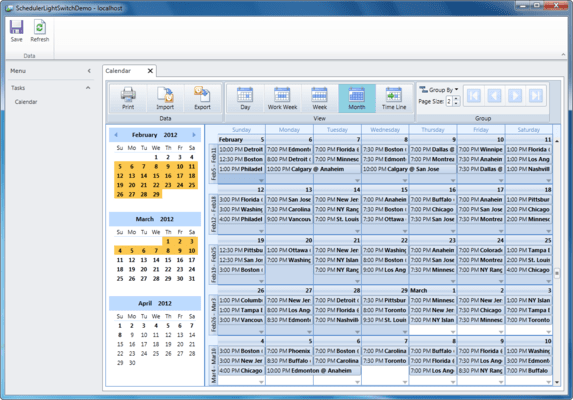
Add button groups to your application; choose from Data (Print, Import, Export), View (Day, Work Week, Week, Month, Time Line), and Group. They are already built and wired to the calendar. To implement, simply select a check box in Visual Studio.

Use Multiple Data Sources
In addition to selecting a primary data source for the screen (appointment information), Scheduler for LightSwitch provides placeholders to connect to secondary data sources for categories, contacts, and resources. These tables don’t need to be related; Scheduler for LightSwitch handles associations for you.

Import and Export Data
Save or load data in supported formats: XML or iCalendar.

Five Built-in Default Views
The Scheduler extension includes five built-in default views: day, week, work week, month, or time line. You can also create your own custom views.

Reminders
Scheduler can display reminder dialogs at specified times before an appointment occurs. Users have the option to dismiss one or more appointments, open the appointment, or reset the reminder to appear again later (snooze).

Resource Grouping
Scheduler for LightSwitch lets you group appointments by contacts, resources, or categories, to create a multi-column layout where each column corresponds to a different item. Navigate through any number of grouped items with ease. Simply drag an appointment to reassign it to a different resource, category, or contact. Grouping is supported in all scheduler views.

Time Line View
Give your users a Time Line view for displaying appointments in a horizontal layout. This view is useful when trying to see multiple groups at once to schedule a meeting. In this view the time is displayed horizontally and groups are arranged vertically, much like the ‘Schedule’ view in Microsoft Outlook 2010.


Support

ComponentOne Platinum Support Subscriptions provide a full year of Telephone and Online Technical Support. ComponentOne Technical Support Engineers are available by phone Monday through Friday, except U.S. holidays, from 9:00 a.m. to 5:00 p.m. Eastern,USA. Customers outside the USA, please remember to check your time difference for phone support.

Product Search

Enter search words:

Award Award