by ComponentOne - Product Type: Component / LightSwitch Controls / LightSwitch Screen Templates
ComponentOne Scheduler for LightSwitch by ComponentOne
URLs: componentone-scheduler-for-lightswitch, componentone scheduler for lightswitch, componentoneschedulerforlightswitch, componentone
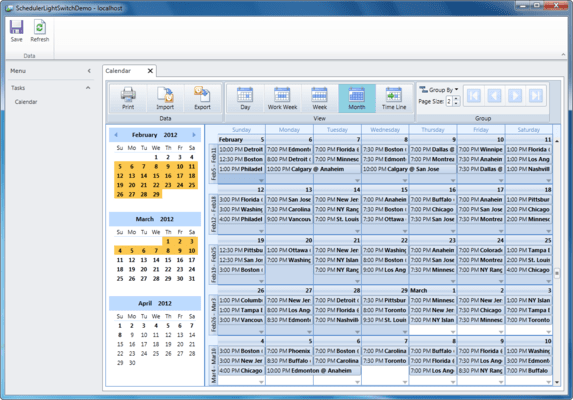
Instant Scheduling in LightSwitch. ComponentOne Scheduler for LightSwitch is a ready-to-use LightSwitch screen that gives you a complete Outlook-style scheduling application. To use, simply add the Scheduler screen to your project and choose a data source. This extension comes complete with five built-in views, recurring appointments, reminders, labels, data binding, grouping, import/export capabilities, and much more.

Scheduler for LightSwitch Features:
Complete Outlook-style Scheduling
Schedule one-time, all day, or recurring appointments with reminders, labels, and availability status just as in Microsoft Outlook. Stay organized with categories, resources, and contacts linked to each appointment.
Pre-built Ribbon Toolbars
Add button groups to your application; choose from Data (Print, Import, Export), View (Day, Work Week, Week, Month, Time Line), and Group. They are already built and wired to the calendar. To implement, simply select a check box in Visual Studio.
Use Multiple Data Sources
In addition to selecting a primary data source for the screen (appointment information), Scheduler for LightSwitch provides placeholders to connect to secondary data sources for categories, contacts, and resources. These tables don’t need to be related; Scheduler for LightSwitch handles associations for you.
Import and Export Data
Save or load data in supported formats: XML or iCalendar.
Five Built-in Default Views
The Scheduler extension includes five built-in default views: day, week, work week, month, or time line. You can also create your own custom views.
Reminders
Scheduler can display reminder dialogs at specified times before an appointment occurs. Users have the option to dismiss one or more appointments, open the appointment, or reset the reminder to appear again later (snooze).
Resource Grouping
Scheduler for LightSwitch lets you group appointments by contacts, resources, or categories, to create a multi-column layout where each column corresponds to a different item. Navigate through any number of grouped items with ease. Simply drag an appointment to reassign it to a different resource, category, or contact. Grouping is supported in all scheduler views.
Time Line View
Give your users a Time Line view for displaying appointments in a horizontal layout. This view is useful when trying to see multiple groups at once to schedule a meeting. In this view the time is displayed horizontally and groups are arranged vertically, much like the ‘Schedule’ view in Microsoft Outlook 2010.
Instant Scheduling in LightSwitch.
Pricing: ComponentOne Scheduler for LightSwitch 2012 v1 1 Developer Subscription License, ComponentOne Scheduler for LightSwitch 2012 v1 1 Developer Upgrade Subscription License (Upgrade for ComponentOne Studio Enterprise or any ComponentOne individual Studio), ComponentOne Scheduler for LightSwitch 2012 v1 1 Developer Subscription Renewal, ComponentOne Scheduler for LightSwitch 2012 v1 with Platinum Support 1 Developer Subscription License with Platinum Support, ComponentOne Scheduler for LightSwitch 2012 v1 with Platinum Support 1 Developer Upgrade Subscription License with Platinum Support (Upgrade for ComponentOne Studio Enterprise or any ComponentOne individual Studio), ComponentOne Scheduler for LightSwitch 2012 v1 with Platinum Support 1 Developer Subscription Renewal with Platinum Support, ComponentOne Scheduler for LightSwitch 2012 v1 with Microsoft Visual Studio LightSwitch Bundle - Special Promotion 1 Developer Subscription License (Includes Microsoft Visual Studio LightSwitch - 1 Developer License (Boxed Product))
Evals & Downloads: Read the ComponentOne Scheduler for LightSwitch help file, Read the ComponentOne Scheduler for LightSwitch Manual
Operating System for Deployment: Windows 7, Windows Vista, Windows XP, Windows Server 2003, Windows 2000
Architecture of Product: 32Bit
Product Type: Component
Component Type: LightSwitch Controls, LightSwitch Screen Templates
Compatible Containers: Microsoft Visual Studio 2010, Microsoft Visual Basic 2010, Microsoft Visual C++ 2010, Microsoft Visual C# 2010, Microsoft Visual Studio LightSwitch 2011, .NET Framework 4.0
Keywords: componentone olap for lightswitch, componentone olap, c1olap, c1 olap
c1 controls, c1 components, componentone controls, componentone components, componentone, componentone, c1, componentone studio, component one, componentone studio enterprise, componentone review, componentone activex, truegrid, true dbgrid, flexgrid
planning plan scheduling schedule schedules scheduler
Calendar calendaring calendars Scheduling Schedule Schedules
Part numbers: PC-542874-452177 542874-452177 PC-542874-452172 542874-452172 PC-542874-452173 542874-452173 PC-542874-452174 542874-452174 PC-542874-452175 542874-452175 PC-542874-452176 542874-452176 PC-542874-452178 542874-452178
Mfr. Part No: ESD-LTS-SCHD ESD-LTS-SCHD-PLAT ESD-LTS-SCHD-PLAT-R ESD-LTS-SCHD-PLAT-U ESD-LTS-SCHD-R ESD-LTS-SCHD-U
Publisher
Primary Category
Related Products
Related Categories