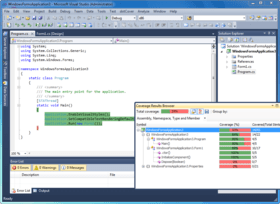
Screenshot Preview

dotCover - Summary

by JetBrains - Product Type: Add-In / Application

Summary

dotCover by JetBrains

URLs: dotcover, jetbrains

A code coverage tool for .NET developers. dotCover is a code coverage tool that reports statement-level coverage in .NET and Silverlight applications. dotCover highlights covered and uncovered code in Visual Studio (Visual Studio 2005, 2008 and 2010) by generating XML-based code coverage reports. dotCover detects which tests cover a particular location in code and integrates with ReSharper's unit testing tools. It comes with a console utility to use with a continuous integration server. dotCover can aggregate data from multiple coverage sessions and merging snapshots. dotCover extends the JetBrains .NET tools family that already includes ReSharper and dotTrace.


dotCover Features:

dotCover integrates with ReSharper test runner and Visual Studio 2010

dotCover adds to ReSharper's unit testing toolset

You can analyze coverage using ReSharper's unit testing context menu

dotCover can also analyze Visual Studio projects without ReSharper installed

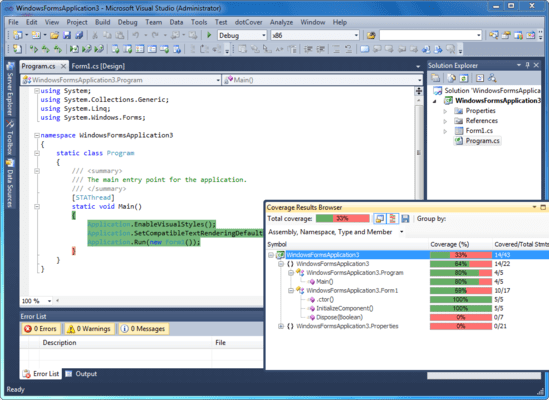
dotCover highlights covered and uncovered lines right in Visual Studio

dotCover detects which tests cover a particular location in code

dotCover: Code Coverage for .NET

Testing code for coverage with dotCover

Similar to dotTrace, dotCover works with ReSharper. When you install dotCover, you see several options appear in the ReSharper menu options as well as the Test Runner window. First of all, under ReSharper | Unit Tests menu option, there is a new option to run coverage reports, either for specific tests or for the entire solution. Similarly, the Test Runner Window offers us the same options. You get a new icon to run tests under coverage, as well as a new tab that will display the output of the coverage report. Based on the information you want to obtain, you can run coverage reports on the entire solution or only certain tests. Running on the entire solution will give you a measurement of how much of yout entire code base is covered. In order to do so, you can select Cover All Tests from Solution. You can assign whatever keyboard shortcut you want to this action by selecting the ReSharper_UnitTest_CoverSolution command. Executing the command will run the unit tests and once completed will then proceed to run a coverage report. You can also run coverage on individual tests or classes, by selecting them and choosing to Cover with dotCover. The window groups coverage reports based on the option selected in the drop-down list. dotCover provides you with two measurements: percentage of code covered and number of statements.

What’s new in dotCover V1.2?

Added support for latest ReSharper versions, enabling easy unit test coverage analysis

What’s new in dotCover V1.1.1?

Integration with ReSharper 6 - dotCover integrates with the latest version of ReSharper 6, allowing a smooth user experience. ReSharper 5.x continues to be supported also.

Per-snapshot Settings - Snapshot settings, including node exclusion and inclusion are now saved in a file alongside the snapshot (*.settings).

Improved presentation of class members - When you browse coverage results with dotCover 1.1.1, you can clearly see properties with getters and setters, as well as events with add and remove accessors. Anonymous delegates and lambdas are represented by nodes within containing methods denoting types that they receive and return.

HTML and JSON reports - In addition to XML export available previously, dotCover 1.1.1 allows you to generate reports as HTML and JSON both from the console runner and from Visual Studio coverage UI.

Integration with NDepend - dotCover 1.1.1 provides support for NDepend in the form of exporting coverage reports to XML for NDepend.

Predefined color schemes - Some like it dark, some like it bright, so why not provide several color highlighting schemes by default? That said, you can still fine-tune coverage highlighting colors by tweaking dotCover display items via Tools | Options | Environment | Fonts and Colors.

Support for Dynamic NUnit Tests - Full support for dynamic NUnit Test cases as well as Combinatorial, Sequential and other common NUnit attributes.

Filtering coverage tree on-the-fly - You can now exclude a specific node, or all nodes except this node, from the coverage tree and have dotCover instantly recalculate percentages of covered and uncovered code.

Getting coverage analysis data from TeamCity - You can now use TeamCity Visual Studio plug-in to connect to a TeamCity server and obtain data from a Continuous Integration coverage analysis run.

Incremental update of coverage info when tests are partially rerun - Coverage information is calculated incrementally without requiring full profiling on new runs, making the whole process much faster.

Per-solution coverage settings - Starting from dotCover 1.1.1, coverage filters are stored per-solution in projectName.dotCover files. In case you're covering a compiled application, i.e. you're not working with a solution per se, global settings are used.

A code coverage tool for .NET developers.

Pricing: dotCover 1.2 - Commercial License 1-9 Commercial License - (price per license) - includes 1 Year of updates and upgrades, dotCover 1.2 - Commercial License 10-19 Commercial License - (price per license) - includes 1 Year of updates and upgrades, dotCover 1.2 - Commercial License 20-49 Commercial License - (price per license) - includes 1 Year of updates and upgrades, dotCover 1.2 - Commercial License Annual Upgrade Subscription, dotCover 1.2 - Personal License 1-9 Personal License - (price per license) - includes 1 Year of updates and upgrades, dotCover 1.2 - Personal License 10-19 Personal License - (price per license) - includes 1 Year of updates and upgrades, dotCover 1.2 - Personal License 20-49 Personal License - (price per license) - includes 1 Year of updates and upgrades, dotCover 1.2 - Personal License Annual Upgrade Subscription

Evals & Downloads: Read the dotCover License Agreement, Read the Show Covering Tests with dotCover document, Read the Running Code Coverage from the Console with dotCover document, Read the dotCover Code Coverage for .NET document, Read the Advanced scenarios with dotCover Console Runner document, Read the Filtering with dotCover document, Download the dotCover 1.2 evaluation on to your computer - Expires After 30 Days

Operating System for Deployment: Windows 7, Windows Server 2008, Windows Vista, Windows XP, Windows Server 2003, Windows 2000

Architecture of Product: 32Bit

Product Type: Add-In, Application

Compatible Containers: Microsoft Visual Studio 2010, Microsoft Visual Studio 2008, Microsoft Visual Studio 2005, Microsoft Visual Basic 2010, Microsoft Visual Basic 2008, Microsoft Visual Basic 2005, Microsoft Visual C++ 2010, Microsoft Visual C++ 2008, Microsoft Visual C++ 2005, Microsoft Visual C# 2010, Microsoft Visual C# 2008, Microsoft Visual C# 2005, .NET Framework 4.0, .NET Framework 3.5, .NET Framework 3.0

Keywords: dotcover,

jetbrains, jet brains, intellij, intellij idea, resharper, teamcity, team city, rubymine, ruby mine, youtrack, dottrace, dot trace, jetbrains idea, intellij download

Development

Part numbers: PC-536403-430456 536403-430456 PC-536403-430459 536403-430459 PC-536403-430462 536403-430462 PC-536403-430472 536403-430472 PC-536403-430465 536403-430465 PC-536403-430467 536403-430467 PC-536403-430469 536403-430469 PC-536403-430473 536403-430473

Mfr. Part No: DC10CL DC10PL DCCUS DCPUS

Product Search

Enter search words:

Quick Links

Publisher

Primary Category

Related Products

Award Award