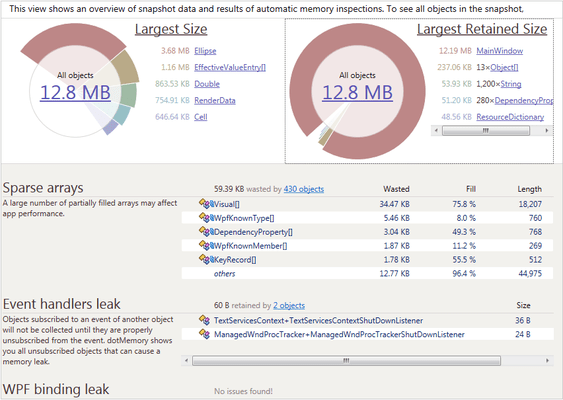
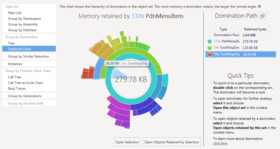
Screenshot Preview

dotTrace Memory - Summary

by JetBrains - Product Type: Add-In / Application

Summary

dotTrace Memory by JetBrains

URLs: dottrace-memory, dottrace memory, dottracememory, jetbrains

A profiling solution for profiling the memory use of your .NET applications. dotTrace Memory lets you discover memory leaks and optimize memory usage in applications based on the .NET Framework including desktop, Web applications, and Windows services. dotTrace Memory includes two profiling modes. You can identify instant memory status, or monitor memory allocation dynamics over time. If you are looking to optimize a certain class, you can quickly find all objects of this class in a memory snapshot. While analyzing a snapshot, you can instantly view the source code of any functions involved.

Memory profiling features in dotTrace Memory

With dotTrace Memory, you can quickly profile the memory usage of your applications based on .NET Framework up to version 4. The profiling process is not only simple but fast. A wealth of profiling data is accurately recorded and presented in the form of memory snapshots, allowing thorough analysis of memory issues.

Versatile memory profiling modes - Depending on your needs, you can profile memory in two different ways. To check what objects are currently loaded in memory (but shouldn't be), you can dump memory at any time during profiling. To also view the difference between two application memory states, during profiling you can mark the start and the end of a time interval, then capture a snapshot containing the difference data. A difference snapshot lets you see how much new memory was allocated and how much was released during the marked time interval. The view can be filtered to show only Live objects, only New objects, only Dead objects, only Garbage objects, or the difference between New and Dead objects.

Convenient data representation - Each memory snapshot holds a wealth of data on all objects allocated in memory, from the roots to every single object allocated or deleted at any time during the profiling session. A number of views are available to you for examining and analyzing memory snapshots, including Class List, Namespace Tree, Outgoing references, Shortest root path, and Allocation Tree. You can also focus on any subsystem of your application by opening it in a separate tab.

Find objects by class - To help you locate the presence of particular class of objects in memory, dotTrace provides the rapid Find objects by class (Ctrl+N) search feature. The use of wildcards and CamelCase abbreviations is supported for faster search results.

Finalized objects - dotTrace Memory lets you see finalized objects — objects which were deleted by the finalizer. You can examine them to find that some were not properly disposed of in the code of your application, which is a potential memory leak.

Merging strongly-connected objects - When you are navigating though the graph of objects in memory, some dependencies are difficult to see at a glance. dotTrace Memory offers an easy way to merge (group) strongly-connected objects together, so that you can see which objects and/or groups any particular node is holding.

A profiling solution for profiling the memory use of your .NET applications.

Pricing: dotTrace 3.5 Memory - Per-developer commercial license 1-9 Developer License - (price per license), dotTrace 3.5 Memory - Per-developer commercial license 10-19 Developer License - (price per license), dotTrace 3.5 Memory - Per-developer commercial license 20-49 Developer License - (price per license), dotTrace 3.5 Memory - Floating commercial license 1-9 Floating License - (price per license), dotTrace 3.5 Memory - Floating commercial license 10-19 Floating License - (price per license), dotTrace 3.5 Memory - Floating commercial license 20-49 Floating License - (price per license), dotTrace 3.5 Memory - Personal License 1-9 Personal License - (price per license), dotTrace 3.5 Memory - Personal License 10-19 Personal License - (price per license), dotTrace 3.5 Memory - Personal License 20-49 Personal License - (price per license)

Evals & Downloads: Read the dotTrace Data Sheet - Requires Acrobat Reader, View the dotTrace Profiling Benefits document - Requires Acrobat Reader, View the dotTrace Reviewer's Guide - Requires Acrobat Reader, View the dotTrace Default keymap - Requires Acrobat Reader, Read the dotTrace License Agreement, Download the dotTrace Memory 3.5 evaluation on to your computer - Expires After 10 Days

Operating System for Deployment: Windows 7, Windows XP, Windows Server 2003, Windows 2000

Architecture of Product: 32Bit

Product Type: Add-In, Application

Compatible Containers: Microsoft Visual Studio 2010, Microsoft Visual Studio 2008, Microsoft Visual Studio 2005, Microsoft Visual Basic 2010, Microsoft Visual Basic 2008, Microsoft Visual Basic 2005, Microsoft Visual C++ 2010, Microsoft Visual C++ 2008, Microsoft Visual C++ 2005, Microsoft Visual C# 2010, Microsoft Visual C# 2008, Microsoft Visual C# 2005, .NET Framework 4.0, .NET Framework 3.5, .NET Framework 3.0, .NET Framework 2.0, .NET Framework 1.1, .NET Framework 1.0, Silverlight 4

Keywords: dottrace, dot trace, memory leak detection, .net profiler, asp.net code profiler, dot net profiler, memory leak detector, memory profiler, c# profiler, dot trace, .net memory leak

jetbrains, jet brains, intellij, intellij idea, resharper, teamcity, team city, rubymine, ruby mine, youtrack, dottrace, dot trace, jetbrains idea, intellij download

Debugging debug debugs Testing Test Tests

Development

Part numbers: PC-541433-380784 541433-380784 PC-541433-380786 541433-380786 PC-541433-380788 541433-380788 PC-541433-380790 541433-380790 PC-541433-380792 541433-380792 PC-541433-380794 541433-380794 PC-541433-380796 541433-380796 PC-541433-380798 541433-380798 PC-541433-380800 541433-380800

Product Search

Enter search words:

Quick Links

Publisher

Primary Category

Related Products

Related Categories

Award Award Award Award