
Exchange Server Archiver
Transparent email archiving software for Exchange.
Published by Redgate Software
Distributed by ComponentSource since 2005
We do not supply this product anymore.
Transparent email archiving software for Exchange.
Published by Redgate Software
Distributed by ComponentSource since 2005
Red Gate has decided to stop developing Exchange Server Archiver and therefore the product is no longer available to download or to purchase. If you currently use Exchange Server Archiver your installation of Exchange Server Archiver (ESA) will not expire, so you can carry on using the software as you wish. Red Gate will continue to honour support contracts, but unfortunately you won't be able to...
Show moreRed Gate has decided to stop developing Exchange Server Archiver and therefore the product is no longer available to download or to purchase. If you currently use Exchange Server Archiver your installation of Exchange Server Archiver (ESA) will not expire, so you can carry on using the software as you wish. Red Gate will continue to honour support contracts, but unfortunately you won't be able to renew contracts that have expired.
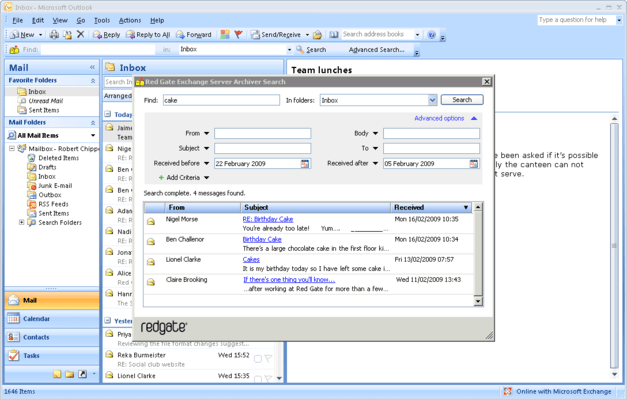
Exchange Server Archiver is an email archiving tool that reduces the size of the Exchange information store by archiving emails and attachments to a dedicated server. The end-user experience is transparent with message preview, instant retrieval and an integrated search of both archived and non-archived emails.

Exchange Server Archiver:
Transparent email archiving
The Outlook Add-in provides a transparent end-user experience with message preview, instant retrieval and an integrated search of both archived and non-archived messages. Minor differences...
Live Chat with our Redgate Software licensing specialists now.



Tel: (888) 850 9911
Fax: +1 770 250 6199


