by DevExpress (Developer Express) - Product Type: Component / VCL
ExpressVerticalGrid by DevExpress (Developer Express)
URLs: expressverticalgrid, devexpress
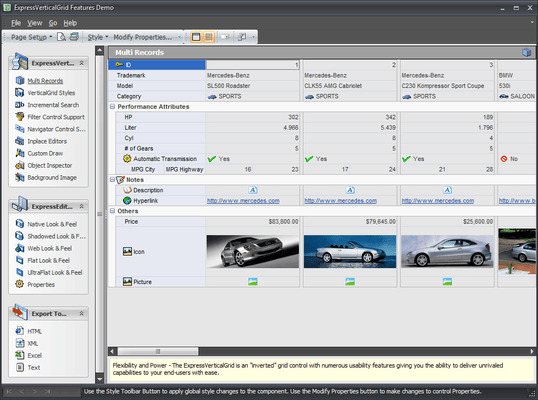
Add an "inverted" grid control to your VCL applications. Formerly known as ExpressInspector, ExpressVertical Grid Suite is an "inverted" grid control for Delphi and C++Builder. With the ExpressVerticalGrid Suite, you will no longer have the traditional hassles associated with positioning and alignment of field labels and controls. Once you start using the ExpressVerticalGrid, you only need to drop a single control on your form, add the appropriate rows, and instantly create a consistent, flexible, and uniform UI across your entire application. And with you can also display multiple columns (inverted grid) from any data source instantly.

Powered by the same architecture and shared libraries first introduced in the ExpressQuantumGrid, ExpressVerticalGrid ships with all the features you have come to expect from Developer Express. It supports our industry leading Look And Feel and Style Controller technologies - and ships with the ExpressEditors Library
The ExpressVerticalGrid can be used in 4 different modes: Data Aware, Unbound, Virtual and RTTI. Whichever mode you choose to use, the VerticalGrid employs our unique DataController library to obtain and save data at lightening speeds. In virtual mode, the VerticalGrid does not persist data and so displaying thousands of records on screen occurs instantaneously!
And remember, just like the QuantumGrid and QuantumTreeList, ExpressVerticalGrid Suite is far more than just a single component. It ships with over 40 standalone field editors - all of which are available in data aware and non-data aware editions.
Features:
Display Data Hierarchically - With the ExpressVerticalGrid, you can display and categorize your information using unlimited nesting
Multiple Columns support - ExpressVerticalGrid allows to display multiple datasource rows within the containter
Multiple Data Modes - The ExpressVerticalGrid Suite allows you to bind data from a traditional data source (TcxDBVerticalGrid); from non-database sources (TcxVerticalGrid); and from custom data structures (TcxVirtualVerticalGrid)
Fast Data LoadingThe ExpressVerticalGrid uses ExpressDataController library first introduced in the ExpressQuantumGrid giving you fast data loading speeds
Data Filtering - Support data filtering via DataController or ExpressFilterControl component
External Navigator Control Support - VerticalGrid fully supports ExpressControlNavigator
Background Image Support - Do you need to display a background image within your list? If so, it's a piece of cake with the ExpressVerticalGrid Suite
BDE Independence - You can use any TDataSet descendant to bind data to the DBVerticalGrid
Runtime Row Customization and Data Organization - With the ExpressVerticalGrid, your end-user can control the appearance of the control as their business needs dictate by adding and removing rows using simple drag and drop. They can even create new data categories on the fly and organize information with ease
Incremental Auto-Search for Each VerticalGrid Column - Your users can instantly locate any information displayed within individual VerticalGrid rows
Full MS Intellimouse Support
Full Drag & Drop Support
Flicker Free Painting
Full Custom Draw Events - Available for background headers, cells
Row Resizing - The ExpressVerticalGrid Suite allows you and your users to resize row height with ease, both at design and runtime
Auto Bands - An entirely new way to present large number of rows on screen. With Auto Bands, you can maximize the use of screen real-estate and minimize the amount of vertical scrolling users perform
Built-in XP Theme Support - With the ExpressVerticalGrid Suite, you can quickly enable XP Themes within your application
Advanced Style Controller - Styles control the display of the visual elements which make up the VerticalGrid (headers, categories, data cell, etc). By using our unique style sheet technology, you can easily manage the style associated with each control element. In fact, by using our Styles repository, you can control the appearance of all grids and editors within your application from a centralized location without any hassles.
Easy to Use Design Time Interface - The ExpressVerticalGrid Suite provides advanced design time features that allow you to control virtually every aspect of the control without having to write a single line of code so you can focus on application logic and not have to fuss with grid setup
Save view layout to Registry, INI Files, and Stream - With just a couple property settings, all runtime modifications made by end-users are automatically stored and retrieved each time a user executes your application
Export to XML, MS ExcelHTML, Text - You will need to write just one line of code to export VerticalGrid into XML, MS ExcelHTML or Text formats
Over 40 Individual Data Editors - Over 40 Powerful and Innovative Data Editors, available as standalone and Inplace Cell variants
Multiple Editor Types for Each Record - Flexibility is at the heart of the VerticalGrid Suite. Via our Multi-Editor support, you can display multiple editors for the same row with ease. (Screen shot)
Advanced Mask Support - ExpressVerticalGrid Suite introduces full regular expression support.
Printing Support via the ExpressPrinting System
Localization Support - ExpressVerticalGrid includes advanced localization support, allowing you to modify resource strings at runtime via a simple procedure call
Add an "inverted" grid control to your VCL applications.
Pricing: ExpressVerticalGrid v2011 vol 2.6 1 Developer License - includes 1 year subscription (updates and upgrades for 1 year), ExpressVerticalGrid v2011 vol 2.6 1 Developer Subscription Renewal - for Subscriptions soon to expire or just expired (updates and upgrades for 1 year), ExpressVerticalGrid v2011 vol 2.6 with Source code 1 Developer License with Source code - includes 1 year subscription (updates and upgrades for 1 year), ExpressVerticalGrid v2011 vol 2.6 with Source code 1 Developer with Source code Subscription Renewal - for Subscriptions soon to expire or just expired (updates and upgrades for 1 year)
Evals & Downloads: Read the Developer Express License Agreement - Requires Acrobat Reader, Download the Developer Express VCL product demonstration on to your computer, Download the Developer Express VCL v2011 vol 2.6 evaluation on to your computer - Displays Nag Screens
Operating System for Deployment: Windows 7, Windows Vista, Windows XP, Windows 2000, Windows NT 4.0
Architecture of Product: 32Bit, 64Bit
Product Type: Component
Component Type: VCL
Compatible Containers: Embarcadero RAD Studio XE2, Embarcadero RAD Studio XE, Embarcadero RAD Studio 2010, C++Builder XE, C++Builder 2010, C++Builder 2007, Delphi XE, Delphi 2010, Delphi 2007 for Win32, Delphi 7.0
Product Class: User Interface Components
Keywords: devexpress vertical grid, expressverticalgrid, expressinspector, express vertical grid, expressverticalgrid suite, expressverticalgrid suite with source, rtti aware edition
devexpress, developer express, dxperience, devexpress.com, devexpress controls, devexpress download, www.devexpress.com, devexpress dxperience, devexpress suite, devexpress components, devexpress tools, devexpress universal, devexpress upgrade
datagrid controls, datatable controls, datagrid components, datatable components, datagrid, data grid, data table, net gridview, net datagrid, data grid, grid control, net datatable, c# gridview, c# datagrid, asp.net datagrid, grid asp, vb.net datagrid
Entry data-entry
Part numbers: PC-511340-384209 511340-384209 PC-511340-384857 511340-384857 PC-511340-384213 511340-384213 PC-511340-384858 511340-384858
Mfr. Part No: 119 120
Publisher
Primary Category
Related Products
Related Categories