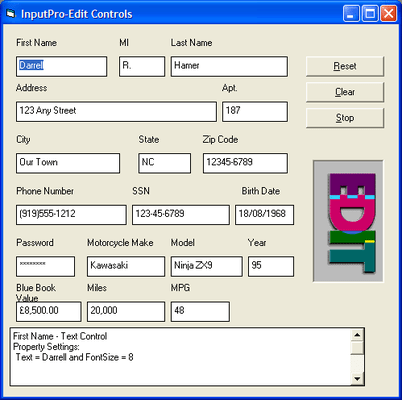
Screenshot Preview

Input Pro

by GrapeCity - Product Type: Component / ActiveX OCX / DLL / VBX

Create professional data entry screens with input masking. InputPro provides six formatted edit components to validate data and alert your user as they enter information or as the application programmatically assigns or edits values. It includes controls for date/time, currency, text, long integer, boolean, and more, each with over 70 properties allowing you to create strict validation routines. It even includes a memo component for displaying text greater than 64K in size.


From
$146.02

Our regular prices are shown below. Please logon to see your discounted prices.

Price in

Input Pro V3.00.38

Add to Cart $ 146.02 1 Developer License
Mfr. Part No: IPR01
Download (5.8 MB)
Add to Cart $ 57.82 1 Developer Upgrade License - Please Note: Requires the previous version
Mfr. Part No: IPR03
Verify Download (5.8 MB)
Add to Cart $ 1,470.00 Source Code Escrow Annual Subscription - (An Escrow Agreement will be sent to you for signature - please read Licensing section below) Download (41 KB)

Our prices include ComponentSource technical support and, for most downloadable products, an online backup and a FREE upgrade to the new version if it is released within 30 days of your purchase.  All sales are made on our standard Terms and Conditions and subject to our Return Policy. Please contact us if you require any licensing option not listed, including volume licensing and previous versions.

Our regular prices are shown above. Please logon to see your discounted prices.

Each of the formatted edit controls have over 70 properties equipping your programming team with the power to create an interface with solid and strict validation routines. Some of the added attributes that are supported by the controls are two state or spin buttons, horizontal scrolling, full clipboard support and null value support. Each control is unmatched in features and flexibility, making this product untouched in the Visual Basic market. All controls in this package can be attached to a data control.

Use the six, formatted edit controls to easily validate data as your user enters information or as your application programmatically assigns or edits the values.

  • Date / Time
  • Masking
  • Currency
  • Text Control
  • Long Integer
  • Double Single

Included Controls

fpBoolean Control - The fpBoolean control adds true/false functionality to your application. Display the control as a check box, an option button (radio button), a 3-D check box, or a 3-D option button, or a 3-D option button, or insert your own bitmaps for each control state.

  • Specify user-defined text for each control state
  • Logically group any number of Boolean controls together
  • Provide a custom 3-D appearance

fpCurrency Control - The fpCurrency control displays monetary values, validates data and prevents users from entering invalid data.

  • Define the currency format, including currency symbol and placement, or use the international settings
  • Define the maximum or minimum values. Values can be between -9,999,999,999.99999 and 9,999,999,999.99999
  • Specify the format for displaying negative values
  • Provide one of four different button styles

fpDateTime Control - The fpDateTime control displays and formats date and time values.

  • Validate data and prevent users from entering invalid data
  • Choose from international short and long date formats, with or without time, or define your own format
  • Access pop-up and drop-down calendars to select dates
  • Limit date and time values by setting maximum and minimum dates and times
  • Provide one of four different button styles

fpDoubleSingle Control - The fpDoubleSingle control displays floating-point numbers.

  • Validate data and prevent users from entering invalid data
  • Define the maximum or minimum values. Values can be between -9,999,999,999.99999 and 9,999,999,999.99999
  • Specify the format for displaying negative values
  • Provide one of four different button styles

fpLongInteger Control - The fpLongInteger control displays integer and long integer values.

  • Validate data and prevent users from entering invalid data
  • Specify the format for displaying negative values
  • Provide one of four different button styles
  • Define the maximum or minimum values. Values can be between -2,147,483,647 and 2,147,483,647

fpMask Control - The fpMask control restricts how data is entered or displayed in the control.

  • Create any mask, including phone numbers or social security numbers
  • Supported mask characters include numbers only, letters only, any character, hexadecimal, and upper or lower case letters
  • Provide literal characters in the mask
  • Retrieve the contents with or without the literal characters
  • Automatically tab when the Mask control is full

fpText Control - The fpText control displays text strings.

  • Automatically change text case to upper, lower, or mixed case
  • Validate passwords and display a placeholding character as the user enters information
  • Limit the number of characters and restrict which characters the user can enter
  • Provide one of four different button styles

fpMemo Control - The fpMemo control displays large text strings.

  • Work with strings greater than 64K
  • Display horizontal or vertical scroll bars at all times or when needed
  • Wrap text
  • Specify the length of a text line

Product Search

Enter search words:

Quick Links

Publisher

Primary Category

Related Products

Related Categories

Award Award