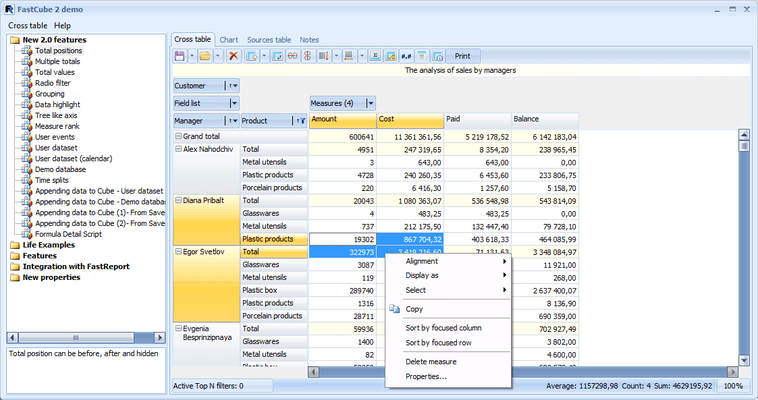
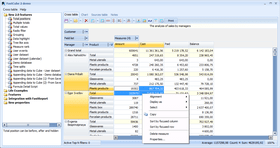
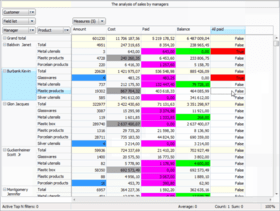
Screenshot Preview

FastCube

by Fast Reports - Product Type: Component / VCL

Effective data analysis tool for Delphi/C++Builder/Lazarus. FastCube is a set of fast desktop OLAP components which enables you to create various reports and diagrams instantly irrespective of the database size. FastCube supports Delphi 5, Delphi 6, Delphi 7, Delphi 2005, Delphi 2006/Turbo Delphi, Delphi 2007, Delphi 2009, C++Builder 6, C++Builder 2007, C++ Builder 2009, CodeGear RAD Studio 2009, Lazarus.

From
$175.42

Our regular prices are shown below. Please logon to see your discounted prices.

Price in

FastCube 1.9 Standard Edition

Add to Cart $ 175.42 1 Single License Download (6.0 MB)
Add to Cart $ 567.42 Team License Download (6.0 MB)
Add to Cart $ 3,518.20 Site License Download (6.0 MB)

FastCube 1.9 Professional Edition

Add to Cart $ 244.02 1 Single License Download (7.3 MB)
Add to Cart $ 763.42 Team License Download (7.3 MB)
Add to Cart $ 4,694.20 Site License Download (7.3 MB)

Our prices include ComponentSource technical support and, for most downloadable products, an online backup and a FREE upgrade to the new version if it is released within 30 days of your purchase.  All sales are made on our standard Terms and Conditions and subject to our Return Policy. Please contact us if you require any licensing option not listed, including volume licensing and previous versions.

Our regular prices are shown above. Please logon to see your discounted prices.

What's New in FastCube 1.9

  • Added support of Embarcadero Rad Studio XE2 (Delphi XE2/C++Builder XE2) Added feature loading data from multiple sources with the same structure. Added TfcCube.UseMultiLoad property and event TfcCube.OnGetNextDataset
  • Added Lithuanian resources (thanks Evaldas) Added in script properties
  • VisibleCol and VisibleRow in TDimensions and TMeasures.
  • Added option mdcoUseYearInWeekOfYear in TfcCube.Options. It allows to distinguish number of week from the past or from the next year.
  • Added in script properties TDimensions.MembersCountInCol: Integer and TDimensions.MembersCountInRow: Integer.
  • Added option mdsoCalcOrderByDimOrder in TfcSlice (Use Dimensions order during calculation measures)
  • Added event OnAfterAddedSliceFieldToRegion: TfcSliceFieldRegionChanged in TfcSlice.
  • Added version info in StatForm (open from toolbar).
  • Added Hungarian resources (thanks Berenyi Gabor)

What's New in FastCube 1.8

  • Added support of Embarcadero Rad Studio XE (Delphi XE/C++Builder XE)
  • Added property RunScriptInDesigner in TfrcCube.
  • Added search by first symbol (after pressing a key) in popup lists (list of fields and the lists of unique values) Added TeeChart 2010 support
  • Fixed error: AV when calculation measure is moved in field list
  • Fixed range drawing when XP themes are enabled.
  • Fixed error with UnicodeString measures
  • Fixed error: AV after compiling project without using runtime packages in BCB 6
  • Fixed error with ftMemo fields
  • Fixed error of TfcGrid printing

What's New in FastCube 1.7

  • Added script event OnGetFieldConv in TfrcCube.
  • Added parameter ACalcRowHeight: boolean in TfcGrid.SelectCell
  • Added events TfcSlice.OnBeforeRemoveSliceFieldFromRegion and TfcSlice.OnBeforeAddedSliceFieldToRegion
  • Added option mdsoAllowFilterAllValues in TfcSlice.Options
  • Added property TfcChart.SkipNullPoints: boolean
  • Added option mdsoSaveFiltersEnabledValues for TfcSlice (to save enabled filters Values (instead of disabled values) in Schema)
  • New key combinations Ctrl+Up and Ctrl+Down in TfcGrid and TfcDetailGrid
  • Added event TfcGrid.OnUpdateSelection: TNotifyEvent
  • TfcGridStyle.UseParentFont is set to False when Style properties are changed.
  • Added TeeChart 2010 support
  • Values of numerical measure are copied to clipboard without format.
  • Alignments are imported from TfcGrid if are used OnGetStyles in TfrcGrid
  • Fixed styles copying. Caused wrong colors in xls and html exports.
  • Fixed grid printing errors.
  • Fixed errors in fields converter.
  • Fixed error with PopUp list with Form.FormStyle=fsStayOnTop
  • Fixed error of fcChart printing.
  • Fixed error of saving Null value in schema with mdsoSaveFiltersByValue option
  • Fixed error in Recompile Wizard: installation packages in Delphi 11.
  • Fixed grid copy to clipboard operation for D9+
  • Fixed memory corruption by the DrawText routine which caused random crashes
  • Fixed error in the Recompile Wizard for C++Builder 6 with FastScript in the Standart edition
  • Fixed few problems with FreePascal and Lazarus
  • Fixed Sort by focused row/column.
  • Fixed error: AV in TfcGridReport
  • Fixed error: AV when schema contains a field which is absent in cube
  • Fixed error of TfcGrid printing

What's New in FastCube 1.6

  • Added function TfcAxis.GetVisibleIndexFromAbs(ALevel: Integer; AAbsIndex: Integer; var AIndex: integer; var AVisible: Boolean): Boolean;
  • Added procedure TfcGrid.SelectCell(ACol, ARow: integer; AMakeVisible: boolean);
  • Added support for Embarcadero Rad Studio 2010 (Delphi/C++Builder)
  • Added option mdsoSaveFiltersByValue ў TfcSlice (save in Schema filters by value)
  • Added new aggregate function "Last value". It is possible to use it with any type of the data!
  • Added property UseParentFont into TfcGridStyles.
  • Font, color and alignment of TfcGrid are used when print with TfrcGrid.
  • Added property Font into TfcGridStyle.
  • Added script property Measure[].TotalValueForDims['dim1, dim2, ...'] to get measure total value for dimensions dim1, dim2, ...
  • Added Greek resources (thanks Dimitris Karagikas)
  • Added an ability to use one field for the measures and dimension simultaneously
  • Added script events OnGetSeriesClass, OnSeriesCreated and OnChartFilled in TfrcChartView.
  • Updated chart support in unit frcCrossRTTI.
  • Added property StackType (MultiBar) in TfcChart.
  • Added support THorizBarSeries in TfcChart.
  • Added new events OnSaveTemplate and OnLoadTemplate in TfcChart.
  • Added new property DefaultTemplatePath in TfcChart.
  • Added new properties DefaultSchemePath, DefaultCubePath and DefaultExportPath in TfcGrid.
  • Added option in Grid: mdgoChangeOrderByClick - Switching order of sorting by one mouse button clicking.
  • Added properties Dimensions.IsTotalByCol and Dimensions.IsTotalByRow. You can use this properties in Script.
  • Added new format type fkCustom (You can to create and registrate custom formates.
  • Use fcCustomFormats.AddFormat. See examples fcExamples).
  • Added Swedish resources from Niklas Larsson
  • Added FastReport integration package for BCB6
  • Added: You simultaneously can change width of all columns in the X axis. Keep key Ctrl at change of width of the column.
  • Only the UTF8 encoding is now used for scheme files.
  • Event TfrcGrid.onGetStyles is changed
  • Fixed export of Null data into various XML formats
  • Fixed error of reading from stream property StackType (MultiBar) in TfcChart.
  • Fixed error with property DefaultExportPath in TfcGrid and property DefaultTemplatePath in TfcChart.
  • Fixed width TfcChartToolBar.
  • Fixed error of reading Chart Template from version before 1.5.5.
  • Fixed error: Calculation of sizes of memos is wrong in FastReport if are used different fonts.
  • Fixed error: AV in Chart if no data in grid
  • Fixed error: Caption of measures are wrong when dimension is collapsed

FASTCUBE is a tool for effective data analysis.
It supports Delphi 5, Delphi 6, Delphi 7, Delphi 2005, Delphi 2006/Turbo Delphi, Delphi 2007, Delphi 2009, C++Builder 6, C++Builder 2007, C++ Builder 2009, CodeGear RAD Studio 2009, Lazarus.

  • FastCube is a handy tool for efficient analytical data arrays handling
  • FastCube usage for report building does not require programmer's high skill level
  • You can build FastCube into your applications created in Delphi or Lazarus environments by way of components' set
  • Connection to any datasource which supports "TDataSet" interface
  • There is an opportunity to build ready-made templates for the cube and to prohibit user's scheme modification
  • You can export cube's cutoff into Excel, Word and HTML
  • All cube's settings may be performed both by programmers and users

The difference between Professional and Standard edition: FastCube Professional has full sources and Standard provides compiled modules only.


Product Search

Enter search words:

Quick Links

Publisher

Primary Category

Related Products

Related Categories

Award