Screenshot Preview

Total Access Emailer - Summary

by FMS - Product Type: Add-In

Summary

Total Access Emailer by FMS

URLs: fms-total-access-emailer, fms total access emailer, fmstotalaccessemailer, fms

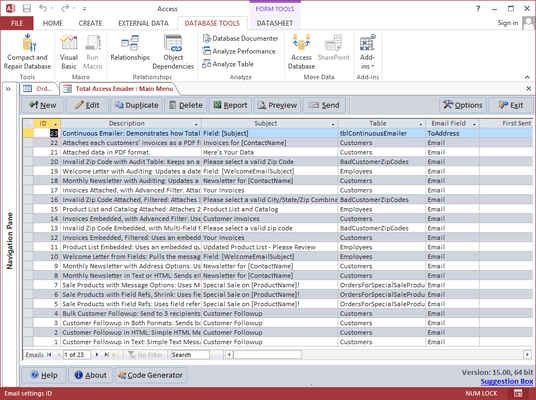
Create and send emails based on your data. Total Access Emailer allows you to generate personalized email for everyone in your table or query. Messages can be in text or HTML format with attachments. Total Access Emailer allows you to use field values in your email subject and message to create unique, personalized emails for each recipient. You can even maintain an audit trail to know who was contacted when with Total Access Emailer.

Total Access Emailer is designed exclusively for Microsoft Access

Total Access Emailer is designed specifically for Access and behaves the way you expect. Tightly integrated into Access, it runs as an Access add-in and includes an interactive, Wizard-like user interface that makes it easy to customize your email blasts in your Access environment.

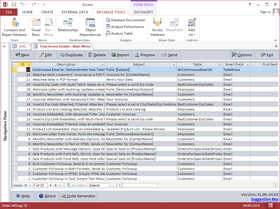
Choose any table or query in your database, specify the email field and you're ready to contact everyone in your list. Your email blast settings are automatically saved in your database for reuse and sharing with other users.

Total Access Emailer: Unlimited Custom Emails

Send Email to Everyone Easily - send email to a list of email addresses from a table or query. Emails can be sent individually or in bulk as regular email or using CC or BCC

Personalize Email Easily - customize the email subject and message for each recipient by referencing field values from your table or query. CanShrink options enhance formatting. Alternatively, you can even specify a field in your data containing the subject and/or message to send so you have complete control over each message

Send Your Email Again - Email blast settings are automatically saved for reuse. Easily send the email again, or edit it with your latest message. Store an unlimited number of email blast settings and share them with your team

Email People Who Weren't Previously Sent To - An optional audit trail can be maintained to know when an email was sent to each person. Easily send the same email to new people or those whom the original message skipped because the process was interrupted

Send HTML and/or Text Messages - You can even prepare both and send one or the other depending on what your email address record specifies

Easily Add Attachments - Each email may have multiple attachments. Use the same attachments for everyone or customize these for each message

Custom FROM Address - Specify the FROM address for your emails. Use the same for every email or reference a field from the data source

Preview Messages - Before you send your email blast, the powerful preview feature sends your messages to a table, the screen, or an email address you specify. Easily preview each custom message before you send it. You can test with the entire list or specify a limited number of messages

Schedule Email Blasts - Launch the email blast and tell it to start at a later time. This is especially useful for scheduling blasts after hours when your mail server is less busy

Send Multiple Email Blasts - Send multiple email blasts one after another. This is ideal if you have email blasts that need to go out consecutively, or use multiple data sources for related email blasts

Avoid Outlook Automation Problems with Total Access Emailer

To prevent email viruses, Outlook makes it practically impossible to send multiple emails programmatically. Users either have to manually confirm messages or run very slowly.

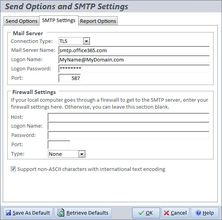
Total Access Emailer avoids this problem by using SMTP rather than Outlook. This is fast and efficient. You can even specify the FROM email address of your messages, which can be different from your Outlook address.

Total Access Emailer Programmatic Features

A programmatic interface is available for Access developers wishing to add email blasts into applications. Give your users the power of sending custom emails at the touch of a button. Royalty-free runtime distribution rights are included.

Total Access Emailer Standard edition does not include the ability to run Total Access Emailer in code or distribute it with your applications.

What's new in Total Access Emailer for Access 2010?

Supports Microsoft Access 2010, 32 and 64 bit Versions - Total Access Emailer 2010 includes support for both the 32 and 64 bit versions of Microsoft Office/Access. This includes the Total Access Emailer add-in, and for the Professional Version, the VBA runtime libraries and distribution programs.

Compress Attached Files into One Zip File and Password Protect It - Total Access Emailer can automatically compress all your file attachments into one zip file that is emailed to your recipient. You can even add a password for additional security. These features are on the Attachment tab when editing an email blast: The name of the zip file and password can be explicitly provided (example above) or use values from fields in your data source to create a unique file name and password for each recipient.

Customize Attached File Names Based on Field Values - Total Access Emailer now supports field references for embedded object names. Previously, the object names were fixed values. Now you can use the value from another field for all or part of its name.

Attachment File Extension Automatically Updated - Additionally, when specifying the output format of an attachment, the extension for the file name is automatically changed based on your selection. So switching from HTML to PDF automatically updates the file name from a *.HTML to *.PDF. If you give your file name a non-standard extension, it is not modified.

International Extended Character Support - Total Access Emailer supports text and HTML emails containing non-Roman, international characters such as: Arabic, Chinese, Greek, Hebrew, Hindi, Japanese, Korean, Persian, Russian and Urdu.

Interactive Code Generator - The new Code Generator lets you interactively select options and build the VBA code to run the currently selected email blast in your application. Simply set your options and paste the code into your module to send and/or preview your email blast.

New Programmatic Interfaces to Improve Email Automation through VBA - Several new VBA functions are available in the Professional Version to provide more options and control for VBA developers. For additional details, visit Sending Microsoft Access Email Blasts Programmatically (VBA):

Send One Email - Rather than creating an email blast from the Total Access Emailer add-in, a new function, TotalAccessEmailer_SendOne, lets you specify the information for sending one email. Provide the FROM address, TO address, subject, message, etc., and the email is sent using your SMTP settings.

Preview Email Blasts - In addition to sending email blasts, you can also preview the emails by sending them to an email of your choice along with the number of records to process. This is similar to the interactive Preview feature from the add-in which you can now incorporate in your application.

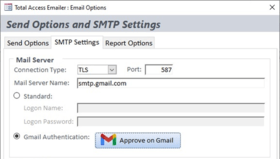
Update and Test SMTP Settings - Two new procedures, TotalAccessEmailer_SetPasswords and TotalAccessEmailer_SMTP_IsValid, let you specify the passwords and test the SMTP settings. The sample database includes a form you can import into your application to give your users this feature as well.

Create and send emails based on your data.

Pricing: Total Access Emailer - for Access 2010 1 Developer License - Professional, Total Access Emailer - for Access 2010 1 Developer License - Standard, Total Access Emailer - for Access 2007 1 Developer License - Professional, Total Access Emailer - for Access 2007 1 Developer License - Standard, Total Access Emailer - for Access 2003 1 Developer License - Professional, Total Access Emailer - for Access 2003 1 Developer License - Standard, Total Access Emailer - for Access 2002 1 Developer License - Professional, Total Access Emailer - for Access 2002 1 Developer License - Standard, Total Access Emailer - for Access 2000 1 Developer License - Professional, Total Access Emailer - for Access 2000 1 Developer License - Standard, Total Access Emailer - for Access 97 1 Developer License - Professional, Total Access Emailer - for Access 97 1 Developer License - Standard, Annual Premium Support Subscription 1 Support License, Annual Premium Support Subscription 1 Support License Renewal

Evals & Downloads: Read the Total Access Emailer for Access 97 help file, Read the Total Access Emailer for Access 2000 help file, Read the Total Access Emailer for Access 2002 help file, Read the Total Access Emailer for Access 2003 help file, Read the Total Access Emailer 2007 help file, Read the Total Access Emailer for Access 2010 help file, Read the FMS License Agreement

Operating System for Deployment: Windows 7, Windows Vista, Windows XP, Windows ME, Windows 2000, Windows 98, Windows NT 4.0, Windows 95

Architecture of Product: 32Bit, 64Bit

Product Type: Add-In

Compatible Containers: Microsoft Office 2010, Microsoft Office 2007, Microsoft Office 2003, Microsoft Office XP, Microsoft Office 2000, Microsoft Office 97, Microsoft Access 2010, Microsoft Access 2007, Microsoft Access 2003, Microsoft Access 2002, Microsoft Access 2000, Microsoft Access 97

Product Class: Component Development Tools

Keywords: total access emailer, fms total access emailer, total access emailer professional, total access emailer standard, total access emailer for access 2007, total access emailer for access 2003

FMS

Database DB Management

e-mail email e mail mail

Part numbers: PC-514195-363824 514195-363824 PC-514195-363825 514195-363825 PC-514195-363809 514195-363809 PC-514195-363808 514195-363808 PC-514195-363803 514195-363803 PC-514195-363807 514195-363807 PC-514195-363802 514195-363802 PC-514195-363806 514195-363806 PC-514195-363801 514195-363801 PC-514195-363805 514195-363805 PC-514195-363800 514195-363800 PC-514195-363804 514195-363804 PC-514195-363810 514195-363810 PC-514195-363811 514195-363811

Product Search

Enter search words:

Quick Links

Publisher

Primary Category

Related Products

Related Categories

Award