by Newtone - Product Type: Component / ActiveX OCX / DLL
ImageKit7 by Newtone
URLs: imagekit7, newtone
Create, edit and manipulate a variety of image types to enhance your applications. ImageKit7 is a component that allows you to add image-processing functionality to your applications quickly and easily. Retrieve images from TWAIN scan devices; load and save image files; edit, display, and print images; draw shapes and text on images; display images as thumbnails or in slideshows. Most of the ImageKit7 functionality is available in DLL style API. The ImageKit7 ActiveX component can be used in Visual Studio .NET via COM wrapper. .NET sample programs are included.
Overview
The ImageKit7 ActiveX supports for JPEG2000, SVG, SXF, and other new file formats; loads and saves image data directly from memory; can stream image data directly to browser; can read BLOB data from and save BLOB data to database; can convert raster image data to vector image data; can automatically detect paper when scanning; and many others.
The ImageKit7 is a multi-threaded component that provides Web server application development. Included in this new version are methods that support variant type parameters for use in ASP and other scripting languages that require variant types. Therefore you can pass variant type variables used in scripting languages directly as parameters in these new methods.
Image Display and Editing
Display Vector Data (DXF(2D), WMF, EMF, SVG, SXF)
Display graduated rule (supports pixels, millimeters, inches units)
Display grid on images (supports pixels, millimeters, inches units)
Simultaneously display both raster and vector images (up to 100 distinct image layers)
Multi-layer functionality
Display coordinates in tooltip
Scroll by mouse drag
Display black and white (1 bit color) images in high quality display
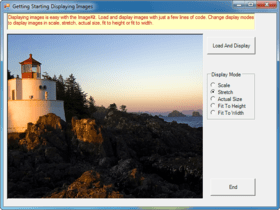
Scale display mode - If images are larger than the ImageKit Control, the image will be scaled to fit within the control
Actual Size display mode - If images are larger than the ImageKit Control, scroll bars are automatically displayed
Actual Size display mode (without scroll bars) - If images are larger than the ImageKit Control, scroll bars are not displayed and image is not scaled
Stretch display mode - Images are resized to fit the dimensions of the ImageKit Control
Set display position of the image - With this functionality you can ever display images at the very bottom of the ImageKit Control
Scrollbar control action - Not only can you scroll with the mouse, but also with code. This includes diagonal scrolling
Regional selection - It is possible to select areas or regions on an image for processing
Image editing toolbar (raster image)
Image editing toolbar (vector image)
Image Effects and Transformations
Convert raster data to vector data
Display vector data with antialias
Digital Watermark - Embed an "invisible" copyright or logo within an image and be able to detect it later
Combine Images - Paste images together or layer images on top of each other
Panorama Composition - This creates a panorama out of two raster images. By simply specifying two attachment locations on each image, creates a panorama
Duplicate images
Copy and paste images to clipboard
Adjust sharpness
Noise reduction
Blur
Mosiac
Outline
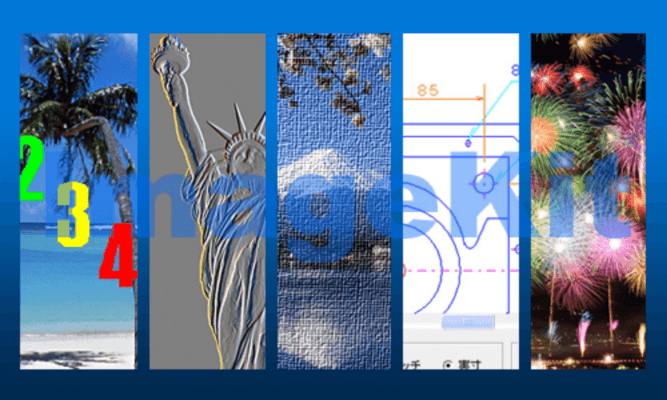
Emboss
Special effects - Oilpaint, canvas, glasstile, lens, ripple, whirlpinch, waves, motionblur and many more...
Twain Scanning
ImageKit7 ActiveX allows you to add scanning functions to your applications quickly and easily. Retrieve images from TWAIN scan devices - scanners, digital cameras, film scanners. Use the scan manufacturer's user interface or build your own custom user interface making scanning a nearly seamless operation. Set scan conditions, pixel type, resolution, bit count, brightness, contrast, highlight, threshold, shadow, enable/disable scan indicator, scan mode, datasource name, scan position, scan units, and more. ADF and duplex scanning is supported.
Support for memory transfer with compression (JPEG, PNG)
Support for file transfer - Set and retrieve the compression method for file and memory transfer
Support for dropout color - This sets the dropout color when using a custom-built scan interface
Support for noise filter - Reduces noise in black and white (1-bit color) images
Support for image filter - Improves image quality. LOWPASS improves halftone images, BANDPASS improves images that include text, and HIGHPASS improves images that have lines
Auto paper size detection - When paper size is set to "undefined" (1000), this function automatically detects the size of the paper and scans
Support for deskew - Corrects skewed documents
Support for moire filter (Epson Scanners) - Sets the moire Filter when scanning with a custom-built scan interface
Support for unsharpness filter (Epson Scanners) - Sets the Epson Unsharpness Filter when scanning with a custom-built scan interface
Support for dynamic threshold (Panasonic Scanners) - Improves clarity and reduces "smudginess" when scanning with a custom-built scan interface
Support for deskew smoothing (Panasonic Scanners) - Significantly reduces jagged lines and text
ADF duplex scanning support
Retrieve thumbnail images from digital cameras
Supports monochrome halftone settings
Supports scaling
Set paper size when scanning
Retrieve the range of setting values for a give scan property
File Processing
The ImageKit Control provides you with numerous functions for loading and saving image files. Of course, load functions for each file type are provided but there is also a load function that automatically detects each file type. Load files of one type and save them as a different type. For example, it is easy to load CAD data (DXF) and save it a JPEG.
Loads BLOB image data from and saves BLOB image data to database
Steam image data directly to the browser
Load images from and save images to seperate color planes
Load images from and save images to memory data
JPEG2000, JPEG2000Stream
SVG
SXF(p21/sfc)
Drawing Functions
Provides functions for drawing shapes and text to the designated object (screen, printer, or memory data). For example, use this functionality to draw a polygon and text on the image currently displayed in the ImageKit Control.
Draw beziar curves
Use the brush to draw rectangles
Draw a focus rectangle
Uses GDI+ to draw text (Solid, Hatch, Texture, Gradiation)
Printing Functions
List ports
Retrieve list of paper size names
Retrieve list of paper tray names
Retrieve list of printer resolutions
Set default printer
Thumbnail Control Display Functions
By selecting the folder and file type, you can automatically display multiple image files as thumbnails. Displays thumbnails in an easy to use, fast, customizable control.
What's New in ImageKit7?
Supports JPEG2000, JPEG2000 Stream, SVG, and SXF file formats
Includes Variant type methods for use in scripting languages
Stream images directly to your browser
Supports database BLOB format
Convert raster images to vector images
Draw beziar curves
Draw text with GDI+
Load or save images in individual color planes
Create, edit and manipulate a variety of image types to enhance your applications.
Pricing: ImageKit7 1 Developer License, ImageKit7 4 Developer Team License, ImageKit7 1 Site Wide License (Allows Unlimited Developers at a Single Physical Address), ImageKit7 - Upgrade License 1 Developer Upgrade License from ImageKit6 - 1 Developer License, ImageKit7 - Upgrade License 1 Developer Upgrade License from ImageKit6 Lite, ImageKit7 - Upgrade License 1 Developer Upgrade License from ImageKit5
Evals & Downloads: Read the ImageKit7 help file, Read the ImageKit7 Before Using (1 Developer) Document, Read the ImageKit7 Before Using (4 Developer) Document, Read the ImageKit7 Before Using (Site Wide) Document, Read the Newtone License Information, Download the ImageKit7 evaluation on to your computer - Expires after 90 days
Operating System for Deployment: Windows Vista, Windows XP, Windows Server 2003, Windows ME, Windows 2000, Windows 98, Windows NT 4.0
Architecture of Product: 32Bit
Product Type: Component
Component Type: ActiveX OCX, DLL
Built Using: ActiveX Template Library (ATL)
General: Internet Enhanced, Includes Digital Signature, OCX96 Compatible, Supports Apartment Model Threading
Compatible Containers: Microsoft Visual Studio 2008, Microsoft Visual Studio 2005, Microsoft Visual Studio .NET 2003, Microsoft Visual Studio .NET, Microsoft Visual Studio 6.0, Microsoft Visual Studio 97, Microsoft Visual Basic 2008, Microsoft Visual Basic 2005, Microsoft Visual Basic .NET 2003, Microsoft Visual Basic .NET, Microsoft Visual Basic 6.0, Microsoft Visual C++ 2008, Microsoft Visual C++ 2005, Microsoft Visual C++ .NET 2003, Microsoft Visual C++ .NET, Microsoft Visual C++ 6.0, Microsoft Visual C# 2008, Microsoft Visual C# 2005, Microsoft Visual C# .NET 2003, Microsoft Visual C# .NET, Microsoft Internet Information Server 6.0, Microsoft Internet Information Server 5.0, Microsoft Internet Information Server 4.0, Microsoft Internet Explorer 7.0, Microsoft Internet Explorer 6.0, Microsoft Internet Explorer 5.5, Microsoft Internet Explorer 5.0, Microsoft Internet Explorer 4.0, C++Builder 5, C++Builder 4, Delphi 7.0, Delphi 6.0, Delphi 5.0, Delphi 4.0, .NET Framework 3.5, .NET Framework 3.0, .NET Framework 2.0, .NET Framework 1.1, .NET Framework 1.0
Keywords: ImageKit6 ImageKit7 Image Kit6 Image Kit7 ImageKit Image Kit image processing imaging scanning printing drawing Effects filters imagekit imagkit
Newtone Corporation
image images processing imaging
Imaging image images
Drawing Draw draws
Part numbers: PC-517551-232709 517551-232709 PC-517551-232710 517551-232710 PC-517551-232711 517551-232711 PC-517551-232712 517551-232712 PC-517551-232713 517551-232713 PC-517551-232714 517551-232714
Publisher
Primary Category
Related Products
Related Categories