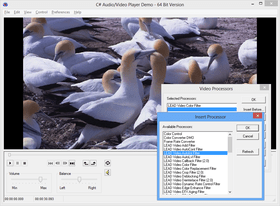
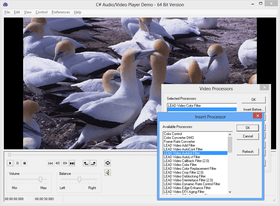
Screenshot Preview

LEADTOOLS Multimedia Suite SDK - Summary

by LEAD Technologies - Product Type: Component / Add-In / ASP.NET AJAX (ATLAS) / .NET WinForms / .NET Class / .NET WPF / DLL / VC++ Class Library

Summary

LEADTOOLS Multimedia Suite SDK by LEAD Technologies

URLs: leadtools-multimedia-suite, leadtools multimedia suite, leadtoolsmultimediasuite, leadtools

Develop audio and visual applications across a wide variety of industries. LEADTOOLS Multimedia Suite SDK is designed for the development of audio/video applications across a wide variety of industries including defense, broadcast and security. This collection of powerful multimedia products from LEAD Technologies provides everything a developer needs to create enterprise level multimedia applications, bundling features from the Multimedia SDK, DVD Module, Video Streaming Module, MPEG-2 Transport Module, Imaging Pro SDK and Cloud SDK.

Developers have access to all multimedia features including capture, playback, conversion, DVD, DVR, MPEG-2 Transport Stream with KLV, video conferencing, UDP/TCP/RTSP streaming and more. Development licenses for most LEADTOOLS codecs, multiplexers, demultiplexers and DirectShow Filters are also included.

Overview of LEADTOOLS Multimedia Suite Technology

Add imaging technology to single and multi-threaded applications

Development tools and components for Win Forms, Web Forms, WPF, C and C++ development

Includes 32 and 64 bit binaries for multimedia capture, conversion, playback and evaluation versions of more than 100 DirectShow filters including effects, sources, sinks, multiplexers, demultiplexers, color space converters, frame rate controllers, and codecs such as H264, MPEG-4, MPEG-2 and VP8. Some filters and codecs may require additional licensing, see licensing help file for more information.

Includes many broad and functionally specific demo projects with source code for VB.NET, C#, C, Visual C++ (MFC), VB

HTML examples for streaming OGG, H264, WMV H264, Flash and IIS Smooth Streaming video from websites

Includes a downloadable component to guarantee that the correct decoders are installed on the

client’s computer before the video starts to play, eliminating the need for the client to reboot the computer before playing the video

Documentation includes sample source code for every function, method, property and event

Free technical support is available to customers and developers evaluating LEADTOOLS

Audio and Video Playback

Play using any DirectShow demultiplexer and codec

Play streaming audio and video from memory, disk and network

Navigate and play from DVDs

Pass surround signals through a SPDIF connection

Zoom video during play

Control playback speed

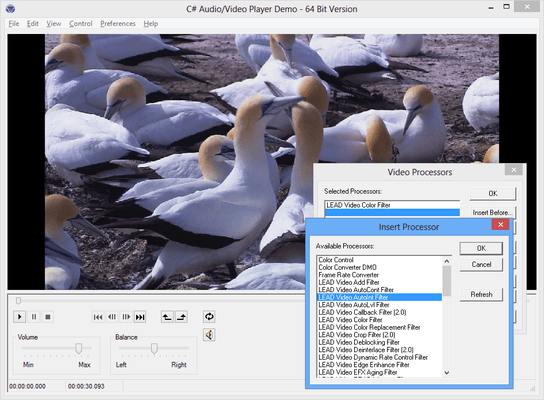
Apply DirectShow audio and video processing filters during play

Capture and save still images to disk or memory from the video stream with frame precision

Set preferred MPEG-2 splitter to use in playback filter graph

Play MXF and MKV files

Play IIS Smooth Streaming Files

Select hardware devices to use for playback

Save player settings to file or stream

Set start and end frame for clipping playback

Get content and tag information

Read and seek DV timecode data

Audio and Video Capture

Capture from any DirectShow or WDM compliant device including capture cards, webcams,

and TV tuners

Capture high resolution video including 720p, 720i, 1080p, 1080i from HDTV digital tuner devices.

Enumerate and select all available audio and video devices programmatically

Capture in real time directly to file, memory, or create live streams for the Internet

Output the capture stream to any DirectShow supported format including AVI, WMV, WMA, OGG, DVSD OGG, WAVE, MPEG-1 Audio (MP3), MPEG-1 System, MPEG-2 (Program and Transport),

Matroska (MKV, WebM), MXF, ISO, MP4, MPEG-2 DICOM, DVD, Network formats, or a series of still images

Flicker free video preview with zoom

Programmatic control of tv tuner functions including input, format, and channel

Select the desired input such as TV Tuner, S-Video or composite video from multi-input capture devices

Enumerate and set capture device settings including resolution, frame rate, color space, format, brightness, contrast, zoom, and pan

Full integration with LEADTOOLS DVR SDK technology to pause, rewind, and fast forward live captures

Use a variety of audio sources including onboard, USB and web cam integrated

Closed captioning support

Real time capture statistics including number of frames captured and dropped

Supports DirectShow video and audio processing filters to customize the capture

Capture in several modes including video only, audio only, and audio and video

Capture audio and video from DV devices without splitting the audio and video data, resulting in faster capture and fewer dropped frames

Programmatically control DV devices functionality such as play, pause, rewind, fast forward, record, and seek based on time codes

Load and save video to DV devices to download, edit, and save back the video to the device

Audio and Video Conversion

Convert any of the supported playback file formats to AVI, MPEG-2, MPEG-1, ISO (Flash HD, MP4, 3GPP, AAC, AVC1, MOV), IIS Smooth Streaming, FLV, XVID, ASF, Matroska (MKV, WebM), MXF, WMV, WAV, WMA, OGG, and more

Quickly convert from one file format to another without recompression such as MP4 to MPEG2

Supports DirectShow video and audio processing filters to customize the conversion.

Add KLV metadata to an output MPEG-2 transport stream

Convert specific chapters or titles using the LEADTOOLS DVD Navigator

Join multiple files or split a larger file into multiple smaller files

Create videos from a series of still images, or create still images from a video

Preview the current frame being converted

Pause and resume conversion process

Load and save conversion settings

Add Script commands (header and stream) to Windows Media files

Convert closed captioning information to readable formats such as SubRip (SRT) or Text

Multiple types of IO supported for conversion including disk, memory, network stream, and

custom source filters

Conversion logging options

Retrieve progress notifications during the conversion process

Output directly to DV

Calculate the estimated conversion output size prior to starting the conversion

Audio and Video Codecs

LEADTOOLS Multimedia Suite can utilize any DirectShow codec to compress or decompress audio and video. LEADTOOLS Multimedia Suite also provides the following audio and video codecs (*available as add-on):

DirectShow Video Codecs

H.264

MPEG-4

MPEG-2

H.263

MCMW*

MJPEG

MJPEG2000*

VP8

RLE

Theora

Screen Capture

DirectShow Audio Codecs

AAC

Vorbis

AMR

MPEG Layer 2 Audio Encoder

AC3 Encoder

Formats, Multiplexers and Demultiplexers

Playback, Convert and Save Any Input File Format Supported by DirectShow Including:

AVI

MXF (Material eXchange Format)

Matroska (MKV, WebM)

Adobe HD

AVCHD

DVD

DVR

MPEG-2 (Transport and Program)

MPEG1 Video

MPEG1 Layer-3 Audio (MP3)

ISO (MP4, 3GPP, AAC, AVC1, MOV, Quicktime 2.0)

IIS Smooth Streaming

DivX / Xvid

Flash Version 6 (FLV H.263)

Flash Version 9 (Flash HD or Flash H.264 or F4V or FLV H.264)

ASF Windows Media Format

WMV Windows Media Format

WMA Windows Media Format

WAV

DVSD

OGG

Still image formats including TIFF, JPEG, BMP and JPEG 2000

DICOM

Audio and Video Formats for Mobile Devices

LEADTOOLS Multimedia Suite technology provides the latest codecs for creating high quality audio and video files playable on most mobile devices such as the iPod, iPhone, PSP, Zune, ZEN and Mobile Phones. In addition to compressing audio and video content for a wide variety of devices, LEAD compressors are optimized to create the smallest files possible while maintaining the highest possible quality to fit even more audio and video files on mobile devices.

DirectShow Filters

The LEADTOOLS Multimedia Suite can utilize and control many DirectShow filters such as encoders, decoders, multiplexers, demultiplexers, sources, and sinks. DirectShow filters are multimedia components that can be used to compress, decompress, process, enhance or stream video and audio data.

LEADTOOLS Cloud SDK

The LEADTOOLS Cloud SDK provides developers with a complete framework which can be used to create powerful cloud-based applications. Utilizing a network of servers and worker machines, developers can easily create any kind of distributed, grid or parallel computing application.

Multimedia for Medical and DICOM Development

The LEADTOOLS Medical Multimedia SDK Module that adds the LEADTOOLS Multimedia SDK and a collection of state-of-the-art DirectShow filters for compressing and decompressing video and audio data inside DICOM files to LEADTOOLS Medical and PACS Imaging SDK products. This feature-rich product is designed to eliminate the complexity from converting cine images and video streams to DICOM objects including X-ray Angiography (XA), Ultrasound (US), Visible Light (VL), Secondary Capture (SC) and much more. The LEADTOOLS Medical Multimedia SDK Module utilizes the most advanced compression algorithms used in the industry and approved by the DICOM standard including MPEG-2, HD MPEG-2, Motion JPEG, and Motion JPEG 2000.

All of the technology from the following products is included with the LEADTOOLS Multimedia Suite:

LEADTOOLS Multimedia SDK

LEADTOOLS Imaging Pro SDK

LEADTOOLS DVD SDK Module

LEADTOOLS DVR SDK Module

LEADTOOLS Video Streaming SDK Module

LEADTOOLS MPEG-2 Transport Stream SDK Module - includes DVR technology

Develop audio and visual applications across a wide variety of industries.

Pricing: LEADTOOLS Multimedia Suite SDK V17.5 1 Developer License, LEADTOOLS Multimedia Suite SDK V17.5 1 Annual Maintenance License, LEADTOOLS Multimedia Suite SDK V17.5 Add-Ons - DVD Module(Requires LEADTOOLS Multimedia Suite SDK or Multimedia SDK) 1 LEADTOOLS DVD Module Developer License, LEADTOOLS Multimedia Suite SDK V17.5 Add-Ons - DVD Module(Requires LEADTOOLS Multimedia Suite SDK or Multimedia SDK) 1 LEADTOOLS DVD Module Developer Upgrade License from previous version, LEADTOOLS Multimedia Suite SDK V17.5 Add-Ons - DVD Module(Requires LEADTOOLS Multimedia Suite SDK or Multimedia SDK) 1 LEADTOOLS DVD Module Annual Maintenance License, LEADTOOLS Multimedia Suite SDK V17.5 Add-Ons - DVR Module(Requires LEADTOOLS Multimedia Suite SDK or Multimedia SDK) 1 LEADTOOLS DVR Module Developer License, LEADTOOLS Multimedia Suite SDK V17.5 Add-Ons - DVR Module(Requires LEADTOOLS Multimedia Suite SDK or Multimedia SDK) 1 LEADTOOLS DVR Module Annual Maintenance License, LEADTOOLS Multimedia Suite SDK V17.5 Add-Ons - Video Streaming Module(Requires LEADTOOLS Multimedia Suite SDK or Multimedia SDK) 1 LEADTOOLS Video Streaming Module Developer License, LEADTOOLS Multimedia Suite SDK V17.5 Add-Ons - Video Streaming Module(Requires LEADTOOLS Multimedia Suite SDK or Multimedia SDK) 1 LEADTOOLS Video Streaming Module Developer Upgrade License from previous version, LEADTOOLS Multimedia Suite SDK V17.5 Add-Ons - Video Streaming Module(Requires LEADTOOLS Multimedia Suite SDK or Multimedia SDK) 1 LEADTOOLS Video Streaming Module Annual Maintenance License, LEADTOOLS Multimedia Suite SDK V17.5 Add-Ons - MPEG-2 Transport Module(Requires LEADTOOLS Multimedia Suite SDK or Multimedia SDK) 1 LEADTOOLS MPEG-2 Transport Module Developer License, LEADTOOLS Multimedia Suite SDK V17.5 Add-Ons - MPEG-2 Transport Module(Requires LEADTOOLS Multimedia Suite SDK or Multimedia SDK) 1 LEADTOOLS MPEG-2 Transport Module Developer Upgrade License from previous version, LEADTOOLS Multimedia Suite SDK V17.5 Add-Ons - MPEG-2 Transport Module(Requires LEADTOOLS Multimedia Suite SDK or Multimedia SDK) 1 LEADTOOLS MPEG-2 Transport Module Annual Maintenance License

Evals & Downloads: Read the LEADTOOLS Multimedia SDK help file, Read the LEADTOOLS products Help files, Read the LEADTOOLS Licensing Help file, Read the LEADTOOLS Standard End User License Agreement, Download the LEADTOOLS Multimedia V17.5 Re-master evaluation on to your computer - Displays Evaluation Messages

Operating System for Deployment: Windows 7, Windows Server 2008, Windows Vista, Windows XP, Windows Server 2003, Windows 2000

Architecture of Product: 32Bit, 64Bit

Product Type: Component, Add-In

Component Type: ASP.NET AJAX (ATLAS), .NET WinForms, .NET Class, .NET WPF, DLL, VC++ Class Library

Compatible Containers: Microsoft Visual Studio 2010, Microsoft Visual Studio 2008, Microsoft Visual Studio 2005, Microsoft Visual Studio 6.0, Microsoft Visual Basic 2010, Microsoft Visual Basic 2008, Microsoft Visual Basic 2005, Microsoft Visual C++ 2010, Microsoft Visual C++ 2008, Microsoft Visual C++ 2005, Microsoft Visual C++ 6.0, Microsoft Visual C# 2010, Microsoft Visual C# 2008, Microsoft Visual C# 2005, Microsoft FrontPage, Microsoft Internet Explorer 7.0, Microsoft Internet Explorer 6.0, CodeGear C++ 5.0 (formerly Borland), CodeGear C++ (formerly Borland), Visual dBase 7.0, Sybase PowerBuilder 6.0, Sybase PowerBuilder 5.0, Watcom C/C++, .NET Framework 4.0, .NET Framework 3.5, .NET Framework 3.0, .NET Framework 2.0, Silverlight 4, Silverlight 3

Keywords: Video multimedia avi capture AIF AIFC Edit film SND conference teleconference Image JPEG art picture sound DirectX Filter compression MPEG-1 MP3 WMV WAV WMA ASF MCMP MJPEG capture motion picture Scan Bitmap draw Twain art processing graphic multi media mu

LEAD Technologies Image+50 Imaging+50 Toolkit+8 SDK+8, leadtools 17, leadtools V17, lead 17, lead v17, lead tools, lead tools 17, lead tools v17, lead tools v17.0, lead technologies

Multimedia media

Imaging image images

image images processing imaging

Part numbers: PC-541961-427267 541961-427267 PC-541961-427268 541961-427268 PC-541961-427269 541961-427269 PC-541961-427270 541961-427270 PC-541961-427271 541961-427271 PC-541961-427272 541961-427272 PC-541961-427273 541961-427273 PC-541961-427274 541961-427274 PC-541961-427275 541961-427275 PC-541961-427276 541961-427276 PC-541961-427277 541961-427277 PC-541961-427278 541961-427278 PC-541961-427279 541961-427279

Mfr. Part No: AMDVD175 AMDVR175 AMMPG2-XPT175 AMMULTSTE175 AMVIDSTRM175 DVD175 DVR175 MPG2-XPT175 MULTSTE175 UDVD175 UMPG2-XPT175 UVIDSTRM175 VIDSTRM175

Product Search

Enter search words:

Award Award