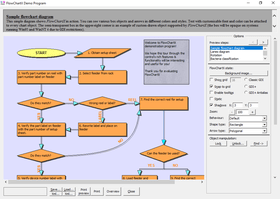
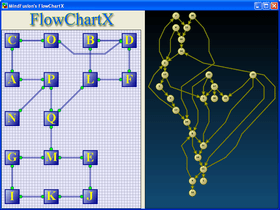
Screenshot Preview

FlowChartX Standard - Summary

by MindFusion Group - Product Type: Component / ActiveX OCX / ActiveX DLL / DLL

Summary

FlowChartX Standard by MindFusion Group

URLs: mindfusion-flowchartx-standard, mindfusion flowchartx standard, mindfusionflowchartxstandard, mindfusion

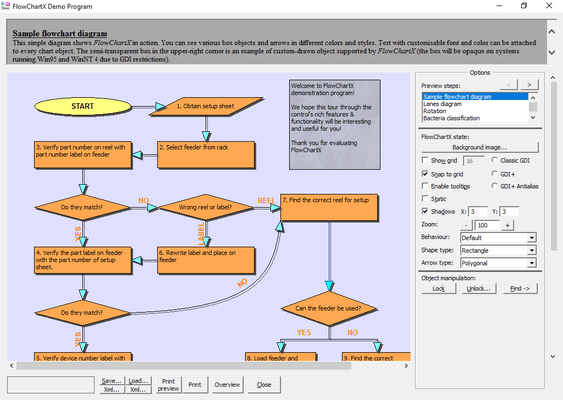
Add work flow diagrams to your applications. FlowChartX helps you create and present work flow, algorithm, and process diagrams, database entity-relationship diagrams, object hierarchy and relationship charts, graphs and trees. MindFusion FlowChartX Standard basic types of objects - boxes, tables and arrows can be grouped and attached one to another, and combined in complex structures. MindFusion FlowChartX Standard provides more than 70 predefined box shapes, as well as user designated and custom-painted boxes. FlowChartX Standard can be purchased with Source Code. Buy FlowChart.NET Standard and obtain 12 months of free upgrades. MindFusion FlowChartX Standard renewals will extend your FlowChartX Standard subscription for another year. FlowChartX Standard Enterprise and FlowChartX Standard Site Licenses also available.

Overview

FlowChartX Standard provides more than 70 predefined box shapes, as well as user designated and custom-painted boxes. Both images and text can be placed inside boxes. Customizable fonts and colors and multiple arrow styles let you customize the appearance of a chart. Other layout features include an alignment grid; shadow effects; scrolling and zooming; locking; z-order; and pen styles.

FlowChartX Standard programming model comprises more than 200 methods, properties and events. The objects in a FlowChartX Standard diagram can be enumerated through several collections - based on the object type and selection state. The diagrams relationship hierarchy can be traversed through 'incoming/outgoing arrows' collections available for the boxes and tables.

Every object type available in MindFusion FlowChartX Standard is exposed as a COM class with properties and methods controlling its look and behavior. Through these classes the FCX objects can be programmatically moved and resized, locked in place, repositioned in the Z-order, grouped and attached; their text, color, font, style and other visual attributes are exposed as properties.

A brief description of the basic FlowChartX Standard types follows below:

Boxes can represent classes in class-hierarchies, flowchart elements, icons in network diagrams, etc. They can hold both graphics and text in different fonts, sizes and colors. Box objects can have any polygonal shape. There are more than 50 predefined box shapes. Apart from them FlowChartX offers you very easy and quick way to define your own shape as you like it. Furthermore boxes support two forms of custom painting. The first type gives you full control over the painting, while in the second one your painting code is performed additionally to the basic painting.

Tables can be used in database diagrams as well as in any other kind of charts that need table representation. They display grids of cells and every cell contains text. Cells, columns and rows can be customized in various ways there are properties available for setting their extents, style and text alignment. Tables dimensions can be programmatically changed; inserting, appending or deleting rows and columns can be done in a very comprehensive, intuitive way whenever you might need it. Tables can also display background images and graphics. The file formats supported are BMP, GIF, JPEG, ICO and WMF (same applies for boxes).

Arrows are used to represent various types of connections and relations in diagrams. FlowChartX Standard offers three basic arrow-types:

poly-line arrows composed of straight-line segments

curved arrows composed of Bezier-spline segments

arrows composed of horizontal and vertical segments, alternating their orientation so that every segment is perpendicular to its neighbor

Each arrow has to be connected to a box or a table object. You can use transparent boxes on any side of an arrow to make it appear as hanging. Some customizable arrows properties are: tip styles, colors, text, pen width and style, modification behavior and number of segments.

FlowChartX Standard is written in C++ using the ATL libraries to implement the needed ActiveX control interfaces.

What’s new in FlowChartX V4.5?

FractalLayout tree layout algorithm

Specify start and end nodes for LayeredLayout

LayeredLayout.EnforceLinkFlow property

Interactive node alignment via alignment guides

Display checkboxes in table cells

Fill a table's caption bar with a gradient

What’s New in FlowChartX V4.4?

Simulated Annealing graph layout algorithm

LayeredLayout.StraightenLongLinks limits the number of links bends

TrackingRectColor property added to Overview

More precise text measuring in GDI+ mode

What’s New in FlowChartX V4.3.1?

This version adds predefined ShapeTemplate definitions that implement the Object Management Group / Business Process Management notation. They are available as members of the Shapes collection and have names that start with a Bpmn prefix.

What’s New in FlowChartX V4.3?

MultipleGraphsPlacement specifies how layout algorithms place independent subgraphs relatively to each other

SplitGraph specifies whether unconnected subgraphs are laid out independently from each other

DecorationLine objects

custom layout of container boxes possible

AutoResizeContainer specifies whether containers should resize to fit their children

containers can be resized to fit child nodes using the ResizeToFitChildren method

items border color can be made semi-transparent by setting FrameColorAlpha

text antialising can be enabled for individual boxes by setting their TextAntiAliasing property

arrows and tables can be custom-drawn

tooltips auto-pop time can be set through the ToolTipAutoPop property

the DocBoundsChanged event is raised when the flowchart document area is resized

HtmlBuilder now exports items in reverse Z order to fix hit-testing of overlapping areas

What’s New in FlowChartX V4.2.1?

Circular graph layout algorithm

The LayoutProgress event lets you track the progress of layout algorithms

LayeredLayout can arrange nodes of varying size without overlapping

The ChangeRelation method lets you change the origin or destination row of an arrow

The tsBelow text style can be used with tables

EnableShadows and EnableSelHandles properties added to ImageExportOptions

Flowchart items can be cloned using their Clone method

What’s New in FlowChartX V4.X?

Native 64-bit support

Improved binary serialization

XML serialization based on MSXML6

Table cell tooltips

PrintOptions.HeaderTextStyle lets you set the header text alignment

Custom label position for Arrow objects

Speed of the GridLayout has been greatly improved

Boxes whose Style is set to bsShape can be rotated

Spanning table cells

Add work flow diagrams to your applications.

Pricing: FlowChartX Standard Edition V4.5 1 Developer Subscription License (12 Months Subscription Included), FlowChartX Standard Edition V4.5 4 Developer Team Subscription License (12 Months Subscription Included), FlowChartX Standard Edition V4.5 8 Developer Team Subscription License (12 Months Subscription Included), FlowChartX Standard Edition V4.5 1 Site Wide Subscription License (Allows Unlimited Developers at a Single Physical Address) (12 Months Subscription Included), FlowChartX Standard Edition V4.5 1 Enterprise Subscription Subscription License (Unlimited number of developers of an enterprise at all its physical addresses) - (12 Months Subscription Included), FlowChartX Standard Edition V4.5 - with Source Code 1 Developer Subscription License - with Source Code (12 Months Subscription Included), FlowChartX Standard Edition V4.5 - with Source Code 4 Developer Team Subscription License - with Source Code (12 Months Subscription Included), FlowChartX Standard Edition V4.5 - with Source Code 8 Developer Team Subscription License - with Source Code (12 Months Subscription Included), FlowChartX Standard Edition V4.5 - with Source Code 1 Site Wide Subscription License (Allows Unlimited Developers at a Single Physical Address) - with Source Code (12 Months Subscription Included), FlowChartX Standard Edition V4.5 - with Source Code 1 Enterprise Subscription Subscription License (Unlimited number of developers of an enterprise at all its physical addresses) - with Source Code (12 Months Subscription Included), FlowChartX Standard Edition Upgrade/1 Year Subscription Renewal 1 Developer Subscription Renewal License (12 Months Subscription Included), FlowChartX Standard Edition Upgrade/1 Year Subscription Renewal 4 Developer Team Subscription Renewal License (12 Months Subscription Included), FlowChartX Standard Edition Upgrade/1 Year Subscription Renewal 8 Developer Team Subscription Renewal License (12 Months Subscription Included), FlowChartX Standard Edition Upgrade/1 Year Subscription Renewal 1 Site Wide Subscription Renewal License (Allows Unlimited Developers at a Single Physical Address) (12 Months Subscription Included), FlowChartX Standard Edition Upgrade/1 Year Subscription Renewal 1 Enterprise Subscription Subscription Renewal License (Unlimited number of developers of an enterprise at all its physical addresses) - (12 Months Subscription Included), FlowChartX Standard Edition with Source Code Upgrade/1 Year Subscription Renewal 1 Developer Subscription Renewal License - with Source Code (12 Months Subscription Included), FlowChartX Standard Edition with Source Code Upgrade/1 Year Subscription Renewal 4 Developer Team Subscription Renewal License - with Source Code (12 Months Subscription Included), FlowChartX Standard Edition with Source Code Upgrade/1 Year Subscription Renewal 8 Developer Team Subscription Renewal License - with Source Code (12 Months Subscription Included), FlowChartX Standard Edition with Source Code Upgrade/1 Year Subscription Renewal 1 Site Wide Subscription Renewal License (Allows Unlimited Developers at a Single Physical Address) - with Source Code (12 Months Subscription Included), FlowChartX Standard Edition with Source Code Upgrade/1 Year Subscription Renewal 1 Enterprise Subscription Subscription Renewal License (Unlimited number of developers of an enterprise at all its physical addresses) - with Source Code (12 Months Subscription Included)

Evals & Downloads: Read the FlowChartX help file, Browse the differences between FlowChartX editions Web pages, Browse the FlowChartX ActiveX License Agreement Web pages, Download the FlowChartX Professional V4.5 evaluation on to your computer - Displays Nag Screens

Operating System for Deployment: Windows Vista, Windows XP, Windows ME, Windows 2000, Windows 98, Windows NT 4.0, Windows 95

Architecture of Product: 32Bit

Product Type: Component

Component Type: ActiveX OCX, ActiveX DLL, DLL

Compatible Containers: Microsoft Visual Studio .NET 2003, Microsoft Visual Studio .NET, Microsoft Visual Studio 6.0, Microsoft Visual Basic .NET 2003, Microsoft Visual Basic .NET, Microsoft Visual Basic 6.0, Microsoft Visual C++ .NET 2003, Microsoft Visual C++ .NET, Microsoft Visual C# .NET 2003, Microsoft Visual C# .NET, Microsoft Visual J++ 6.0, Microsoft Visual FoxPro 6.0, Microsoft Outlook 2002, Microsoft Outlook 2000, Microsoft FrontPage, Delphi 8.0, C#Builder, .NET Framework 1.1, .NET Framework 1.0

Product Class: Business Components

Keywords: flowchartx standard, mindfusion flowchartx standard, buy flowchartx standard, buy mindfusion flowchartx standard, purchase flowchartx standard, purchase mindfusion flowchartx standard, order flowchartx standard, order mindfusion flowchartx standard, flowchartx standard reseller, mindfusion flowchartx standard reseller, flowchartx standard distributor, mindfusion flowchartx standard distributor, flowchartx standard subscription, mindfusion flowchartx standard subscription, renew flowchartx standard, renew mindfusion flowchartx standard, flowchartx standard upgrade, mindfusion flowchartx standard upgrade, flowchartx standard site, mindfusion flowchartx standard site, flowchartx standard enterprise, mindfusion flowchartx standard enterprise

Flow Diagramming diagram diagrams flowchart

Part numbers: PC-513482-415391 513482-415391 PC-513482-415394 513482-415394 PC-513482-415397 513482-415397 PC-513482-415395 513482-415395 PC-513482-415400 513482-415400 PC-513482-415392 513482-415392 PC-513482-415396 513482-415396 PC-513482-415398 513482-415398 PC-513482-415393 513482-415393 PC-513482-415399 513482-415399 PC-513482-415401 513482-415401 PC-513482-415402 513482-415402 PC-513482-415403 513482-415403 PC-513482-415404 513482-415404 PC-513482-415405 513482-415405 PC-513482-415406 513482-415406 PC-513482-415407 513482-415407 PC-513482-415408 513482-415408 PC-513482-415409 513482-415409 PC-513482-415410 513482-415410

Product Search

Enter search words:

Award